Skip to content

Add a clear after date to vacation delegates and show them on the Profile page - #102472

Merged
luacmartins merged 19 commits into
mainfrom
claude-vacationDelegateClearAfter
Oct 14, 2026
Merged

luacmartins merged 19 commits into
mainfrom
claude-vacationDelegateClearAfter

Conversation

@MelvinBot

@MelvinBot MelvinBot commented Sep 28, 2026 •

Copy link
Copy Markdown
Contributor

Explanation of Change

Vacation delegates never ended on their own, and the only place they showed up was the bottom of Profile > Status. People forgot to remove them, and approvers whose admin set one had no way to see why reports stopped reaching them. This PR makes the delegate visible on Profile and lets the person setting it pick a date and time it clears at.

What changed

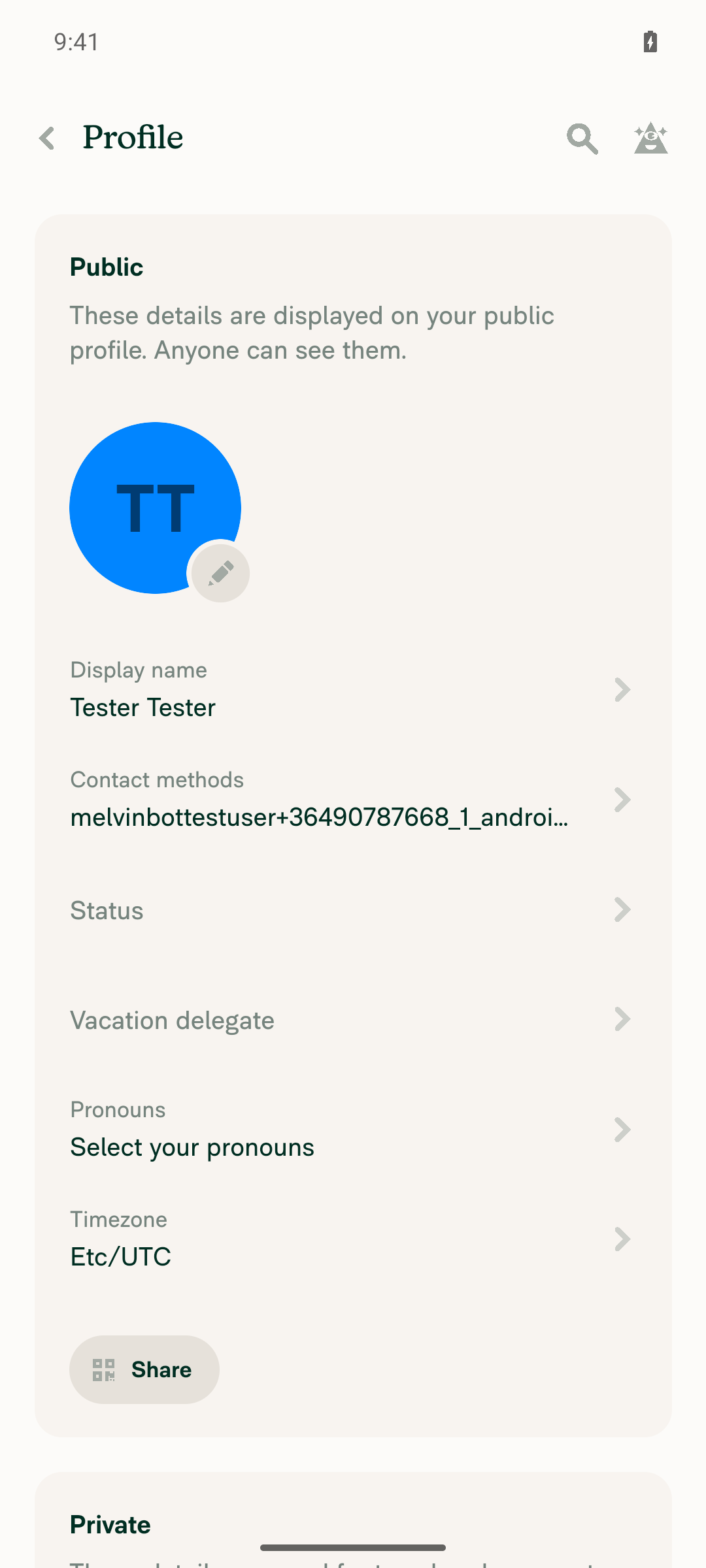
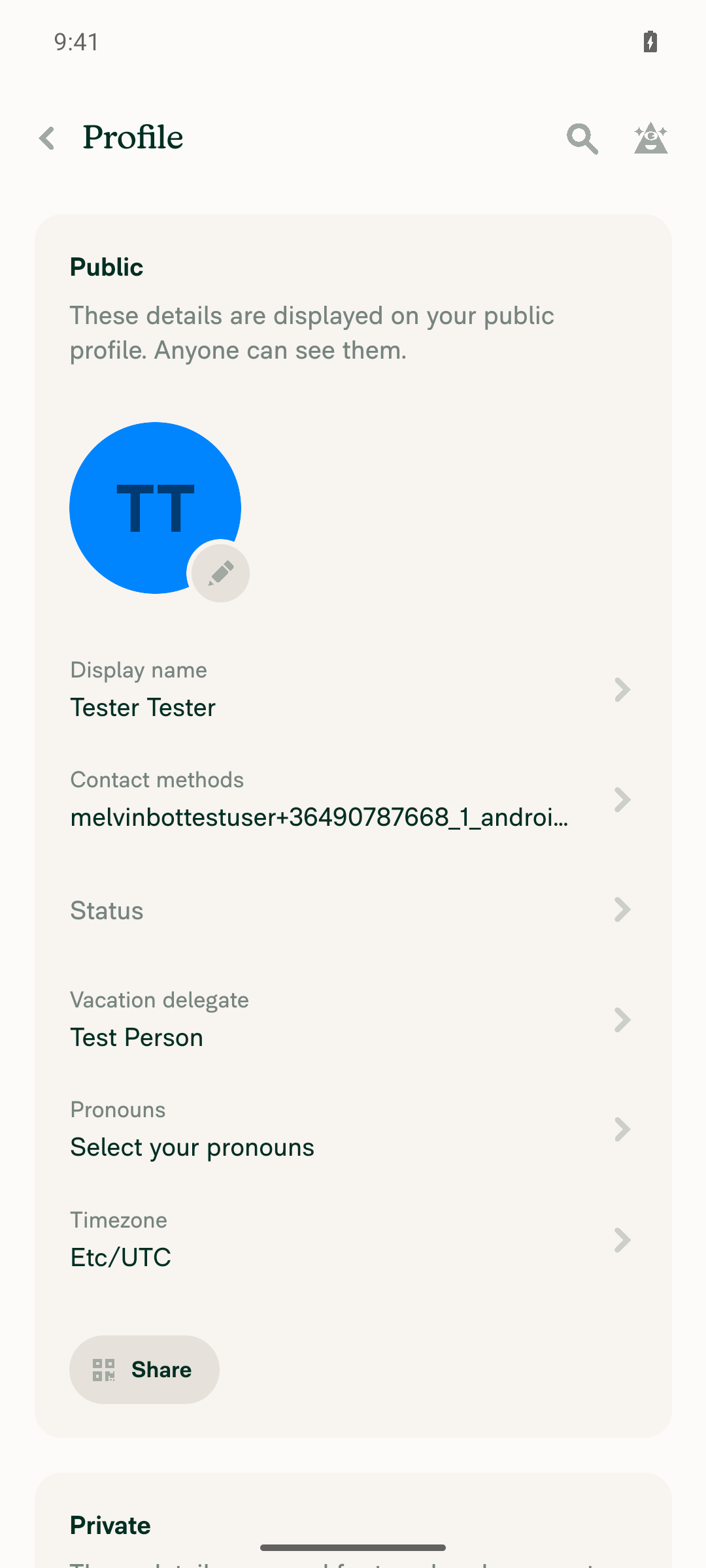
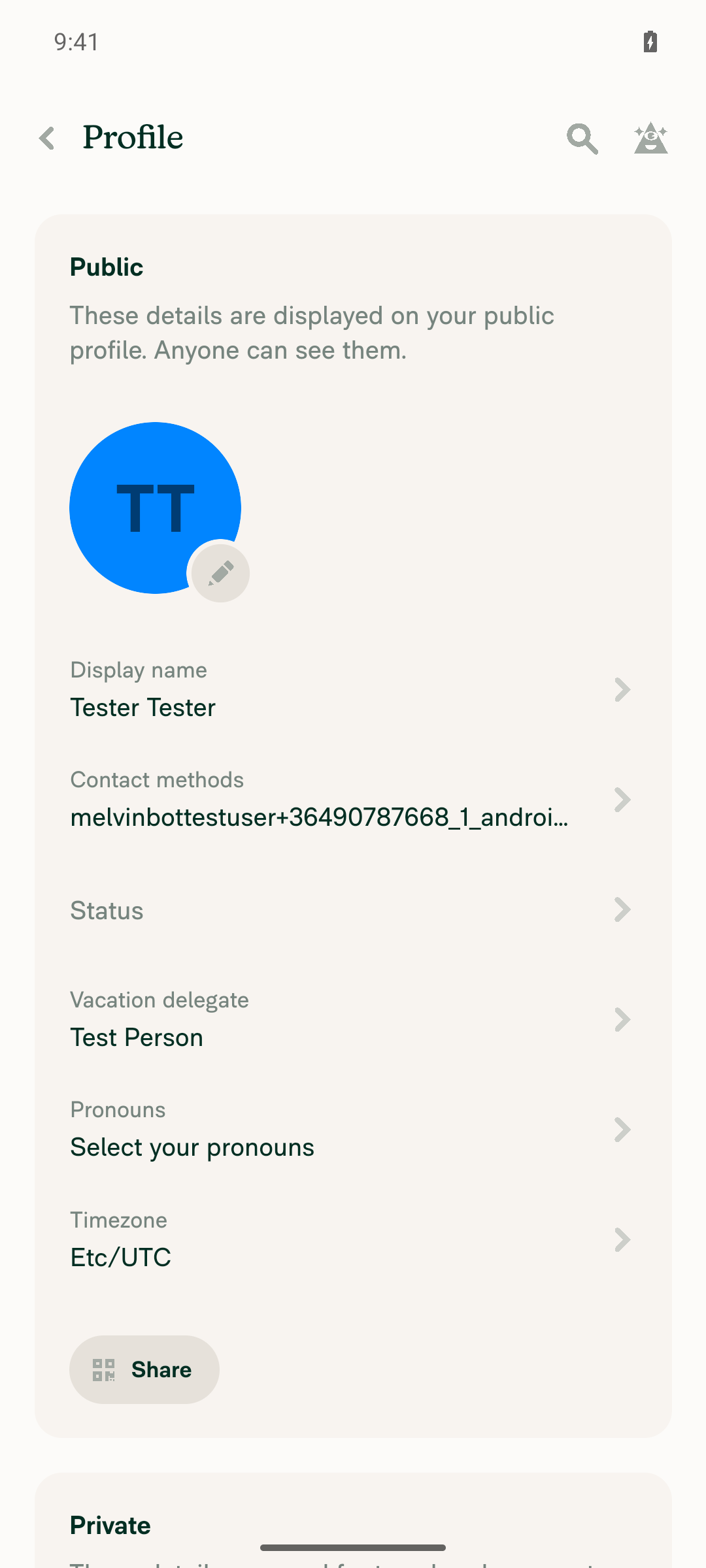
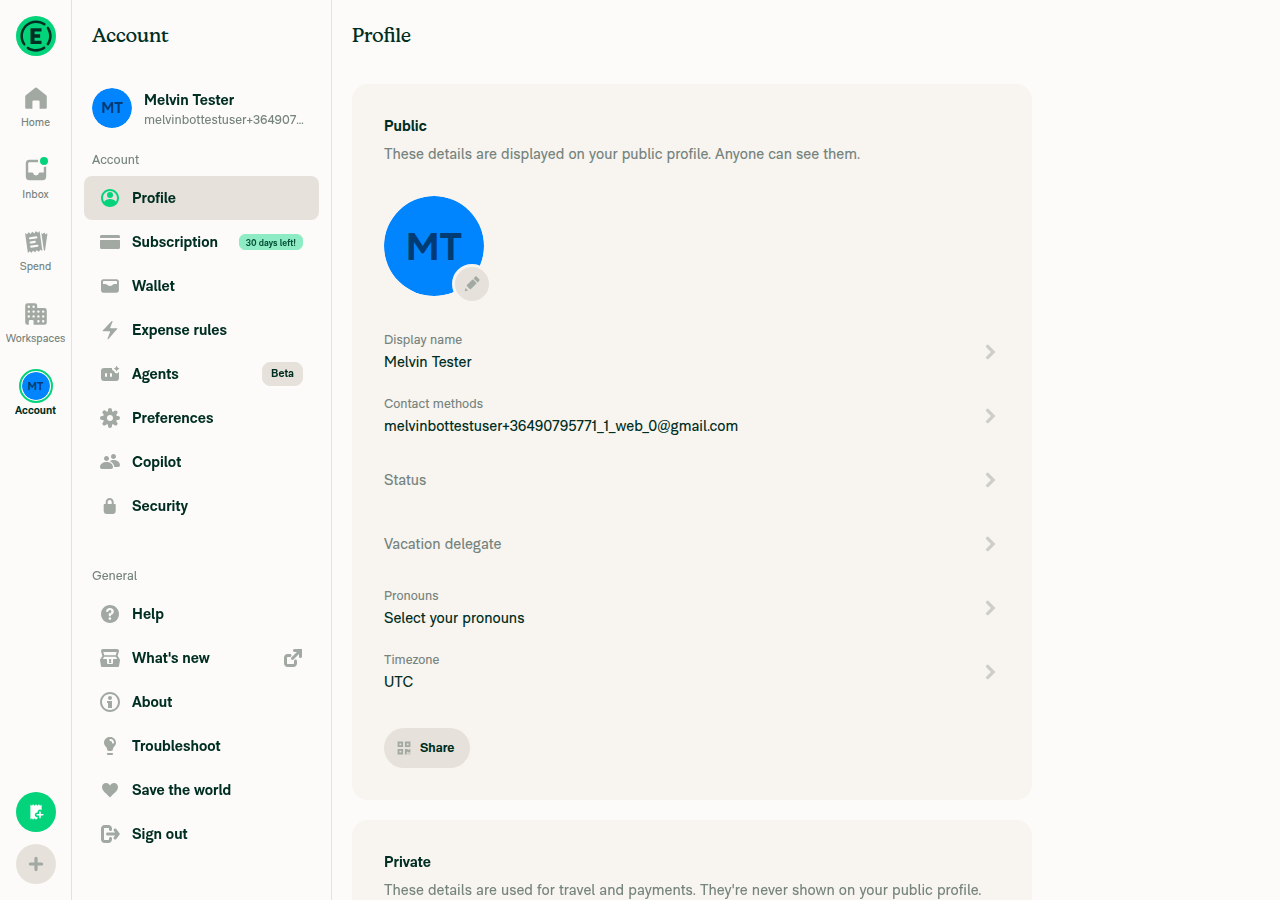
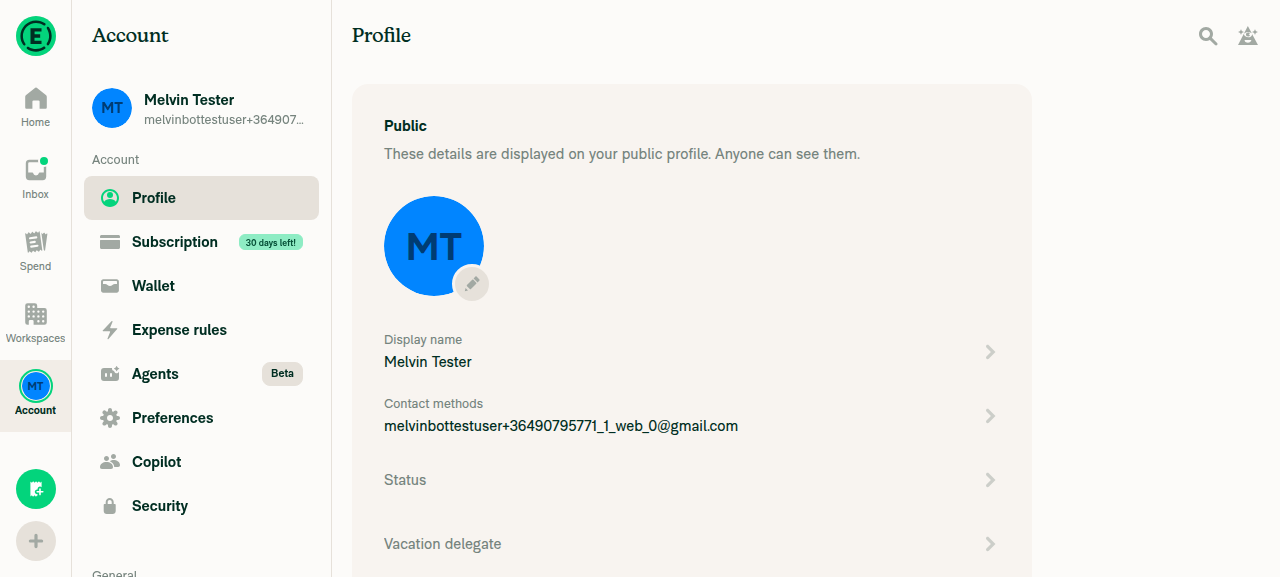
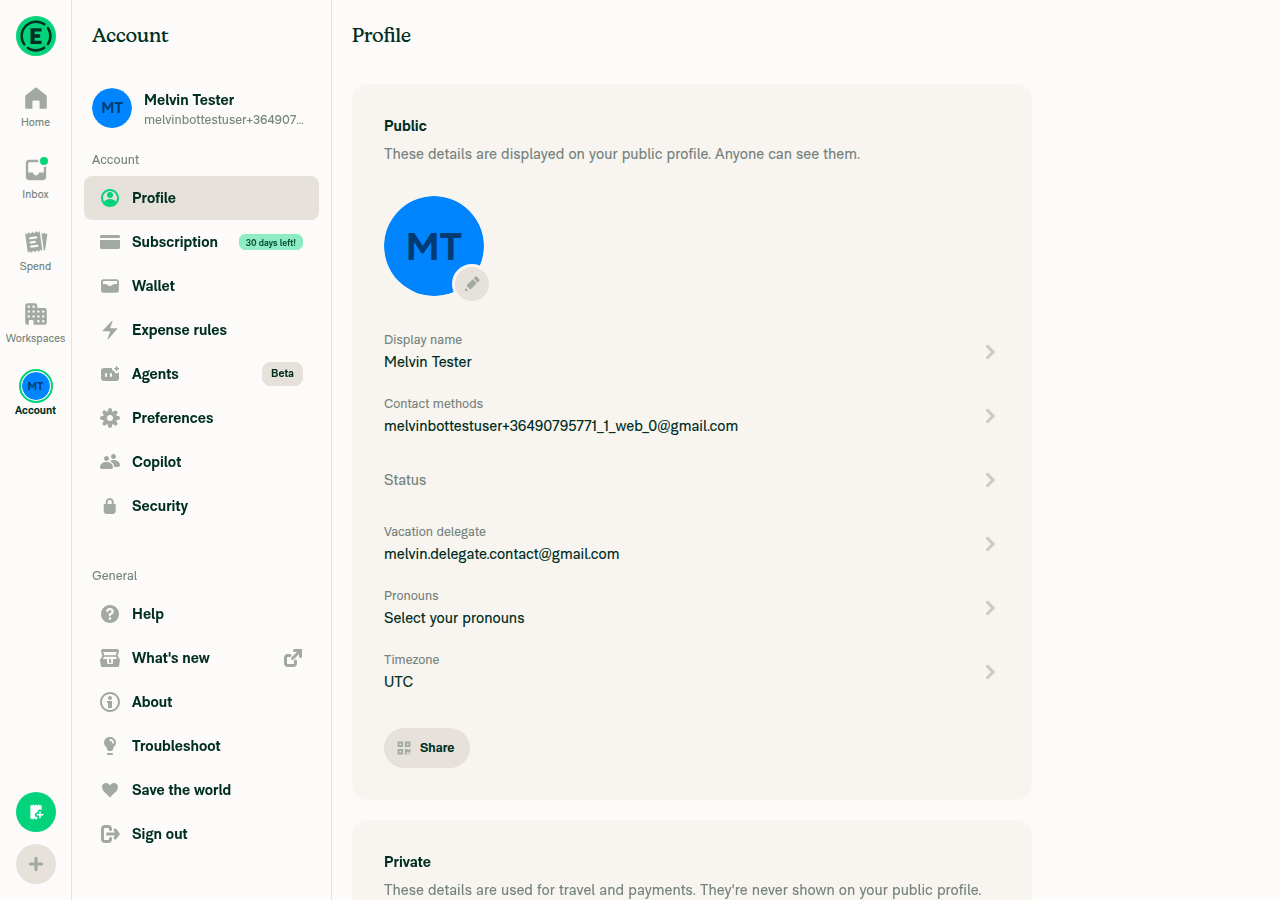
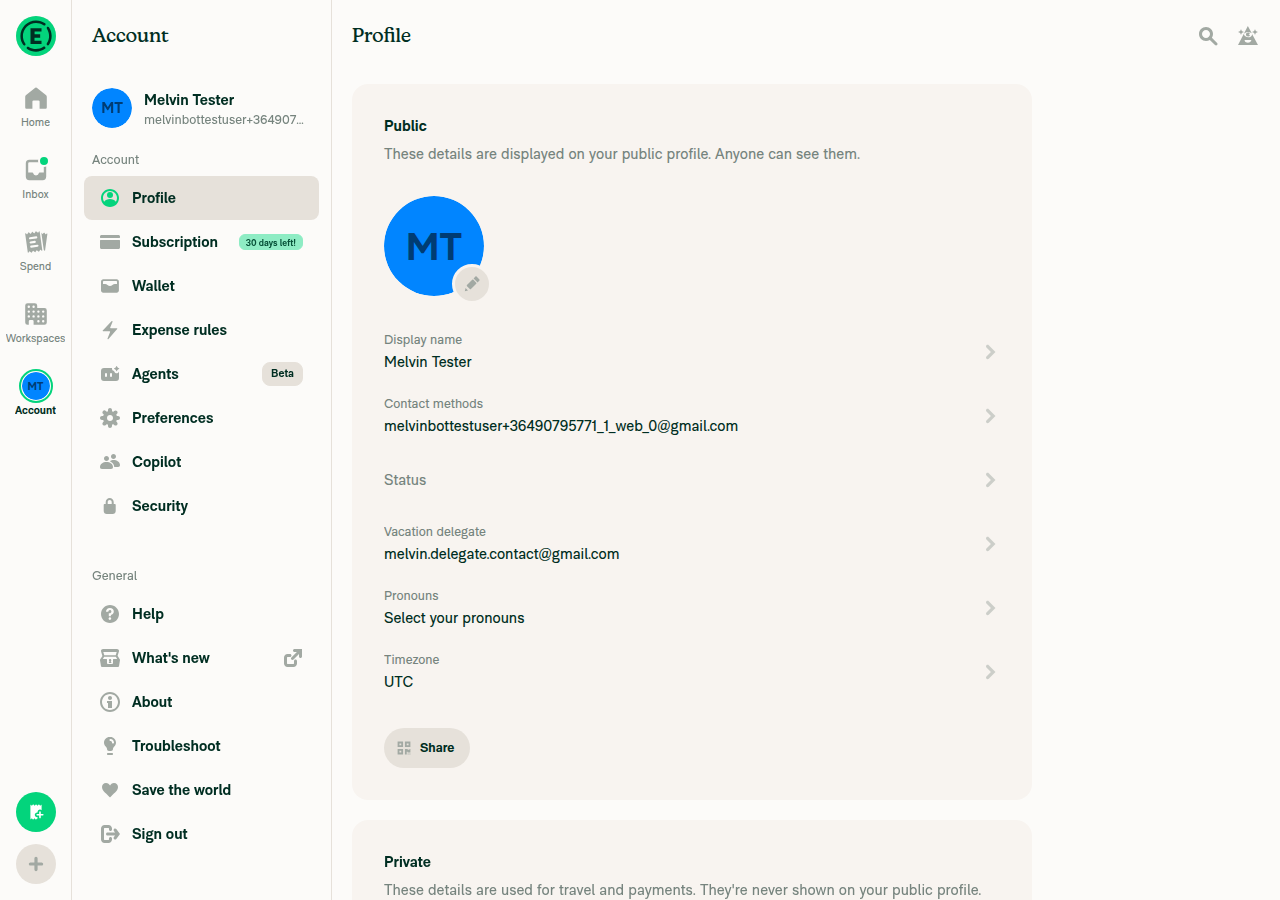
  • Profile row. A new Vacation delegate row sits after Status. It shows the delegate and "Until Oct 1, 2026 5:30 PM" when a date is set, and carries the delegate's error dot (moved off the Status row). The row always opens the form. With no delegate, the form's Choose delegate row is unselected. The domain member details row works the same way. The section is removed from the Status page.

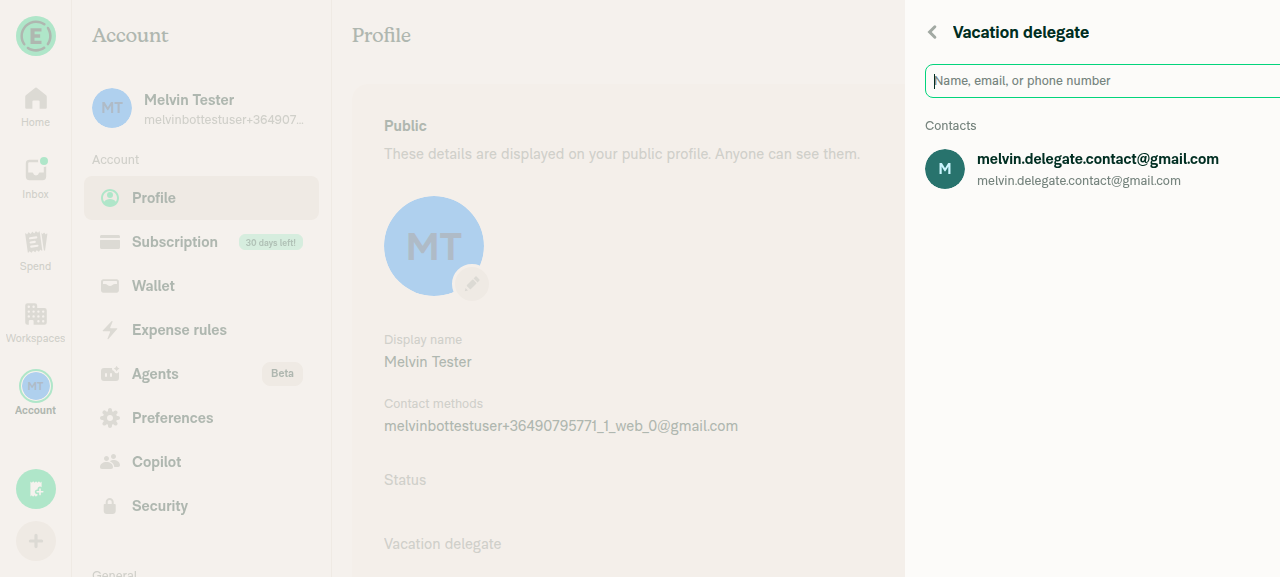
  • Member picker. The picker is only reached from the form's Choose delegate row, on both Profile and the domain member details page. Its header reads Choose delegate, and picking a member returns to the form. A saved delegate whose clear after time has passed is not preselected.

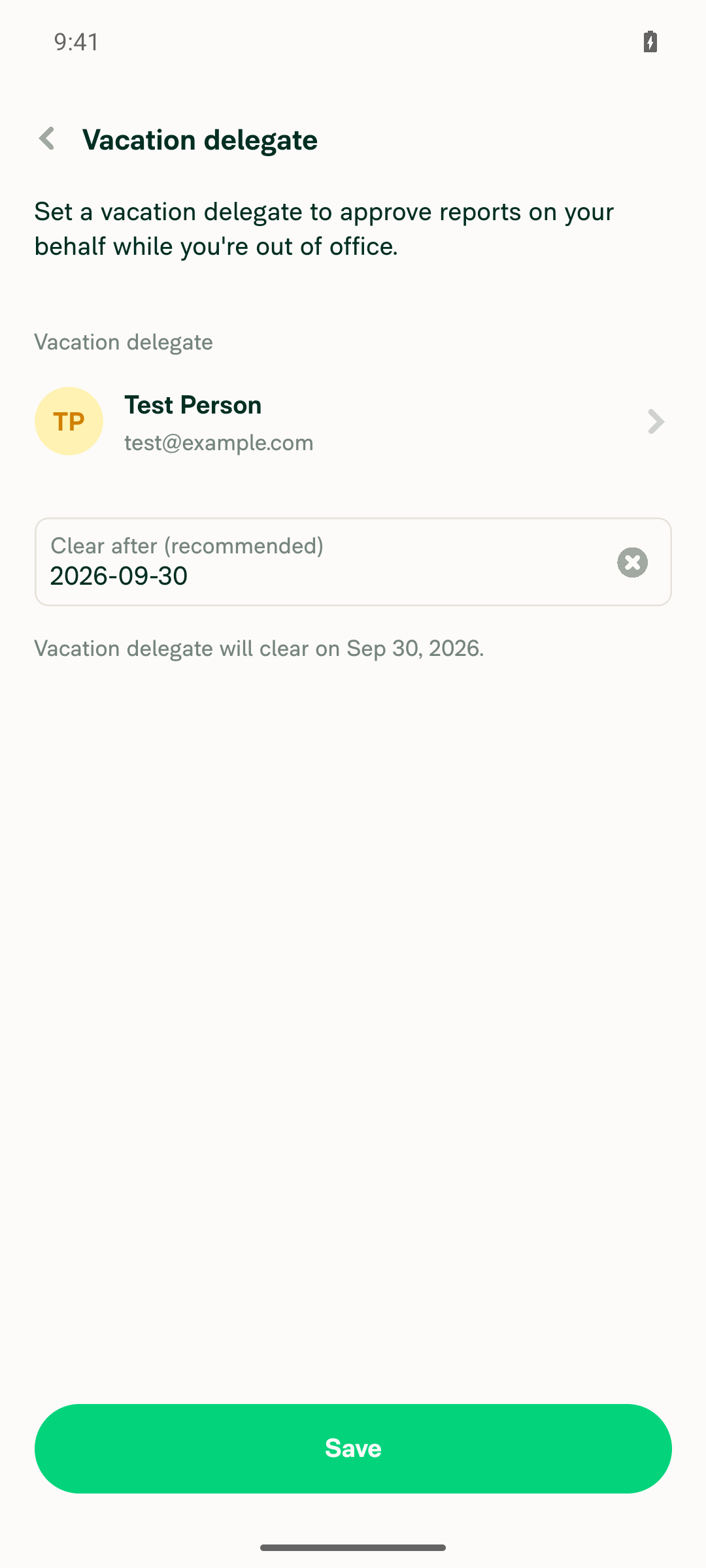
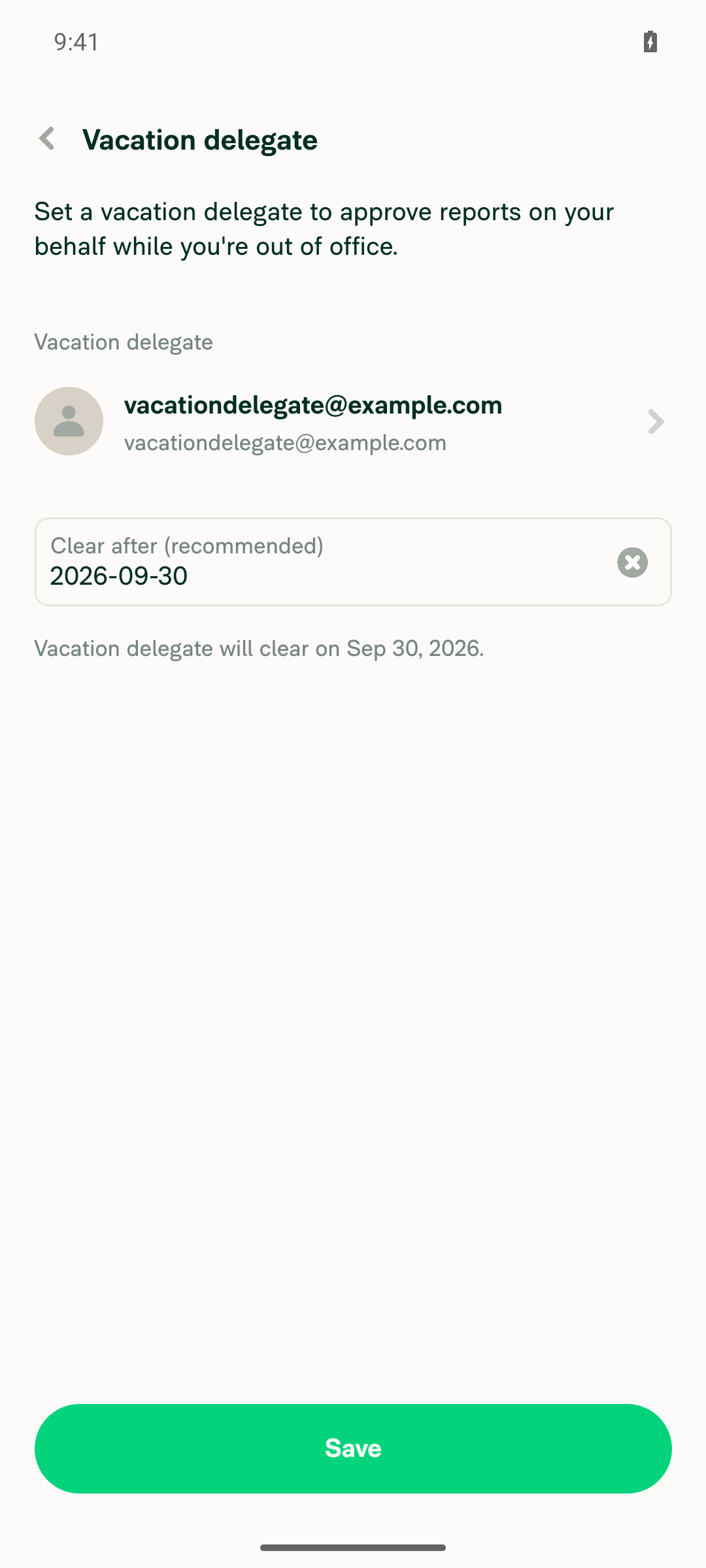
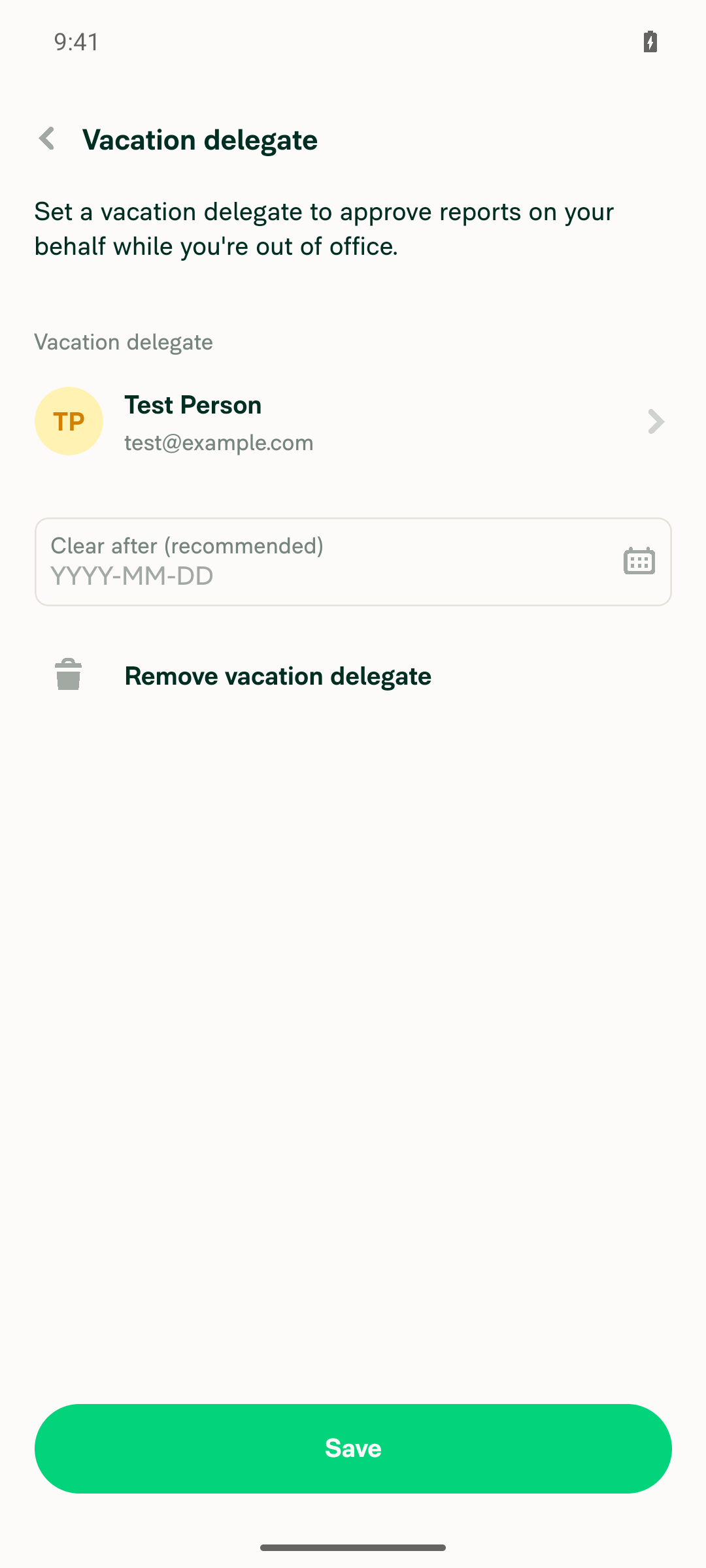
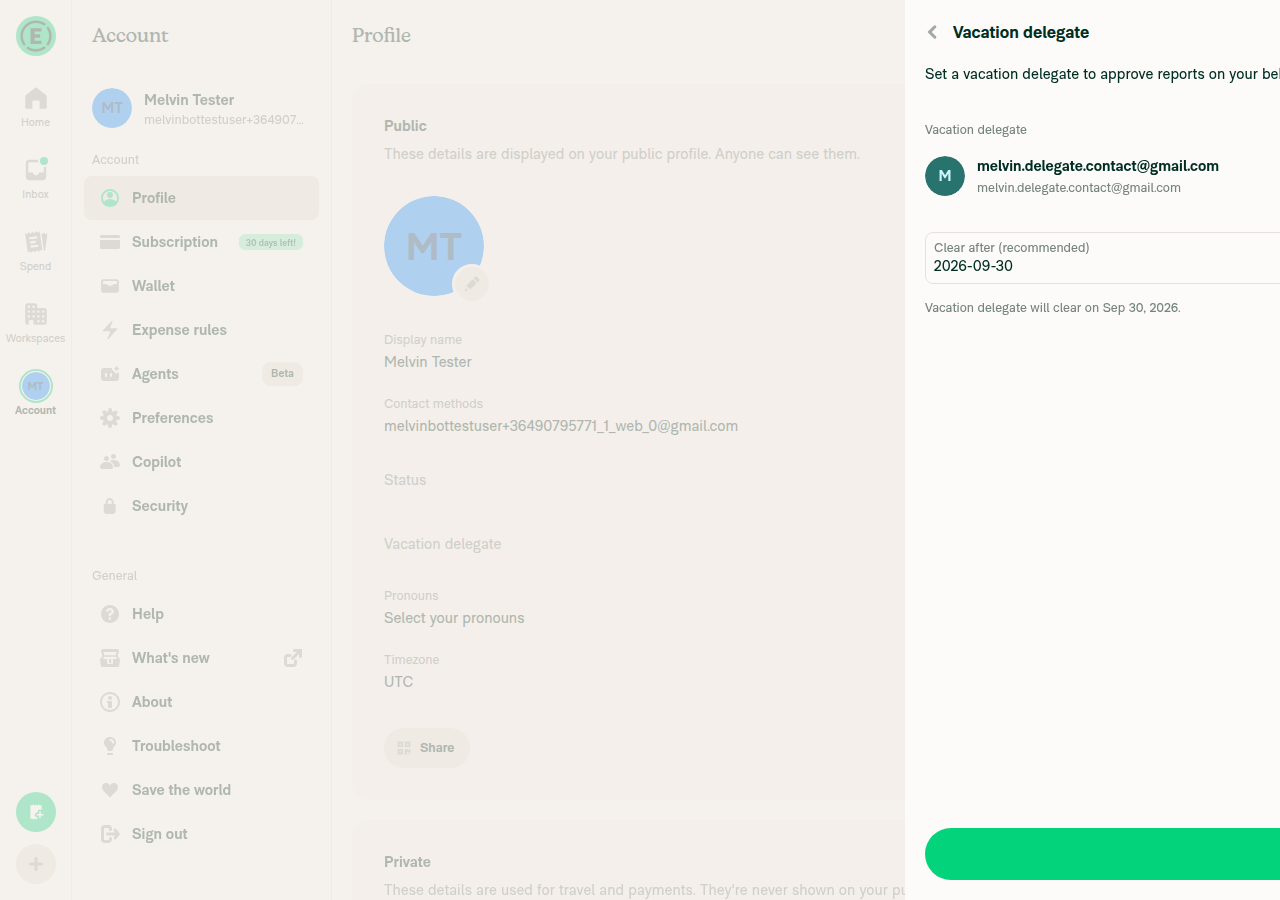
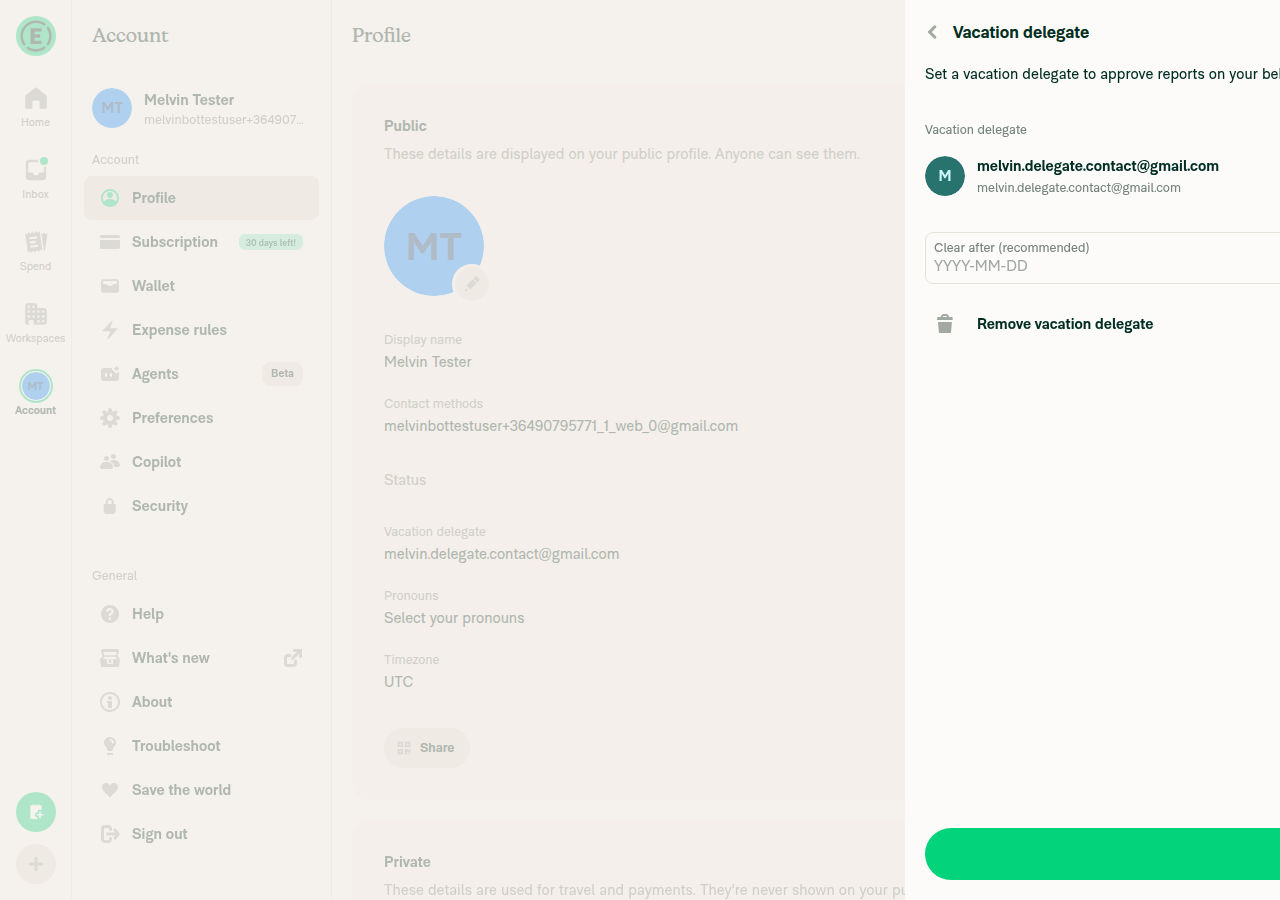
  • New form. Picking a member no longer saves right away. The form is titled Vacation delegate and shows:

    • the chosen member;
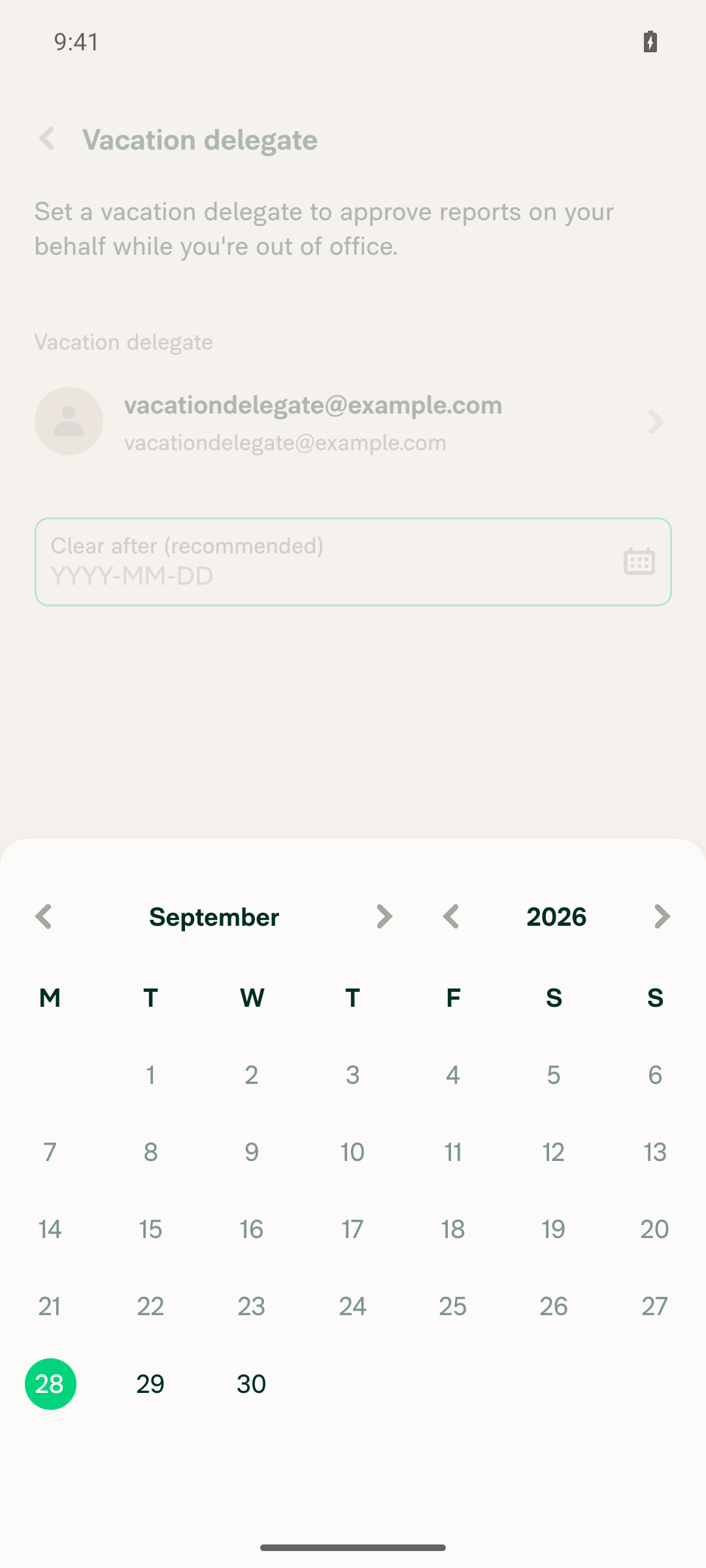
    • an optional Clear after (recommended) date input, with today as the earliest day;
    • a Time row once a date is picked (defaults to 11:59 PM);
    • the note "Vacation delegate will clear on …";
    • Save, and Remove vacation delegate when a delegate was already saved.

    The date input shows a calendar icon while empty and a clear (X) button once a date is picked. The X clears the date, so the delegate goes back to never clearing. Domain admins use the same form on the member details page, and the date and time are read in the member's Profile timezone. A failed save shows the error in a modal and restores the previous delegate.

  • Data. SetVacationDelegate sends an optional clearAfter from both setVacationDelegate and setDomainVacationDelegate. Per the backend note, it is a UTC SQL datetime (yyyy-MM-dd HH:mm:ss): the picked date and time in the timezone of the person the delegate belongs to, or the end of that day if no time is picked (VacationDelegateUtils.getVacationDelegateClearAfter). It is stored on the NVP and the domain record, rolled back through a new previousClearAfter (the same way previousDelegate works), and cleared on delete. Removing your own delegate drops any queued SetVacationDelegate for it (resolveVacationDelegateDeletionConflicts), so an offline change can't bring the removed delegate back.

  • Missing workspaces step. On a 305, the picked date is kept in pendingClearAfter next to pendingDelegate, so the step sends it again instead of dropping it. After Invite or Skip, the step closes the whole RHP with Navigation.dismissModal(), so the form and picker under it don't stay in the stack. Its usePreventRemove guard now replays the blocked action through the navigation container instead of the screen's own navigation. The screen's dispatch stamped its route key on the action as source, and the root stack, which can't find that key, dropped the action and left the RHP open.

  • Display guard. A delegate whose clearAfter has passed shows as "no delegate" until the backend's clear reaches the client. The App never deletes it itself; the backend stays in charge.

  • Routes. The screens moved from settings/profile/status/vacation-delegate to settings/profile/vacation-delegate (form), .../select (picker), and .../missing-workspaces. The domain flow adds domain/:domainAccountID/members/:accountID/vacation-delegate/select.

  • DatePicker (affects every date input in the App). The clear (X) button now gets the icon container's horizontal padding (clearButtonStyle), so it sits exactly where the calendar icon was. This moves the X in every date input, not just this form. The icon prop now also overrides the default calendar icon.

  • Help doc. Delegate-when-out-of-office.md now covers the Profile row and the clear after date and time.

Notes from the C+ review

  • 🟢 Backend clearAfter support is verified. Setting a date, clearing the delegate at that time, and dropping a cleared date on save all work against the backend. Confirm the backend PRs are deployed to production before merging.
  • 🟡 SetDatePage is not reused. The date lives in its own form, ONYXKEYS.FORMS.VACATION_DELEGATE_FORM, so it can't overwrite a status clear date the user is in the middle of setting.
  • 🟡 Re-picking the current delegate no longer deletes it. Removal is now the form's Remove vacation delegate button.
  • 🟢 Date and time. Per the suggestion on the issue, the form has a Time row under the date. It uses the shared TimeModalPicker, the same one per diem uses, and only shows once a date is picked. It defaults to 11:59 PM, so a date with no time change still clears at the end of that day. A time that has already passed shows "Please choose a time at least one minute ahead". The Profile row and the form note show the time too.
  • 🟢 A picked date can be cleared. The X on the date input takes the delegate back to never clearing, which resolves the earlier design question.
  • 🟡 Design question: calendar icon. The date input uses the existing solid calendar icon (CalendarSolid), which matches the mockups. Other date inputs in the App use the outline Calendar icon.
  • 🟡 Design question: date format. The mockups show 2026/10/01. The input keeps the shared DatePicker format (2026-10-01).

Fixed Issues

$ #102202
PROPOSAL: #102202 (comment)

Tests

Prerequisites

  • Account A is an admin of workspace W. Accounts B and C are members of W.
  • Account D is not a member of W.
  • A domain admin account, and a domain member M.

In the steps below, "tomorrow" stands for tomorrow's date. The date input shows it as yyyy-MM-dd (e.g. 2026-10-13). The note under the inputs and the "Until" label show it as MMM d, yyyy followed by the time (e.g. Oct 13, 2026 11:59 PM).

Profile row and Status page

  1. Sign in as Account A and go to Account > Profile. Verify a Vacation delegate row shows right after Status, with no value.
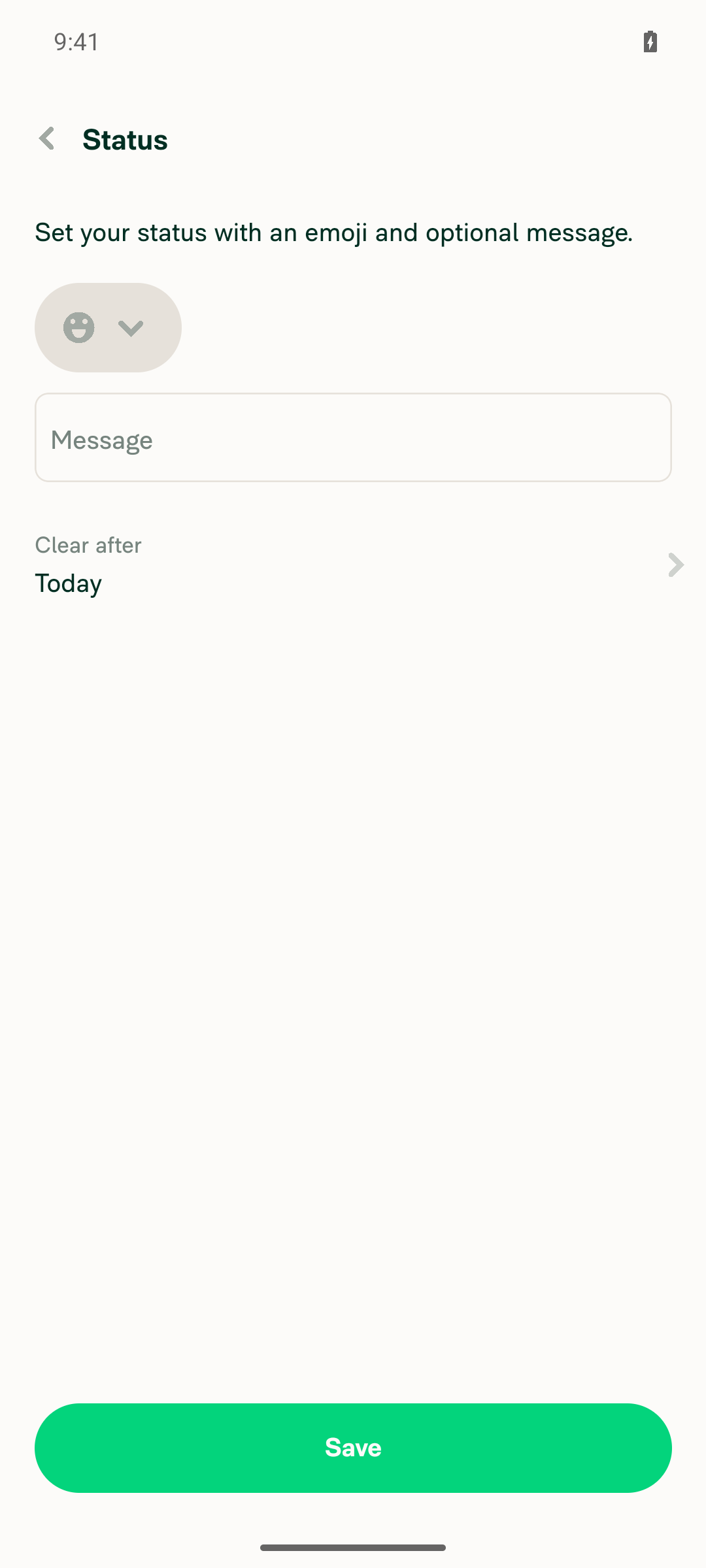
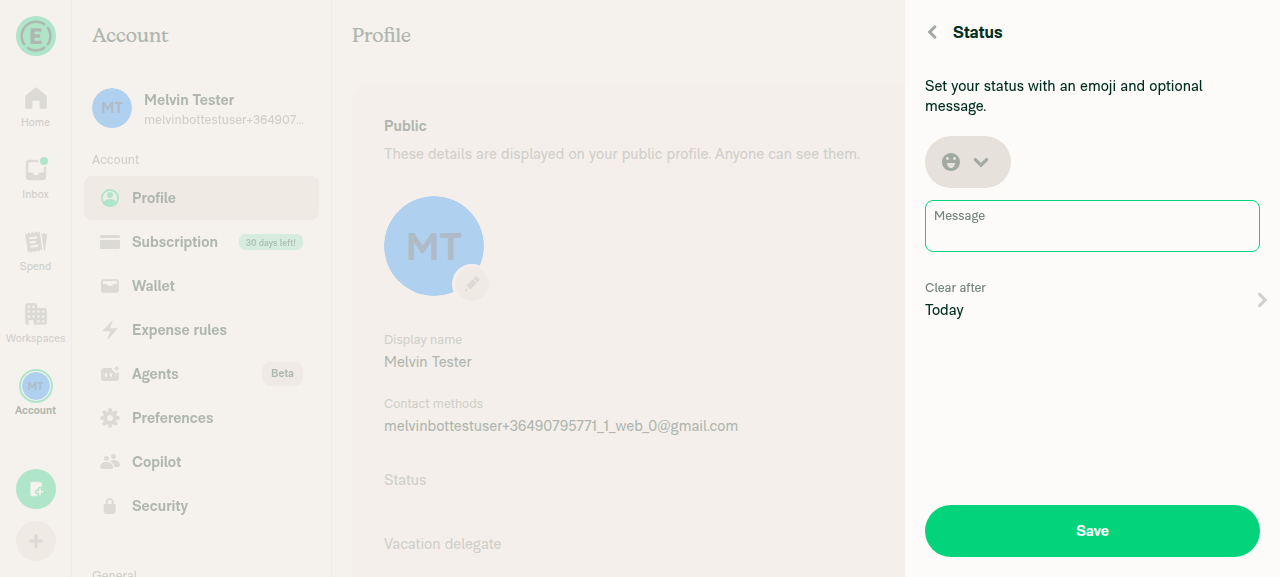
  2. Open Status. Verify there's no vacation delegate section at the bottom of the page. Go back.

Set a delegate with a clear after date and time

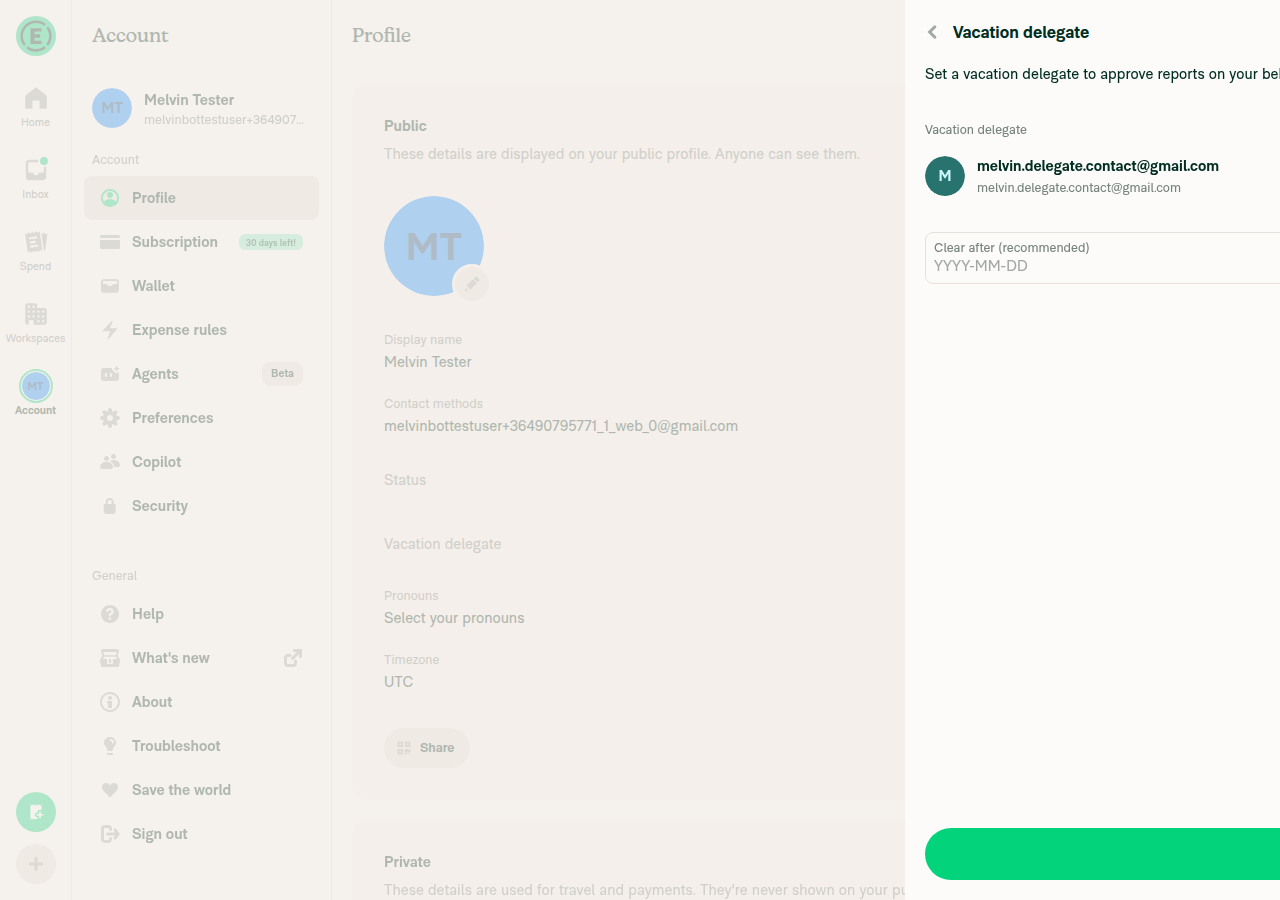
  1. Click Vacation delegate. Verify a form opens with:

    • the header Vacation delegate;
    • the text "Set a vacation delegate to approve reports on your behalf while you're out of office.";
    • an unselected Choose delegate row;
    • an empty Clear after (recommended) input with a calendar icon;
    • a disabled Save button.

    Verify there's no Time row, no "Vacation delegate will clear on …" note, and no Remove vacation delegate button.

  2. Click Choose delegate. Verify the member picker opens with the header Choose delegate, with no member preselected. Click its back button and verify you return to the form.

  3. Click Choose delegate again and pick Account B. Verify you return to the form, which now shows Account B's avatar and name as a pill under Choose delegate, with Save enabled.

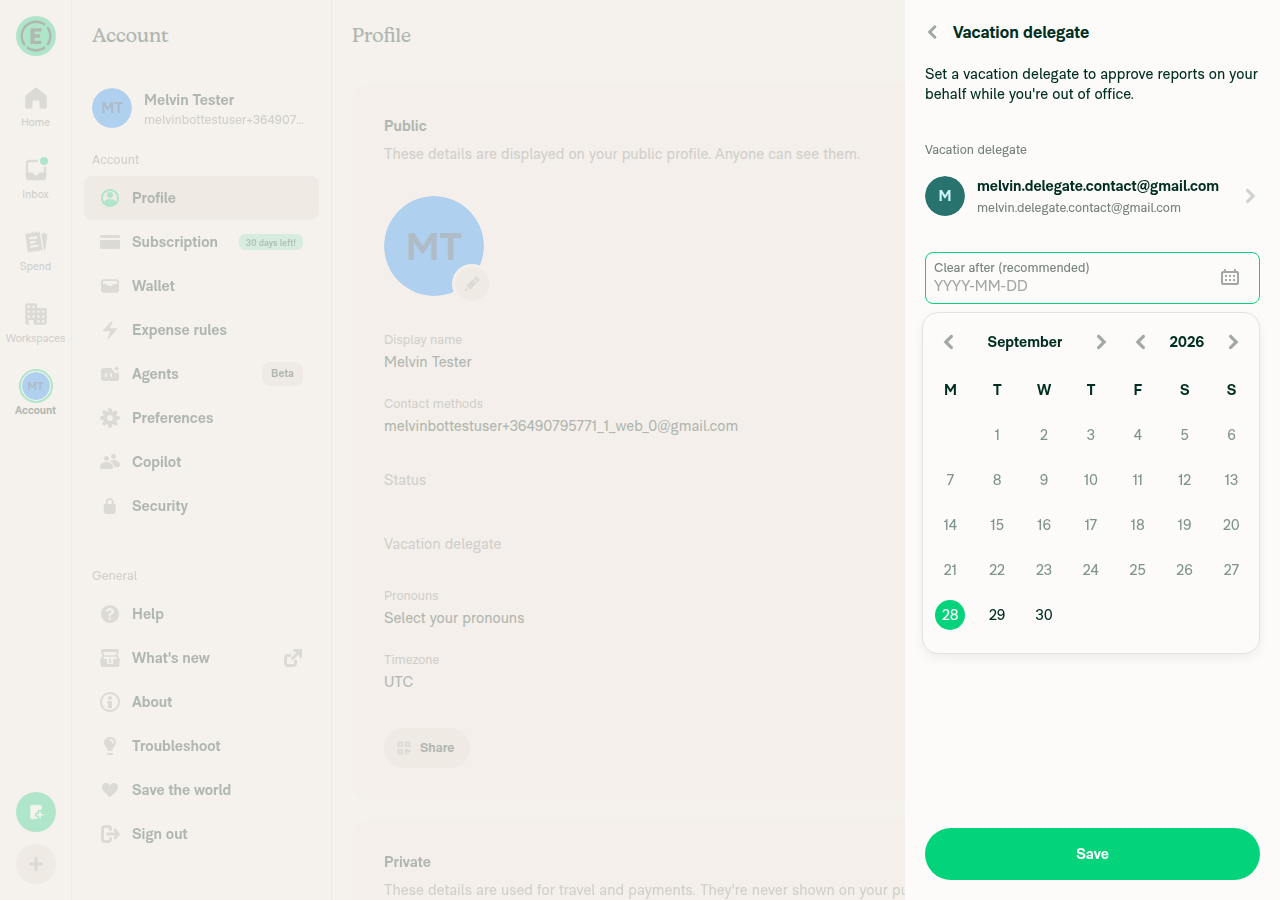
  4. Click the Clear after (recommended) input. Verify the calendar opens and days before today can't be picked. Pick tomorrow. Verify:

    • the input shows tomorrow as yyyy-MM-dd (e.g. 2026-10-13);
    • the calendar icon is replaced by a clear (X) button in the same spot;
    • a Time row appears, showing 11:59 PM;
    • the note reads "Vacation delegate will clear on Oct 13, 2026 11:59 PM".
  5. Click the X. Verify the input is empty again with the calendar icon in the same spot, and the Time row and the note are gone. Pick tomorrow again.

  6. Click the Time row, set 5:30 PM and confirm. Verify the Time row shows 5:30 PM and the note reads "Vacation delegate will clear on Oct 13, 2026 5:30 PM".

  7. Click Save. Verify:

    • Save shows a spinner;
    • Remove vacation delegate never appears, either while saving or while the RHP closes;
    • the RHP closes;
    • the Profile row shows the Vacation delegate label, Account B's pill, and "Until Oct 13, 2026 5:30 PM" under it.
  8. Refresh the page. Verify the Profile row still shows Account B and "Until Oct 13, 2026 5:30 PM".

Edit and remove

  1. Click the Vacation delegate row. Verify the form opens showing:
    • Account B under Choose delegate;
    • 2026-10-13 in Clear after (recommended), with the X;
    • 5:30 PM in Time;
    • the "Vacation delegate will clear on Oct 13, 2026 5:30 PM" note;
    • a Remove vacation delegate button.
  2. Change only the Time to 6:00 PM and click Save. Verify the RHP closes right away (no spinner) and the Profile row shows Account B with "Until Oct 13, 2026 6:00 PM".
  3. Open the form and click Choose delegate. Verify the picker shows Account B selected at the top. Pick Account C. Verify you return to the form with Account C's pill, and the date, time and note are unchanged.
  4. Click Save. Verify Save shows a spinner, then the RHP closes and the Profile row shows Account C's pill with "Until Oct 13, 2026 6:00 PM".
  5. Open the form. Pick today's date, then set Time to a time that has already passed. Click Save. Verify:
    • "Please choose a time at least one minute ahead" shows under Time;
    • the form stays open;
    • no request is sent.
  6. Click the header back button without saving. Verify you return to Profile. Click the Vacation delegate row again and verify the form shows the saved values (Account C, 2026-10-13, 6:00 PM), not the unsaved ones.
  7. Click the X on Clear after (recommended) and click Save. Verify the RHP closes and the Profile row shows Account C with no "Until" line. Refresh and verify it stays that way.
  8. Open the form and click Remove vacation delegate. Verify the RHP closes and the Profile row shows Vacation delegate with no value.

No date

  1. Set Account B as delegate without picking a date and click Save. Verify the Profile row shows Account B's pill with no "Until" line. Open the form again and verify Clear after (recommended) is empty, with the calendar icon and no Time row.

Error from the backend

  1. Have Account C set its own vacation delegate. Then, as Account A, open the form, pick Account C and click Save. Verify:

    • an Add vacation delegate modal shows the backend's error message;
    • no error row with an X shows under the delegate pill.

    Click Got it. Verify the modal closes, the spinner on Save stops, the form shows the previous delegate again, and Save can be clicked again.

Automatic clearing

  1. Set Account B as delegate with today's date and a time 2 minutes ahead, then click Save. Verify the Profile row shows "Until ". Wait until that time passes and refresh. Verify:
    • the Profile row shows no delegate;
    • clicking it opens the form with Choose delegate unselected;
    • clicking Choose delegate shows no member preselected.

Missing workspaces step

Note

This step only appears when Account A belongs to at least one workspace that the chosen delegate is not a member of. With no workspaces, or a delegate who is already in all of them, the delegate is saved directly.

  1. Open the form, pick Account D, pick tomorrow, set Time to 5:30 PM, and click Save. Verify:

    • the Profile row doesn't change while the request runs;
    • a screen opens saying Account D is not a member of the workspaces listed, with W under "You are an admin of these workspaces:".

    Click Invite. Verify the whole RHP closes and the Profile row shows Account D's pill with "Until Oct 13, 2026 5:30 PM", appearing once without flashing.

  2. Remove the delegate and repeat step 22, but click Skip instead of Invite. Verify the same result.

While you're someone else's delegate

  1. Set Account A as Account B's vacation delegate, then sign in as Account A. Click the Vacation delegate row. Verify it shows "You can't set a vacation delegate because you're currently the delegate for the following members:" with Account B listed, and no form.
  2. Open settings/profile/vacation-delegate directly. Verify the same message shows.

Domain admin

  1. As a domain admin, go to Domains > [domain] > Members and open your own member entry. Click Vacation delegate. Verify the form opens with Choose delegate unselected. Click Choose delegate and verify the picker header reads Choose delegate and you aren't listed (search for your own email too). Go back to the member list.
  2. Open member M and click Vacation delegate. Verify the form opens with Choose delegate unselected. Click Choose delegate and verify the picker lists you, but not M.
  3. Pick Account B. Verify you return to the form, which shows Account B's pill under Choose delegate. Pick tomorrow, set Time to 5:30 PM and click Save. Verify you return to M's member details, and the row shows Account B's pill with "Until Oct 13, 2026 5:30 PM". The date and time are read in M's Profile timezone.
  4. Sign in as M and open Account > Profile. Verify the row shows Account B with the same "Until Oct 13, 2026 5:30 PM".
  5. Back as the admin, open M's Vacation delegate row. Verify the form shows the saved date (with the X), the time and Remove vacation delegate. Click it and verify M's row shows no delegate.

Other date inputs (shared DatePicker change)

  1. Go to Account > Profile and click Date of birth in the Private section. Note where the calendar icon sits on the date input. Pick a date. Verify the X sits exactly where the calendar icon was. Click the X and verify the field clears and the calendar icon comes back in the same spot. Pick a date again, save, and verify the field works as before.
  2. Start a manual expense and open its Date. Pick a date and clear it. Verify the X sits exactly where the calendar icon was, and the field works as before.
  • Verify that no errors appear in the JS console

Offline tests

Note

Go offline with the browser's network throttling (DevTools > Network > Offline) or by turning off the device's network. The Force offline switch under Troubleshoot still sends requests to the server, so the server applies changes that should be waiting in the queue.

Self-service (Profile)

  1. While online, set Account B as your vacation delegate, clearing tomorrow at 5:30 PM. Then go offline.
  2. Go to Account > Profile. Verify the row shows Account B with "Until Oct 13, 2026 5:30 PM". Click it and verify the form opens with Account B, 2026-10-13 and 5:30 PM.
  3. Set Time to 6:00 PM. Verify the note reads "Vacation delegate will clear on Oct 13, 2026 6:00 PM". Click Save. Verify the RHP closes right away with no error, and the Profile row shows Account B with "Until Oct 13, 2026 6:00 PM", greyed out.
  4. Click the row again. Verify the form opens with the Choose delegate pill, the date, the Time row and the note all greyed out. Go back.
  5. Go back online. Verify the Profile row is no longer greyed out and still shows "Until Oct 13, 2026 6:00 PM", with no error.
  6. Go offline again and open the form. Click Choose delegate. Verify the offline blocking view shows, and its back button returns to the form.
  7. Set Time to 7:00 PM and click Save. Open the form again and click Remove vacation delegate. Verify the RHP closes and the Profile row is struck through.
  8. Go back online. Verify the Profile row goes straight to showing no delegate, with no flash of Account B's pill or the 7:00 PM "Until" label, and no error. In the network tab, verify only DeleteVacationDelegate is sent, not the queued SetVacationDelegate.
  9. While offline with no delegate set, click Vacation delegate. Verify the form opens with Choose delegate unselected and Save disabled. Click Choose delegate and verify the offline blocking view shows (the member picker is online only, same as on main).

Domain admin

  1. While online, set a vacation delegate for member M, clearing tomorrow at 5:30 PM. Go offline, open M and click Vacation delegate. Verify the form opens with the saved date and time.
  2. Set Time to 6:00 PM and click Save. Verify you return to M's details right away, and the row shows "Until Oct 13, 2026 6:00 PM", greyed out. Go back online and verify the row is no longer greyed out, with no error.
  3. Go offline again, open the form and click Choose delegate. Verify the offline blocking view shows.
  4. Go back to the form and click Remove vacation delegate. Verify M's row shows no delegate. Go back online and verify it stays removed, with no error.

QA Steps

Same as tests, including steps 31 and 32, which check that other date inputs in the App still work after the shared DatePicker change.

  • Verify that no errors appear in the JS console

PR Author Checklist

  • I linked the correct issue in the ### Fixed Issues section above
  • I wrote clear testing steps that cover the changes made in this PR
    • I added steps for local testing in the Tests section
    • I added steps for the expected offline behavior in the Offline steps section
    • I added steps for Staging and/or Production testing in the QA steps section
    • I added steps to cover failure scenarios (i.e. verify an input displays the correct error message if the entered data is not correct)
    • I turned off my network connection and tested it while offline to ensure it matches the expected behavior (i.e. verify the default avatar icon is displayed if app is offline)
    • I tested this PR with a High Traffic account against the staging or production API to ensure there are no regressions (e.g. long loading states that impact usability).
  • I included screenshots or videos for tests on all platforms
  • I ran the tests on all platforms & verified they passed on:
    • Android: Native
    • Android: mWeb Chrome
    • iOS: Native
    • iOS: mWeb Safari
    • MacOS: Chrome / Safari
  • I verified there are no console errors (if there's a console error not related to the PR, report it or open an issue for it to be fixed)
  • I followed proper code patterns (see Reviewing the code)
    • I verified that comments were added to code that is not self explanatory
    • I verified that any new or modified comments were clear, correct English, and explained "why" the code was doing something instead of only explaining "what" the code was doing.
    • I verified any copy / text that was added to the app is grammatically correct in English. It adheres to proper capitalization guidelines (note: only the first word of header/labels should be capitalized), and is either coming verbatim from figma or has been approved by marketing (in order to get marketing approval, ask the Bug Zero team member to add the Waiting for copy label to the issue)
  • If a new code pattern is added I verified it was agreed to be used by multiple Expensify engineers
  • I followed the guidelines as stated in the Review Guidelines
  • I tested other components that can be impacted by my changes (i.e. if the PR modifies a shared library or component like Avatar, I verified the components using Avatar are working as expected)
  • If a new CSS style is added I verified that:
    • A similar style doesn't already exist
    • The style can't be created with an existing StyleUtils function (i.e. StyleUtils.getBackgroundAndBorderStyle(theme.componentBG))
  • If new assets were added or existing ones were modified, I verified that:
    • The assets are optimized and compressed (for SVG files, run npm run compress-svg)
    • The assets load correctly across all supported platforms.
  • If the PR modifies code that runs when editing or sending messages, I tested and verified there is no unexpected behavior for all supported markdown - URLs, single line code, code blocks, quotes, headings, bold, strikethrough, and italic.
  • If the PR modifies a generic component, I tested and verified that those changes do not break usages of that component in the rest of the App (i.e. if a shared library or component like Avatar is modified, I verified that Avatar is working as expected in all cases)
  • If the PR modifies a component related to any of the existing Storybook stories, I tested and verified all stories for that component are still working as expected.
  • If the PR modifies a component or page that can be accessed by a direct deeplink, I verified that the code functions as expected when the deeplink is used - from a logged in and logged out account.
  • If the PR modifies the UI (e.g. new buttons, new UI components, changing the padding/spacing/sizing, moving components, etc) or modifies the form input styles:
    • I verified that all the inputs inside a form are aligned with each other.
    • I added Design label and/or tagged @Expensify/design so the design team can review the changes.
  • I added unit tests for any new feature or bug fix in this PR to help automatically prevent regressions in this user flow.
  • If the main branch was merged into this PR after a review, I tested again and verified the outcome was still expected according to the Test steps.

Screenshots/Videos

Android: Native
Android: mWeb Chrome
iOS: Native
iOS: mWeb Safari
MacOS: Chrome / Safari

@OSBotify

This comment has been minimized.

@github-actions github-actions Bot changed the title Add a clear after date to vacation delegates and show them on the Profile page [No QA] Add a clear after date to vacation delegates and show them on the Profile page Sep 28, 2026
@OSBotify

This comment has been minimized.

@codecov

codecov Bot commented Sep 28, 2026 •

Copy link
Copy Markdown

Codecov Report

✅ Changes either increased or maintained existing code coverage, great job!

Files with missing lines Coverage Δ
src/CONST/index.ts 95.90% <ø> (ø)
src/ONYXKEYS.ts 100.00% <ø> (ø)
src/SCREENS.ts 100.00% <ø> (ø)
src/components/DatePicker/index.tsx 63.88% <100.00%> (+0.68%) ⬆️
src/components/VacationDelegateMenuItem.tsx 100.00% <100.00%> (ø)
src/libs/DateUtils.ts 80.45% <100.00%> (+0.62%) ⬆️
...avigation/linkingConfig/RELATIONS/DOMAIN_TO_RHP.ts 100.00% <ø> (ø)
...igation/linkingConfig/RELATIONS/SETTINGS_TO_RHP.ts 100.00% <ø> (ø)
src/libs/Navigation/linkingConfig/config.ts 62.50% <ø> (ø)
src/libs/VacationDelegateUtils.ts 100.00% <100.00%> (ø)
... and 15 more
... and 16 files with indirect coverage changes

@MelvinBot

MelvinBot commented Sep 28, 2026 •

Copy link
Copy Markdown
Contributor Author

🤖 Android test steps verification results: ⚠️ partial

The Vacation delegate row moved from Status to Profile, and the pick and remove flows work. But the Clear after date is not kept after Save, so the Profile row never shows "Until ". The PR's Tests section is still a TODO, so I built these steps from the PR's "What changed" list.
Profile row back to empty state after remove

Step Status
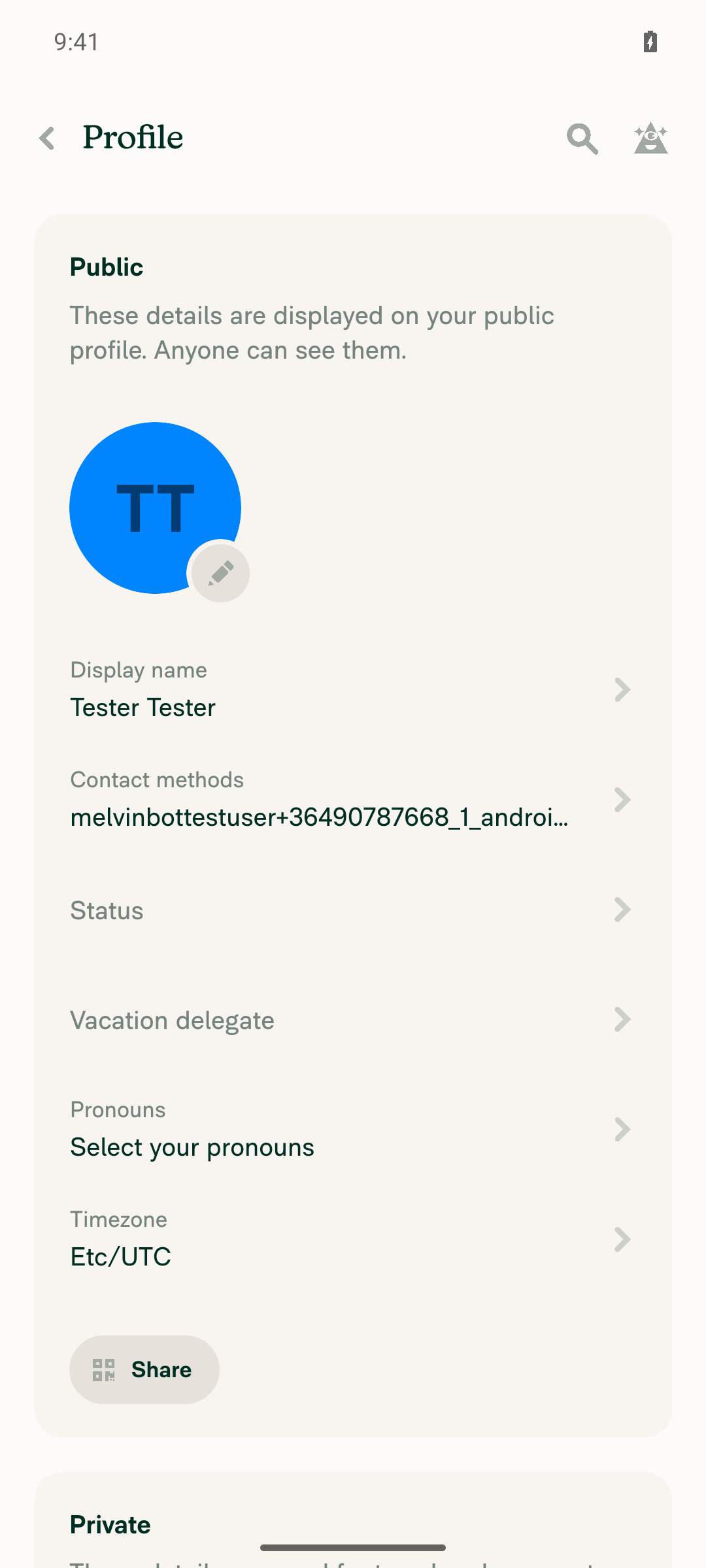
1. Profile shows a new "Vacation delegate" row directly after "Status"Profile menu order: Display name, Contact methods, Status, Vacation delegate, Pronouns, Timezone, Share.
Profile page showing Vacation delegate row after Status
✅
2. Status page no longer has a vacation delegate sectionStatus shows only emoji/Status, Message, Clear after (Today), and Save.
Status page with no vacation delegate section
✅
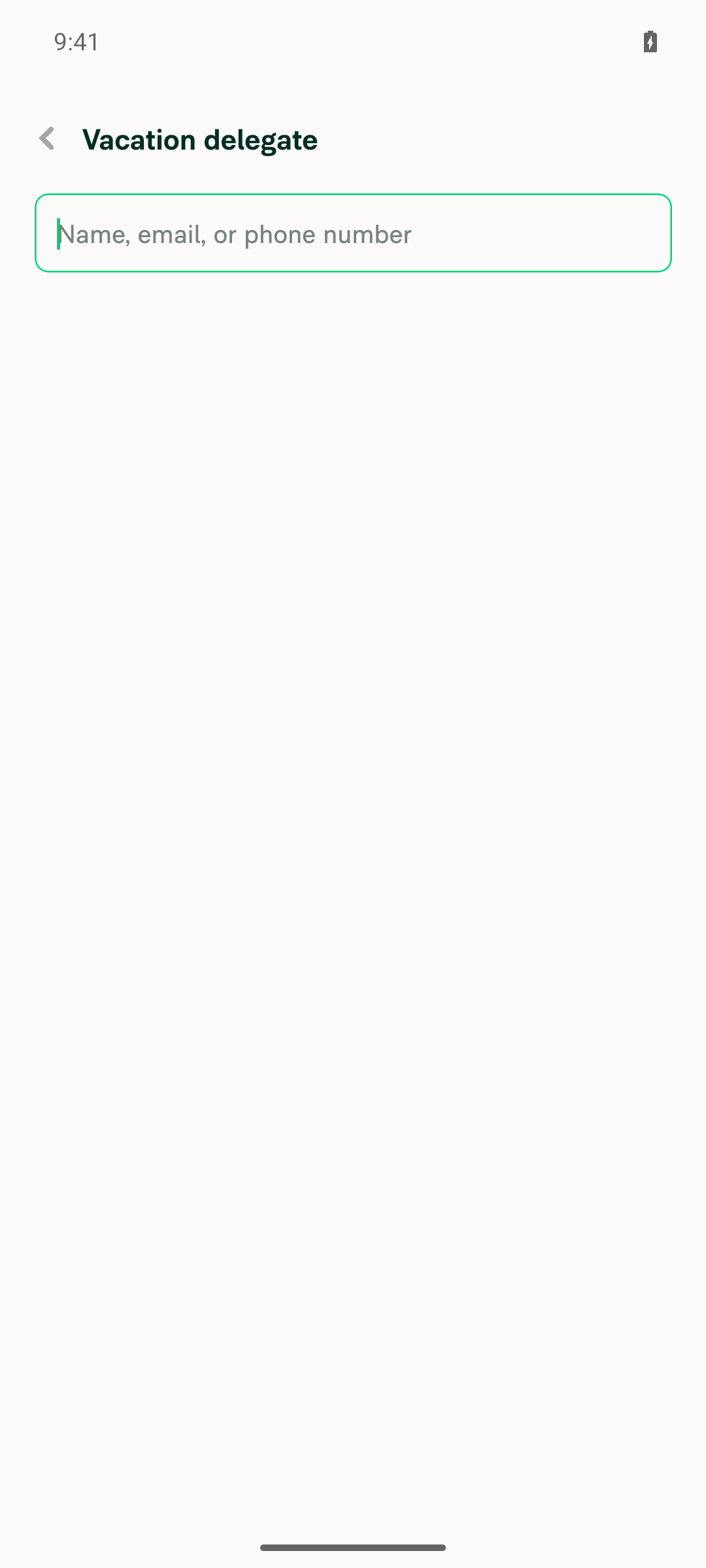
3. With no delegate set, the Profile row opens the member picker directlyTapping the row opened the "Name, email, or phone number" search screen with no step in between.
Member selection search screen
✅
4. Picking a member opens a form with the member, Clear after field, Save, and Remove vacation delegatePicking "Test Person" opened the form without saving. It showed the member, "Clear after (recommended)", and Save. "Remove vacation delegate" was missing on this first-time form and only shows once a delegate is saved. With nothing to remove yet, this may be intended.
New-delegate form with Test Person picked, no Remove button
❌
5. Clear after date picker blocks dates before todaySeptember 1 to 27 were disabled. Today (September 28) and later were selectable.
Date picker with past dates disabled
✅
6. After picking a future date, the form shows "Vacation delegate will clear on <date>"After picking September 30, the form showed "Vacation delegate will clear on Sep 30, 2026."
Clear-after note showing the picked date
✅
7. Save returns to Profile, and the row shows the delegate plus "Until <date>"After Save, the row showed only "Test Person" with no "Until" text. Reopening the form showed an empty Clear after field, so the date was not kept. The likely cause is the backend clearAfter support noted in the PR: if the server response doesn't include clearAfter, it overwrites the optimistic value. I did not confirm this.
Profile row after save, missing Until textReopened form showing Clear-after date lost after save
❌
8. Saving with an empty date works, and the row shows the delegate without "Until"Save succeeded, and the row showed "Test Person" with no "Until" text.
Profile row after saving with empty Clear-after date
✅
9. "Remove vacation delegate" removes it, and the Profile row returns to emptyTapping Remove returned to Profile, and the row showed only "Vacation delegate".
Profile row back to empty state after remove
✅

view run · view recording

@MelvinBot

MelvinBot commented Sep 28, 2026 •

Copy link
Copy Markdown
Contributor Author

🤖 Web test steps verification results: ⚠️ partial

The Vacation delegate row, member picker, date minimum, clear note, and remove flow all work. But the Clear after date is not kept after Save: Profile shows no "Until ", and the date field is empty when you reopen the form. The PR's Tests section is still a TODO, so I built these steps from the PR's "What changed" list, the same as the Android run.
Profile row back to empty state after removal

Step Status
1. Profile shows a new "Vacation delegate" row directly after "Status"Profile row order: Display name, Contact methods, Status, Vacation delegate, Pronouns, Timezone.
Profile page with Vacation delegate row after Status
✅
2. Status page no longer has a vacation delegate sectionStatus shows only Status, Message, Clear after (Today), and Save.
Status page with no vacation delegate section
✅
3. With no delegate set, the Profile row opens the member picker directlyClicking the row opened the "Name, email, or phone number" search page with no step in between. The test account had no contacts, so I invited [email protected] to a workspace to have someone to pick.
Member selection list with one contact option
✅
4. Picking a member opens a form with the member, Clear after field, Save, and Remove vacation delegatePicking the member opened the form without saving. It showed the member, "Clear after (recommended)", and Save. "Remove vacation delegate" was missing on this first-time form and only shows once a delegate is saved. Android behaves the same way. With nothing to remove yet, this may be intended.
Form after picking a member, showing no Remove button yet
❌
5. Clear after date picker blocks dates before todayEvery date through September 27, 2026 was disabled. Today (September 28) was the first date you could pick.
Date picker with all past dates disabled
✅
6. After picking a future date, the form shows "Vacation delegate will clear on <date>"After picking September 30, the form showed "Vacation delegate will clear on Sep 30, 2026."
Form showing clear-on note after picking a date
✅
7. Save returns to Profile, and the row shows the delegate plus "Until <date>"After Save, the row showed only the delegate email with no "Until" text. Reopening the form showed an empty Clear after field, so the date was not kept. Android had the same result. The likely cause is the backend clearAfter support noted in the PR: if the server response doesn't include clearAfter, it overwrites the optimistic value. I did not confirm this. I also skipped the reload check so the session wouldn't be signed out.
Profile row after Save, missing Until text
❌
8. Saving with an empty date works, and the row shows the delegate without "Until"The reopened form showed "Remove vacation delegate" and an empty date. Save returned to Profile, and the row showed only the delegate email.
Edit form on reopen showing Remove vacation delegate buttonProfile row after saving with empty date
✅
9. "Remove vacation delegate" removes it, and the Profile row returns to emptyClicking Remove returned to Profile, and the row showed only "Vacation delegate".
Profile row back to empty state after removal
✅

view run · view recording

@ikevin127

This comment has been minimized.

… a Choose delegate label, and keep the empty date label inside the input

Co-authored-by: Kevin Brian Bader <[email protected]>
@MelvinBot

MelvinBot commented Sep 29, 2026 •

Copy link
Copy Markdown
Contributor Author

I pushed 5cffbfc to bring the form and the Profile row closer to the mockups. I couldn't check it in a browser: the web test session went blank during onboarding, before it reached Profile. Please check the screens by eye.

What changed:

  • Delegate pill: The delegate now shows as a UserPill (avatar and name) with the label above it and a chevron on the right, the same pattern the new task Assignee row uses (VacationDelegateMenuItem.tsx:53). The login line under the name is gone.
  • "Choose delegate" label: The form row is now labeled "Choose delegate" instead of "Vacation delegate", with translations for every locale (VacationDelegateForm.tsx:102).
  • Date input label: DatePicker has a new opt-in shouldForceActiveLabel prop. The form sets it to false, so the empty, unfocused input shows "Clear after (recommended)" inside the field with the calendar icon and no YYYY-MM-DD placeholder. Once a date is picked, the label moves above it (DatePicker/index.tsx:237). Every other DatePicker keeps the current behavior.
  • Note under the date: It now reads "Vacation delegate will clear on Oct 1, 2026" with no trailing period, matching the mockup.
  • Profile row: It uses the same pill row, with "Until {date}" on its own line under the pill instead of after a "·" (ProfilePage.tsx:162). The domain member details row also gets the pill.

Where it still differs from the mockups:

  • Date format: The mockups show 2026/10/01. The input keeps the DatePicker format (2026-10-01), and "Until" uses the same Oct 1, 2026 format as the note. Matching the mockup exactly would mean changing the shared date format.
  • Icon after a date is picked: DatePicker swaps the calendar icon for a clear button once a date is set. I kept that, because the clear button is the only way to go back to "never clears".

Checks: Typecheck, lint, spell check, and the formatter pass. The React Compiler check passes for the changed components except DatePicker, which already failed the check before this change. The five vacation delegate and Profile Jest suites pass (68 tests). I updated them for the pill, which no longer shows the login.


view run · no recording available

@OSBotify

Copy link
Copy Markdown
Contributor

🦜 Polyglot Parrot! 🦜

Squawk! Looks like you added some shiny new English strings. Allow me to parrot them back to you in other tongues:

View the translation diff
diff --git a/src/languages/de.ts b/src/languages/de.ts
index 437caf4b..666c4749 100644
--- a/src/languages/de.ts
+++ b/src/languages/de.ts
@@ -3861,9 +3861,9 @@ ${amount} für ${merchant} – ${date}`,
                 `<strong>${delegate}</strong> ist kein Mitglied der unten aufgeführten Arbeitsbereiche. Admins der Arbeitsbereiche, die Sie nicht verwalten, werden gebeten, die Person hinzuzufügen. Möchten Sie die Person jetzt zu den Arbeitsbereichen einladen, in denen Sie Admin sind?`,
             youAreAMemberOf: 'Sie sind Mitglied dieser Arbeitsbereiche:',
             youAreAnAdminOf: 'Sie sind Admin dieser Arbeitsbereiche:',
-            chooseDelegate: 'Vertretung auswählen',
+            chooseDelegate: 'Delegierte Person auswählen',
             clearAfterRecommended: 'Löschen nach (empfohlen)',
-            willClearOn: (date: string) => `Die Urlaubsvertretung wird am ${date} entfernt`,
+            willClearOn: (date: string) => `Urlaubsvertretung endet am ${date}`,
             until: (date: string) => `Bis ${date}`,
             removeDelegate: 'Urlaubsvertretung entfernen',
         },
diff --git a/src/languages/el.ts b/src/languages/el.ts
index 7dc64aee..d5c49437 100644
--- a/src/languages/el.ts
+++ b/src/languages/el.ts
@@ -3911,11 +3911,11 @@ ${amount} για ${merchant} - ${date}`,
                 `Ο/Η <strong>${delegate}</strong> δεν είναι μέλος των παρακάτω χώρων εργασίας. Θα ζητηθεί από τους διαχειριστές των χώρων εργασίας που δεν διαχειρίζεστε να τον/την προσθέσουν. Θέλετε να τον/την προσκαλέσετε τώρα σε αυτούς που διαχειρίζεστε ως διαχειριστής;`,
             youAreAMemberOf: 'Είστε μέλος αυτών των χώρων εργασίας:',
             youAreAnAdminOf: 'Είστε διαχειριστής αυτών των χώρων εργασίας:',
-            chooseDelegate: 'Επιλέξτε αναπληρωτή',
+            chooseDelegate: 'Επιλέξτε εκπρόσωπο',
             clearAfterRecommended: 'Εκκαθάριση μετά από (συνιστάται)',
-            willClearOn: (date: string) => `Ο εκπρόσωπος διακοπών θα καταργηθεί στις ${date}`,
-            until: (date: string) => `Έως ${date}`,
-            removeDelegate: 'Κατάργηση εκπροσώπου διακοπών',
+            willClearOn: (date: string) => `Η ανάθεση αδειούχου θα λήξει στις ${date}`,
+            until: (date: string) => `Μέχρι ${date}`,
+            removeDelegate: 'Κατάργηση αναπληρωτή διακοπών',
         },
     },
     stepCounter: (step, total, text) => {
diff --git a/src/languages/es.ts b/src/languages/es.ts
index 65835143..f120b102 100644
--- a/src/languages/es.ts
+++ b/src/languages/es.ts
@@ -3781,8 +3781,8 @@ ${amount} para ${merchant} - ${date}`,
             youAreAnAdminOf: 'Usted es administrador de estos espacios de trabajo:',
             chooseDelegate: 'Elegir delegado',
             clearAfterRecommended: 'Borrar después de (recomendado)',
-            willClearOn: (date: string) => `El delegado de vacaciones se eliminará el ${date}`,
-            until: (date: string) => `Hasta el ${date}`,
+            willClearOn: (date: string) => `El delegado de vacaciones se borrará el ${date}`,
+            until: (date: string) => `Hasta ${date}`,
             removeDelegate: 'Eliminar delegado de vacaciones',
         },
     },
diff --git a/src/languages/fr.ts b/src/languages/fr.ts
index 0c701d9e..1db6af88 100644
--- a/src/languages/fr.ts
+++ b/src/languages/fr.ts
@@ -3871,7 +3871,7 @@ ${amount} pour ${merchant} - ${date}`,
             youAreAnAdminOf: 'Vous êtes administrateur de ces espaces de travail :',
             chooseDelegate: 'Choisir un délégué',
             clearAfterRecommended: 'Effacer après (recommandé)',
-            willClearOn: (date: string) => `Le délégué de vacances sera supprimé le ${date}`,
+            willClearOn: (date: string) => `La délégation de vacances sera annulée le ${date}`,
             until: (date: string) => `Jusqu’au ${date}`,
             removeDelegate: 'Supprimer le délégué de vacances',
         },
diff --git a/src/languages/it.ts b/src/languages/it.ts
index 481e794f..0b152956 100644
--- a/src/languages/it.ts
+++ b/src/languages/it.ts
@@ -3844,9 +3844,9 @@ ${amount} per ${merchant} - ${date}`,
             youAreAnAdminOf: 'Sei amministratore di questi spazi di lavoro:',
             chooseDelegate: 'Scegli delegato',
             clearAfterRecommended: 'Cancella dopo (consigliato)',
-            willClearOn: (date: string) => `La delega ferie verrà rimossa il ${date}`,
+            willClearOn: (date: string) => `Il delegato per le vacanze verrà rimosso il ${date}`,
             until: (date: string) => `Fino al ${date}`,
-            removeDelegate: 'Rimuovi delega ferie',
+            removeDelegate: 'Rimuovi delegato ferie',
         },
     },
     stepCounter: (step: number, total?: number, text?: string) => {
diff --git a/src/languages/ja.ts b/src/languages/ja.ts
index 23e2672f..1ae059f5 100644
--- a/src/languages/ja.ts
+++ b/src/languages/ja.ts
@@ -3812,9 +3812,9 @@ ${integrationName === CONST.ONBOARDING_ACCOUNTING_MAPPING.other ? 'あなたの'
             youAreAMemberOf: 'あなたはこれらのワークスペースのメンバーです:',
             youAreAnAdminOf: 'あなたはこれらのワークスペースの管理者です:',
             chooseDelegate: '代理人を選択',
-            clearAfterRecommended: 'クリア日(推奨)',
+            clearAfterRecommended: 'この時間後に自動クリア(推奨)',
             willClearOn: (date: string) => `休暇代理人は${date}に解除されます`,
-            until: (date: string) => `${date}まで`,
+            until: (date: string) => `${date} まで`,
             removeDelegate: '休暇代理人を削除',
         },
     },
diff --git a/src/languages/nl.ts b/src/languages/nl.ts
index cc775dc8..3aefa229 100644
--- a/src/languages/nl.ts
+++ b/src/languages/nl.ts
@@ -3844,11 +3844,11 @@ ${amount} voor ${merchant} - ${date}`,
                 `<strong>${delegate}</strong> is geen lid van de onderstaande werkruimtes. Beheerders van de werkruimtes die je niet beheert, wordt gevraagd diegene toe te voegen. Wil je diegene nu uitnodigen voor de werkruimtes waar je beheerder van bent?`,
             youAreAMemberOf: 'Je bent lid van deze werkruimtes:',
             youAreAnAdminOf: 'Je bent beheerder van deze werkruimtes:',
-            chooseDelegate: 'Gedelegeerde kiezen',
+            chooseDelegate: 'Kies gemachtigde',
             clearAfterRecommended: 'Wissen na (aanbevolen)',
-            willClearOn: (date: string) => `De vertegenwoordiger tijdens vakantie wordt gewist op ${date}`,
+            willClearOn: (date: string) => `Vakantiegedelegeerde wordt op ${date} verwijderd`,
             until: (date: string) => `Tot ${date}`,
-            removeDelegate: 'Vertegenwoordiger tijdens vakantie verwijderen',
+            removeDelegate: 'Vakantiegemachtigde verwijderen',
         },
     },
     stepCounter: (step: number, total?: number, text?: string) => {
diff --git a/src/languages/pl.ts b/src/languages/pl.ts
index 84575180..33f043e3 100644
--- a/src/languages/pl.ts
+++ b/src/languages/pl.ts
@@ -3873,11 +3873,11 @@ ${amount} dla ${merchant} - ${date}`,
                 `<strong>${delegate}</strong> nie jest członkiem poniższych przestrzeni roboczych. Administratorzy przestrzeni roboczych, którymi nie zarządzasz, zostaną poproszeni o dodanie tej osoby. Czy chcesz zaprosić tę osobę do przestrzeni, w których jesteś administratorem?`,
             youAreAMemberOf: 'Jesteś członkiem tych przestrzeni roboczych:',
             youAreAnAdminOf: 'Jesteś administratorem tych przestrzeni roboczych:',
-            chooseDelegate: 'Wybierz zastępcę',
+            chooseDelegate: 'Wybierz delegata',
             clearAfterRecommended: 'Wyczyść po (zalecane)',
-            willClearOn: (date: string) => `Zastępca urlopowy zostanie usunięty ${date}`,
+            willClearOn: (date: string) => `Zastępstwo wakacyjne wygaśnie ${date}`,
             until: (date: string) => `Do ${date}`,
-            removeDelegate: 'Usuń zastępcę urlopowego',
+            removeDelegate: 'Usuń zastępcę na czas urlopu',
         },
     },
     stepCounter: (step: number, total?: number, text?: string) => {
diff --git a/src/languages/pt-BR.ts b/src/languages/pt-BR.ts
index 0e02130d..3bec9312 100644
--- a/src/languages/pt-BR.ts
+++ b/src/languages/pt-BR.ts
@@ -3835,7 +3835,7 @@ ${amount} para ${merchant} - ${date}`,
             clearAfterRecommended: 'Limpar após (recomendado)',
             willClearOn: (date: string) => `O delegado de férias será removido em ${date}`,
             until: (date: string) => `Até ${date}`,
-            removeDelegate: 'Remover delegado de férias',
+            removeDelegate: 'Remover representante de férias',
         },
     },
     stepCounter: (step: number, total?: number, text?: string) => {
diff --git a/src/languages/zh-hans.ts b/src/languages/zh-hans.ts
index c99e62f2..af721575 100644
--- a/src/languages/zh-hans.ts
+++ b/src/languages/zh-hans.ts
@@ -3720,9 +3720,9 @@ ${amount},商户:${merchant} - 日期:${date}`,
             youAreAMemberOf: '你是这些工作区的成员:',
             youAreAnAdminOf: '你是这些工作区的管理员:',
             chooseDelegate: '选择代理人',
-            clearAfterRecommended: '清除日期(推荐)',
+            clearAfterRecommended: '建议在此之后清除',
             willClearOn: (date: string) => `休假代理将于 ${date} 清除`,
-            until: (date: string) => `直到 ${date}`,
+            until: (date: string) => `截至 ${date}`,
             removeDelegate: '移除休假代理',
         },
     },

Note

You can apply these changes to your branch by copying the patch to your clipboard, then running pbpaste | git apply 😉

View workflow run

@OSBotify

This comment has been minimized.

@ikevin127

This comment has been minimized.

@MelvinBot

Copy link
Copy Markdown
Contributor Author

Yes. The draft is ready for luacmartins to test the backend end to end. Both write paths already send clearAfter to SetVacationDelegate, and all CI checks pass except Check independent approval, which can be ignored.

What the App sends:

One thing the backend must match: The App reads the date from a clearAfter field on nvp_private_vacationDelegate and on the domain's private_vacationDelegate_<accountID> entry. If the backend returns it under another name, "Until {date}" won't show.

Expected result against the backend drafts: After Save, Profile shows "Until {date}", and the form keeps the date when you reopen it. Both web and Android runs failed that step against the current backend. The most likely reason is that the server response doesn't include clearAfter yet, so it overwrites the optimistic value. Your drafts should fix that. I couldn't open the backend drafts from here to confirm.

Still open, but not blocking a backend test: The Tests and QA sections are TODO, and the date-only choice (end of day, no time) still needs design sign-off.

@ikevin127

This comment has been minimized.

@ikevin127

This comment has been minimized.

- Title both member pickers "Choose delegate".
- Push the form from a picker opened straight from Profile or member details, and pop only the form on back, so back returns to the picker.
- Close the whole RHP after Invite or Skip on the missing workspaces step. Its removal guard now replays the blocked action through the navigation container; replaying it through the screen stamped the screen's key as the source, so the root stack dropped it.
- Keep a solid calendar icon on the clear after input after a date is picked, and hide its clear button.
- Tighten the gap under the delegate row and give the remove button the same top spacing with or without the clear-on note.

Co-authored-by: Kevin Brian Bader <[email protected]>
@MelvinBot MelvinBot changed the title [No QA] Add a clear after date to vacation delegates and show them on the Profile page Add a clear after date to vacation delegates and show them on the Profile page Sep 30, 2026
@melvin-bot

melvin-bot Bot commented Sep 30, 2026

Copy link
Copy Markdown

Hey! I see that you made changes to our Form component. Make sure to update the docs in FORMS.md accordingly. Cheers!

1 similar comment
@melvin-bot

melvin-bot Bot commented Sep 30, 2026

Copy link
Copy Markdown

Hey! I see that you made changes to our Form component. Make sure to update the docs in FORMS.md accordingly. Cheers!

@MelvinBot

Copy link
Copy Markdown
Contributor Author

I fixed all six items in 4ecae14 and updated the PR description. Typecheck, lint, formatting, and spelling pass, and so do the vacation delegate and Profile Jest suites (146 tests). I couldn't check it in a browser because the test session showed a blank page before it started, so please check the screens by hand.

  1. Picker header: Both pickers now use statusPage.vacationDelegate.chooseDelegate. The form header still says Vacation delegate.
  2. Back from the form: A picker opened from Profile or member details now pushes the form. A picker opened from the form's Choose delegate row pops back to that form (VacationDelegatePage.tsx:41, DomainMemberVacationDelegatePage.tsx:60). The back button on both forms now pops one screen and still clears the draft. Save and Remove still close the whole flow.
  3. Date input: The input sets shouldHideClearButton and uses a new opt-in shouldKeepCalendarIconWhenSelected prop (DatePicker/index.tsx:240). It uses the existing CalendarSolid icon, which matches the mockup. Typed text can't get into the field because it is controlled and only changes when a date is picked or cleared. I haven't checked this in a browser. The PR notes list three design questions: a picked date can't be cleared before saving, the icon differs from other date inputs, and the date format is 2026-10-01 instead of 2026/10/01.
  4. Gap under the pill: I removed the extra mt4 (VacationDelegateForm.tsx:108).
  5. Remove button spacing: The button now sits in a View with mt4, and the note gets mb2. That matches the date input's own bottom margin, so the gap is the same with or without the note (VacationDelegateForm.tsx:126).
  6. Missing workspaces step: After Invite or Skip, the step now calls Navigation.dismissModal(), which closes the whole RHP, including the form and picker under it. The draft is cleared too. Tests now cover both buttons.
Why item 6's step never closed

The usePreventRemove guard let the exit through by calling navigation.dispatch(data.action) on the screen's own navigation. That call adds the screen's route key to the action as source. The old exit popped inside the same stack, which knows that key, so it worked. The new exit pops the whole RHP from the root stack. The root can't find that key, so its POP does nothing and the action is dropped.

The guard now uses navigationRef.dispatch(data.action) instead, which doesn't add a source (VacationDelegateMissingWorkspacesPage/index.tsx:101). This is the same pattern useDiscardChangesConfirmation uses. A new test covers it. The "second click does nothing" part goes away, because the screen now leaves.

PR description: I removed [No QA] from the title and added the design questions to the Notes section. The DatePicker React Compiler check still fails. That failure was already there before this PR ("Cannot access refs during render"), and all other changed components pass.

@github-actions github-actions Bot changed the title Add a clear after date to vacation delegates and show them on the Profile page [No QA] Add a clear after date to vacation delegates and show them on the Profile page Sep 30, 2026
@OSBotify

This comment has been minimized.

@MelvinBot

Copy link
Copy Markdown
Contributor Author

The failing check is unrelated to this PR, so I didn't push a fix.

Analysis: ESLint check fails with one max-lines error in src/libs/PolicyUtils.ts:4001 (4,039 lines; the limit is 4,000). This PR doesn't touch that file. On this branch the file has 3,987 lines. main already has 4,039, and CI lints the PR merged with main.

Fix in progress: [No QA] Move NetSuite helpers out of PolicyUtils to fix max-lines lint failure fixes this on main. After it merges, merge main into this branch or re-run the check.

Evidence: Every other check passes. Check independent approval also fails, but it only needs a reviewer approval.


view run

@MelvinBot

Copy link
Copy Markdown
Contributor Author

The only real failure is still ESLint check, and it isn't caused by this PR, so I didn't push a fix. My earlier comment has the details.

Cause: src/libs/PolicyUtils.ts has 4,039 lines on main, over the 4,000-line max-lines limit. This PR doesn't touch that file, and it has 3,987 lines on this branch. CI lints the PR merged with main, so every PR picks up the error.

Next step: [No QA] Move NetSuite helpers out of PolicyUtils to fix max-lines lint failure fixes this on main, but it is still open. After it merges, merge main into this branch or re-run ESLint check. If you want me to trim PolicyUtils.ts in this PR anyway, say so. That would add unrelated changes and would conflict with that fix PR.

Check independent approval just needs a reviewer's approval.


view run

@luacmartins

Copy link
Copy Markdown
Contributor

Conflicts

@ikevin127

Copy link
Copy Markdown
Contributor

@MelvinBot Fix conflicts and failing CIs (unit tests and TS check).

…teClearAfter

Co-authored-by: Kevin Brian Bader <[email protected]>

# Conflicts:
#	src/libs/actions/RequestConflictUtils.ts
#	tests/unit/RequestConflictUtilsTest.ts
@OSBotify

This comment has been minimized.

@MelvinBot

Copy link
Copy Markdown
Contributor Author

I merged main into this branch and resolved the conflicts in 7786b7a. The unit test failure and the original TS errors are fixed. One new TS error comes from main and still fails typecheck.

  • Conflicts: main removed resolveDetachReceiptConflicts from RequestConflictUtils.ts. I dropped it and its tests, and kept this PR's resolveVacationDelegateDeletionConflicts.
  • Unit tests: The IOURequestStepConfirmationPageTest failure came from main, and merging fixed it. Seven of eight test jobs now pass, and job 6 hasn't started yet. Locally, that test, the conflict tests, and the vacation delegate tests pass (438 tests).
  • TS check: Merging fixed the SplitTest.ts errors. typecheck now fails on a duplicate personalDetailsByLogins key in tests/actions/PolicyTest.ts:764 and :782. It was added by two main merges, including [No QA] Fix typecheck on main: pass personalDetailsByLogins in PolicyTest. This PR doesn't touch that file, and current main has the same error, so I didn't change it here. After main is fixed, merge main again or re-run typecheck. If you want the one-line fix in this PR, tell me.

Check independent approval only needs a reviewer's approval.

@ikevin127

Copy link
Copy Markdown
Contributor

@MelvinBot Branch still has conflicts.

…teClearAfter

Co-authored-by: Kevin Brian Bader <[email protected]>

# Conflicts:
#	src/components/DatePicker/index.tsx
@MelvinBot

Copy link
Copy Markdown
Contributor Author

The conflicts are fixed. main changed again after my last merge, so I merged it in again in 7eb737e. GitHub now shows the branch as mergeable.

What conflicted: src/components/DatePicker/index.tsx. main reverted "Show up to three report fields per row and edit them inline", which removed some DatePicker props and its icon logic. I took main's version and kept this PR's icon prop, so the vacation delegate date input still shows the solid calendar icon. It still swaps the icon for the clear button once a date is picked.

Checks:

  • ✅ Jest: VacationDelegateFormPageTest, VacationDelegatePageTest, VacationDelegateUtilsTest (31 tests).
  • ⚠️ typecheck still fails with one error in tests/actions/PolicyTest.ts:782 (duplicate property). The error is on main, and this PR doesn't touch that file.

@OSBotify

This comment has been minimized.

@luacmartins

Copy link
Copy Markdown
Contributor

@ikevin127 checks are failing

@ikevin127

This comment has been minimized.

@MelvinBot

Copy link
Copy Markdown
Contributor Author

Merged main and pushed (581b256). No code changes were needed: both failures came from main, not this PR, and the merge fixes them.

  • typecheck: The duplicate-property error in tests/actions/PolicyTest.ts is gone on current main. Local npm run typecheck passes.
  • ESLint: The two MenuItemWithTopDescription deprecation errors were in MoneyRequestViewReportFields.tsx and MoneyReportView.tsx, which this PR doesn't touch. ESLint now passes locally on those files and on every file this PR changes.

view run

@OSBotify

Copy link
Copy Markdown
Contributor

A preview of your ExpensifyHelp changes have been deployed to https://de46a423.helpdot.pages.dev ⚡️

Updated articles:

@ikevin127

Copy link
Copy Markdown
Contributor

@luacmartins All 🟢 now, if you could please remove the [NoQA] from the title before merge 🙌 (bot keeps wrongly adding it since there are some changes in a docs file) - but this needs QA once merged and deployed.

@luacmartins luacmartins changed the title [No QA] Add a clear after date to vacation delegates and show them on the Profile page Add a clear after date to vacation delegates and show them on the Profile page Oct 14, 2026

@luacmartins luacmartins left a comment

Copy link
Copy Markdown
Contributor

Choose a reason for hiding this comment

The reason will be displayed to describe this comment to others. Learn more.

This is a really big PR given the changes. Let's try to keep it smaller in the future please!

@luacmartins
luacmartins merged commit 6e8f740 into main Oct 14, 2026
47 of 48 checks passed
@luacmartins
luacmartins deleted the claude-vacationDelegateClearAfter branch October 14, 2026 23:13
@github-actions

Copy link
Copy Markdown
Contributor

🚧 luacmartins has triggered a test Expensify/App build. You can view the workflow run here.

@OSBotify

Copy link
Copy Markdown
Contributor

✋ This PR was not deployed to staging yet because QA is ongoing. It will be automatically deployed to staging after the next production release.

@OSBotify

Copy link
Copy Markdown
Contributor

🚀 Deployed to staging by https://github.com/luacmartins in version: 9.5.10-0 🚀

platform result
🕸 web 🕸 success ✅
🤖 android 🤖 success ✅
🍎 iOS 🍎 success ✅

@MelvinBot

Copy link
Copy Markdown
Contributor Author

A help site update is needed. I opened Docs updates for E/A#102472 Update domain admin vacation delegate steps for new form as a draft.

Why: This PR made two steps in Manage-Domain-Members.md:114-115 wrong:

  1. Select the member you want to assign as the delegate.
  2. Click Confirm.

Now Vacation delegate opens a form. The admin selects Choose delegate, can set an optional Clear after (recommended) date, and then selects Save. The docs PR replaces those two steps with these three. Delegate-when-out-of-office.md was already updated in this PR.

@ikevin127, please review the linked help site PR and confirm it reflects the current behavior. Then mark the linked help site PR Ready for review


view run

@OSBotify

Copy link
Copy Markdown
Contributor

🚀 Deployed to staging by https://github.com/luacmartins in version: 9.5.12-0 🚀

platform result
🕸 web 🕸 success ✅
🤖 android 🤖 success ✅
🍎 iOS 🍎 success ✅

@MelvinBot

Copy link
Copy Markdown
Contributor Author

A help site update is needed. I opened Docs updates for E/A#102472 Update domain vacation delegate steps to use Save.

This PR already updated Delegate-when-out-of-office.md, but it missed the domain admin steps in Manage-Domain-Members.md. Those steps now describe a button that no longer exists:

  1. Select the member you want to assign as the delegate.
  2. Click Confirm.

Domain admins now use the new form. They select Choose delegate, pick a member, and select Save. The docs PR changes only those two steps.

@ikevin127, please review the linked help site PR and confirm it reflects the current behavior. Then mark the linked help site PR Ready for review


view run

@OSBotify

Copy link
Copy Markdown
Contributor

🚀 Deployed to production by https://github.com/cristipaval in version: 9.5.12-1 🚀

platform result
🕸 web 🕸 success ✅
🤖 android 🤖 success ✅
🍎 iOS 🍎 success ✅

Bundle Size Analysis (Sentry):

Sign up for free to join this conversation on GitHub. Already have an account? Sign in to comment

Labels

Melvin-Test-Android Melvin-Test-Web Triggers Melvin to run the testing steps of the PR on web

Projects

None yet

Development

Successfully merging this pull request may close these issues.

7 participants