Repository navigation
Conversation


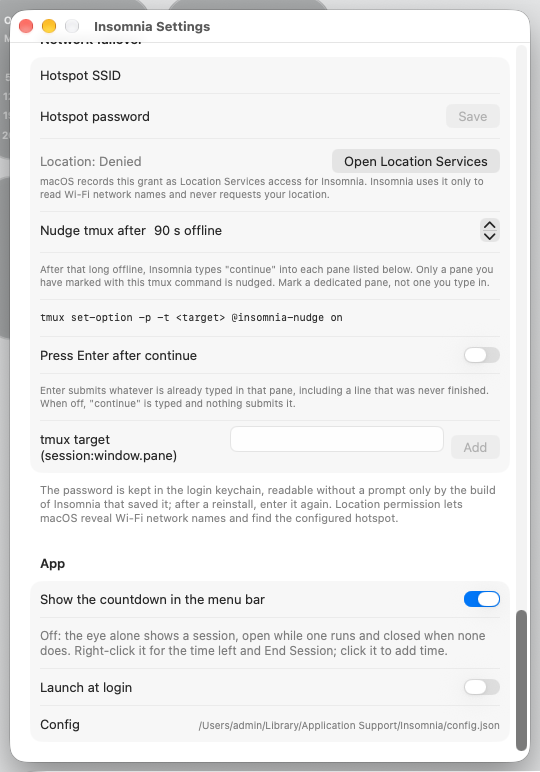
Settings > App > "Show the countdown in the menu bar" (showMenuBarCountdown,
on by default and for a config.json without the key). Off, the status item
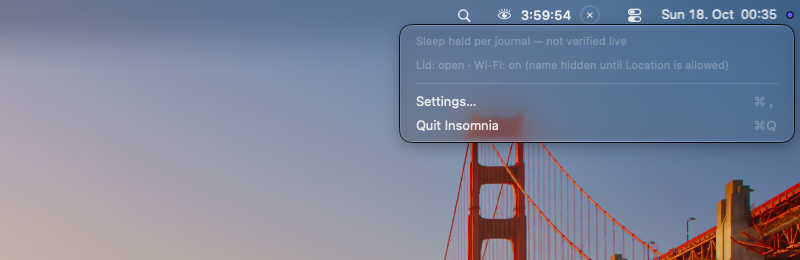
is the eye alone: open while a session starts or runs, closed otherwise,
with no countdown and no hold-to-end ring. While a session runs the
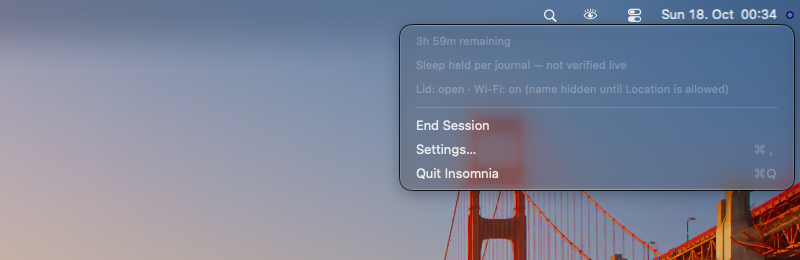
right-click menu then leads with the time left ("2h 14m remaining", read
when the menu opens) and offers End Session above Settings, standing in
for the ring. Clicking the eye still opens the extend pills. VoiceOver
reads the time left on the eye.

Checked on a real Mac (macOS 27.0.1, built-in display plus a Studio
Display): the eye opens and closes with the session, the menu shows the
time left, and End Session ends the session.

Co-Authored-By: Claude Opus 5.5 <[email protected]>


…thout the countdown

End-to-end test in a VM on macOS 27.0.1The option works as described. With "Show the countdown in the menu bar" switched off, a running session shows only the eye in the menu bar. The right-click menu then adds the time left and End Session, and End Session ends the session and restores sleep. The switch is on by default, and main's menu bar is unchanged. SetupA Tart VM on the maintainer's Mac mini, macOS 27.0.1 (26A434) with Xcode 27.0. Each version was built from source and installed with Main (76e517d) against this PR's head (aad9e76). The script ( Results
The menu bar during a session, main on top and this PR (countdown off) below:
The right-click menu, main on top and this PR below:
The switch in Settings, at its default (on):
Not covered
The full logs are 🤖 Generated with Claude Code |




|
Thank you for this. Your head commit aad9e76 is merged unchanged into #145, together with five other menu bar pull requests that change the same files. When #145 merges, GitHub marks this pull request as merged too, with your commits and your authorship. Please don't push to this branch from now on. A new commit wouldn't be in #145, so this pull request would stay open instead of showing as merged. If you want to change something, comment here and I'll add it to #145. #145's description lists the conflicts resolved in its merge commits and the two maintainer fixes after them. 🤖 Generated with Claude Code |


What changes
showMenuBarCountdown). It is on by default, and a config.json without the key loads it as on, so nothing changes for existing installs.remainingText, so the bar is not redrawn every second for it.refreshCountdown()), because the 1 Hz redraw stops while the lid is closed. End Session has no key equivalent. With the countdown on, the menu is unchanged.StatusMenu.menu(...)takes a newendSession:selector, and the two StatusMenuWarningTests that build an NSMenu pass it.Tests
MenuBarCountdownOptionTests:StatusItemController.menuItemsadds the line and the item only while a session runs with the countdown off.startingand.runningwith the countdown off, and wider again once it is turned back onswift testpasses locally: 1228 tests, 0 failures, 13 skipped for want of tmux. The release build with-warnings-as-errorsis clean.Real Mac
On macOS 27.0.1 with the built-in display and a Studio Display: the eye opens and closes with the session with nothing beside it, the menu shows the time left, and End Session ends the session.
Two macOS 27 problems turned up during that run. Neither comes from this PR, and both are on main. Clicks on a widened status item reach the app twice: first through the WindowServer's menu bar window, which the global monitor takes for a click in another app and so collapses the pills, then at the item's centre rather than under the pointer, so a click on Days or Minutes lands on Hours. Separately, the eye's tap bounce can stop at 0.86 when the item's resize lands mid-bounce. Those fixes will be a separate PR.
🤖 Generated with Claude Code


The PR appears safe to merge; no actionable issues were found.Summary
Adds an option to hide the menu bar countdown while keeping the eye visible.
No actionable issues found. Native macOS tests and UI checks were not run in this Linux environment.
cpugeniusexplicitly deferred two pre-existing macOS 27 problems: widened-item clicks can collapse or misdirect the pills, and resizing can leave the eye's bounce at 0.86. Neither is introduced by this PR.Reviews (3) · Last reviewed commit: "Menu bar: an option to show the eye with..." · Reviewed by Greptile