Repository navigation
Conversation


![greptile-apps[bot]](https://avatars.githubusercontent.com/in/867647?s=60&v=4)

Greptile's review of krishhgg#104 found two ways to lose a setting. The window was as tall as its form, 896 pt, and not resizable. AppKit fits a window taller than the screen to it only when the window is resizable (constrainFrameRect(_:to:)), so on a 13-inch MacBook Air with the Dock at the bottom, Open at login was below the screen. The window is now resizable with zoom still dimmed, and the form has one width and no fixed height, so it scrolls on a short screen. The window refits to the form each time it opens. The fixed width also stops the one-time lid-close notice from widening the window to 738 pt. Choose… saved the app's bundle ID, but an app Launch Services hasn't seen, such as one just unzipped, has no URL for that ID, so its row was left out and could not be changed or removed. Choose… now registers the app (LSRegisterURL) before reading its ID. Co-Authored-By: Claude Opus 5.5 (1M context) <[email protected]>

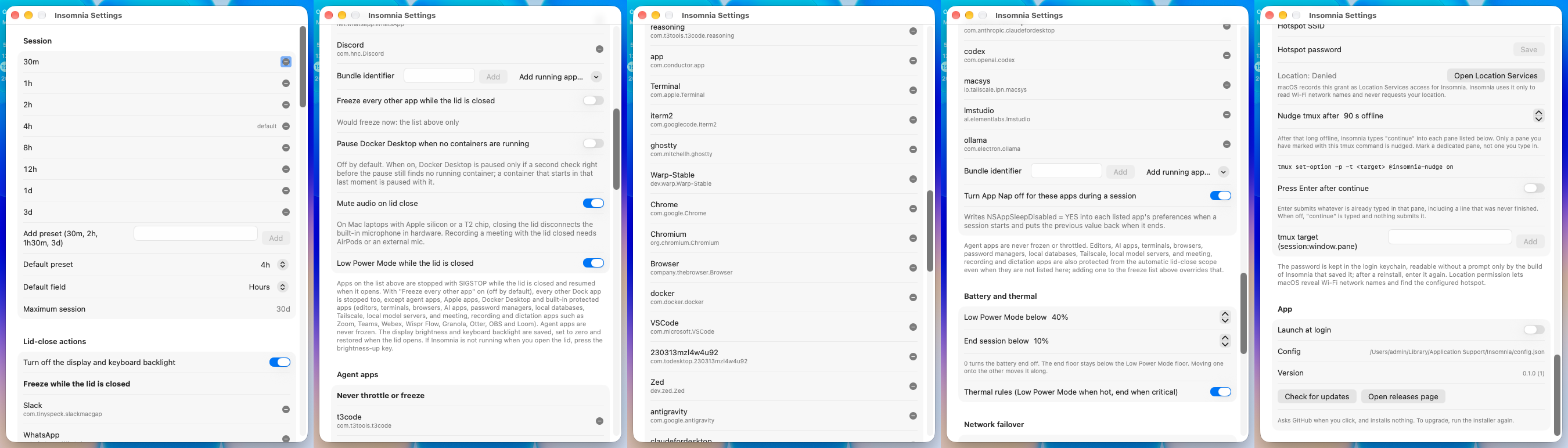
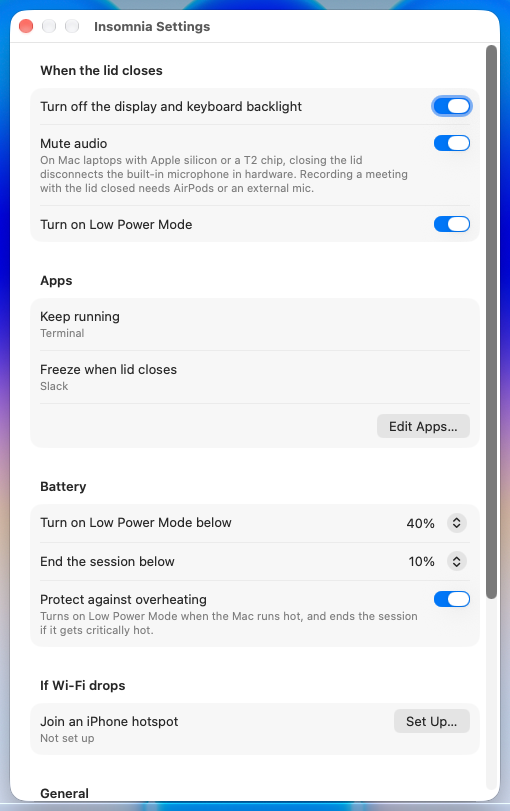
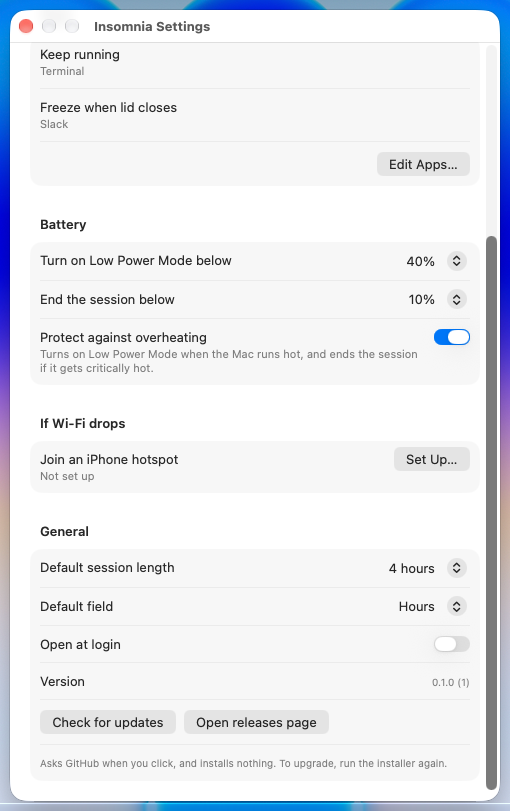
…s a typed name The Settings window was one long scrolling form with bundle IDs, SIGSTOP and NSAppSleepDisabled on screen, and two "Add running app" menus that meant opposite things; during testing, Comet landed on the freeze list that way. Settings is now one page that fits without scrolling. Edit Apps keeps one list with a rule per app, so each app sits on exactly one of agentList and freezeList. The hotspot name suggests networks this Mac has joined and still takes a typed name, matching either apostrophe (krishhgg#87). Every config.json key stays. Co-Authored-By: Claude Opus 5.5 (1M context) <[email protected]>
Greptile's review of krishhgg#104 found two ways to lose a setting. The window was as tall as its form, 896 pt, and not resizable. AppKit fits a window taller than the screen to it only when the window is resizable (constrainFrameRect(_:to:)), so on a 13-inch MacBook Air with the Dock at the bottom, Open at login was below the screen. The window is now resizable with zoom still dimmed, and the form has one width and no fixed height, so it scrolls on a short screen. The window refits to the form each time it opens. The fixed width also stops the one-time lid-close notice from widening the window to 738 pt. Choose… saved the app's bundle ID, but an app Launch Services hasn't seen, such as one just unzipped, has no URL for that ID, so its row was left out and could not be changed or removed. Choose… now registers the app (LSRegisterURL) before reading its ID. Co-Authored-By: Claude Opus 5.5 (1M context) <[email protected]>
Greptile's review of 44cb790 found no test for the Launch Services registration Choose… now does: the existing test reads Calculator's bundle ID, which passed before the fix too. testChoosingAnAppLaunchServicesHasNotSeenListsIt builds a stand-in app with a new bundle ID, checks it isn't found by that ID, runs bundleID(ofAppAt:) and checks isInstalled now finds it. Without the LSRegisterURL call the last check fails. Launch Services ignores apps in temporary folders and bundles with no executable, so the stand-in is a copy of /usr/bin/true next to the test bundle. The test unregisters it with lsregister -u and deletes it. Co-Authored-By: Claude Opus 5.5 (1M context) <[email protected]>


|
@greptileai please review this PR. |

End-to-end test in a VM on macOS 27.0.1The one-page Settings, Edit Apps and the hotspot sheet all open, show the current config and close with Done. One thing to look at: an app on both lists in an older SetupA Tart VM on the maintainer's Mac mini, macOS 27.0.1 (26A434) with Xcode 27.0. Each version was built from source and installed with This PR's head (3a13fa0). A stand-in Results
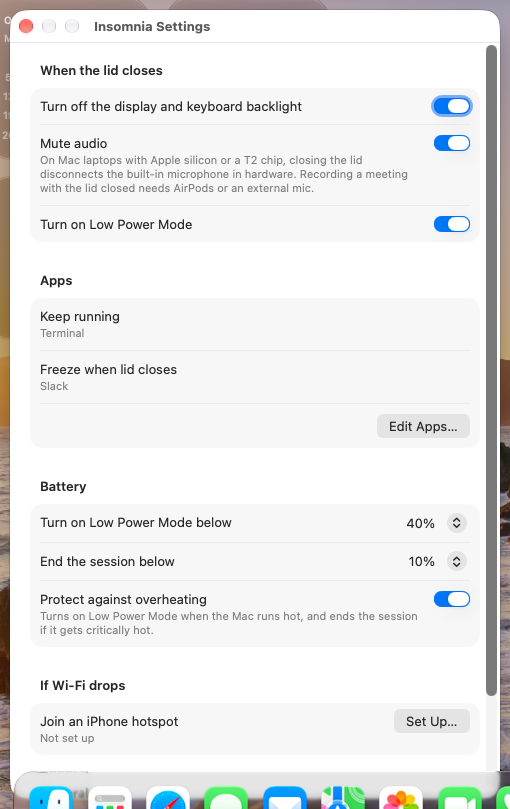
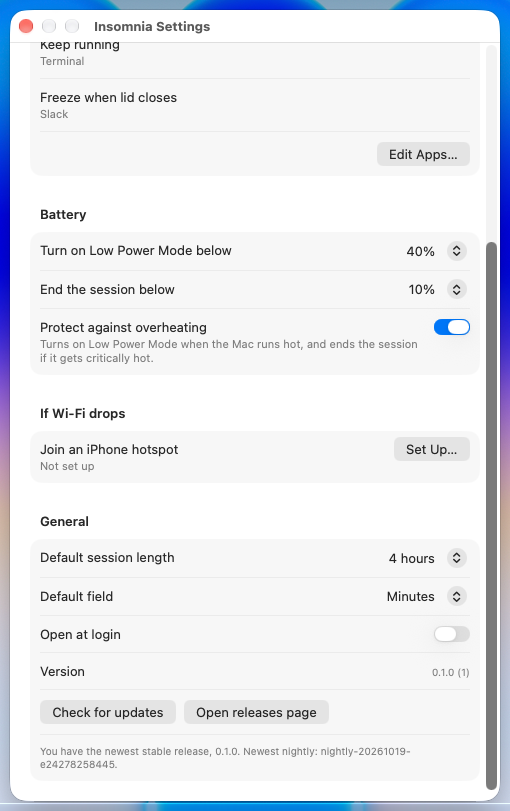
Settings (the Dock covers the bottom rows):
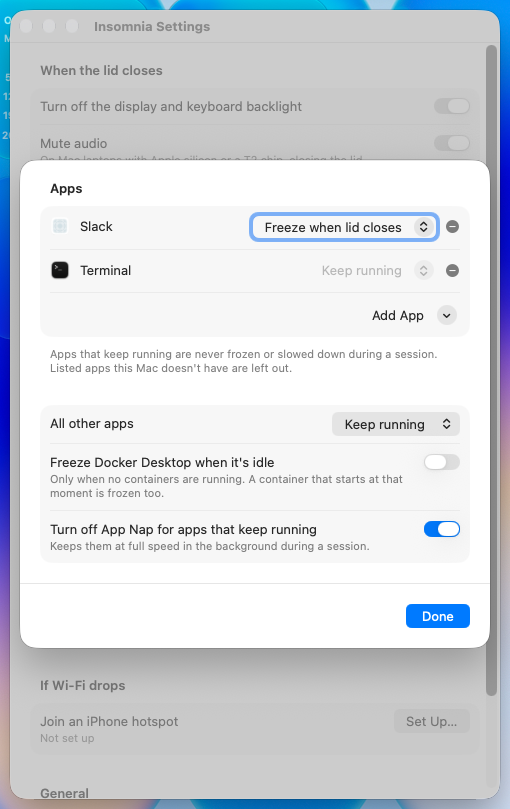
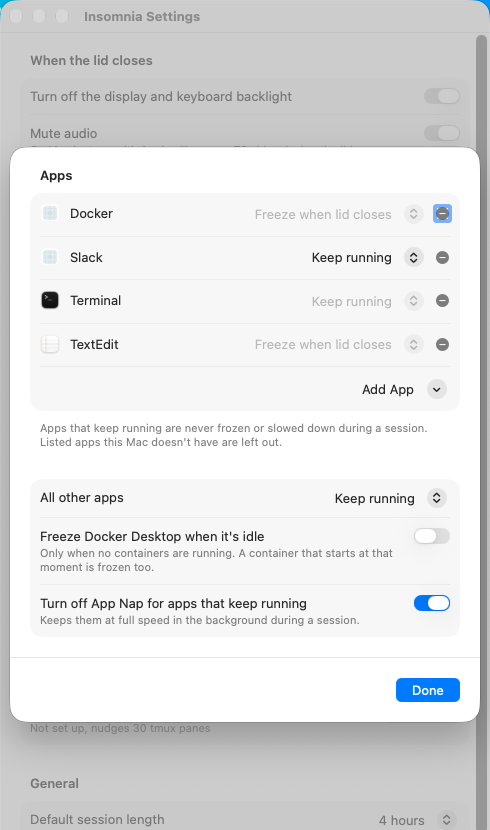
Edit Apps:
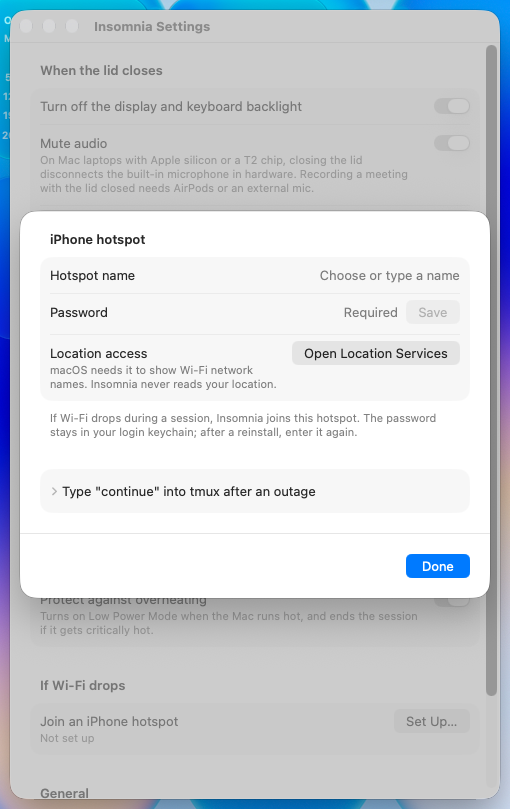
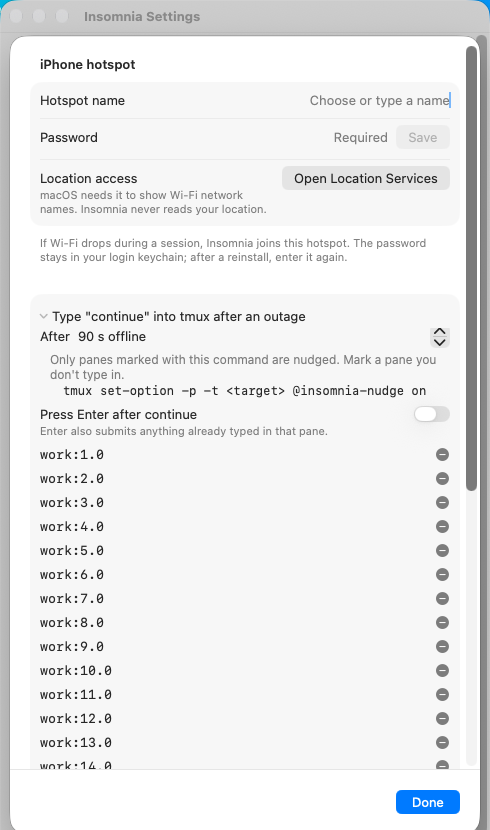
The hotspot sheet:
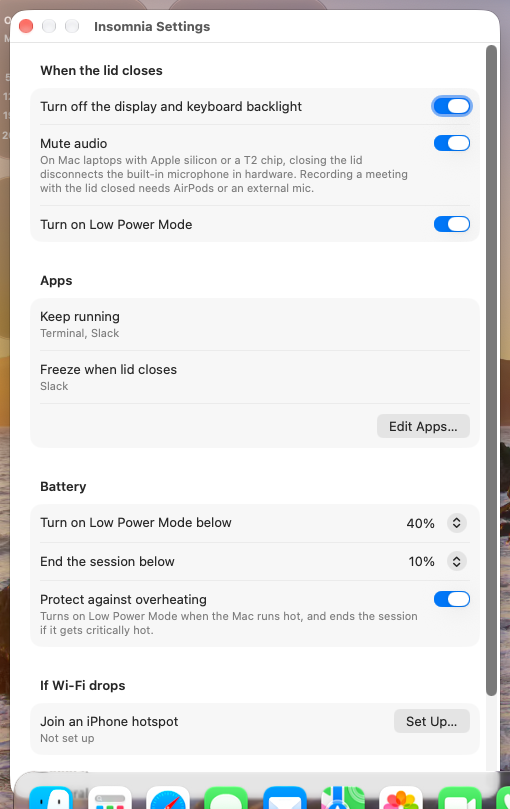
Slack on both lists, the page and then Edit Apps:
Not covered
The full logs are 🤖 Generated with Claude Code |
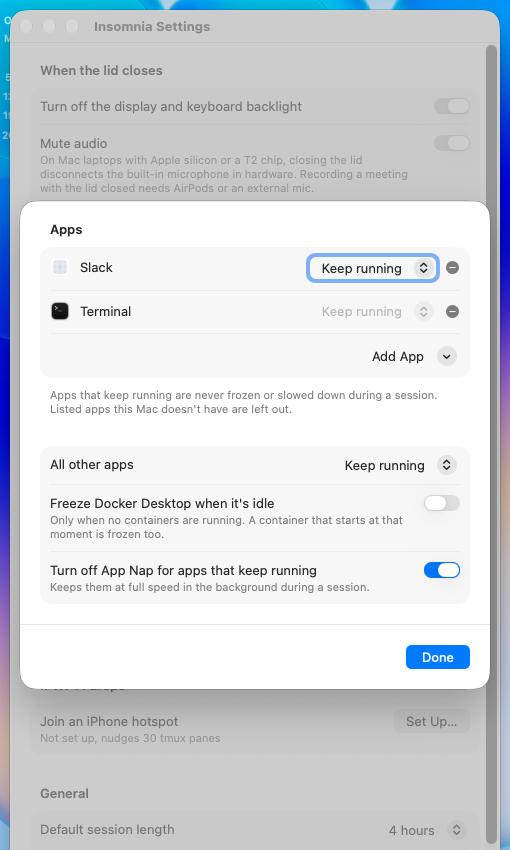
|
Thanks for this. Three things to fix before it can merge. 1. An app on both lists shows two rulesThis is the case in Greptile's open thread on Picking a rule in Edit Apps doesn't clean it up either. Fix: in 2. The hotspot sheet can grow taller than the screenWith many tmux targets, opening the disclosure in Fix: cap the sheet's height and let the form scroll. 3. The new label tests need an English systemThe asserts at Fix: let Push the fixes as new commits on this branch (no rebase or force-push). CI, Greptile and the Codex review then run again on the new head. My VM test above covered 🤖 Generated with Claude Code |
Co-Authored-By: Claude Opus 5.5 (1M context) <[email protected]>
The owner's review of krishhgg#104, and Greptile's open thread on SettingsView, found that an app an older config.json names on both agentList and freezeList showed under both summary lines on the Settings page. Edit Apps showed it once, as Keep running, which is what the freeze planner does with it. Picking Keep running didn't clean it up either: setRule returned early when the effective rule was unchanged, so the app stayed on the freeze list. The summaries now come from the effective rules (Config.apps(with:), built on rule(for:)), the same rows Edit Apps shows. setRule takes the app off every list but the one for its rule even when that rule is unchanged, and an app already on the right list keeps its place there. Co-Authored-By: Claude Opus 5.5 (1M context) <[email protected]>
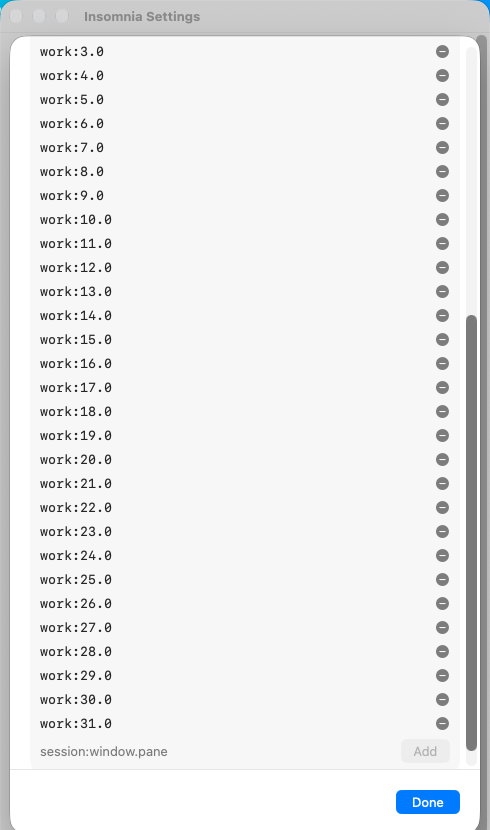
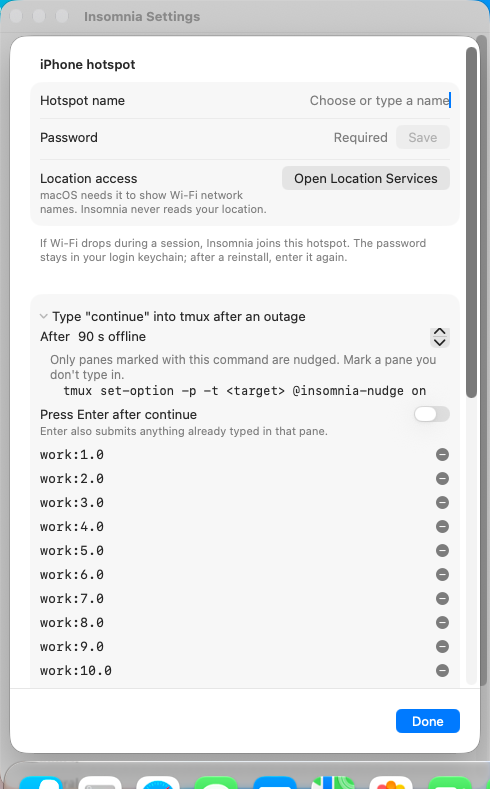
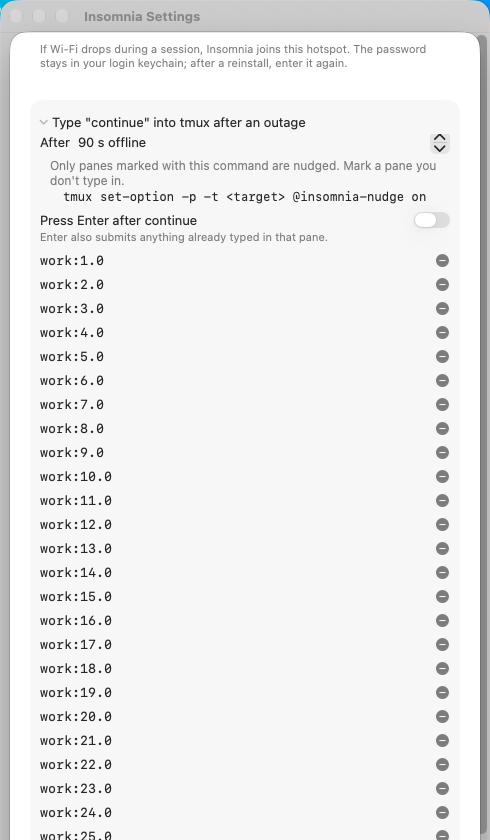
The owner's VM run of krishhgg#104 found that with 30 tmux targets and the tmux disclosure open, the hotspot sheet was 870 pt tall and Done was below the bottom of the screen. The sheet's vertical fixedSize held the form at the height of all its rows, so it could not scroll. Without it, macOS sizes the sheet itself: a sheet's default sizing on macOS fits the content's height, up to a maximum it takes from the height of the window presenting it. In a scratch copy on a 16-inch MacBook Pro, a sheet like this one with 60 rows in a 929 pt window stopped at 857 pt with its bottom on screen, while with fixedSize it was 1084 pt and ran 32 pt off the bottom. Short sheets kept their height: 295 pt collapsed and 596 pt with 12 rows open, either way. testTheHotspotSheetCanBeShorterThanItsRows offers the sheet less height than its rows need and checks it takes no more; with the fixedSize back it fails. Co-Authored-By: Claude Opus 5.5 (1M context) <[email protected]>
The owner's review of krishhgg#104 noted that testSessionLengthsReadAsWords expects English text while lengthLabel formats in the Mac's current locale, so on a Mac set to French it fails ("1 heure") although the formatting is right. lengthLabel takes a locale, Locale.autoupdatingCurrent by default, which is the locale the units style used before, so Settings reads the same. The test passes en_US_POSIX. Co-Authored-By: Claude Opus 5.5 (1M context) <[email protected]>
The release checklist's Settings items now cover an app config.json names on both lists and the hotspot sheet with 30 tmux targets, and docs/spec.md says how Settings treats an app on both lists. The validation record has today's checks of 544b7c9 on a MacBook Pro with macOS 27.0.1: the summaries, the Edit Apps cleanup, and the hotspot sheet's height in a scratch copy with the tmux section open. Co-Authored-By: Claude Opus 5.5 (1M context) <[email protected]>
|
Thanks for the VM run. All three are fixed in new commits on this branch, on top of a merge of current main (8134726). There was no rebase and no force-push. 1. An app on both lists shows two rules: 891fd8e
2. The hotspot sheet can grow taller than the screen: 5d57192
3. The label tests need an English system: 544b7c9
Docs and checks
Sources: |
Greptile's review of ac6e05e found that an older config.json can name an Apple app or Docker Desktop on freezeList alone. Edit Apps then showed "Freeze when lid closes" in a disabled picker, and the summary on the page listed the app under it, though FreezePlanner.isDenied keeps such an app running. rule(for:) now returns what the planner does: Keep running for any listed app it denies (the agent list, Apple apps, Insomnia, Docker Desktop), Freeze otherwise. Edit Apps and the summaries both read it. The row's Remove button already clears the stale entry. In a release build with TextEdit and Docker Desktop on freezeList alone, the page read "Keep running: Terminal, TextEdit, Docker" and "Freeze when lid closes: Discord", both rows read Keep running, and Remove took TextEdit off freezeList. testAppsThePlannerNeverFreezesShowAsKeepRunning fails with the previous rule(for:). Co-Authored-By: Claude Opus 5.5 (1M context) <[email protected]>
End-to-end test in a VM on macOS 27.0.1, rerun at 43281e6The fixes work in the VM:
The head reviewed before the fix (3a13fa0) showed the old behavior for each of these. SetupThe same VM and method as the earlier run: macOS 27.0.1 (26A434) with Xcode 27.0, each version built from source and installed with
It then read the Settings page and Edit Apps.
Results
The "1 more" on the page is Docker; Edit Apps lists it. The Settings page and Edit Apps, this PR on top and the head before the fix below:
The hotspot sheet with the tmux list open, this PR (opened, then scrolled to the bottom after adding
With the Dock shown, this PR:
Before the fix. The sheet's content is cut off at the top (the hotspot name and password rows are missing), and its bottom, with Done, is past the screen's bottom edge, where the screenshot stops:
Not covered
The full logs are 🤖 Generated with Claude Code |
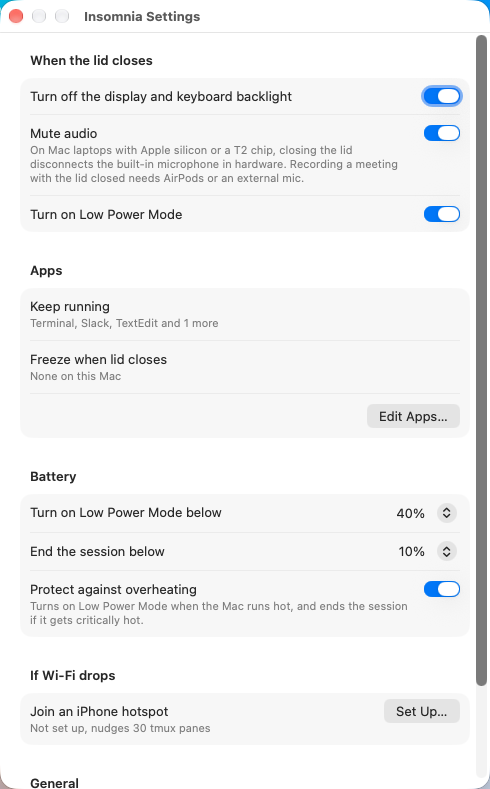
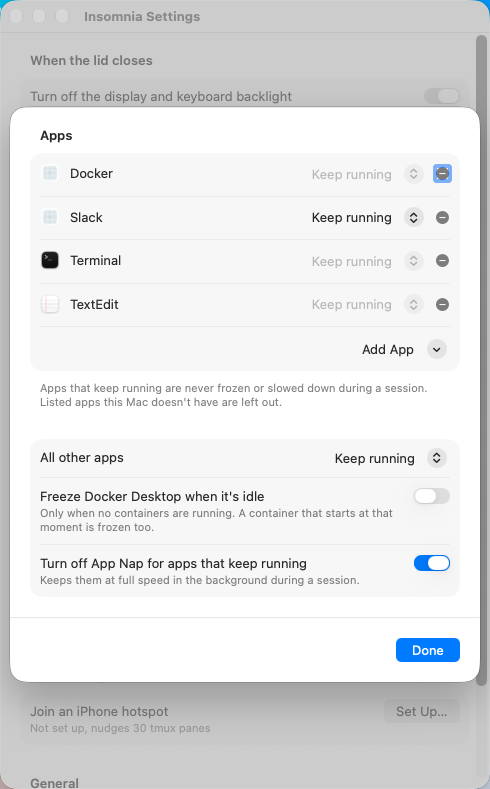
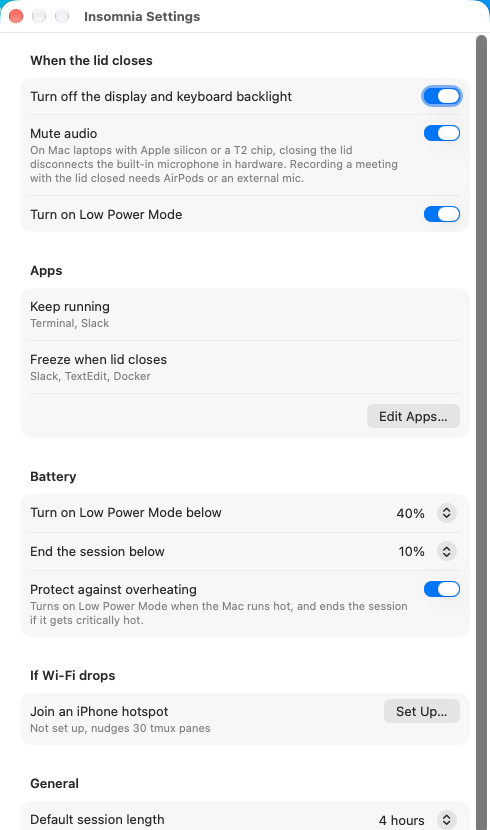
Conflicts: - SettingsView.swift: main added a Default field picker (krishhgg#116), the version line and the update check (krishhgg#117) to the old layout. They sit in General on the one page: Default field after Default session length, the version and the update check after Open at login, as main ordered them. releaseCheck is main's, unchanged. - InsomniaApp.swift: SettingsView without AnyView, as this branch has it, with main's ReleaseChecker passed in. - docs/spec.md: both edits to the presets line. Also from the merge: the Settings window test passes a ReleaseChecker, and main's "Settings > App" in README.md, docs and ReleaseCheck.swift reads "Settings > General", the section's name on the one page. Co-Authored-By: Claude Opus 5.5 (1M context) <[email protected]>
#132 cab1050 against main e242782: the Countdown setting, the bar with Time left and End time in light and dark, the right-click menu, the 12/24 hour switch, an unknown value, and two GIFs (a switch during a session and one while a start is pending). #71 ffdb1bc and 2a45e18: the Lock the screen row and its help text. #104 0baa658 against main: the Settings window, Default field Minutes, the update check, and the Edit Apps and If Wi-Fi drops sheets. Co-Authored-By: Claude Opus 5.5 <[email protected]>
macOS 27.0.1 VM check of
|
| Top | Bottom |
|---|---|
 |
 |
Default field
| Check | Result |
|---|---|
| Default field, Hours to Minutes | The pop-up reads Minutes, and config.json has "defaultFocusField": "minutes" |
| Clicking the eye | The pills open with Minutes focused |
| Typing 5, then Enter | session started until 2026-10-19T23:51:28Z (300s requested), and session.json is 300 s long |



On a first try, the down arrow in the open menu picked Days instead of Minutes. The pills then opened on Days, and 5 then Enter started a 5 day session (432000 s), so that setting held too.
Version and Check for updates
The Version row reads 0.1.0 (1). Check for updates showed "You have the newest stable release, 0.1.0. Newest nightly: nightly-20261019-e24278258445." The log says:
release check: asking GitHub for the latest release and the releases list
release check: installed 0.1.0 (1), newest stable 0.1.0, newest nightly nightly-20261019-e24278258445: up to date
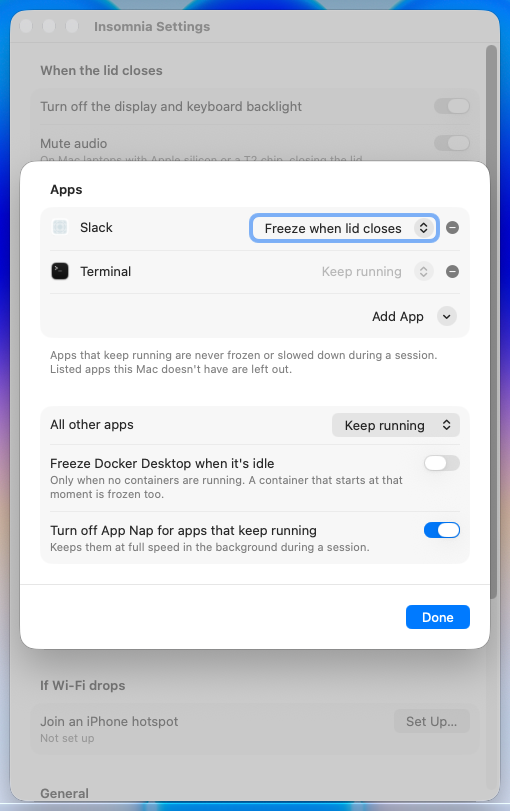
Edit Apps and If Wi-Fi drops
| Edit Apps… | If Wi-Fi drops, Set Up… |
|---|---|
 |
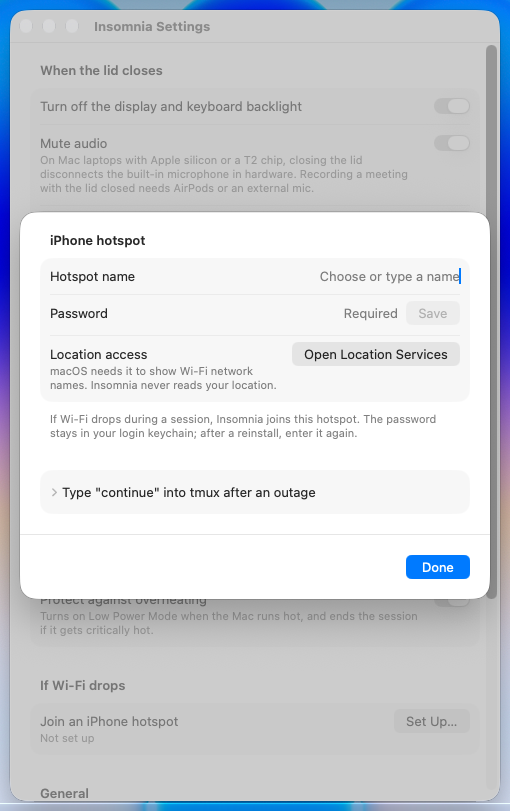 |
Edit Apps opened a 470x488 sheet, and Return closed it. Set Up… opened the 470x387 iPhone hotspot sheet, and Return closed it. Afterwards the window was the same as before.
Seen on the way
With the form scrolled to the bottom, the update report is a line taller than the hint it replaces, so its last line sat below the visible area until the form was scrolled again. That's a small layout point, not a failure.
Run notes: run-lab27.log. Builds: main, this PR. Nothing of the app was left installed in the VM afterwards.
🤖 Generated with Claude Code
|
Thanks for this, @nsd97. To avoid merge conflicts with the other open pull requests, your branch lands through #147, which merges your head commit 0baa658 unchanged. When #147 merges, GitHub marks this pull request merged and the commits stay yours. Please don't push to this branch now. A new commit wouldn't be in #147, so this pull request would stay open instead of showing as merged. If something needs changing, comment here or on #147 and it'll go in as a follow-up there. #147 moves two new controls from #145, Countdown and "Show the countdown in the menu bar", into your General section, and fixes one test: the app summary test now compares with Finder's localized name instead of the literal "Finder". 🤖 Generated with Claude Code |
…in the battery link Greptile's three findings on #104's code in this PR: - Choose... dropped Apple apps, so Terminal could not come back to Keep running, or to its App Nap cover, after a Remove. Config.addApp adds any app as Keep running; the running-apps menu still leaves Apple apps out. - Done stayed enabled while a password save waited on the keychain. A save that failed after the sheet closed showed its notice nowhere. Done and interactive dismissal now wait for the save. - The battery pickers lost main's caption saying the two levels move each other, so Never for Low Power Mode turned the battery end off without a word. The caption is back under End the session below. Co-Authored-By: Claude Opus 5.5 <[email protected]>
Lands #104 at 0baa658, by nsd97. Conflicts with #84 and #132, resolved here: #104 rebuilds the Settings page, and #84 (show the countdown in the menu bar) and #132 (countdown style) each added a control to the old one. Both controls move into #104's General section after Default field, with #132's onChange that applies a style change to a running session at once. The spec keeps #104's presets wording, #132's end time text with the maintainer's time change fix, and #84's toggle as its own bullet. The release checklist keeps both sides' bullets.
…in the battery link Greptile's three findings on #104's code in this PR: - Choose... dropped Apple apps, so Terminal could not come back to Keep running, or to its App Nap cover, after a Remove. Config.addApp adds any app as Keep running; the running-apps menu still leaves Apple apps out. - Done stayed enabled while a password save waited on the keychain. A save that failed after the sheet closed showed its notice nowhere. Done and interactive dismissal now wait for the save. - The battery pickers lost main's caption saying the two levels move each other, so Never for Low Power Mode turned the battery end off without a word. The caption is back under End the session below.


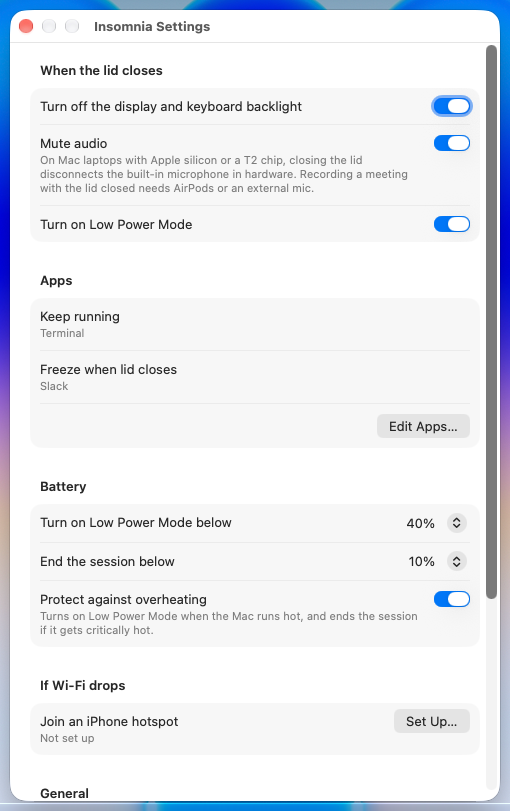
Why
The Settings window was one 520 pt form with about 2,500 pt of content. It showed bundle IDs, SIGSTOP and
NSAppSleepDisabled, and a footer that listed about 20 kinds of protected apps. Two "Add running app…" menus sat in different sections and meant opposite things. On a real Mac, Comet went into the freeze list instead of the agent list and was frozen twice during testing. The hotspot name had to be typed, and a straight apostrophe never matches an iPhone's hotspot (#87).What
agentListandfreezeList(Config.setRule), so no app sits on a list the user didn't choose.FreezePlanner.isDenied.freezeAllApps, with the "Would freeze now" line. The Docker and App Nap switches moved here, each with a one-line explanation.CWConfiguration.networkProfiles, throughtextInputSuggestions) and still takes any name typed.Avery'soffersAvery’s iPhone, and picking it saves the iPhone's own spelling (Hotspot: an SSID typed with a straight apostrophe never matches an iPhone hotspot #87). Hotspot: look for the SSID with the other apostrophe when the scan finds nothing #101 covers a name typed without picking one, at join time, and the two work together.presets, so Default session length is now a menu over them.SettingsView.swiftwent from 628 lines to 233, withAppsSheet,HotspotSheet,RunningAppsand a 25-lineSessionManager+Settingsfor the shared bindings.HotspotPasswordField.SettingsWindowhostsSettingsViewdirectly, withoutAnyView. It is resizable, with zoom dimmed, only so AppKit can fit it to a short screen, and it refits to the form each time it opens.chipLabellost its last caller and is gone.Tests
SettingsTests: hotspot suggestions with either apostrophe, each network once, case and accents ignored; app summaries; Choose… reading a bundle ID, and listing an app Launch Services hadn't seen; session length labels; the window fitting a screen shorter than the form and keeping its width with the longest notice.ConfigTests: app rules (one list per app, no change for the same rule, an app on both lists) and floor choices.LidCloseCopyTests: the microphone note is now the mute toggle's subtitle.ConfigTestsandConfigLoadTests.SettingsPasswordNoticeTestsandFailoverMachineTestscall the moved methods.swift test: 1,245 tests, none skipped, and no failures on the third commit. Each earlier full run had one timing failure outside Settings, a different test each time:UIStatusTests.testCollapseReadsTheSessionWhenTheSlotsLeaveNotWhenThePillsStartFoldingandRecoveryScriptTests.testUninstallRunsRecoveryUnderItsOwnLockAndKeepsLockInodeon the first commit,RecoveryScriptTests.testUninstallUsesTheCheckoutBackstopWhenTheAppDeclaresTheVersionon the second. Each passed when run again, andRecoveryScriptTestspassed as a whole (232 tests).swift build -c release -Xswiftc -warnings-as-errors/bin/bash -nplus the bash 4 grepscripts/check-lid-simulation-gate.shDecisions
textInputSuggestionsrather than an AppKit combo box.Not covered
setRule, and FreezerTests covers the planner.SettingsView.swift(Backstop: end a valid session when the app is gone, the battery is below the end floor, or heat is critical #34, Add standalone desktop control center and portable setup #54, Lid close: lock the screen when the lid closes #71, Add opt-in hotspot usage tracking and budget warnings #73, Auto: keep awake for registered agent work #79, Heat: keep Low Power Mode on until nominal, and show it in the menu #80, Heat: end the session after 15 minutes of serious heat, and sleep a closed lid #81, Menu bar: an option to show the eye without the countdown #84, Menu bar: Add Compact and Minimal menu bar modes + UX fixes #96). I'll rebase this one onto whichever lands first.Screenshots
From a release build on macOS 27.0 with a throwaway config.
Before, upstream
mainat three scroll positions:After, light and dark:
Edit Apps and If Wi-Fi drops:
The hotspot picker. Typing
Avery'swith a straight apostrophe offers both of Avery’s devices. This is the same build, except that the joined-networks list returns sample names so no real network shows:Alternative option: toolbar panes (mockups, not built). Every setting stays, split into General, Lid Closed, Agent Apps, Battery and Network panes. I built and recommend the one page above instead: the settings people change most are all on one screen, the app lists open in a sheet only when needed, and there's no last-selected pane to restore. If you'd rather have panes, the sections above map one to one:
Sources
Textin the label is a subtitle. Toggle, LabeledContent.roundedBorderis soft-deprecated, so the fields use the form's own style. macOS 27 Release Notes🤖 Generated with Claude Code


The PR appears safe to merge; no new actionable issues were found.Summary
Settings becomes one page, with separate sheets for app rules and hotspot setup.
Diagram
%%{init: {'theme': 'neutral'}}%% flowchart TD Settings[Settings page] --> Apps[Edit Apps sheet] Settings --> Hotspot[Hotspot sheet] Settings --> Config[Shared Config] Apps --> Rules[Config.setRule] Rules --> Config Hotspot --> Config Hotspot --> Keychain[HotspotSecretStore] Config --> Saved[config.json] Config --> Session[Session services]Reviews (9) · Last reviewed commit: "Merge origin/main into settings-hig" · Reviewed by Greptile