Skip to content

Draw chart skeletons instead of spinners while a chart loads - #100610

Closed
sharabai wants to merge 16 commits into
Expensify:mainfrom
software-mansion-labs:feat/charts/loading-skeletons
Closed

sharabai wants to merge 16 commits into
Expensify:mainfrom
software-mansion-labs:feat/charts/loading-skeletons

Conversation

@sharabai

@sharabai sharabai commented Sep 8, 2026 •

Copy link
Copy Markdown
Contributor

Explanation of Change

Each chart content component returned an ActivityIndicator while loading, and SkiaWebChart showed a second
one while the web chart engine downloads. Both now draw ChartSkeleton, one shape per chart view, and so does the
Skeleton Wall's chart card, a spinner since #99560. Charts in messages
keep today's fallback.

ChartWidthBox measures the width above the lazy chart boundary, and each chart body passes it to victory-native as
explicitSize with plot bounds from getCartesianPlotBounds, so the chart draws in its first frame at the
placeholder's size. On web the canvas paints blank for a frame after mount, so SkiaWebChart keeps the chart hidden
under the placeholder until the canvas dispatches skia-first-draw, added by the 005+emit-first-draw-event Skia
patch.

Important

  • The Skeleton Wall's chart card draws a line shape even on an account whose Home ends up with no chart. During app load nothing knows whether that slot resolves to the Insights Section, which shows Spend over time by default.
  • A placeholder can differ from its loaded chart in three ways, each moving the box or a line once at handover. Rotated x-axis labels grow a line or bar chart, each pie legend row past the first grows the card, and the loaded zero line, placed from the data, can land a few pixels from the placeholder's.
  • The bar placeholder draws no y-axis line, although the design does. The loaded bar chart has none.
  • The horizontal bar chart (wide layouts with the insightsPage beta) shows the vertical bar placeholder, and its body still measures its own width after mount.
  • The skeleton flash on the Spend page between sidebar links is #99985, not this change. This PR changes what a placeholder looks like, not when one appears.

Fixed Issues

$ #98968
PROPOSAL:

Tests

Preconditions:

  • Account A: an admin of a workspace with a few months of expenses, whose Home shows Spend over time.
  • Account B: an account whose Home shows no Insights Section.
  • Before every cold start, clear storage: Chrome DevTools > Application > Storage > Clear site data on web, or reinstall the app on native.
  • Where a step says throttle, set Chrome DevTools > Network > Slow 4G, or the equivalent on device.
  • For test 3 step 8, as Account A, turn on insightsPage in Settings > Troubleshoot > Beta overrides, in a browser window wider than the narrow layout breakpoint.
  • Tests 1 to 3 run on web. Test 4 runs at a narrow browser width, on iOS and on Android.

1. Home shows one shape from the first painted frame to the chart (Account A, then Account B)

  1. As Account A, clear site data, throttle the network, and sign in.
  2. While Home loads, verify that the second card in the left column shows a shimmering line shape across the card width, not a spinner.
  3. When the real Sections replace the placeholder cards, verify that the Insights Section shows the same line shape in a card of the same height.
  4. When the chart arrives, verify that it replaces the placeholder with no spinner at any point since step 2.
  5. Sign out, then repeat steps 1 and 2 as Account B.
  6. When the load finishes, verify that no card in the left column is left blank where the chart would have been.

2. The web handover has no blank frame (Account A, web)

  1. Open Chrome DevTools > Network, tick Disable cache, and throttle to Slow 4G.
  2. Open Chrome DevTools > Performance, tick Screenshots, start recording, and reload Home.
  3. Stop the recording once the chart has drawn, and step through the filmstrip across the moment the placeholder gives way.
  4. Verify that no frame shows a spinner, an empty card between the placeholder and the chart, or both at once.

3. Each chart type holds its shape and its size (Account A, web)

  1. Open Search, run an expense search grouped by month in the line view, throttle the network, and reload.
  2. Verify that the placeholder is the shimmering line shape.
  3. As the chart replaces it, verify that the content below does not shift down and the chart's bottom line lands within a few pixels of the placeholder's bottom axis.
  4. Switch the chart type to bar and reload, and verify that the placeholder is a row of shimmering bars and step 3 holds.
  5. Group by category and reload, and verify that the box grows once as the rotated labels land and does not move again.
  6. Switch the chart type to pie on a search with three or four categories and reload, and verify that the placeholder is a shimmering ring with two short bars in its middle and the content below does not shift down when the legend appears.
  7. Open a report containing a chart in a message, and verify it loads as it does on main.
  8. Open Insights in the left navigation and reload, and verify that the Top spenders and Top merchants cards show the shimmering bar placeholder, never a spinner, and then horizontal bars.

4. Narrow layout and native (Account A)

  1. At a narrow browser width, repeat test 1 steps 1 to 4.
  2. Verify that the line shape fits the single-column card without running past its edge.
  3. Repeat test 1 steps 1 to 4 on iOS and on Android.
  • Verify that no errors appear in the JS console

Offline tests

  1. As Account A, with Home loaded, turn the network off and reload the app.
  2. Verify that the Insights Section shows its offline treatment rather than a placeholder that cannot resolve.
  • Verify that no errors appear in the JS console

QA Steps

Same as tests 1, 3 and 4. Test 2 needs the DevTools Performance panel, so it is developer facing.

  • Verify that no errors appear in the JS console

PR Author Checklist

  • I linked the correct issue in the ### Fixed Issues section above
  • I wrote clear testing steps that cover the changes made in this PR
    • I added steps for local testing in the Tests section
    • I added steps for the expected offline behavior in the Offline steps section
    • I added steps for Staging and/or Production testing in the QA steps section
    • I added steps to cover failure scenarios (i.e. verify an input displays the correct error message if the entered data is not correct)
    • I turned off my network connection and tested it while offline to ensure it matches the expected behavior (i.e. verify the default avatar icon is displayed if app is offline)
    • I tested this PR with a High Traffic account against the staging or production API to ensure there are no regressions (e.g. long loading states that impact usability).
  • I included screenshots or videos for tests on all platforms
  • I ran the tests on all platforms & verified they passed on:
    • Android: Native
    • Android: mWeb Chrome
    • iOS: Native
    • iOS: mWeb Safari
    • MacOS: Chrome / Safari
  • I verified there are no console errors (if there's a console error not related to the PR, report it or open an issue for it to be fixed)
  • I followed proper code patterns (see Reviewing the code)
    • I verified that comments were added to code that is not self explanatory
    • I verified that any new or modified comments were clear, correct English, and explained "why" the code was doing something instead of only explaining "what" the code was doing.
    • I verified any copy / text that was added to the app is grammatically correct in English. It adheres to proper capitalization guidelines (note: only the first word of header/labels should be capitalized), and is either coming verbatim from figma or has been approved by marketing (in order to get marketing approval, ask the Bug Zero team member to add the Waiting for copy label to the issue)
  • If a new code pattern is added I verified it was agreed to be used by multiple Expensify engineers
  • I followed the guidelines as stated in the Review Guidelines
  • I tested other components that can be impacted by my changes (i.e. if the PR modifies a shared library or component like Avatar, I verified the components using Avatar are working as expected)
  • If a new CSS style is added I verified that:
    • A similar style doesn't already exist
    • The style can't be created with an existing StyleUtils function (i.e. StyleUtils.getBackgroundAndBorderStyle(theme.componentBG))
  • If new assets were added or existing ones were modified, I verified that:
    • The assets are optimized and compressed (for SVG files, run npm run compress-svg)
    • The assets load correctly across all supported platforms.
  • If the PR modifies code that runs when editing or sending messages, I tested and verified there is no unexpected behavior for all supported markdown - URLs, single line code, code blocks, quotes, headings, bold, strikethrough, and italic.
  • If the PR modifies a generic component, I tested and verified that those changes do not break usages of that component in the rest of the App (i.e. if a shared library or component like Avatar is modified, I verified that Avatar is working as expected in all cases)
  • If the PR modifies a component related to any of the existing Storybook stories, I tested and verified all stories for that component are still working as expected.
  • If the PR modifies a component or page that can be accessed by a direct deeplink, I verified that the code functions as expected when the deeplink is used - from a logged in and logged out account.
  • If the PR modifies the UI (e.g. new buttons, new UI components, changing the padding/spacing/sizing, moving components, etc) or modifies the form input styles:
    • I verified that all the inputs inside a form are aligned with each other.
    • I added Design label and/or tagged @Expensify/design so the design team can review the changes.
  • I added unit tests for any new feature or bug fix in this PR to help automatically prevent regressions in this user flow.
  • If the main branch was merged into this PR after a review, I tested again and verified the outcome was still expected according to the Test steps.

Screenshots/Videos

Android: Native
Android: mWeb Chrome
iOS: Native
iOS: mWeb Safari
MacOS: Chrome / Safari

@codecov

codecov Bot commented Sep 8, 2026 •

Copy link
Copy Markdown

Codecov Report

✅ Changes either increased or maintained existing code coverage, great job!

Files with missing lines Coverage Δ
src/components/Charts/BarChart/index.native.tsx 100.00% <100.00%> (+100.00%) ⬆️
src/components/Charts/ChartWidthBox.tsx 100.00% <100.00%> (ø)
src/components/Charts/LineChart/index.native.tsx 100.00% <100.00%> (+50.00%) ⬆️
src/components/Charts/PieChart/PieChartContent.tsx 72.54% <100.00%> (+72.54%) ⬆️
src/components/Charts/PieChart/index.native.tsx 100.00% <100.00%> (+50.00%) ⬆️
src/components/Charts/SkiaWebChart/index.tsx 100.00% <100.00%> (ø)
src/components/Charts/VictoryTheme.ts 100.00% <100.00%> (ø)
src/hooks/useContainerWidth.ts 100.00% <100.00%> (ø)
src/pages/home/HomePage.tsx 100.00% <ø> (ø)
src/pages/home/HomePageSkeleton.tsx 100.00% <ø> (ø)
... and 10 more
... and 267 files with indirect coverage changes

@github-actions

Copy link
Copy Markdown
Contributor

⚠️ This PR is possibly changing native code and/or updating libraries, it may cause problems with HybridApp. Please check if any patch updates are required in the HybridApp repo and run an AdHoc build to verify that HybridApp will not break. Ask Contributor Plus for help if you are not sure how to handle this. ⚠️

@sharabai sharabai changed the title Feat/charts/loading skeletons Draw chart skeletons instead of spinners while a chart loads Sep 27, 2026
@sharabai

sharabai commented Sep 28, 2026 •

Copy link
Copy Markdown
Contributor Author

@Expensify/design

This is how the skeletons currently look for charts on the Home page and in the Search Page.

Skeleton.charts.high.res.mp4

A few questions:

Should skeletons have some minimum duration? Right now they can sometimes be shown for such a short time that the transition feels a bit jarring.

Another one is about bar charts. The mocks look good with the aspect ratio that the real cards have on the Home page, but in the Search Page, the charts are kind of stretched out. That works fine for pie charts and even line charts imo, but a stretched-out bar chart doesn’t look great.

Insights.high.res.mp4

A related question is how this fits with the upcoming Insights tab. The charts there have a similar aspect ratio to the ones on the Home page, so the stretched-out bar chart issue doesn’t really exist there. However, bar charts in Insights can also be horizontal, whereas so far we’ve only had vertical bar charts, so that would call for a different skeleton.

I’m mostly wondering how much we should optimize for the current Search Page behavior here. If Insights is coming relatively soon, it might not make much sense to spend too much time on a perfect solution for the stretched-out bar chart if we’ll be using the same components there anyway. Do we know roughly how long Insights is expected to be behind the beta?

@sharabai

Copy link
Copy Markdown
Contributor Author

@MelvinBot review

@sharabai

Copy link
Copy Markdown
Contributor Author

@MelvinBot find regressions

@MelvinBot

Copy link
Copy Markdown
Contributor

Review

The approach looks sound. I found one real layout-shift bug, one edge case to harden, and one cleanup request.

1. The pie placeholder reserves a legend row even when the chart hides its legend.
ChartSkeleton.tsx:343 always sizes the pie box as CHART_CONTENT_MIN_HEIGHT + PIE_LEGEND_ROW_HEIGHT (about 60px extra). But SearchChartView.tsx:113 passes shouldShowLegend={!renderDetails}, and the Insights pie widget renders a data table (InsightsChartWidget.tsx:53, dashboardSpecs.ts:79). So on the Insights page, the table jumps up about 60px when the pie replaces its placeholder. The PR's known-differences list doesn't cover this case.
Fix: Give ChartSkeleton a legend flag (for example, hasLegend). Pass it from PieChart/index.tsx and from the loading branch in PieChartContent.tsx:152.

2. On web, the placeholder never goes away if the chart body renders no canvas.
SkiaWebChart/index.tsx:70 removes the overlay only after skia-first-draw. Two paths never draw:

  • The pie with no drawable slices. PieChartContent.tsx:166 skips PolarChart when processDataIntoSlices returns [], for example when every total is 0.
  • Any body that returns null for data.length === 0.

Today's callers mostly filter out empty data first. Even so, these cases would now shimmer forever over a hidden chart, where they used to show a blank area. I haven't reproduced this in the app. To harden it, release the overlay when the body renders without a canvas. One way is for the body to render its own placeholder, or report an empty state, in those branches.

3. Unrelated comment removals (minor).
The diff deletes existing doc comments that this change doesn't touch. For example, the palette and getChartColor docs and several axis/tooltip field docs in VictoryTheme.ts, the constant docs in LineChartContent.tsx, and the inline comments in PieChartContent.tsx. Consider restoring them to keep the diff focused.

Checked and fine
  • First-draw listener timing: WithSkiaWeb creates a fresh lazy() on every mount, so the canvas always commits after the container. React flushes the container's passive effect, which attaches the skia-first-draw listener, before that commit. The synchronous dispatch can't be missed.
  • getCartesianPlotBounds matches the labelOffset: VictoryTheme.axis.labelGap y-axis config in both cartesian bodies, and plotBoundsDrift.test.ts guards it against victory-native changes.
  • The vertical bar barWidth now comes from handleScaleChange. That handler reruns whenever the plot width or data length changes the x scale.
  • useContainerWidth's new ref is optional, so existing callers that only use onLayout behave as before.
  • CI: only Check independent approval is failing.

view run

@MelvinBot

MelvinBot commented Sep 28, 2026 •

Copy link
Copy Markdown
Contributor

Regression check

I found one new regression risk. It adds to the two issues in my earlier review.

1. On web, every chart stays hidden forever if patch 005 is missing.
SkiaWebChart/index.tsx:70 keeps the chart at opacity0 until skia-first-draw fires, and nothing else ever reveals it. Only 005+emit-first-draw-event.patch dispatches that event. So if the patch isn't applied, every Home, Search and Insights chart shows a shimmer forever. That can happen with a stale local node_modules, a failed patch-package run, or a Skia upgrade that drops or mis-rebases the patch. Today, a missing patch just loses a feature. With this PR, it hides every chart.

I hit this myself. The web test environment had the PR code but not the new patch. "Spend over time", "Top categories" and "Top merchants" all stayed on their placeholders:

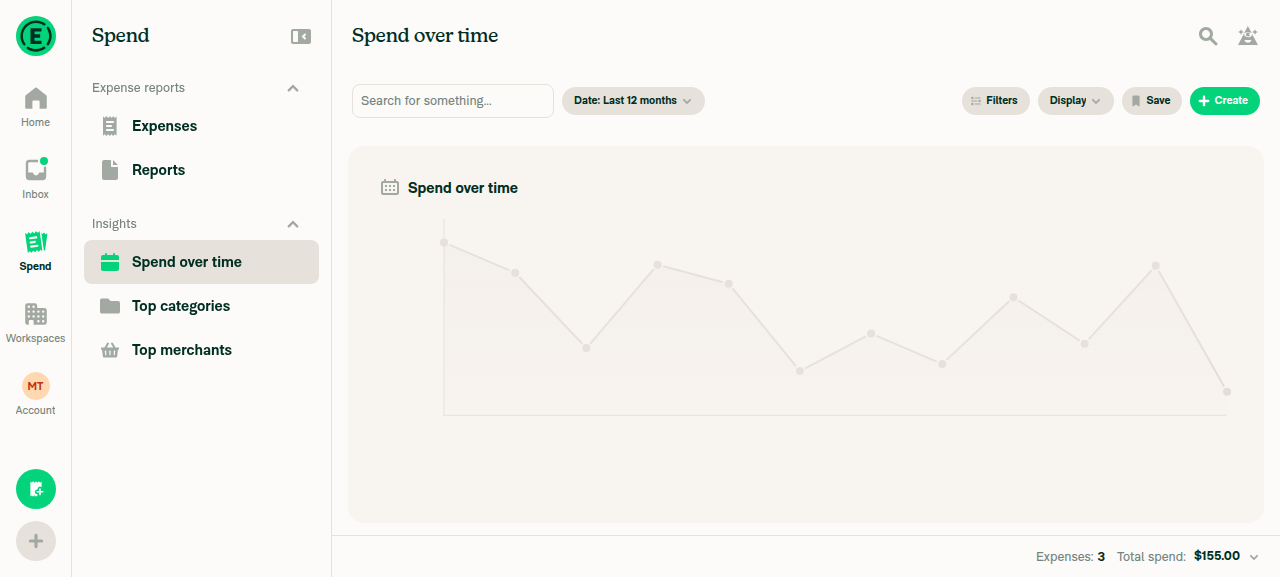
Spend over time still on the placeholder after 10s, without patch 005 applied

Fix: Add a fallback that reveals the chart anyway. For example, drop the overlay after a short timeout once the lazy component has mounted. Or reveal it on the frame after mount if no first-draw event arrives. A dev-only warning when the timeout fires would also catch a dropped patch early.

Still open from my earlier review:

  • Pie placeholder height: the pie placeholder always reserves a legend row. The Insights pie widget hides its legend and shows a table instead, so the table jumps up about 60px when the chart loads.
  • Charts with nothing to draw: a body that renders no canvas never fires the first-draw event, so its placeholder shimmers forever. Two cases: a pie with no drawable slices, and any body that returns null for empty data. Fix 1 would also cover this.
What I checked and couldn't verify
  • Test coverage: I couldn't verify the PR's real behavior on web, because the patch wasn't applied in the test environment. I didn't check the handover jump, the hover tooltips or console errors either. Re-run test 1 and test 3 with the patch applied.
  • No change: charts in chat messages pass no loadingFallback, so they keep today's spinner. The same goes for the ChartUnavailable path.
  • First-draw listener timing: the listener can't miss the event. WithSkiaWeb makes a new lazy() on every mount, so the canvas always commits after the container's listener effect has run.
  • Nothing else removed is still used: chartActivityIndicator, HomePageSkeletonSpinnerCard and SPINNER_TEST_ID have no remaining references.

view run · view recording

@sharabai

Copy link
Copy Markdown
Contributor Author

Replying to this comment.

1 is fixed in 11cd87e and 3 in 25d246a, and 2 stays as it is in this PR.

On 2, the placeholder only stays up when a pie's groups all total 0. Every chart with something to draw mounts a canvas, and Insights and Home send empty data to their empty state before the chart mounts (InsightsChartWidget.tsx:80-81). That rests on the backend never sending all-zero groups, which nothing here enforces, since the callers only check the row count (resolveChartData.ts:55). If that data ever shows up, it should resolve to the empty state, which unmounts the placeholder along with the chart, so I'm not adding a release to SkiaWebChart.

@sharabai

Copy link
Copy Markdown
Contributor Author

Replying to this comment.

Not a bug: a patch that fails to apply can't get into a build, and removing it on purpose goes through the entry that says what depends on it.

Install runs patch-package with --error-on-fail and treats any warning, including a version mismatch after a Skia bump, as a failure, so the install stops. A PR that deletes the patch has to remove its details.md entry to pass the patch validator, and that entry says the chart stays hidden until the event arrives. The screenshot comes from MelvinBot's sandbox, which can't reinstall dependencies, so it ran this branch's code over node_modules installed without the new patch, which a CI or production build never does.

@sharabai

Copy link
Copy Markdown
Contributor Author

@codex review

@sharabai

Copy link
Copy Markdown
Contributor Author

@MelvinBot review

@MelvinBot

Copy link
Copy Markdown
Contributor

Re-review (11cd87e, 25d246a)

The legend fix is correct. I found no new bugs, and one small comment regression.

  • Pie legend row (my earlier item 1): fixed. ChartSkeleton now reserves the legend row only when shouldShowLegend is true. Both the web fallback in PieChart/index.tsx and the loading branch in PieChartContent.tsx pass it through. The default stays true, which matches PieChartContent, and the new test covers the table case.

  • All-zero pie (item 2) and missing patch: your reasoning holds. A pie whose totals are all 0 should resolve to the empty state upstream, and --error-on-fail blocks a build that doesn't have patch 005. No change needed.

  • Comment restore (item 3): done, but 25d246a also trimmed the new comments in ChartSkeleton.tsx. It dropped the reasons behind a few magic numbers:

    • Y_AXIS_GUTTER (why it stays fixed at 64)
    • Y_RANGE_TYPICAL_STEPS (the "zero line sits one step in eleven above the bottom" part, which explains the 11)
    • the note on PLACEHOLDER_BY_VIEW explaining that each height matches the box its chart draws into
    • the doc on the chrome field, while its sibling shimmer keeps one

    Consider putting those back. This is optional.

CI: only Check independent approval is failing.


view run

@dubielzyk-expensify

Copy link
Copy Markdown
Contributor

Should skeletons have some minimum duration? Right now they can sometimes be shown for such a short time that the transition feels a bit jarring.

I don't think we should have a minimum duration as that would hide the real data for longer than we need. I think it's only really jarring when the skeleton and graph has a bigger mismatch. It looks better on the insights page and on the pie chart. I wonder if there's a way to align them a bit more with what realistically will show up.

However, bar charts in Insights can also be horizontal, whereas so far we’ve only had vertical bar charts, so that would call for a different skeleton.

Agree. I think we'd want that if we go this route.

I do overall quite like it on the insights page. The spend over time transition feels good to me.

Very curious for what @Expensify/design thinks as well. I could also just see us not doing the charts at all if we think this feels too weird. The biggest question to me is: A) does it make it feel quicker and more responsive than the spinner and B) does the transition from skelly to real feel elegant.

If the answer to A is no, then I think we drop it. If the answer is yes, then I think we work on just fixing the B thing.

@dannymcclain

Copy link
Copy Markdown
Contributor

I'm also curious for @JmillsExpensify's thoughts here, but this is my take:

I like them better on the Insight's page than eslewhere, but to me personally, these are not adding a whole lot of value. Especially on Home/Spend. I think a spinner with a little fade in on the chart would be nicer. But this is just my 2 cents of course. I think I argued for the spinner at the get go but everyone gravitated towards the chart skeletons, so I'm fine with continuing on if people are digging them. My perspective is just that they're never going to really match the end state, so the transition is always going to feel a bit jumpy.

@dubielzyk-expensify

dubielzyk-expensify commented Sep 29, 2026 •

Copy link
Copy Markdown
Contributor

I like them better on the Insight's page than eslewhere, but to me personally, these are not adding a whole lot of value. Especially on Home/Spend. I think a spinner with a little fade in on the chart would be nicer. But this is just my 2 cents of course. I think I argued for the spinner at the get go but everyone gravitated towards the chart skeletons

I'm fine with this. I think they sounded like a good idea, but seeing it I'm not fully convinced so if you think it's not a good idea then I think we don't go for it 👍 I think we just do the spinner

@sharabai

sharabai commented Oct 5, 2026

Copy link
Copy Markdown
Contributor Author

@shawnborton @JmillsExpensify could you weigh in here? @dubielzyk-expensify and @dannymcclain are leaning toward dropping the chart skeletons in favor of a spinner with a fade-in on the chart, and I'd like to lock the direction before putting more work into this.

The options I see:

  1. Spinner plus fade-in on both Home and Insights. I'd close this PR and open a small one for the fade-in.
  2. Skeletons on Insights only, since each tile's chart type is fixed there. Home keeps the spinner. This one needs a horizontal bar skeleton design: on wide layouts the Insights bar charts are horizontal, and right now they load with the vertical bar skeleton because that's the only bar design we have.
  3. Skeletons on both, as this PR does now. Home always shows the line chart skeleton, since while Home loads we don't know which chart that card will end up showing, or whether it shows one at all. Insights still needs the horizontal bar design from option 2.

Which one should I go with?

@shawnborton

Copy link
Copy Markdown
Contributor

Personally I am more than happy to try out just the spinner approach and see how that feels. Basically keep an eye on load times and if we feel like the page is feeling sluggish as a result of these, let's revisit with more specific skeleton styles.

@sharabai

sharabai commented Oct 5, 2026

Copy link
Copy Markdown
Contributor Author

Personally I am more than happy to try out just the spinner approach and see how that feels. Basically keep an eye on load times and if we feel like the page is feeling sluggish as a result of these, let's revisit with more specific skeleton styles.

@shawnborton just want to make sure we're aligned on this one. So you mean this?

  1. Spinner plus fade-in on both Home and Insights. I'd close this PR and open a small one for the fade-in.

@shawnborton

Copy link
Copy Markdown
Contributor

Yes, but I defer to Danny and Jon.

@dannymcclain

Copy link
Copy Markdown
Contributor

Basically keep an eye on load times and if we feel like the page is feeling sluggish as a result of these, let's revisit with more specific skeleton styles.

Yeah this is a good shout—if we find that the spinners are feeling super slow we can revisit.

@dubielzyk-expensify

Copy link
Copy Markdown
Contributor

Sounds good to me too 👍

@sharabai

sharabai commented Oct 6, 2026

Copy link
Copy Markdown
Contributor Author

Alright, I hear you. I’ll close this PR in favor of the fade-in spinners once I have them ready.

@sharabai sharabai closed this Oct 6, 2026
@sharabai

sharabai commented Oct 6, 2026

Copy link
Copy Markdown
Contributor Author

Closed in favor of #103210

Sign up for free to join this conversation on GitHub. Already have an account? Sign in to comment

Labels

None yet

Projects

None yet

Development

Successfully merging this pull request may close these issues.

5 participants