Repository navigation
Show when a routine runs next, and read custom schedules in plain words - #136
Conversation


 abhishekgahlot2
left a comment
abhishekgahlot2
left a comment
abhishekgahlot2
left a comment
There was a problem hiding this comment.
Thanks a lot for this, it's a really useful change and the plain-words schedule reads well. Two things need fixing before we can merge, because the preview can disagree with when the routine actually runs:
- Daylight saving fall-back picks the wrong next run. In
schedules-data.ts(around 396-408) the search walks wall-clock times and assumes a one-hour shift. Cases that come out wrong compared with the backend'scronMatches:30 1 * * *in New York from 2026-11-01 05:45 UTC: expected 06:30 UTC the same day, preview says Nov 2.0,45 2 * * *in Berlin from 2026-10-25 00:30 UTC: expected 00:45, preview says 01:00.45 1 * * *in Lord Howe (30-minute shift) from 2026-04-04 14:00 UTC: expected 14:45, preview says 15:15.
Checking both occurrences of a repeated local time and taking the earliest matching UTC instant should fix all three. Please add these as tests.
- A routine with no timezone uses the server's zone, not the browser's. The preview (around 313-320) uses the viewer's zone, so for a UTC server and a viewer in Kolkata,
0 9 * * *shows Wednesday 9 AM while the scheduler fires Tuesday 09:00 UTC. Either show it in the server's zone (and say so) or ask the backend for the next run.
Smaller things, not blocking: link the live preview to the input with aria-describedby and a polite live region; validate the cron before turning it into words on the list rows (61 9 * * 2,4 currently reads as "9:61 AM"); and every-minute schedules recompute on each render, so caching it would help with many routines.
Happy to re-review as soon as you push. Thanks again!

|
recheck |

|
All contributors have signed the CLA ✍️ ✅ |
|
I have read the CLA Document and I hereby sign the CLA |

|
Thanks for the careful review, and for spelling out the failing cases. Pushed a fix round: Fall-back next run: the conversion now resolves every UTC instant a wall time maps to (both occurrences of a repeated time, none for a skipped one) by sampling the offsets in effect around it, instead of landing on a single occurrence with a one-hour correction. The day scan also takes the earliest instant of the day rather than the first in wall order, which is what the Berlin case needed. Added tests for all three of your cases (New York, Berlin, and Lord Howe), plus the first-occurrence side of the New York case and a spring-forward gap case. I also checked the results against a minute-by-minute walk of the backend cronMatches and they agree. No-timezone routines: I looked for the server zone in what the API already returns and it is not exposed anywhere, and there is no next-run endpoint to ask. So rather than inventing API surface in this PR, I took the honest half of your first option that the frontend can do today: the preview no longer substitutes the viewer's zone. A routine with no timezone (or an unknown one, which the backend also treats as server local) now shows no next run at all, while the cadence words and the Server timezone label still show. If you would rather expose the server zone from the API, I am happy to wire the preview to it as a follow-up and compute the exact day and time. Smaller items: the live preview in the routine form is now tied to the cron input with aria-describedby and is a polite live region. cadenceLabel validates the expression before turning it into words, so list rows fall back to the raw expression instead of reading 9:61 AM. Next-run results are cached per cron, zone, and start minute, so every-minute schedules no longer rescan on each render. Frontend suite is green: 1696 tests passing (1692 before, plus the 4 new ones), typecheck clean. Happy to adjust any of this. |
|
Thanks for digging into this, you're right. The server never says when a routine runs next, or which timezone a routine without one actually uses. We're fixing that server-side now: each routine will get a |
|
Thanks, that sounds right. The client-side math was only ever filling a gap in what the API returns, so I would rather read nextRunAt off the routine and drop it. Ping me here when the server change lands, or link it in that edited comment, and I will switch this preview over to it and re-run the frontend suite. The no-timezone case in this PR already shows no guessed next run, so nothing here will disagree with the scheduler in the meantime. |
|
The server side is in: #363 and #365 add |
|
Server side received, thank you. Switched the preview over to it: Routine rows: the next run now reads off the routine itself, the new nextDueAt from #363, rendered in the routine's timezone. ApiRoutine carries nextDueAt, and its timezone is now the always-set string the API returns. Routine form: the live preview asks GET /api/automations/preview from #365, debounced while typing and aborted when the field changes, and shows the first of next_runs in the zone the routine will run in. A create that names no zone previews in UTC, matching the server default. If the call fails or names no run, the preview shows the schedule in words only, with no guessed time. Dropped: the client-side next-run engine is gone from schedules-data.ts, the cron matcher port, the zoned occurrence scan, and its cache. What stays on the client is cadenceLabel's plain words and a validation check, so an invalid expression still reads as invalid instead of as words. The daylight-saving cases from your review now belong to the backend engine and its tests; the frontend tests for them are replaced with rendering tests for the instants the server returns, plus client tests for the preview call (URL, zone, and the 400 path). Checks: frontend suite 1693 pass, 0 fail; frontend typecheck clean; biome lint clean on the changed files. Route JS for /bots and /bots/[id] measures 662K gzip locally, unchanged from the current head of this PR (the +2K over main was already noted in the PR body). One scope note: the Schedules page never computed a next run on the client (its rows show cadence, zone, and last run), so there was nothing to switch there. |
|
Hi @abhishekgahlot2, just checking in on this one. I switched the preview over to the server side on Oct 18 as you asked, using nextDueAt from #363 and the preview endpoint from #365, and dropped the client side cron math. Head is 6d4ce80. Happy to make any further changes if you spot something on re-review. Thanks again. |
abhishekgahlot2
left a comment
abhishekgahlot2
left a comment
There was a problem hiding this comment.
Thanks for the rework, this looks good now.


Closes #107.
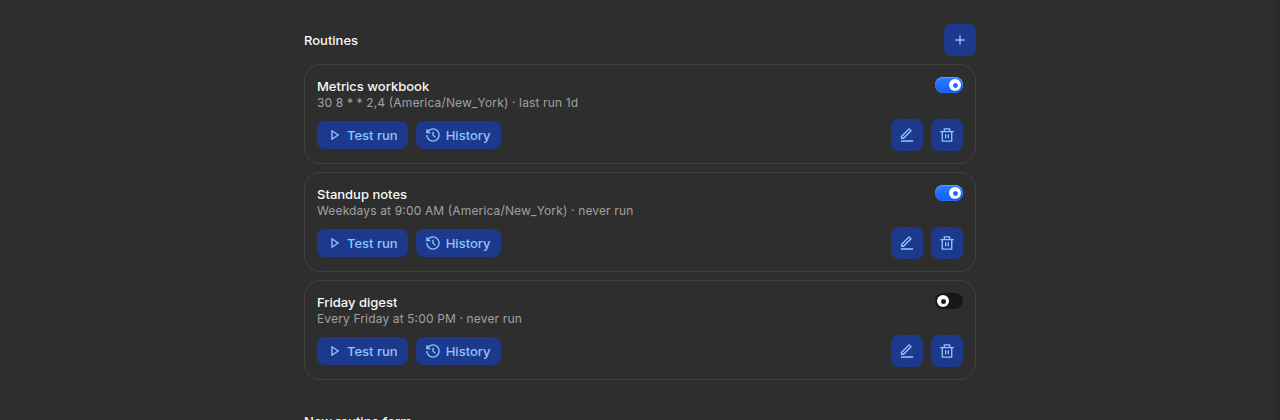
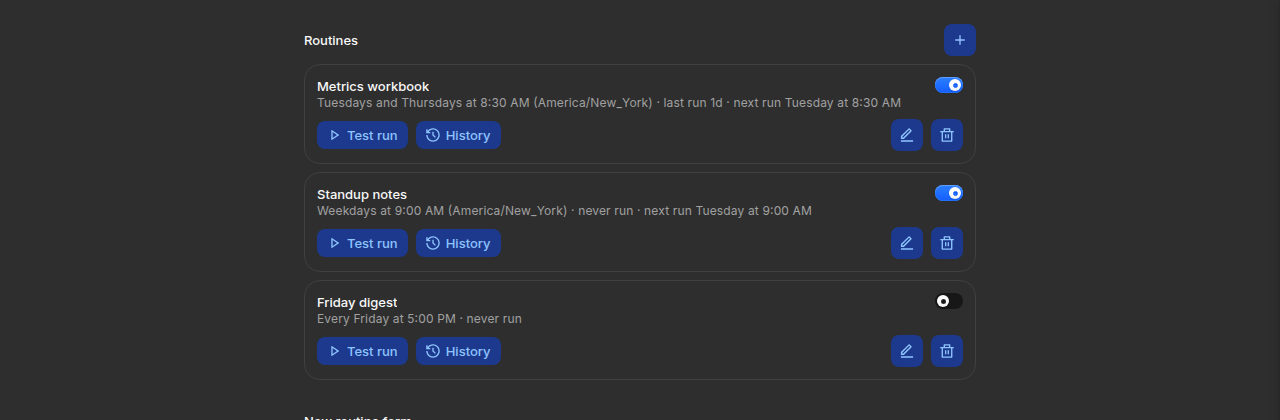
Each routine on the Bots page now shows when it runs next, with a day
and a time, in the routine's own timezone, next to a schedule read in
plain words: "Tuesdays and Thursdays at 8:30 AM (America/New_York) ·
last run 1d · next run Tuesday at 8:30 AM". Custom schedules with
weekday lists and ranges now read as words instead of raw cron, in
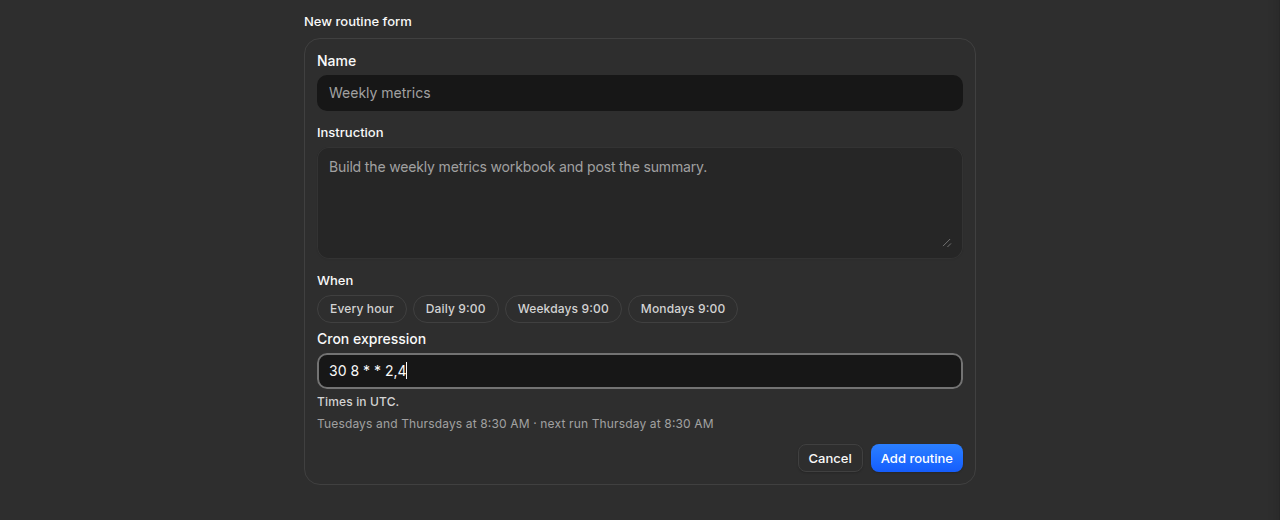
the routine rows and on the Schedules page. While typing a custom
schedule in the routine form, a live preview under the field shows
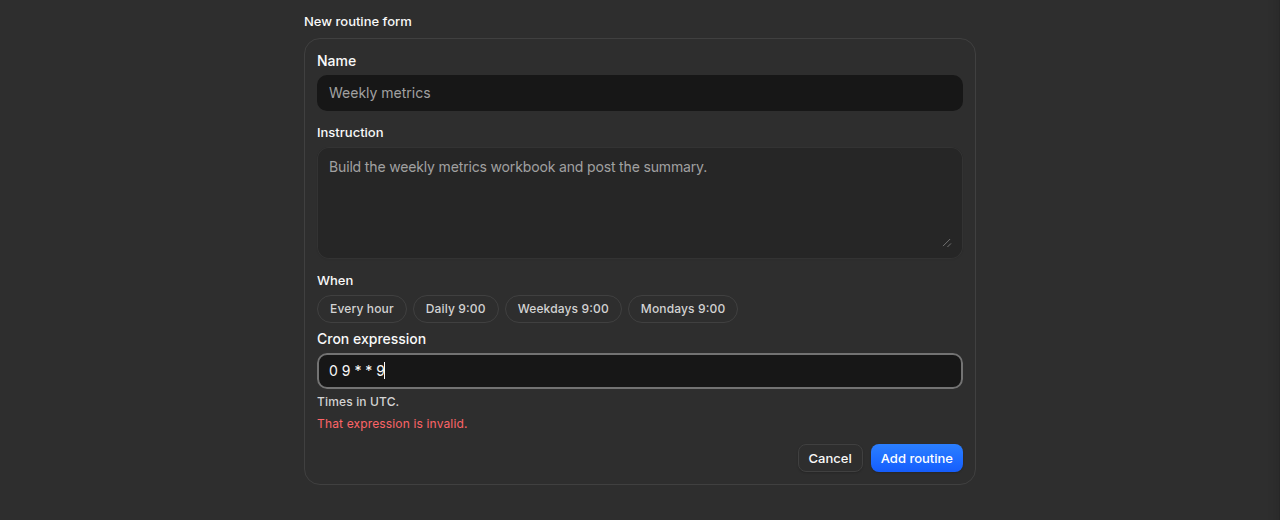
the schedule in words and the next run, or says the expression is
invalid.
How it meets the issue, point by point:
{day} at {time}" for enabled routines, computed in the routine's
timezone. Paused routines show no next run, since they do not fire
while off.
the next run as you type, and "That expression is invalid." when
the expression does not parse.
cadenceLabelinfrontend/app/agent/schedules/schedules-data.tsnow reads2,4as"Tuesdays and Thursdays" and
1-5as "Weekdays" (0,6reads"Weekends"); anything it cannot phrase falls back to the raw
expression, as before.
automation-data.test.tsgains cases for custom schedules(a weekday list, a weekday range, a sub-hourly step, and a
day-of-month plus weekday expression), a timezone case
(America/New_York, and Pacific/Auckland where the run lands on a
different local day), and invalid expressions.
How it is built:
from
backend/src/schedules/cron.tsis ported intoschedules-data.ts(same field grammar, same day-of-month andday-of-week OR rule), and the search walks the wall clock in the
routine's timezone with Intl, so DST changes land on the right
local time. The backend is untouched. The port was checked against
the backend matcher directly: a differential run over 13 schedules
and instants, including the 2026 spring-forward and fall-back
transitions, agreed on every case.
cadenceLabelkeeps its existing phrases for the schedules italready knew, so nothing that read as words before changes.
Checks run:
bun run typecheck(root, every package): cleancd frontend && bun run test: 1692 pass, 0 fail (includes the 6 new tests)cd frontend && bun run lint: exit 0; the 4 changed files are cleanbun run build && bun run perf:routes, this branch vsmain, both measured locally): /bots and /bots/[id] 662K gzip vs
660K on main (+2K from the schedule matcher this change adds);
/agent/schedules unchanged at 183K. Main already measures at the
660 KB ceiling noted in frontend/AGENTS.md, so the number is here
in the open rather than trimmed around.
Proof from a real run: screenshots below are the real Routines
section and routine form running in a browser (local dev build with
the routines endpoints served fixture data in the endpoint's shape,
since a seeded hosted account was not available). Before, the custom
schedule shows as raw cron and there is no next run; after, the rows
read in words with the next run, the form previews the issue's own
example (
30 8 * * 2,4) as it is typed, and an invalid expression(
0 9 * * 9) gets the invalid message.Before:
After: the rows, the form preview, and the invalid message:
Disclosure, plainly: I build agent tooling at Ghost Developer Studio
(Ghost Hands, a governed browser-automation tool, and Ghost Kernel, an
event-recording kernel) and used them while working on this. Ghost
Hands drove the browser for the screenshots above under a standard
policy, with every action recorded in a trail; Ghost Kernel recorded
the plan and verification for the change (its pre-change run recorded
the new tests as failing, its post-change run verified them). The
code here is mine to explain, and I ran every check listed above
myself.
Need help on this PR? Tag
@codesmith-botwith what you need.