- GitHub Repository (public repository)
- GitLab Repository (dismissed)
- NPM Repository (where JS releases are hosted)
- Maven Central Repository (where all stable releases are hosted)
- GitHub Maven Repository (where all releases are hosted, there including dev releases)
- Documentation (work in progress)
- Presentation (currently describing the main API of 2P-Kt — outdated)

tuProlog (2P henceforth) is a multi-paradigm logic programming framework written in Java.
2P-Kt is a Kotlin-based and multi-platform reboot of 2P. It consists of an open ecosystem for Symbolic Artificial Intelligence (AI). For this reason, 2P-Kt consists of a number of incrementally inter-dependent modules aimed at supporting symbolic manipulation and reasoning in an extensible and flexible way.
A complete overview about modules and their dependencies is provided by the following diagram:
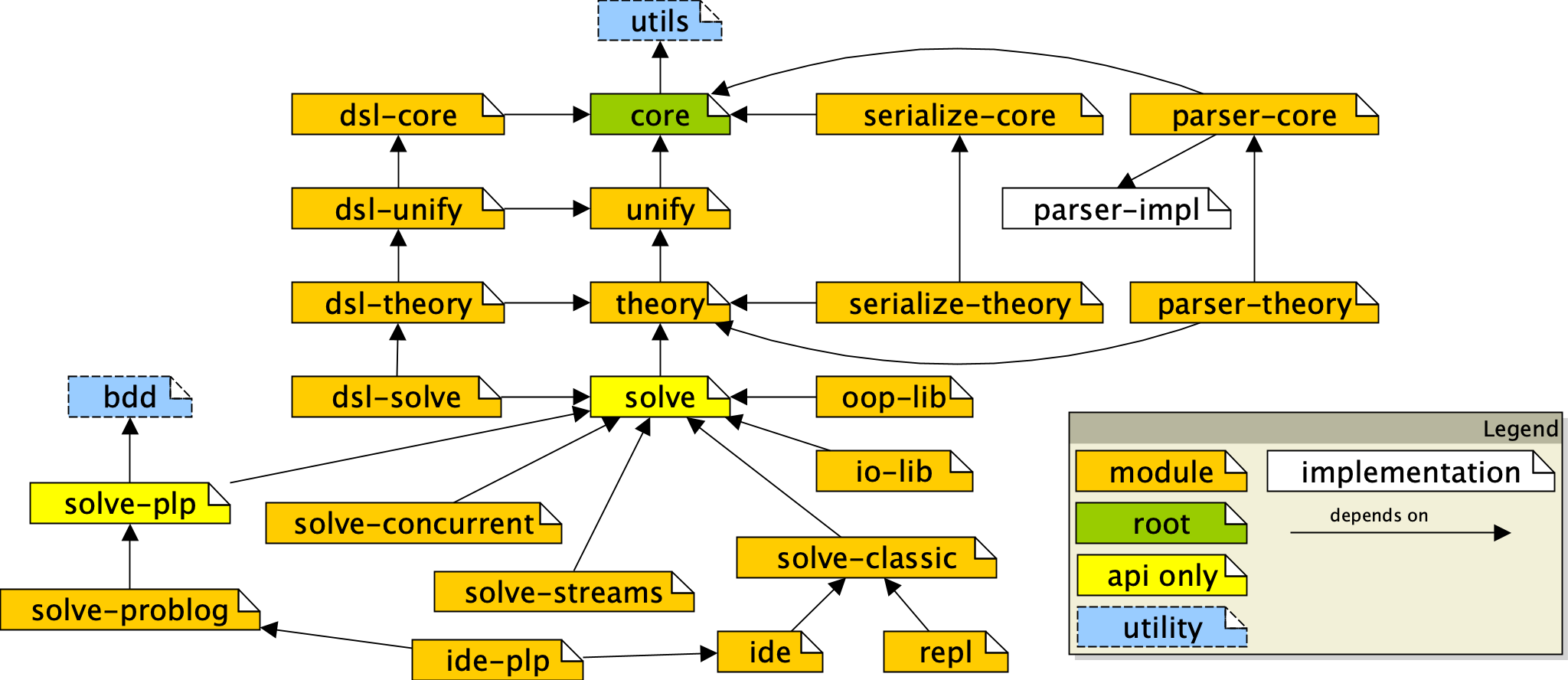
As shown in the project map, 2P-Kt currently focuses on supporting knowledge representation and automatic reasoning through logic programming, by featuring:
-
a module for logic terms and clauses representation, namely
core, -
a module for logic unification representation, namely
unify, -
a module for in-memory indexing and storing logic theories, as well as other sorts of collections of logic clauses, namely
theory, -
a module providing generic API for resolution of logic queries, namely
solve, coming with several implementations (e.g.solve-classicandsolve-streams, targetting Prolog ISO Standard compliant resolution), -
a module providing generic API for the probabilistic resolution of logic queries via probabilistic logic programming (PLP), namely
solve-plp, coming with an implementation targetting ProbLog (solve-problog)- leveraging on module
:bdd, which provides a multi-platform implementation of binary decision diagrams (BDD)
- leveraging on module
-
a module providing OR-concurrent resolution facilities, namely
solve-concurrent, -
a number of modules (i.e., the many
dsl-*modules) supporting a Prolog-like, Domain Specific Language (DSL) aimed at bridging the logic programming with the Kotlin object-oriented & functional environment,- further details are provided in this paper
-
three parsing modules:
parser-impl, providing the actual (hand-written, ANTLR-free) lexer/parser, and two thin public-facing wrappers around it —parser-core, aimed at parsing single terms/clauses, andparser-theory, aimed at parsing whole theories (withop/3operator-table support), -
two serialisation-related modules: one aimed at (de)serialising terms and clauses, namely
serialize-core, and the other aimed at (de)serialising terms theories, namelyserialize-theory, -
a module for using Prolog via a command-line interface, namely
repl, -
a toolkit-neutral GUI model shared by every Prolog-editing frontend, namely
gui, coming with a probabilistic-logic (PLP) extension, namelygui-plp, -
a desktop, Swing-based IDE/GUI for editing and running Prolog theories, namely
ide-swing, coming with a PLP-specific extension for inspecting ProbLog explanations, namelyide-plp-swing, -
a browser-based IDE requiring no installation, namely
ide-web, built on the very sameguimodel aside-swing.
The modular, unopinionated architecture of 2P-Kt is deliberately aimed at supporting and encouraging extensions towards other sorts of symbolic AI systems than Prolog---such as ASP, tabled-Prolog, concurrent LP, etc.
Furthermore, 2P-Kt is developed as in pure, multi-platform Kotlin project. This brings two immediate advantages:
- it virtually supports several platforms, there including JVM, JS, Android, and Native (even if, currently, only JVM and JS are supported),
- it consists of a very minimal and lightweight library, only leveraging on the Kotlin common library, as it cannot commit to any particular platform standard library.
2P-Kt can either be used as a command-line program or as a Kotlin, JVM, or JS library.
The 2P-Kt executables are currently available for download on the Releases section of the GitHub repository.
The 2P-Kt modules for JVM or Kotlin users are currently available for import
on Maven Central, under the it.unibo.tuprolog group ID (not
to be confused with the it.unibo.alice.tuprolog, which contains the old Java-based implementation).
The same modules are available through an ad-hoc Maven repository as well,
hosted by GitHub.
The 2P-Kt modules for JS users, are available for import on NPM, under the @tuprolog organization.
If you need a GUI for your Prolog interpreter, 2P-Kt ships two IDE flavors, both available on the Releases section
of the GitHub repository: a desktop application (Swing-based, ide-swing)
and a browser-based one requiring no installation (ide-web). Both are built on the very same, toolkit-neutral gui
model, so they offer the same core editing/solving experience.
The page of the latest release of 2P-Kt exposes a number of Assets. There, the one named:
2p-ide-swing-VERSION-redist.jar
is the self-contained, executable Jar containing the 2P-Kt-based Prolog interpreter (VERSION may vary depending on the
actual release version).
A ProbLog-specific build, bundling the ide-plp-swing extension described above (explanations rendered as BDD
diagrams), is published the same way, under matching 2p-ide-plp-swing-VERSION-redist*.jar asset names.
After you download the Jar, you can simply launch it by running:
java -jar 2p-ide-swing-VERSION-redist.jarHowever, if you have properly configured the JVM on your system, it may be sufficient to just double-click on the aforementioned JAR to start the IDE. In any case, running the JAR should make the following window appear:
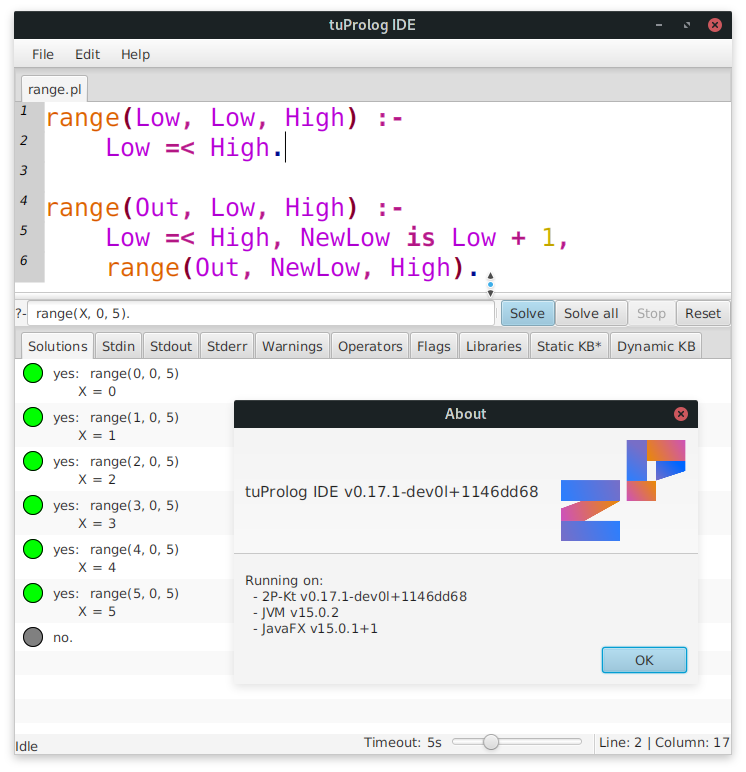
There, one may query the 2P-Kt Prolog interpreter against the currently opened theory file, which can of course be loaded from the user's file system by pressing File and then Open....
To issue a query, the user must write it in the query text field, at the center of the application. By either pressing Enter while the cursor is on the query text field, or by clicking on the Solve (resp. Solve all) button, the user can start a new resolution process, aimed at solving the provided query. Further solutions can be explored by clicking on the Next (resp. All next) button over and over again. The Next (resp. All next) button shall appear in place of Solve (resp. Solve all) if and when further solutions are available for the current query.
One may also compute all the unexplored solutions at once by clicking on the Solve all (resp. All next) button. Avoid this option in case of your query is expected to compute an unlimited amount of solutions.
To perform a novel query, they user may either:
- write the new query in the query text field, and then press Enter, or
- click on the Stop button, write the new query in the query text field, and then press the Solve (resp. Next) button again.
The Reset button cleans up the status of the solver, clearing any side effect possibly provoked by previous queries (including assertions, retractions, prints, warnings, loading of libraries, operators, or flags).
Finally, users may inspect the current status of the solver by leveraging the many tabs laying at the bottom of the IDE. There,
- the Solutions tab is aimed at showing the Prolog interpreter's answers to the user's queries;
- the Stdin tab is aimed at letting the user provide some text the Prolog interpreter's standard input stream;
- the Stdout tab is aimed at showing the Prolog interpreter's standard output stream;
- the Stderr tab is aimed at showing the Prolog interpreter's standard error stream;
- the Warnings tab is aimed at showing any warning possibly generated by the Prolog interpreter while computing;
- the Diagnostics tab lists syntax errors/warnings found in the currently edited theory, each with a one-based line/column location matching the same underlining and tooltip shown directly in the editor;
- the Operators tab is aimed at showing the current content Prolog interpreter's operator table;
- the Flags tab is aimed showing the actual values of all the flags currently defined with the Prolog interpreter;
- the Libraries tab is aimed at letting the user inspect the currently loaded libraries and the predicates, operators, and functions they import;
- the Static (resp. Dynamic) KB tab is aimed at letting the user inspect the current content of the Prolog interpreter's static (resp. dynamic) knowledge base.
Any of these tabs may be automatically updated after a solution to some query is computed. Whenever something changes w.r.t. the previous content of the tab, an asterisk will appear close to the tab name, to notify an update in that tab.
Finally, the status bar at the bottom of the window shows the caret's current line/column (one-based, like every other location shown by the IDE), next to the current resolution status.
If you would rather not install anything, the same editing/solving experience is available straight from a browser.
Up-to-date Web IDE is available at https://tuprolog.github.io/2p-kt/web-ide/
If you want to deploy the Web IDE yourself, the page of the latest release of 2P-Kt exposes, among its Assets, one named:
ide-web-VERSION.zip
Unzip it, then serve the resulting folder with any local static file server (its own end-to-end tests do the same)
and open index.html in a modern browser. Editing, syntax highlighting, diagnostics, and query solving all work the
same way as in the desktop IDE.
One notable difference among Web and Swing IDEs is how pages are stored: New/Open.../ Save/Save as... manage pages persisted in the browser's own local storage (so they survive a reload but do not touch the file system), while Upload.../Download are the ones that read/write an actual theory file on disk.
If you just need a command-line Prolog interpreter, you can rely on the 2P-Kt REPL which is available on the Releases section of the GitHub repository.
The page of the latest release of 2P-Kt exposes a number of Assets. There, the one named:
2p-repl-VERSION-redist.jar
is the self-contained, executable Jar containing the 2P-Kt-based Prolog interpreter (VERSION may vary depending on the
actual release version).
After you download the 2p-repl-VERSION-redist.jar, you can simply launch it by running:
java -jar 2p-repl-VERSION-redist.jarThis should start an interactive read-eval-print loop accepting Prolog queries. A normal output should be as follows:
# 2P-Kt version LAST_VERSION_HERE

?- <write your dot-terminated Prolog query here>.
For instance:
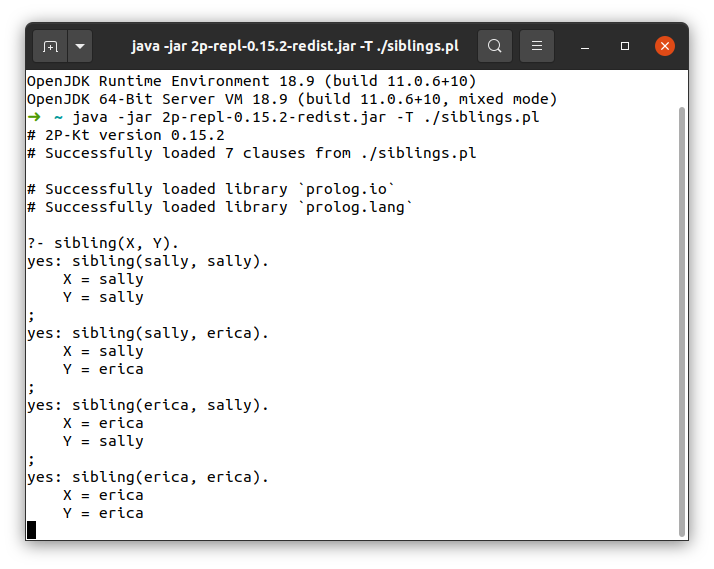
Other options or modes of execution are supported. One can explore them via the program help, which can be displayed by running:
java -jar 2p-repl-VERSION-redist.jar --helpThis should display a message similar to the following one:
Usage: java -jar 2p-repl.jar [<options>] <command> [<args>]...

  Start a Prolog Read-Eval-Print loop

Options:
  -T, --theory=<text>  Path of theory file to be loaded
  -t, --timeout=<int>  Maximum amount of time for computing a solution
                       (default: 1000 ms)
  --oop                Loads the OOP library
  -h, --help           Show this message and exit

Commands:
  solve  Compute a particular query and then terminate
To import the 2P-Kt module named 2P_MODULE (version 2P_VERSION) into your Kotlin-based project leveraging on Gradle,
you simply need to declare the corresponding dependency in your build.gradle(.kts) file:
// assumes Gradle's Kotlin DSL
dependencies {
   implementation("it.unibo.tuprolog", "2P_MODULE", "2P_VERSION")
}
In this way, the dependencies of 2P_MODULE should be automatically imported.
The step above, requires you to tell Gradle to either use Maven Central or our GitHub repository (or both) as a source for dependency lookup. You can do it as follows:
// assumes Gradle's Kotlin DSL
repositories {
    maven("https://maven.pkg.github.com/tuProlog/2p-kt")
    mavenCentral()
}
Authentication may be required in case the GitHub repository is exploited
Remember to add the -jvm suffix to 2P_MODULE in case your project only targets the JVM platform:
// assumes Gradle's Kotlin DSL
dependencies {
   implementation("it.unibo.tuprolog", "2P_MODULE-jvm", "2P_VERSION")
}To import the 2P-Kt module named 2P_MODULE (version 2P_VERSION) into your Kotlin-based project leveraging on Maven,
you simply need to declare the corresponding dependency in your pom.xml file:
<dependency>
   <groupId>it.unibo.tuprolog</groupId>
   <artifactId>2P_MODULE-jvm</artifactId>
   <version>2P_VERSION</version>
</dependency>
In this way, the dependencies of 2P_MODULE should be automatically imported.
The step above, requires you to tell Maven to either use Maven Central or our GitHub repository (or both) as a source for dependency lookup. You can do it as follows:
<repositories>
    <repository>
        <id>github-2p-repo</id>
        <url>https://maven.pkg.github.com/tuProlog/2p-kt</url>
    </repository>
</repositories>
Authentication may be required in case the GitHub repository is exploited
Remember to add the -jvm suffix to 2P_MODULE in case your project only targets the JVM platform:
<dependency>
   <groupId>it.unibo.tuprolog</groupId>
   <artifactId>2P_MODULE-jvm</artifactId>
   <version>2P_VERSION</version>
</dependency>The 2P-Kt software is available as a JavaScript library as well, on NPM, under the @tuprolog organization.
Because of how the Kotlin-to-JS compiler works,
there's no sense in importing one module selectively.
So if you want to use 2P-Kt in JavaScript, better would be for you to use the @tuprolog/2p-full project as a
dependency (note the 2p- prefix: every 2P-Kt npm package is published as @tuprolog/2p-<module>, not bare
@tuprolog/<module>).
To import the @tuprolog/2p-full module into your package.json, it is sufficient to declare your dependency as follows:
{
  "dependencies": {
    "@tuprolog/2p-full": "^2P_MODULE_VERSION"
  }
}Working with the 2P-Kt codebase requires a number of tools to be installed and properly configured on your system:
- JDK 17+ (please ensure the
JAVA_HOMEenvironment variable is properly configured) - Kotlin 2.4+
- Gradle 9.7+ (the
./gradlewwrapper already pins this version, so a separately installed Gradle is optional) - Git 2.20+
detekt(the static analyzer run by./gradlew check) is known to crash on very recent JDKs (e.g. JDK 26); if it fails for no apparent reason, retry withJAVA_HOMEpointed at a JDK 21-23 instead.
To participate in the development of 2P-Kt, we suggest the IntelliJ Idea IDE. The free, Community version will be fine.
You will need the Kotlin plugin for IntelliJ Idea. This is usually installed upon Idea's very first setup wizard. However, one may easily late-install such plugin through the IDE's Plugins settings dialog. To open such dialog, use Ctrl+Shift+A, then search for "Plugins"
-
Clone this repository in a folder of your preference using
git cloneappropriately -
Open IntelliJ Idea, then File > Open... and select the
2p-ktfolder you just cloned (assuming you cloned without specifying a different folder name). Modern IntelliJ versions auto-detect the Gradle build and import it, no separate "Import Project" wizard needed. -
Wait for the IDE to import the project from Gradle. The process may take several minutes, due to the amount of dependencies. Should the synchronization fail, make sure the IDE's Gradle is configured correctly: in 'Settings -> Build, Execution, Deployment -> Build Tools > Gradle', for the option 'Use Gradle from' select 'gradle-wrapper.properties file'. Enabling auto-import is also recommended
Contributions to this project are welcome. Just some rules:
-
We use git flow, so if you write new features, please do so in a separate
feature/branch -
We recommend forking the project, developing your stuff, then contributing back via pull request directly from the Web interface
-
Commit often. Do not throw pull requests with a single giant commit adding or changing the whole world. Split it in multiple commits and request a merge to the mainline often
-
Stay in sync with the
developbranch: pull often fromdevelop(if the build passes), so that you don't diverge too much from the main development line -
Do not introduce low quality or untested code. Merge requests will be reviewed before merge.
While developing, you can rely on IntelliJ to build the project, it will generally do a very good job. If you want to generate the artifacts, you can rely on Gradle. Just point a terminal on the project's root and issue
./gradlew buildThis will trigger the creation of the artifacts the executions of the tests, the generation of the documentation and of the project reports.
The 2P project leverages on Semantic Versioning (SemVer, henceforth).
In particular, SemVer is enforced by the current Gradle configuration, which features DanySK's Git sensitive SemVer Gradle Plugin. This implies it is strictly forbidden in this project to create tags whose label is not a valid SemVar string.
Notice that the 2P project's version has reached major 1 (e.g. 1.5.1), meaning it is no longer in the initial-development
stage of SemVer (major 0).
According to SemVer, this implies the public API should not undergo breaking changes
without a major version bump; minor and patch releases should remain backward-compatible.
If you meet some problem in using or developing 2P, you are encouraged to signal it through the project "Issues" section on GitHub.