
Your coding agents are pigs. Piggery is the farm.
Lợn cày tasks


piggery-intro.mp4
Work goes into a pig's trough and waits there until the pig is back. It only counts as eaten when the job is actually done, not when the pig sniffed at it. Every pig also has a pen: its role says who it may talk to and whether it may have piglets (workers). The farm checks the fence itself, so no amount of sweet talk gets a pig through it.
pi, Claude Code, Codex, omp, dsh and opencode pigs all live on the same farm and talk to each other. The farm is one Go binary and a SQLite file, and nothing runs in the cloud.

flowchart LR
  a["agent on pi"] <-->|mail| farm
  b["agent on Claude Code"] <-->|mail| farm
  c["agent on …"] <-->|mail| farm
  farm(("🐖 piggery<br/>mailbox + gate")) --- shape[["a team layout<br/>lead → peers<br/>peer ↔ peer<br/>…"]]
  shape --> work[/"your tasks and projects,<br/>plowed"/]
- One mailbox for every agent, whatever its harness. A pi session can mail a Claude Code session, and a worker's answer wakes whoever is waiting for it.
- A gate on every mail and every spawn. It checks them against the team's layout, a small YAML file you pick or write.
- Layouts are files. Eight come built in (see Farm layouts); any other shape is one more file.
| Harness | Your sessions | Workers piggery starts | Tested with | Add piggery |
|---|---|---|---|---|
| pi | yes (extension) | yes (pi --mode rpc) |
0.87.1 | piggery setup pi |
| Claude Code | yes (plugin + MCP) | yes (claude -p) |
2.1.283 | piggery setup claude |
| Codex | yes (hooks + MCP) | yes (codex app-server) |
0.157.1 | piggery setup codex |
| omp | yes (extension) | yes (omp --mode rpc) |
18.4.2 | piggery setup omp |
| dsh | yes (dsh web, plugin) |
yes (dsh --profile sdk) |
0.2.0-rc.1, 0.2.0-rc.2 | piggery setup dsh |
| opencode | yes (plugin) | yes (opencode serve) |
1.18.34, 1.19.0 | piggery setup opencode |
- Workers run on the harness their role names (
spawn.harness), else on the harness of the session that founded the team. piggery setupalone shows each harness's version and whether piggery is installed in it.
curl -fsSL https://raw.githubusercontent.com/sting8k/piggery/main/install.sh | sh
piggery setup pi       # and/or: claude, codex, omp, dsh, opencode
On Windows (experimental), in PowerShell:
irm https://raw.githubusercontent.com/sting8k/piggery/main/install.ps1 | iexThe script picks the build for your OS and CPU (Linux, macOS or Windows; amd64 or arm64), checks it
against the release's checksums.txt, and puts it in ~/.local/bin (%USERPROFILE%\.local\bin
on Windows).
- Another directory:
PIGGERY_INSTALL_DIR=.... A given release:PIGGERY_VERSION=v0.3.0. - By hand: download
piggery-<os>-<arch>(piggery-windows-<arch>.exeon Windows) from the latest release,chmod +xit, put it on your PATH. - With Go 1.26+:
go install github.com/sting8k/piggery/cmd/piggery@latest. - Later:
piggery updateinstalls a newer release. What changed is in CHANGELOG.md.
- Open pi, Claude Code, Codex, omp,
dsh webor opencode in your project. - Ask it for a team: "make a lead-peer team to fix the failing tests".
- Watch the farm:
piggery top.
More:
- docs/guide.md: running teams, watching and stepping in, customizing
~/.piggery. - docs/reference.md: every command, config key, profile key and manifest key.
Using Paseo? PigMonitor shows your teams in the app: who is working, who needs you, each agent's transcript and mail.
paseo plugin install github:Patruxs/PigMonitor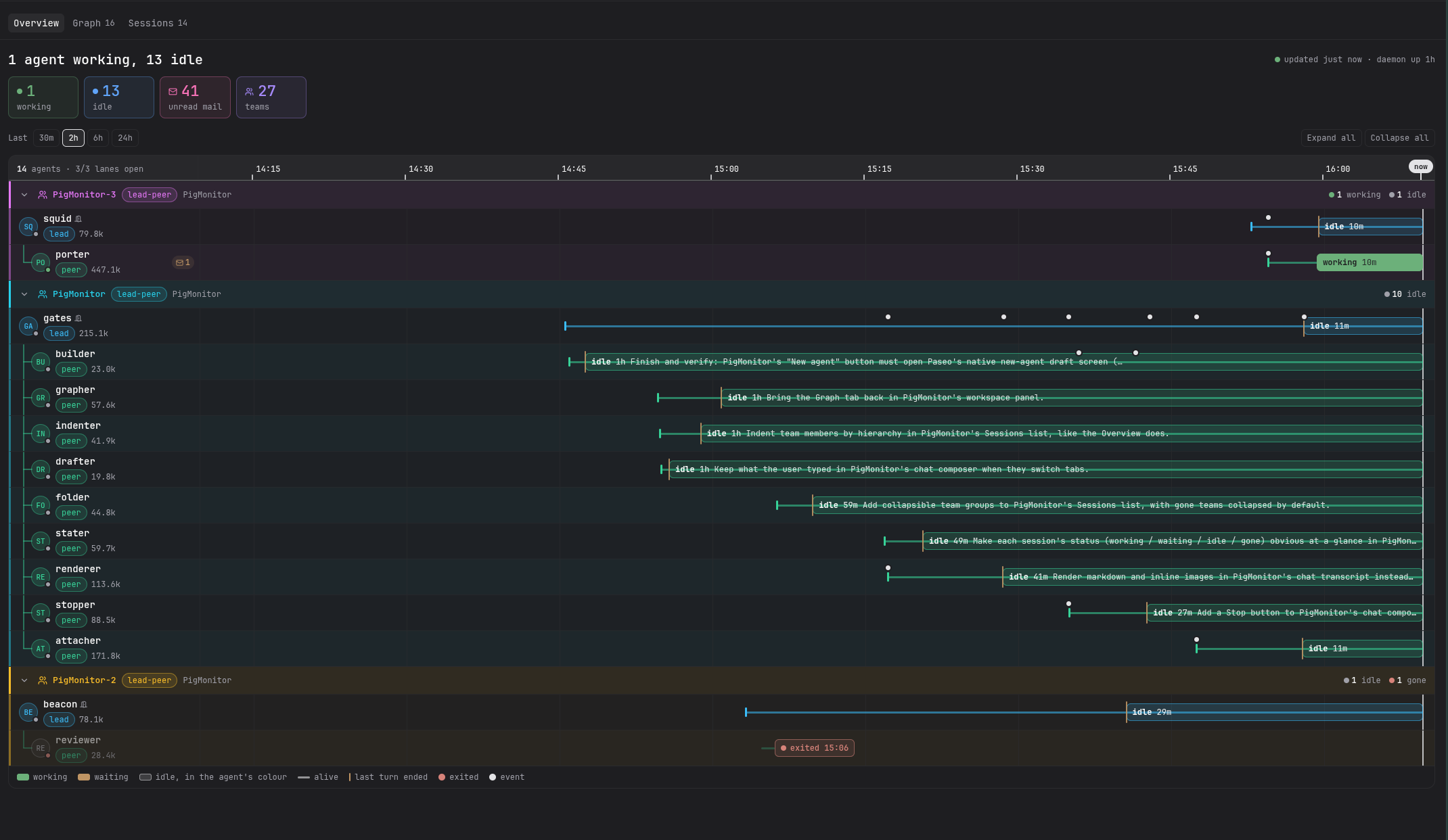 |
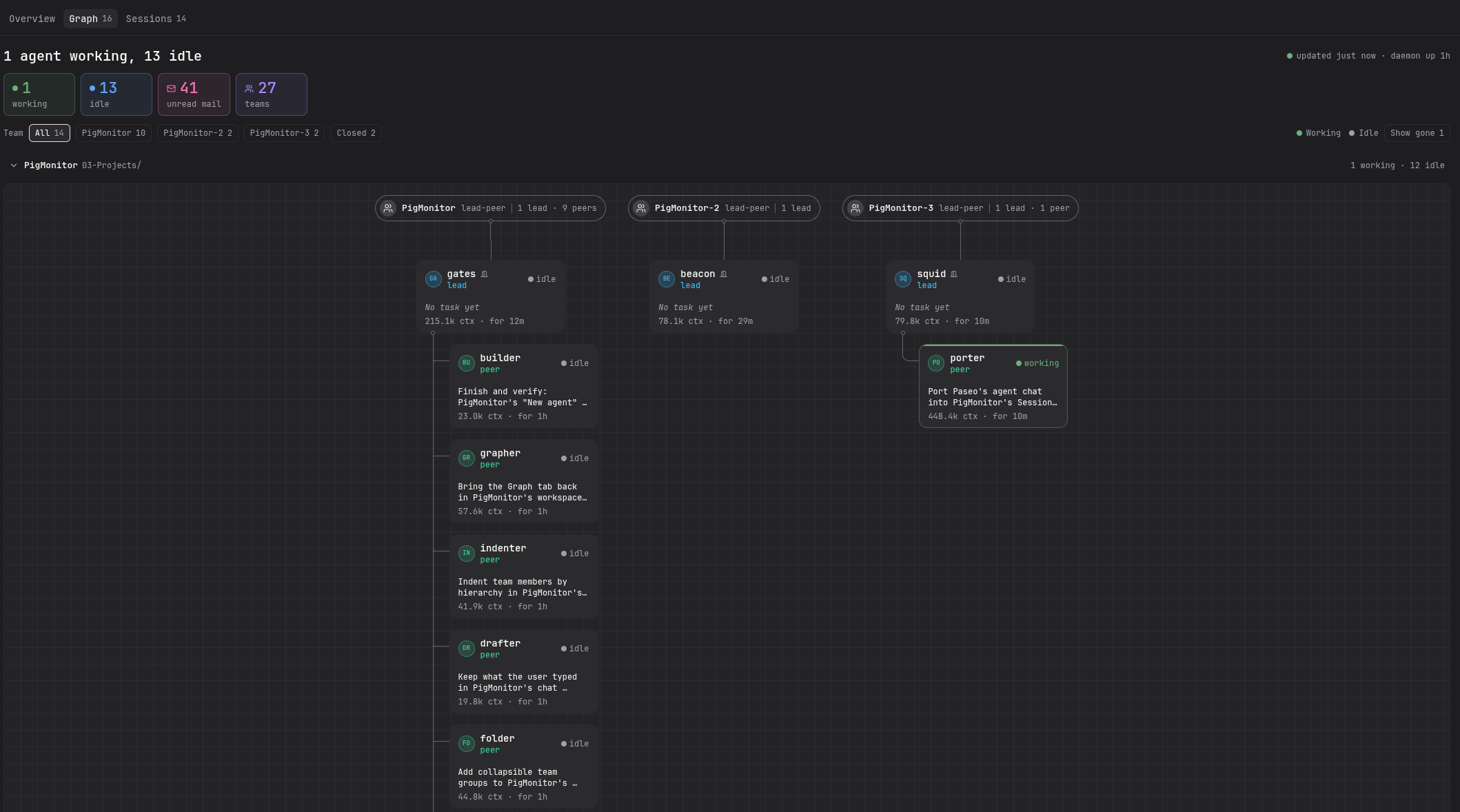 |
| Overview: every team and agent on a timeline, coloured by state | Graph: each team as an org chart, with what each agent is doing |
PigMonitor is made by Patruxs, who took piggery further inside Paseo than our own plugin ever did. Thank you! The screenshots are from PigMonitor's README.
| Template | Who does what |
|---|---|
lead-peer |
A lead owns the plan and judges the results; peers own scopes and speak up with evidence. |
slp |
You steer a supervisor; each lane has a lead and peers, often in its own git worktree. |
council |
A chair asks members for independent views on one hard decision. |
amp-like |
A lead does the work; an oracle (hard reasoning) and a reviewer (diffs) each answer once. |
dual-lens |
A taskforce: a chair takes one hard question or review, asks two lenses on different models, then makes them answer each other's conflicts. |
advisor |
A taskforce of one: read-only advice on a hard decision or a stalled approach, with a check that would prove it wrong. |
gastown-like |
A mayor splits the work; polecats do each task on its own branch; a refinery merges them one at a time. |
Each one is drawn, with when to pick it, in manifests/README.md.
Make your own: piggery template new mine --from slp, then edit
~/.piggery/templates/mine/manifest.yaml (see the guide).
go build ./cmd/piggery
go test ./...
The tests compare files byte for byte, so every file is checked out with LF line endings
(.gitattributes), on Windows too. A Windows clone made before that file covered everything may
still hold CRLF copies; check them out again with git rm -rq --cached . && git reset -q --hard.
MIT