


All five run on one free Oracle Cloud ARM machine, behind real HTTPS. No install needed.
App Link Login Lichess Study to PDF https://study.lichess-essentials.duckdns.org none — open Chess Analyzer https://analyzer.lichess-essentials.duckdns.org test/testpassword1234@Player Prepper https://prepper.lichess-essentials.duckdns.org test/testpassword1234@Repertoire Creator https://repertoire.lichess-essentials.duckdns.org test/testpassword1234@Weakness Report https://weakness.lichess-essentials.duckdns.org test/testpassword1234@The credentials are shared and published on purpose so anyone can try these. There are no user accounts — the saved data is shared too, so treat anything you put in as public. Study to PDF has no password gate at all.
Do not paste a Lichess token you care about. The links are encrypted, but four of the apps hold a pasted token in a process-wide global, so it would be used by every other visitor until that app restarts.
FUTURE.md has the deployment details, credential reset steps and the full list of caveats.
Tools that fix the things I keep running into as a long-time Lichess user. Built for my own use, open source in case they are useful to anyone else.
| App | What it does |
|---|---|
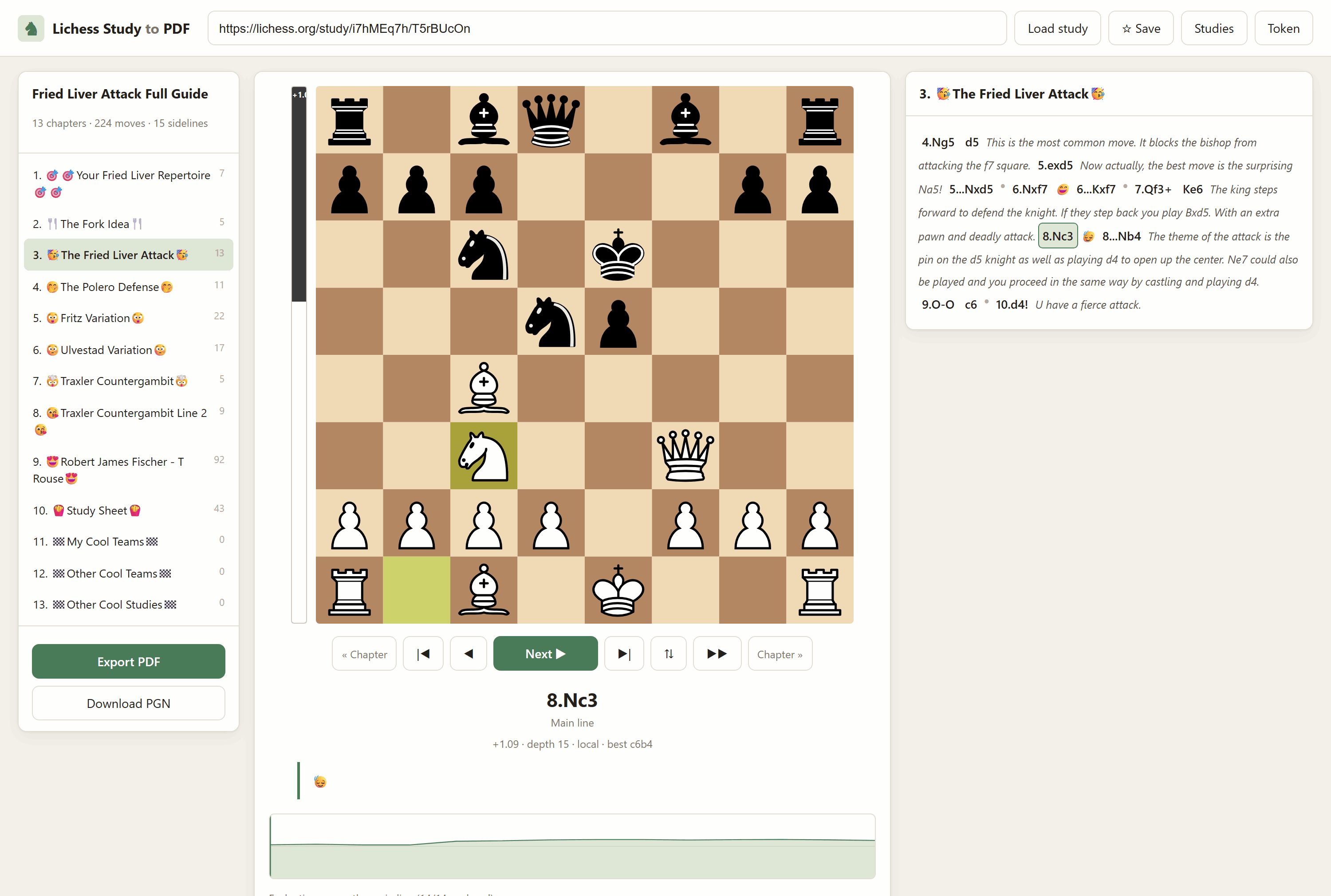
| Lichess-Study-to-PDF | Turns a study into a typeset chess book or a step-through PDF — every sideline, comment and annotation included — plus a browser interface with a live engine eval bar and a board you can play your own moves on. Imports private studies without a token. |
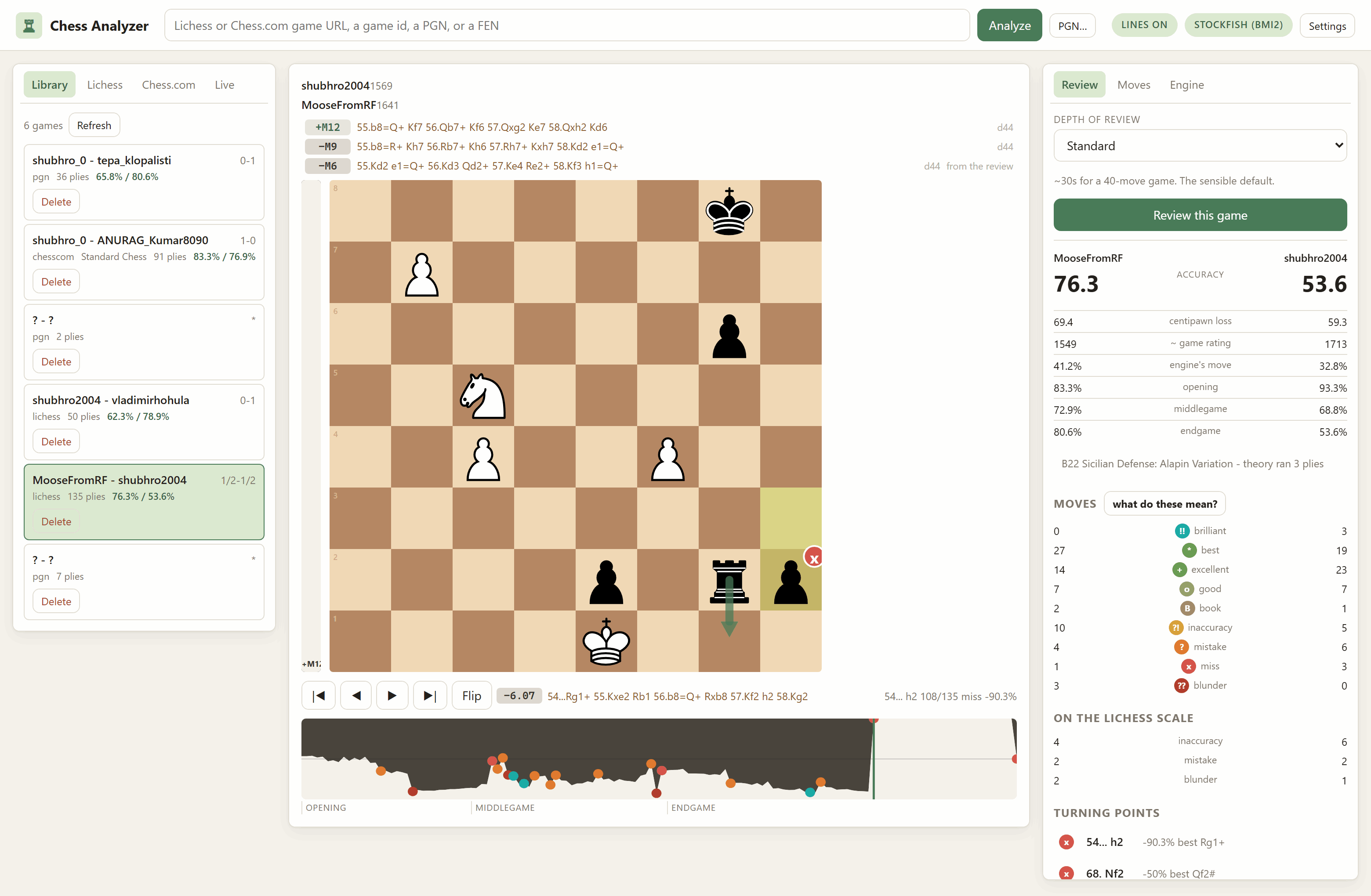
| ChessAnalyzer | Review any game with a local engine — from Lichess, from Chess.com, or from a PGN you paste. Accuracy and move labels on both the Lichess and a Chess.com-style scale, with the rules for every label written down and shown in the app. Eval graph, ranked engine lines, mouse-wheel stepping, and a live mode that follows a game while it is still being played — including Chess.com live games, which no documented API exposes. Or arrange the pieces by hand for a game happening in front of you, say who is to move, and get the evaluation. |
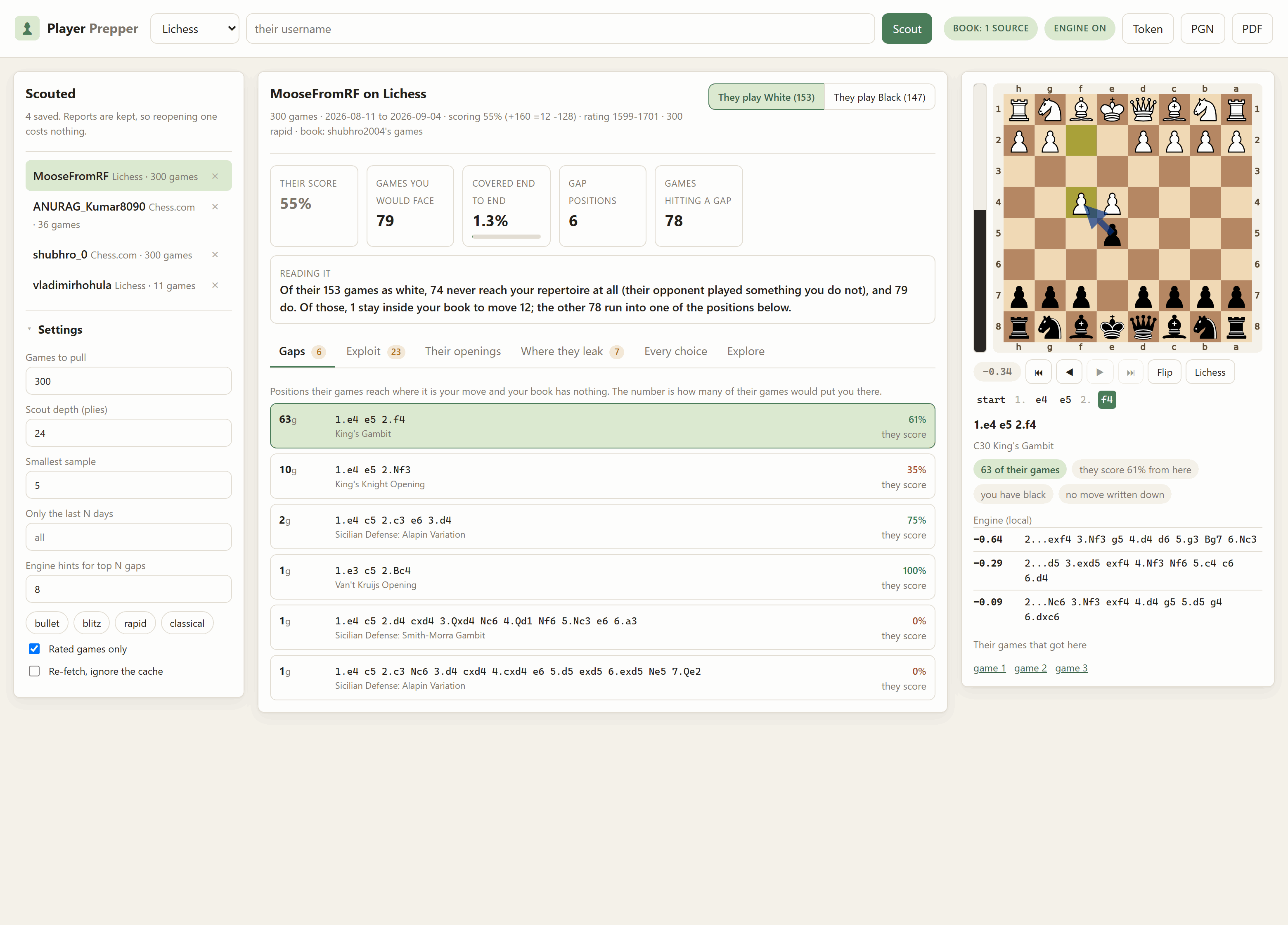
| Player-Prepper | Scout an opponent from their own games, on either site. What they play per colour, where their own results say they leak points, and — measured against your repertoire, a study or your own games — every position they steer into that you have no answer for, ranked by how many of their games would put you there. Its exploit tab crosses their habits with what the engine says you get, on an opportunity score whose factors you switch on and off. Playable board with a live eval bar, and it prints the lot as a prep sheet. |
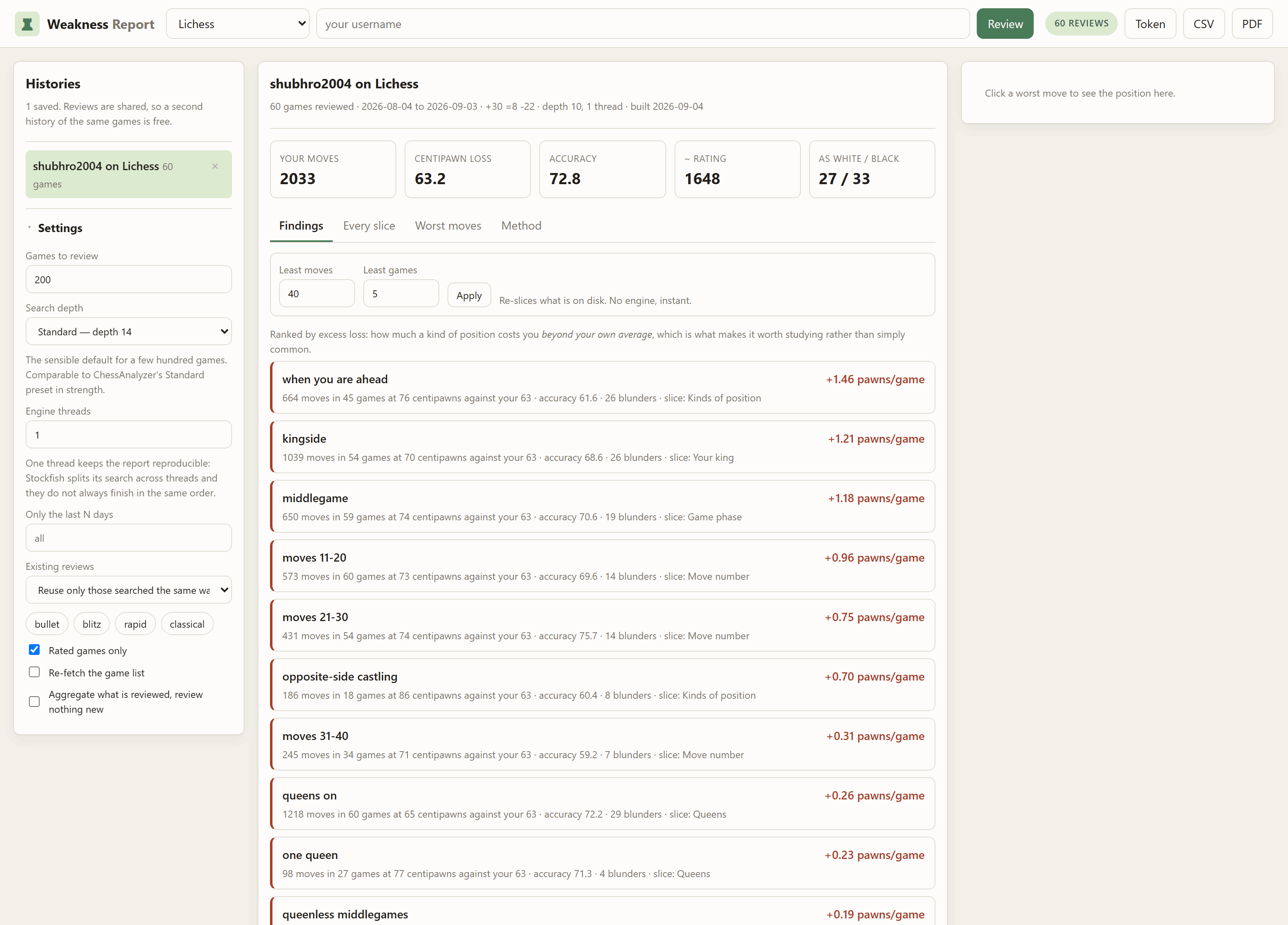
| Weakness-Report | Review a few hundred of your own games and find out what you are actually bad at. Slices your whole history by the kind of position you were in — queenless middlegames, opposite-side castling, under thirty seconds, rook endings — and ranks each by how much it costs you beyond your own average, which is the difference between a true claim and a useful one. Prints as a document. |
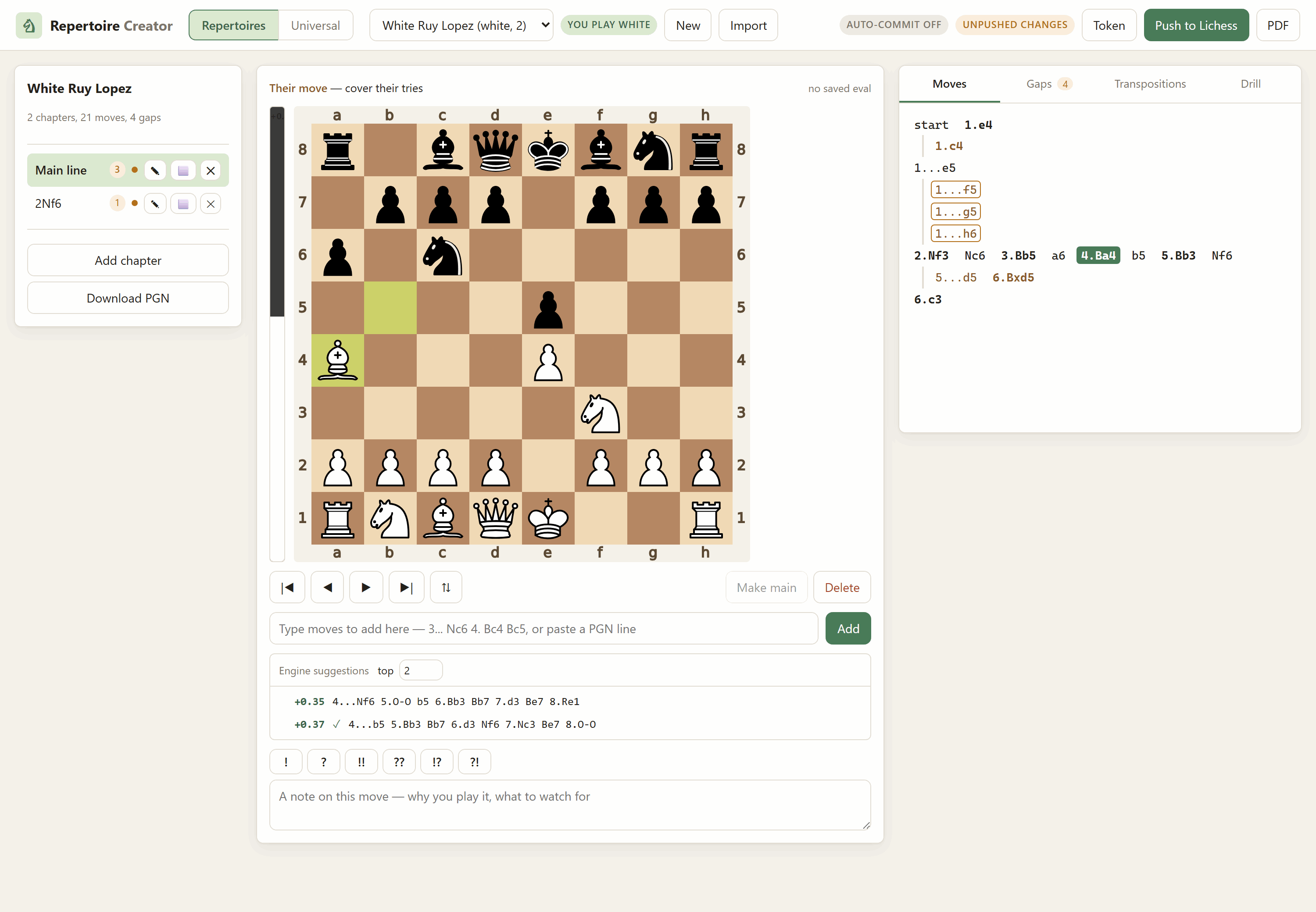
| Repertoire-Creator | Build an opening repertoire locally — play or type the lines, annotate them, live eval bar and ranked engine suggestions — then publish it to Lichess as a study, drill yourself on it, or export it as a PDF. Knows which side you play, so it finds the positions you have no answer for. Its universal mode drops the chapters entirely: record sequences, and everything you have written down becomes one book keyed by position that tells you your own move as you play, or says gap. Saves to disk as you type and can commit and push itself. |
Lichess-Study-to-PDF — a study open in the browser: chapters down the left, a live engine eval beside the board, and every sideline, comment and annotation in the notation panel.
ChessAnalyzer — a finished review: the engine's ranked lines above the board, the move's label on its own square with the engine's preferred move drawn beside it, the eval graph underneath, and the report on the right.
Player-Prepper — a scout of a real opponent: their record and your coverage across the top, the gaps ranked by how many of their games reach each one, and the selected gap with the engine's suggestion on it.
Weakness-Report — sixty games reviewed and sliced: the overall figures, then the kinds of position costing the most, each with the sample it rests on.
Repertoire-Creator — a repertoire being written: the move tree on the right, ranked engine suggestions under the board with a tick against the moves you already have, and the gap count in the tab bar.
If you only want to use the apps, this is the whole thing:
pip install lichess-essentialsThat installs all five and gives you five commands — chess-analyzer,
lichess-study-pdf, repertoire, prepper and weakness. Each takes
serve to open its web interface, or works from the command line.
They are separate packages, so you can take only the one you want:
pip install chess-game-analyzer     # review any game with a local engine
pip install lichess-study-to-pdf    # a study as a PDF you can step through
pip install repertoire-creator      # build a repertoire, publish it as a study
pip install player-prepper          # scout an opponent
pip install weakness-report         # what you are actually bad at
A few features are one app borrowing another, and those are optional extras rather than a dependency everyone pays for. Each app says which command to run if you ask for a feature it has not got:
| Want | Install |
|---|---|
| PDF export from Repertoire-Creator | pip install "repertoire-creator[pdf]" |
| Engine suggestions, prep sheets and private studies in Player-Prepper | pip install "player-prepper[prep]" |
| Board diagrams in a Weakness-Report PDF | pip install "weakness-report[diagrams]" |
| Lichess cloud-eval fallback in ChessAnalyzer | pip install "chess-game-analyzer[cloud]" |
weakness-report is the exception: it depends on chess-game-analyzer outright, so
pip installs that for you. A weakness report is an aggregation of that app's
review, and the two are meant to agree about the same game.
Where your files go. Installed from pip there is no repository to put them
beside, so each app uses the normal per-user folder for your platform —
%LOCALAPPDATA%\weakness-report\history on Windows,
~/.local/share/weakness-report/history on Linux,
~/Library/Application Support/... on macOS. Every app prints its own path in
the banner when it starts. Working from a checkout instead, files stay in the
repository exactly as the rest of this README describes.
An engine is still your own to supply: install Stockfish from your package
manager, put it on PATH, or point STOCKFISH_PATH at it. ChessAnalyzer can
also download one for you from its Engines tab.
The badges above are live. Behind them:
| Package | PyPI | Daily / by installer | Totals |
|---|---|---|---|
| lichess-essentials | pypi | pypistats | pepy |
| chess-game-analyzer | pypi | pypistats | pepy |
| lichess-study-to-pdf | pypi | pypistats | pepy |
| repertoire-creator | pypi | pypistats | pepy |
| player-prepper | pypi | pypistats | pepy |
| weakness-report | pypi | pypistats | pepy |
Nothing needs setting up for any of that — PyPI publishes its download logs and both sites read them. Figures appear about a day after the first release.
Worth knowing before reading anything into them: these counts include CI
runs, mirrors and bots as well as people. pypistats can break a package
down by installer, which is the honest way to look — traffic whose installer
is pip from varied Python versions is closer to real use than a flat line
that only ever arrives from one.
This is the developer path, and what the Docker and hosting setups build from. All apps share one virtualenv at the repository root:
# Windows PowerShell
python -m venv .lichess
.\.lichess\Scripts\python.exe -m pip install -r Lichess-Study-to-PDF\requirements.txt
.\.lichess\Scripts\python.exe -m pip install -r Repertoire-Creator\requirements.txt
.\.lichess\Scripts\python.exe -m pip install -r ChessAnalyzer\requirements.txt
.\.lichess\Scripts\python.exe -m pip install -r Player-Prepper\requirements.txt
.\.lichess\Scripts\python.exe -m pip install -r Weakness-Report\requirements.txt
.\.lichess\Scripts\python.exe -m pip install -e Lichess-Study-to-PDF
# Git Bash on Windows
python -m venv .lichess
./.lichess/Scripts/python.exe -m pip install -r Lichess-Study-to-PDF/requirements.txt
./.lichess/Scripts/python.exe -m pip install -r Repertoire-Creator/requirements.txt
./.lichess/Scripts/python.exe -m pip install -r ChessAnalyzer/requirements.txt
./.lichess/Scripts/python.exe -m pip install -r Player-Prepper/requirements.txt
./.lichess/Scripts/python.exe -m pip install -r Weakness-Report/requirements.txt
./.lichess/Scripts/python.exe -m pip install -e Lichess-Study-to-PDF
# macOS / Linux
python -m venv .lichess
./.lichess/bin/python -m pip install -r Lichess-Study-to-PDF/requirements.txt
./.lichess/bin/python -m pip install -r Repertoire-Creator/requirements.txt
./.lichess/bin/python -m pip install -r ChessAnalyzer/requirements.txt
./.lichess/bin/python -m pip install -r Player-Prepper/requirements.txt
./.lichess/bin/python -m pip install -r Weakness-Report/requirements.txt
./.lichess/bin/python -m pip install -e Lichess-Study-to-PDFThat last line installs the study exporter as a library, which is how Repertoire-Creator, Player-Prepper and Weakness-Report get their engine ladder and their PDF layouts instead of carrying a second copy of them.
Weakness-Report also reads its review rules — accuracy, move labels, where the
middlegame starts — from ChessAnalyzer, so that a game means the same thing
in both apps. It finds the folder by itself in a normal checkout, so there is
nothing extra to install; pip install -e ChessAnalyzer also works if you
would rather have it on the path properly.
Run each from inside its own folder:
# Windows PowerShell
cd Lichess-Study-to-PDF
& "..\.lichess\Scripts\python.exe" -m lichess_study_pdf.cli serve      # port 8777

cd ..\Repertoire-Creator
& "..\.lichess\Scripts\python.exe" -m repertoire_creator.cli serve     # port 8778

cd ..\ChessAnalyzer
& "..\.lichess\Scripts\python.exe" -m chess_analyzer.cli serve         # port 8779

cd ..\Player-Prepper
& "..\.lichess\Scripts\python.exe" -m player_prepper.cli serve        # port 8780

cd ..\Weakness-Report
& "..\.lichess\Scripts\python.exe" -m weakness_report.cli serve       # port 8781
# Git Bash on Windows
cd Lichess-Study-to-PDF && ../.lichess/Scripts/python.exe -m lichess_study_pdf.cli serve
cd ../Repertoire-Creator && ../.lichess/Scripts/python.exe -m repertoire_creator.cli serve
cd ../ChessAnalyzer && ../.lichess/Scripts/python.exe -m chess_analyzer.cli serve
cd ../Player-Prepper && ../.lichess/Scripts/python.exe -m player_prepper.cli serve
cd ../Weakness-Report && ../.lichess/Scripts/python.exe -m weakness_report.cli serve
# macOS / Linux
cd Lichess-Study-to-PDF && ../.lichess/bin/python -m lichess_study_pdf.cli serve
cd ../Repertoire-Creator && ../.lichess/bin/python -m repertoire_creator.cli serve
cd ../ChessAnalyzer && ../.lichess/bin/python -m chess_analyzer.cli serve
cd ../Player-Prepper && ../.lichess/bin/python -m player_prepper.cli serve
cd ../Weakness-Report && ../.lichess/bin/python -m weakness_report.cli serveThen open http://127.0.0.1:8777, http://127.0.0.1:8778,
http://127.0.0.1:8779, http://127.0.0.1:8780 or http://127.0.0.1:8781.
Ctrl+C stops any of them.
Optional but worth it: a Stockfish
binary in Lichess-Study-to-PDF/engine/ gives the other apps evaluation bars,
Player-Prepper its suggested move for a gap, and Weakness-Report the engine it
reviews your whole history with (ChessAnalyzer can also download one for you
from its engine picker). A LaTeX install (MiKTeX or TeX Live) unlocks the
typeset chess-book export. Each app's startup banner tells you whether it
found them.
Publishing a repertoire to Lichess additionally needs an API token with the
study:write scope — see
the Repertoire-Creator README.
Repertoire-Creator writes into Repertoire-Creator/repertoires/, which is
inside this repository, and it commits and pushes that folder for you by
default. Only that folder is ever committed. If this repository is public, that
publishes your opening preparation too — turn pushing off with the git pill in
the app, or point REPERTOIRE_DIR somewhere private.
Full instructions, the CLI reference and troubleshooting live in each app's own README: Lichess-Study-to-PDF, Repertoire-Creator, ChessAnalyzer, Player-Prepper, Weakness-Report.
The apps read each other's folders and never write to them, so any of them can
run beside any other. Player-Prepper reads Repertoire-Creator/repertoires/;
Weakness-Report reads ChessAnalyzer's reviewed games and its review rules.
Their own folders — Player-Prepper/prep/ and Weakness-Report/history/ —
are gitignored: a scouting report about a named person, and a page of numbers
about how you play, are not things to publish by accident.
Releases are published by .github/workflows/publish.yml,
which runs only on a version tag. Pushing to main changes nothing on
PyPI.
# 1. bump the version of whatever changed
#    e.g. Weakness-Report/pyproject.toml:  version = "0.2.0"
# 2. commit it
git commit -am "Weakness Report 0.2.0"
# 3. tag and push the tag
git tag v0.2.0
git push origin main --tags
The version bump is the part that does the work. PyPI will not overwrite a version that exists, and will not let a version number be reused even after a release is deleted — so a tag pushed without a bump publishes nothing. The five packages you did not touch are skipped rather than failing, which is the normal case: most releases change one app.
Authentication is Trusted Publishing rather than an API token. GitHub proves the workflow's identity to PyPI over OpenID Connect and PyPI issues a short-lived token scoped to one project, so there is no long-lived credential in this repository or in GitHub secrets.
Each of the six projects needs its publisher configured once, at
https://pypi.org/manage/project/<name>/settings/publishing/:
| Field | Value |
|---|---|
| Owner | spearb0lt |
| Repository name | Lichess-Essentials |
| Workflow name | publish.yml |
| Environment name | pypi |
The environment must also exist on the GitHub side, under
Settings → Environments → New environment → pypi. It is worth adding a
required reviewer there, so that a release waits for a click rather than
happening the instant a tag lands.
MIT — see LICENSE.