
Rendering NSAttributedStrings along arbitrary continuous UIBezierPaths
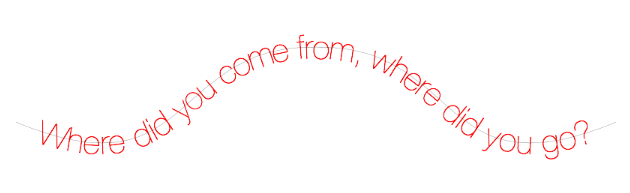
let bezierPath = UIBezierPath()
bezierPath.moveToPoint(CGPointMake(50, 50+150))
bezierPath.addCurveToPoint(CGPointMake(50+200, 50), controlPoint1: CGPointMake(50+10, 50+75), controlPoint2: CGPointMake(50+100, 50))
bezierPath.addCurveToPoint(CGPointMake(50+400, 50+150), controlPoint1: CGPointMake(50+300, 50), controlPoint2: CGPointMake(50+400-10, 50+75))

let attributedString = NSAttributedString(string: "Where did you come from, where did you go?", attributes: [
	NSFontAttributeName: UIFont(name: "HelveticaNeue-UltraLight", size: 60) ?? UIFont.systemFontOfSize(30),
	NSForegroundColorAttributeName: UIColor.redColor()
	])
let bezierString = BezierString(bezierPath: bezierPath)

// generate an image
let img:UIImage! = bezierString.imageWithAttributedString(attributedString)

// or render onto a preexisting context
bezierString.drawAttributedString(attributedString, toContext: UIGraphicsGetCurrentContext())
Alternatively, in place of UILabel, use a UIBezierLabel instance, assign a bezierString or bezierPath and use as a normal UILabel
// create a label, either in code or Interface Builder
let label = UIBezierLabel(frame: CGRectZero)

// set the properties
label.bezierPath = bezierPath
label.textAlignment = .Center
label.text = "Where did you come from, where did you go?"
label.sizeToFit()
- Xcode 7.0+
- iOS 7.0+