Skip to content

About

No description, website, or topics provided.

Resources

Stars

0 stars

Watchers

0 watching

Forks

Latest commit


History

4 Commits

Folders and files

NameName
Last commit message
Last commit date


Repository files navigation

專案上傳與下載提示與步驟

下載專案

  1. 於要下載的資料夾目錄(或桌面)內點選滑鼠右鍵,選擇Git Bash Here開啟 Git 終端機。
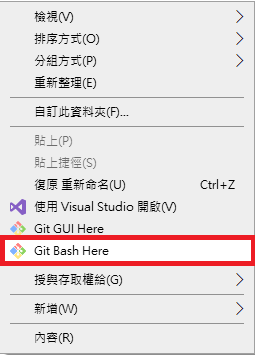
    開啟終端機

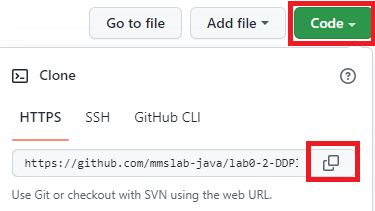
  2. 於 Github 網頁上複製遠端資料庫的網址。

    取得遠端資料庫網址

  3. 於終端機內輸入以下指令,並貼上遠端資料庫的網址。

    git clone [遠端資料庫網址黏貼處]

上傳專案

  1. 專案編輯完成後,於專案的根目錄點選滑鼠右鍵,選擇Git Bash Here開啟 Git 終端機。
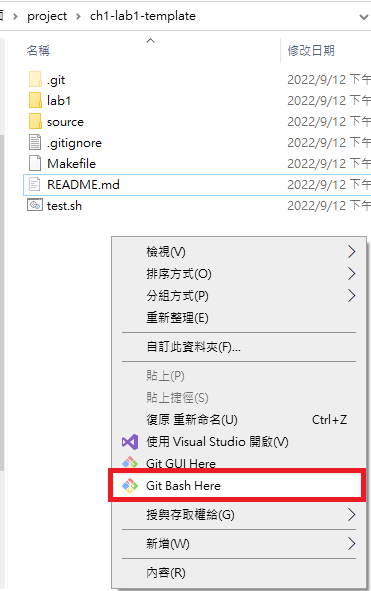
    開啟終端機

  2. 於終端機中依序輸入以下指令,將程式上傳至遠端資料庫。

    git add .
    git commit -m "[修改的內容描述]"
    git push origin master

疑難排解

  • 未設定 git 使用者資訊(name/email) 輸入以下指令設定使用者資訊
    git config --global user.name "Your Name"
    git config --global user.email [email protected]

About

No description, website, or topics provided.

Resources

Stars

0 stars

Watchers

0 watching

Forks

Releases

Packages

Contributors

Languages