



-blue)
A PowerShell module for automating and scripting against the Pi-hole v6 REST API — DNS blocking control, allow/deny lists, groups, stats, and server actions, all from PowerShell.
This module targets Pi-hole's v6 API only. It will not work against Pi-hole v5 or earlier.
- Features
- Requirements
- Installation
- Getting an API Password
- Quick Start
- Command Reference
- Example Output
- Testing
- Contributing
- License
- Enable/disable DNS blocking, optionally for a set duration
- Manage allow/deny lists and groups
- Trigger server actions: flush network table, restart DNS, update gravity
- Pull stats, summaries, and diagnostic info
- Every function authenticates and closes its own session automatically — no manual login/logout calls needed
- PowerShell 7.0+ (Core edition) — the module refuses to load on Windows PowerShell 5.1 or other editions
- A reachable Pi-hole v6 server and an API app password
Install from the PowerShell Gallery:
Install-Module -Name PiHoleShell -Scope CurrentUser
Import-Module -Name PiHoleShell-
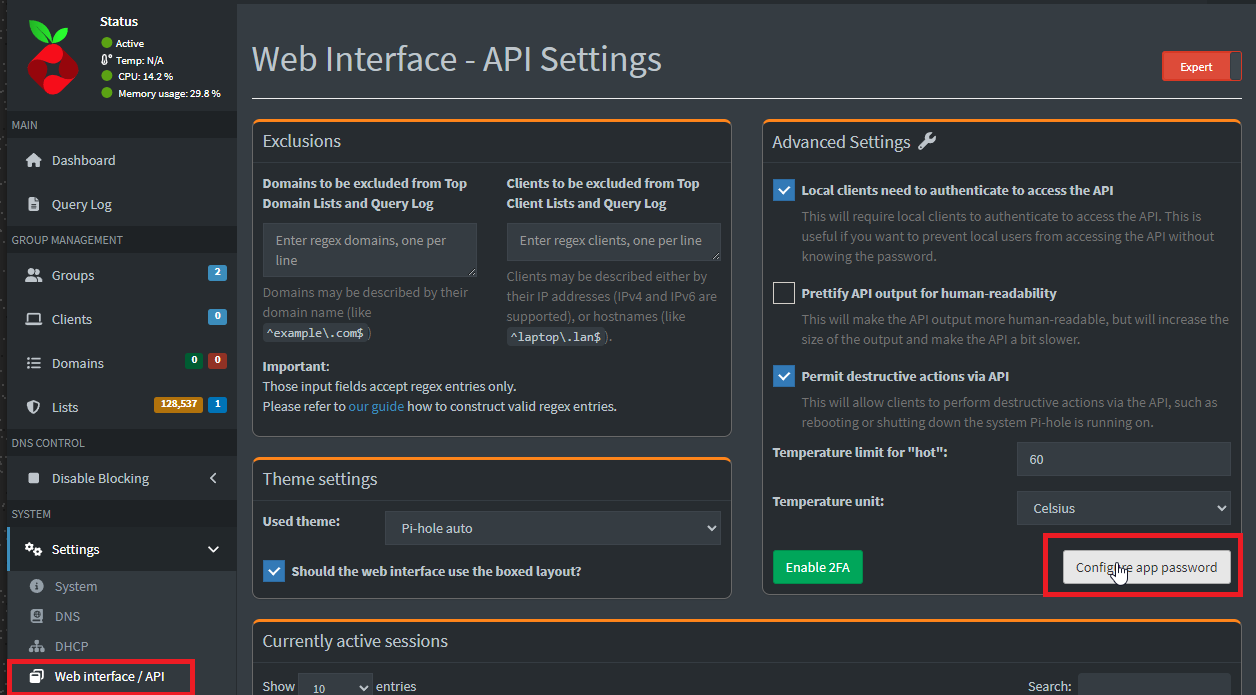
Log into your Pi-hole web interface, then go to Web Interface / API settings and select Configure app password.
-
Copy the generated password, then click Enable new app password.
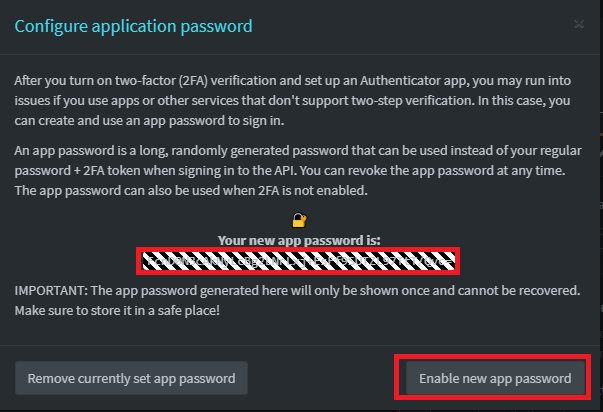
Keep this password secret — anyone with it has full API access to your Pi-hole.
$PiHoleServer = "https://pihole.example.com:8489"
$Password = "<your-app-password>"

# Check whether blocking is currently enabled
Get-PiHoleDnsBlockingStatus -PiHoleServer $PiHoleServer -Password $Password -IgnoreSsl:$true

# Disable blocking for 5 minutes, then it re-enables automatically
Set-PiHoleDnsBlocking -PiHoleServer $PiHoleServer -Password $Password -Blocking False -TimeInSeconds 300 -IgnoreSsl:$true
Every function accepts the same core parameters:
| Parameter | Description |
|---|---|
-PiHoleServer |
Base URL of your Pi-hole, e.g. https://pihole.example.com:8489 |
-Password |
The app password from Getting an API Password |
-IgnoreSsl |
Skip TLS certificate validation (useful for self-signed certs) |
-RawOutput |
Return the unmodified API response instead of a formatted object |
Functions marked 🚧 are still under active development — signatures and output shapes may change. This section is generated from the module's actual exported functions by tools/Update-ReadmeCommandReference.ps1, and kept in sync automatically on every develop → main pull request — don't hand-edit the block below.
See docs/EXAMPLES.md for real, captured output from every function below.
| Function | Description |
|---|---|
Invoke-PiHoleFlushLogs |
Flushes the DNS logs |
Invoke-PiHoleFlushNetwork |
Flushes the network table. This includes removing both all known devices and their associated addresses. |
Restart-PiHoleDnsService |
Restarts the pihole-FTL service |
Update-PiHoleActionsGravity |
Update Pi-hole's adlists by running pihole -g |
| Function | Description |
|---|---|
Get-PiHoleDnsBlockingStatus |
Get Pi-hole's current DNS blocking status |
Set-PiHoleDnsBlocking |
Enable or disable Pi-hole's DNS blocking |
| Function | Description |
|---|---|
Get-PiHoleGroup |
Get groups |
New-PiHoleGroup |
Creates a new group |
Remove-PiHoleGroup |
Delete one or more groups |
Update-PiHoleGroup |
Update a group |
| Function | Description |
|---|---|
Add-PiHoleList |
Add a new list |
Get-PiHoleList |
Get lists |
Remove-PiHoleList |
Remove a list |
Search-PiHoleListDomain |
No description yet |
Update-PiHoleList |
Update a list |
| Function | Description |
|---|---|
Get-PiHoleDomain |
Get domains |
New-PiHoleDomain |
Add a new domain |
Remove-PiHoleDomain |
Remove a domain |
Update-PiHoleDomain |
Update a domain |
| Function | Description |
|---|---|
Get-PiHoleClient |
Get clients |
Get-PiHoleClientSuggestion |
Get client suggestions |
New-PiHoleClient |
Add a new client |
Remove-PiHoleClient |
Remove a client |
Update-PiHoleClient |
Update a client |
| Function | Description |
|---|---|
Get-PiHoleQuery |
Get queries |
Get-PiHoleStatsDatabaseQueryType |
Get query types (long-term database) |
Get-PiHoleStatsDatabaseSummary |
Get database content details |
Get-PiHoleStatsDatabaseTopClient |
Get top clients (long-term database) |
Get-PiHoleStatsDatabaseTopDomain |
Get top domains (long-term database) |
Get-PiHoleStatsDatabaseUpstream |
Get metrics about Pi-hole's upstream destinations (long-term database) |
Get-PiHoleStatsQuerySuggestions |
Get query filter suggestions |
Get-PiHoleStatsQueryType |
Get query types Request a breakdown of query types (A, AAAA, ...) |
Get-PiHoleStatsRecentBlocked |
Request most recently blocked domain |
Get-PiHoleStatsSummary |
Get overview of Pi-hole activity Request various query, system, and FTL properties |
Get-PiHoleStatsTopClient |
Get top clients Request the top clients (by query count) |
Get-PiHoleStatsTopDomain |
Get top domains Request the top domains (by query count) |
Get-PiHoleStatsUpstream |
Get metrics about Pi-hole's upstream destinations |
| Function | Description |
|---|---|
Add-PiHoleConfigArrayItem |
Add config array item |
Get-PiHoleConfig |
Get current configuration of Pi-hole |
Get-PiHoleConfigProperty |
Get special properties of your Pi-hole configuration |
Get-PiHoleDhcpLease |
Get currently active DHCP leases |
Get-PiHoleHistory |
Get activity graph data |
Get-PiHoleHistoryClient |
Get per-client activity graph data |
Get-PiHoleHistoryDatabase |
Get activity graph data (long-term data) |
Get-PiHoleHistoryDatabaseClient |
Get per-client activity graph data (long-term data) |
Get-PiHoleInfoClient |
Get information about the requesting client |
Get-PiHoleInfoDatabase |
Get info about the long-term database |
Get-PiHoleInfoFtl |
Get info about various FTL parameters |
Get-PiHoleInfoHost |
Get information about the host system |
Get-PiHoleInfoLogin |
Get login page information |
Get-PiHoleInfoMessage |
Get Pi-hole diagnosis messages |
Get-PiHoleInfoMessageCount |
Get count of Pi-hole diagnosis messages |
Get-PiHoleInfoMetrics |
Get metrics info |
Get-PiHoleInfoSensors |
Get info about various sensors |
Get-PiHoleInfoSystem |
Get info about various system parameters |
Get-PiHoleInfoVersion |
Get Pi-hole version |
Get-PiHoleLogDnsmasq |
Get DNS log content |
Get-PiHoleLogFtl |
Get FTL log content |
Get-PiHoleLogWebserver |
Get webserver log content |
Get-PiHoleNetworkDevice |
Get info about the devices in your local network as seen by your Pi-hole |
Get-PiHoleNetworkGateway |
Get info about the gateway of your Pi-hole |
Get-PiHoleNetworkInterface |
Get info about the interfaces of your Pi-hole |
Get-PiHoleNetworkRoute |
Get info about the routes of your Pi-hole |
Get-PiHolePadd |
Get summarized data for PADD |
Get-PiHoleTeleporterDownload |
Export Pi-hole settings |
Remove-PiHoleConfigArrayItem |
Delete config array item |
Remove-PiHoleDhcpLease |
Remove a DHCP lease |
Remove-PiHoleInfoMessage |
Delete a Pi-hole diagnosis message |
Remove-PiHoleNetworkDevice |
Delete a device from the network table |
Set-PiHoleConfig |
Change configuration of your Pi-hole |
Session handling is automatic for every command above, but these are available for managing sessions directly:
| Function | Description |
|---|---|
Get-PiHoleAuthStatus |
Check if authentication is required |
Get-PiHoleAuthTotp |
Suggest new TOTP credentials |
Get-PiHoleCurrentAuthSession |
List of all current sessions including their validity and further information about the client such as the IP address and user agent. |
Remove-PiHoleAuthSession |
Using this endpoint, a session can be deleted by its ID. |
The module ships with two kinds of Pester tests under tests/:
-
Unit tests (
*.Tests.ps1) mock the API and run anywhere:Invoke-Pester -Path .\tests -ExcludeTagFilter Integration
-
Integration tests (
*.Integration.Tests.ps1) run against a real Pi-hole server and are skipped automatically unless configured. To run them, copytests/IntegrationConfig.example.ps1totests/IntegrationConfig.local.ps1(gitignored) and fill in your server URL and app password, then run:Invoke-Pester -Path .\tests -TagFilter Integration
These make real changes on the target server (they flush the network table, restart DNS, and rebuild gravity) — point them at a test instance, not production, if you'd rather not disrupt it.
This project is still early and growing. Issues, suggestions, and pull requests are welcome — see the 🚧 items in the Command Reference above for functions that could use testing or polish.