


Delta Arrow Reader is a fast, memory-efficient Delta Lake reader.
- Get results faster. Spend less time downloading and processing data your query doesn't need.
- Use less memory. Process results as they arrive, without keeping the whole result in RAM.
- Skip the cluster setup. Read and filter Delta tables in your own application, without running Spark.
Faster than delta-rs, DuckDB, Polars, and single-machine Spark in all eight of our filtered-read benchmarks, using TPC-H-derived tables with about 60 million rows each. Results compare median times for the first complete query after table initialization, excluding startup.
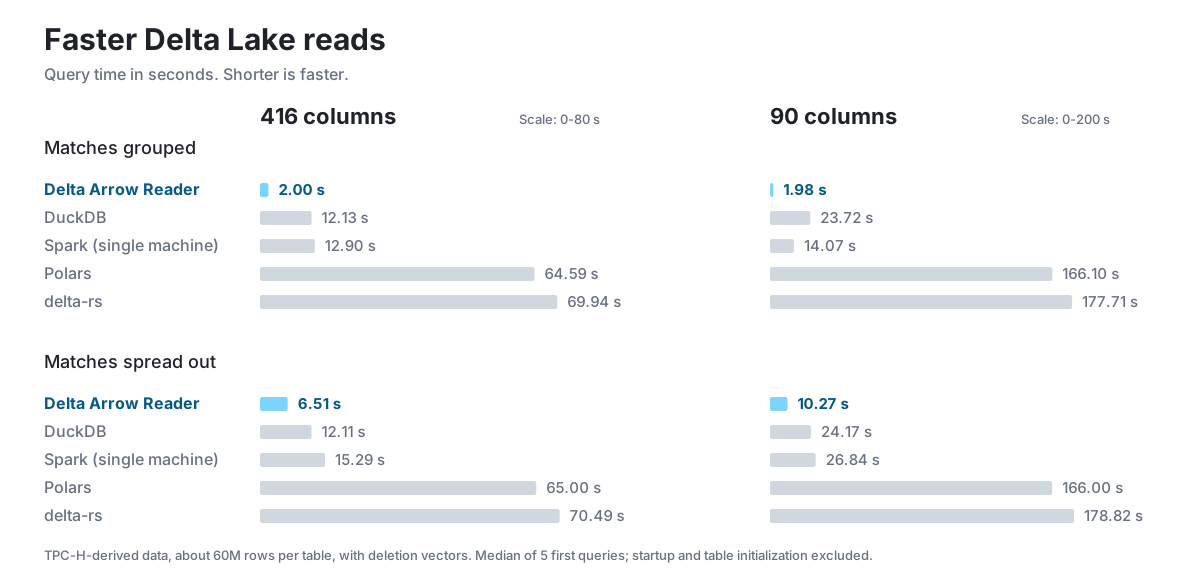
Showing four cases using deletion vectors to mark deleted rows. Full results include all eight cases, with and without deletion vectors.
Install from PyPI (Python 3.10 or later):
pip install delta-arrow-readerRead tables as PyArrow batches or query them with SQL. Start with the Python quickstart or browse the Python API reference. See installation for supported platforms.
Install the reader and Tokio (Rust 1.94 or later):
cargo add delta-arrow-reader
cargo add tokio --features macros,rt-multi-thread
Read up to 100 rows from an existing Delta table:
use delta_arrow_reader::DeltaTableBuilder;

#[tokio::main]
async fn main() -> Result<(), Box<dyn std::error::Error>> {
    let table = DeltaTableBuilder::new("/path/to/delta-table")
        .load_table()
        .await?;
    let scan = table.scan().with_limit(100).build().await?;
    let mut batches = scan.into_stream();

    while let Some(batch) = batches.next_batch().await? {
        println!("Read {} rows", batch.num_rows());
    }
    Ok(())
}
Save this as src/main.rs, replace the table path, and run cargo run.
Read a table or query with SQL. See the Rust API reference for types and methods.
The Python package includes the delta-arrow-reader command. You can also
install a standalone dar binary or container.
The CLI returns snapshot
metadata as JSON and rows as an Arrow IPC stream.
For development and benchmark setup, see the repository documentation.