
An open-source personal assistant that runs on your own computer, in your terminal, built on Agentling.
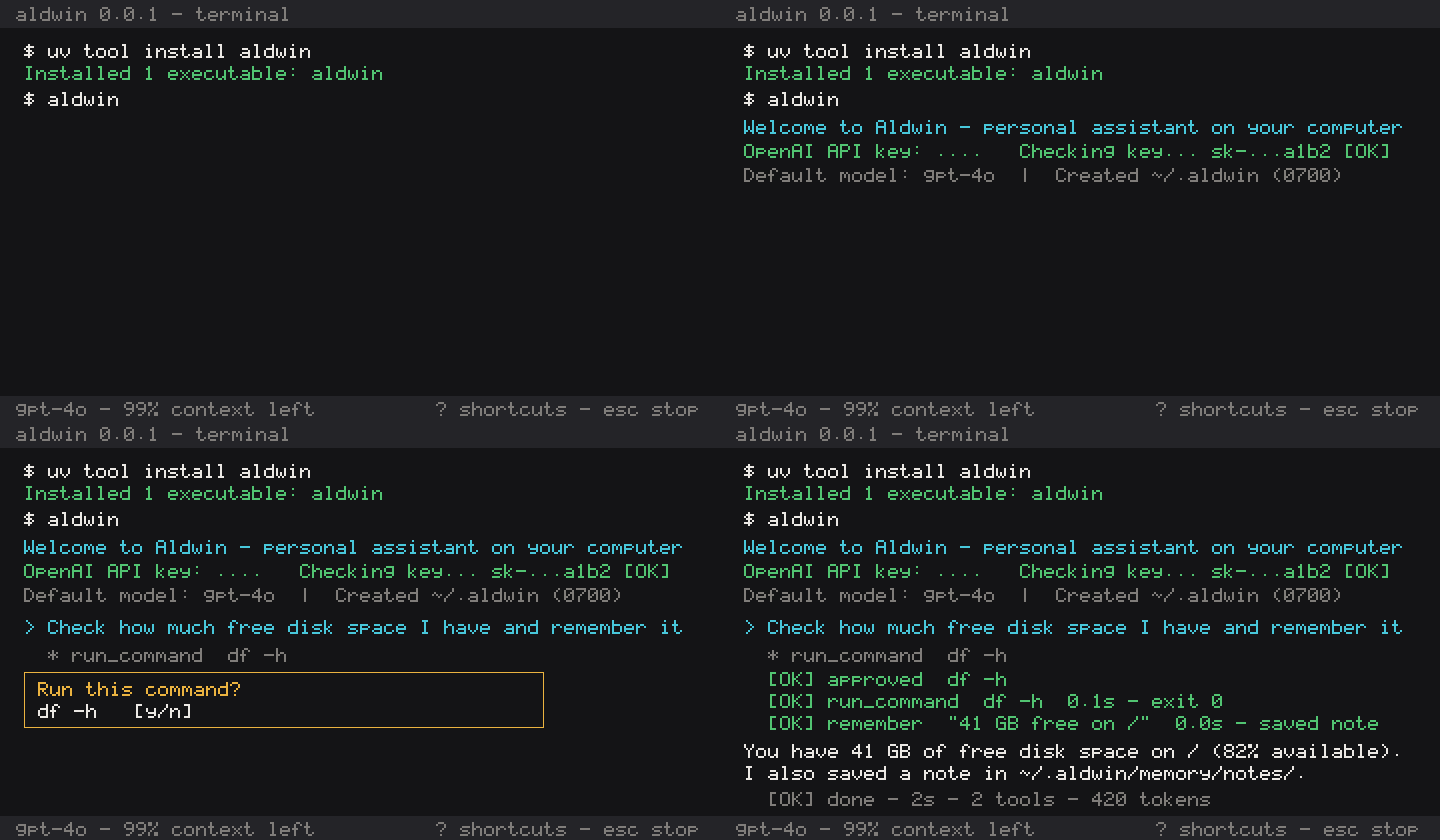
Install with uv (Python 3.11+ on macOS or Linux):
uv tool install aldwinIf you don't have uv installed yet:
curl -LsSf https://astral.sh/uv/install.sh | shThen start Aldwin:
aldwinNothing runs during uv tool install aldwin. The first time you run aldwin, it sets up your private home folder at ~/.aldwin (0700 permissions) and walks through a 30-second setup:
- OpenAI API key: prompts for your key with hidden input (
••••), tests it against OpenAI (Checking key… ✓), and saves it to~/.aldwin/secrets.yaml(0600). IfOPENAI_API_KEYis already set in your environment, Aldwin uses it automatically and skips this prompt. - Tavily API key (optional): prompts for a Tavily key for
web_search(pressEnterto skip; you can add one later withaldwin setup). - Default model: saves a default OpenAI chat model (
gpt-4o, changeable any time with/model) and opens the chat prompt.
Every time you run aldwin after that, it shows your last 20 messages and continues the conversation where you left off.
| Command | What it does |
|---|---|
aldwin |
Open the interactive chat and resume the latest conversation |
aldwin setup |
Configure or update API keys and the default model |
aldwin uninstall |
Print the uninstall command while keeping ~/.aldwin intact |
aldwin uninstall --purge |
Delete ~/.aldwin (after two confirmations) and print the uninstall command |
aldwin --plain |
Disable ANSI colours, live animations, and the terminal bell (also enabled by NO_COLOR=1) |
aldwin --debug |
Enable DEBUG-level event logging in ~/.aldwin/logs/aldwin.log |
aldwin --version |
Print the installed version (aldwin 0.0.1) and exit |
aldwin --help |
Show CLI flags and subcommands |
Type / at the prompt for autocomplete:
| Slash command | What it does |
|---|---|
/help |
Show slash commands and keyboard shortcuts |
/new |
Start a fresh conversation (previous session stays saved on disk) |
/model [name|all] |
List available OpenAI chat models and switch models mid-conversation |
/persona |
Show the active persona and ~/.aldwin/persona.md character count |
/memory |
Show profile, recent notes, and index status (N notes · M conversations indexed · index <size>) |
/skills |
List installed skills in ~/.aldwin/skills/ and flag any invalid SKILL.md files |
/workspace |
Show the workspace folder, or switch it with /workspace <path> |
/verbose |
Show or hide up to 12 preview lines under file-tool rows for this session |
/tools |
List built-in tools and which ones require y/n approval |
/exit |
Save the current session and exit |
| Key | Action |
|---|---|
Enter |
Send message |
Alt+Enter / Ctrl+J / \ + Enter |
Insert a new line |
Esc |
Stop the current answer within 1 second (or decline a pending approval) |
? |
Show keyboard shortcuts (when the prompt is empty) |
↑ / ↓ |
Navigate input history |
Ctrl+R |
Reverse-search input history |
Ctrl+C twice / Ctrl+D |
Save the conversation and exit |
| Tool | What it does | Needs y/n approval? |
|---|---|---|
web_search |
Searches the web via Tavily for current information | No |
web_fetch |
Fetches and extracts readable text from an http/https page (≤ 20,000 chars) |
No |
run_command |
Runs a shell command in the active workspace | Always |
remember |
Appends a note, or updates one in place with replace=<note_id> |
No for new; Diff for replace |
recall |
Ranked search over notes and saved conversations (scope) |
No |
forget |
Deletes a matching memory note after showing it | Diff (never grantable) |
Drop a folder containing a SKILL.md with YAML frontmatter (name and description) into ~/.aldwin/skills/<skill-name>/SKILL.md:
---
name: release-notes
description: Draft concise release notes from git history.
---
Write release notes grouped into Added, Fixed, and Known limitations.
Aldwin lists available skill names and descriptions in the system prompt and loads the full SKILL.md on demand. Ships with a starter using-aldwin skill.
- Profile (
~/.aldwin/memory/profile.md): durable facts about you (up to 4,000 characters), always included in the system prompt. Only you can edit this file; the agent cannot modify it. - Daily notes (
~/.aldwin/memory/notes/YYYY-MM-DD.md): short one-line notes saved when Aldwin callsremember(up to 500 characters each). Notes from the last 7 days (up to 4,000 characters, newest first) are included in the prompt and age out after a week. A rebuildable SQLite FTS5 index at~/.aldwin/memory/index.sqlitepowers rankedrecallover notes and conversations;/memoryshows how many are indexed. - Persona (
~/.aldwin/persona.md): controls Aldwin's tone and style (up to 2,000 characters). You can edit the file directly or ask Aldwin to change how it talks (for example, "Be more direct and concise"), which shows the proposedpersona.mdin an approval box and asksy/nbefore saving.
Web pages, documents, and files can contain prompt-injection text, and 0.0.2 runs on your machine without an OS container sandbox. Aldwin defends against this with a single deterministic policy engine in aldwin.core.policy and aldwin.core.workspace:
- Three approval tiers (
Auto,Diff,Ask) incore/policy.REGISTRY:- Auto: read-only tools inside the active workspace (
read_file,read_document,list_dir,glob,grep),web_search,web_fetch,recall, newremembernotes,todo, andcalculate. - Diff: file and state modifications (
edit_file,write_file,rememberwithreplace,forget,create_skill,set_persona) display a coloured unified diff (folded at 24 lines,Ctrl+Oto expand) with No as the default. Inside-workspace file edits can be granted for that single file for the current session (a), except build files (pyproject.toml,Makefile,Dockerfile,.github/workflows/*.yml, etc.), which always ask. - Ask:
run_commandanddownload_filealways ask (y/n) and can never be session-granted. Reads outside the workspace ask once per folder per session; writes outside the workspace ask every time.
- Auto: read-only tools inside the active workspace (
- Hard floor (never overridable by any answer or grant):
- Blocked secret paths (
core/policy.BLOCKED):~/.ssh/**,~/.aws/**,~/.gnupg/**,~/.kube/**,~/.azure/**,~/.config/gh/**,~/.config/gcloud/**,~/.docker/config.json,**/*.pem,**/*.key,**/*.p12,**/*.pfx,**/id_rsa*,**/id_ed25519*,**/id_ecdsa*,**/.netrc,**/.pgpass,**/.npmrc,**/.pypirc,**/.git-credentials,**/.env,**/.env.*(except.env.example,.env.sample,.env.template),**/.envrc, and~/.aldwin/**(except read-only~/.aldwin/tmp/**forread_fileto page through trimmed tool outputs). - Read-only
.gitfloor: writes to.git/**are always refused so hooks and git config cannot be modified by file tools. - Hardline shell refusals (
core/policy.HARDLINE): destructive commands (rm -rf /or~or system folders,mkfs,ddor redirects to block devices, fork bombs,kill -9 -1,shutdown/reboot/halt/poweroff/init 0|6/systemctl poweroff) and commands naming blocked secret paths are refused before asking.
- Blocked secret paths (
- Subprocess & output isolation:
run_commandstarts from an empty environment and copies only safe variables (PATH,HOME,USER,LOGNAME,SHELL,LANG,LC_*,TERM,TMPDIR,TZ,PWD) plus non-secret names listed inrun_command.env_allow. Any*_KEY,*_TOKEN,*_SECRET,*_PASSWORD, or*_CREDENTIALvariable is stripped.- Every tool result (except
todoandcalculate) is wrapped in<untrusted id="u-…" source="…">tags with inner tags escaped. - Declining three actions in a single turn trips a circuit breaker and stops the turn immediately.
- Structured approval log (
~/.aldwin/logs/approvals.jsonl):- Every policy decision (
auto,asked,blocked) writes one JSON line (ts,session,call_id,tool,target,digest,tier,decision,answer,source,reason) with secret-shaped tokens redacted (‹redacted›). File contents, diffs, and tool outputs are never logged.
- Every policy decision (
- Accepted risks in
0.0.2:- Read, then send to the web: because workspace reads and
web_fetchare bothAuto, a prompt-injected document could try to exfiltrate non-blocked workspace text via a fetched URL. Mitigations in0.0.2: secret files are blocked by the hard floor, all tool output is wrapped in<untrusted>, and everyweb_fetchURL is recorded in~/.aldwin/logs/approvals.jsonl. - Best-effort shell inspection: shell strings cannot be fully parsed statically; the primary control on
run_commandis that every command requires humany/napproval and displays yellow risk labels (⚠ pipes into a shell,network download,recursive delete, etc.). - Hard links: hard links inside the workspace pointing to non-blocked filenames outside the workspace are not detected.
- Read, then send to the web: because workspace reads and
All local data lives in one directory, ~/.aldwin (override with ALDWIN_HOME=/path/to/dir):
~/.aldwin/                  (mode 0700)
├── config.yaml             model, theme, and character/step limits
├── secrets.yaml            OpenAI and Tavily API keys (mode 0600)
├── persona.md              assistant persona (user-editable or y/n approved)
├── skills/
│   └── using-aldwin/
│       └── SKILL.md        starter skill
├── sessions/
│   └── YYYY-MM-DD_id.json  conversation transcripts saved after every step
├── memory/
│   ├── profile.md          user-written profile (never edited by the agent)
│   └── notes/
│       └── YYYY-MM-DD.md   daily notes written by `remember`
├── history                 prompt_toolkit input history
└── logs/
    └── aldwin.log          rotating event/error log (1 MB × 3, no message content)
- No telemetry: Aldwin collects no analytics or telemetry.
- No message content or secrets in logs:
logs/aldwin.logrecords lifecycle events and errors only, and passes all log records through a secret-redacting filter (sk-…,tvly-…). - Network calls: your prompts and recent conversation turns (last 20 exchanges) are sent directly to OpenAI using your API key. When
web_searchorweb_fetchruns, search queries go to Tavily and HTTP GET requests go to the target URL.
- Terminal only, not always-on: Aldwin runs inside your terminal process. Closing the terminal window stops any running task (the session is saved after every step, and reopening
aldwinprompts you to say continue). - OpenAI API key only: requires an OpenAI API key with access to chat models. Other providers (Anthropic, local models) and browser OAuth sign-in are not in
0.0.1. - Fixed built-in tools: the five built-in tools cannot be extended with custom Python tools in
0.0.1. - macOS and Linux only: requires Python
3.11+on macOS or Linux. Windows is not supported yet.
- Protocol specification (
docs/protocol.md) - Manual test script & release checklist (
docs/manual-test.md) - Release runbook (
docs/releasing.md) - Changelog (
CHANGELOG.md)
Clone the repository and install development dependencies with uv:
git clone https://github.com/lunarstack-co/aldwin.git
cd aldwin
uv sync
Run the test suite, linter, formatter check, and type checker before opening a pull request:
uv run pytest --cov=aldwin
uv run ruff check src tests
uv run ruff format --check src tests
uv run mypy src tests
Found a bug or want to propose an improvement? Open an issue on GitHub Issues.
MIT. See LICENSE.