
RTCTraining is a Local/LAN WebRTC learning and experiment project.
It runs a local WebRTC service, a local Dashboard service, collects browser
getStats() samples, and exports CSV data for repeatable RTC experiments.
- WebRTC experiment page screenshot.
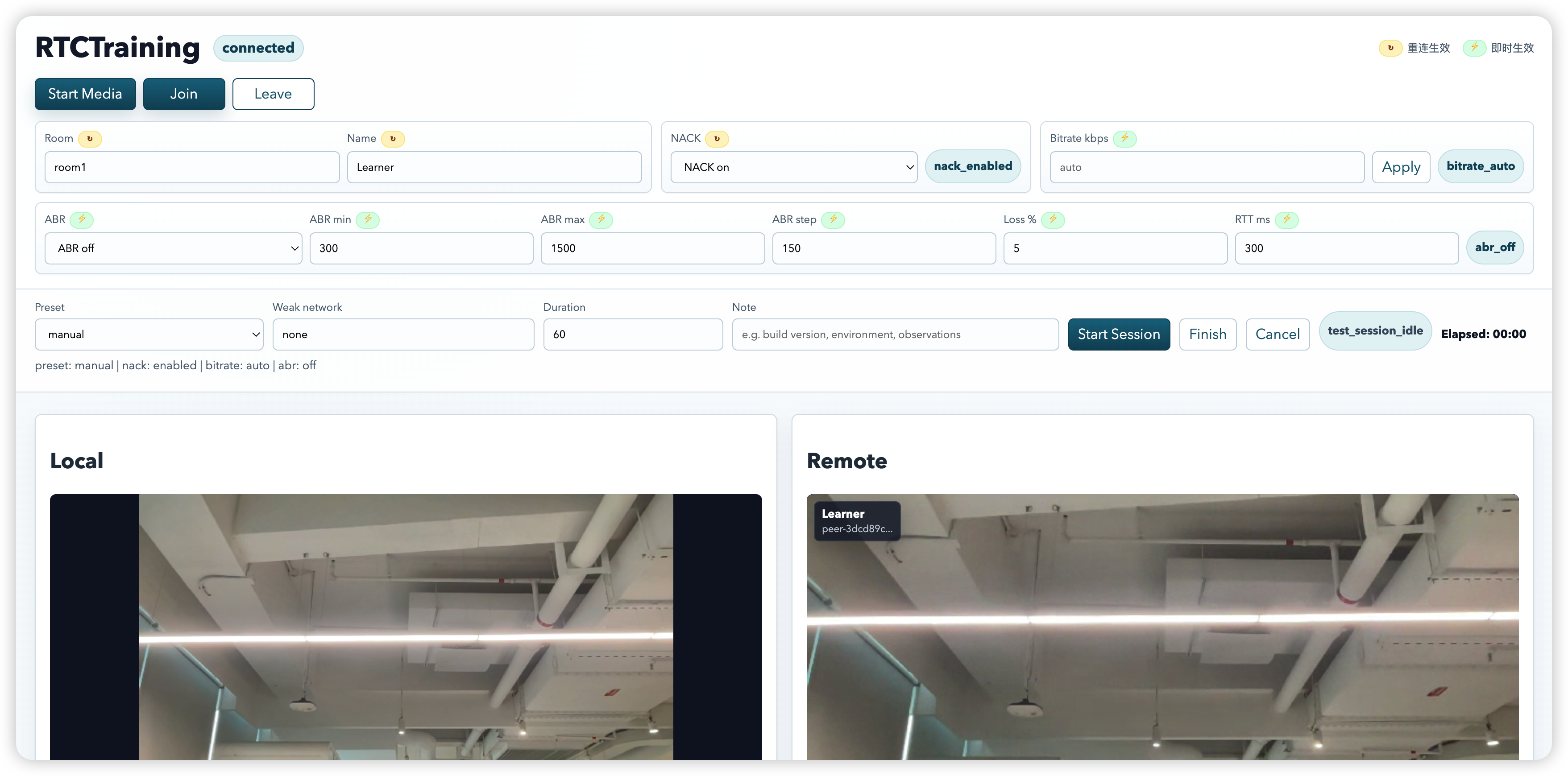
- Runs a local browser WebRTC experiment page.
- Connects peers through local HTTP polling signaling.
- Collects browser
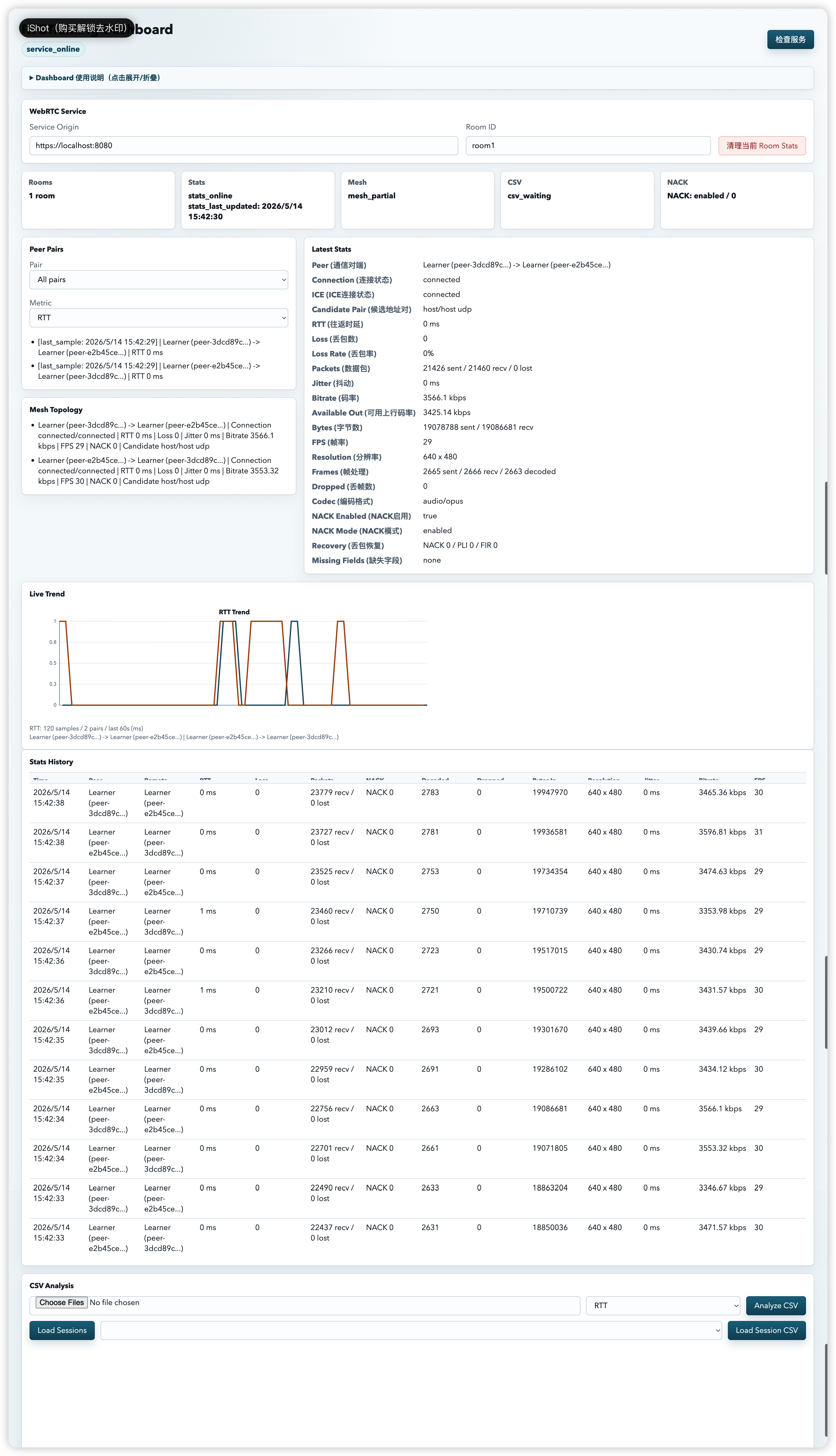
getStats()samples. - Shows live room, peer pair, and metric state in Dashboard.
- Exports experiment sessions as CSV files.
- Compares multiple CSV files for NACK, ABR, bitrate, loss, jitter, FPS, and RTT.
- Provides a lightweight smoke harness for service startup and API checks.
RTCTraining is designed for trusted local development networks. It is not a production chat system and does not include accounts, authentication, TURN, SFU, MCU, recording, or long-term storage.
- Python 3.12 recommended.
- Desktop Chrome for browser experiments.
- Local camera and microphone permission, or Playwright fake media for E2E.
- A trusted local or LAN network.
python3 -m venv .venv
.venv/bin/python -m pip install -r requirements.txt
cp .env.example .env
make cert
make harness-smoke
The app reads RTC_* environment variables directly from the shell. The .env
file is a reference for local configuration; load it with your shell or tooling
when you want to override defaults.
Start each service in a separate terminal:
make run-webrtcmake run-dashboardOpen:
- WebRTC:
https://localhost:8080 - Dashboard:
http://127.0.0.1:8081
The WebRTC page uses a self-signed local certificate. Browser certificate warnings are expected for local development.
- Open the WebRTC page in two or three desktop Chrome tabs or machines.
- Use the same room id and different display names.
- Join the room from each page.
- Choose experiment controls such as NACK, ABR, or manual bitrate before the session starts.
- Click
Start Session. - Watch live peer-pair metrics in Dashboard.
- Finish the session and download CSV files.
- Load multiple CSV files in Dashboard to compare runs.
This workspace may include local sample CSV files under data/ for trying the
Dashboard CSV comparison flow:
data/20260514-075916Z_alice_peer-e2b45cee-2e03-45fe-b17b-bb377d2b7120_to_peer-3dcd89cc-eb68-4fc8-bbff-d01c2d8298df_bitrate_300_nack-enabled_abr-off_bitrate-300kbps_16s.csvdata/20260514-080003Z_alice_peer-e2b45cee-2e03-45fe-b17b-bb377d2b7120_to_peer-3dcd89cc-eb68-4fc8-bbff-d01c2d8298df_bitrate_800_nack-enabled_abr-off_bitrate-800kbps_16s.csv
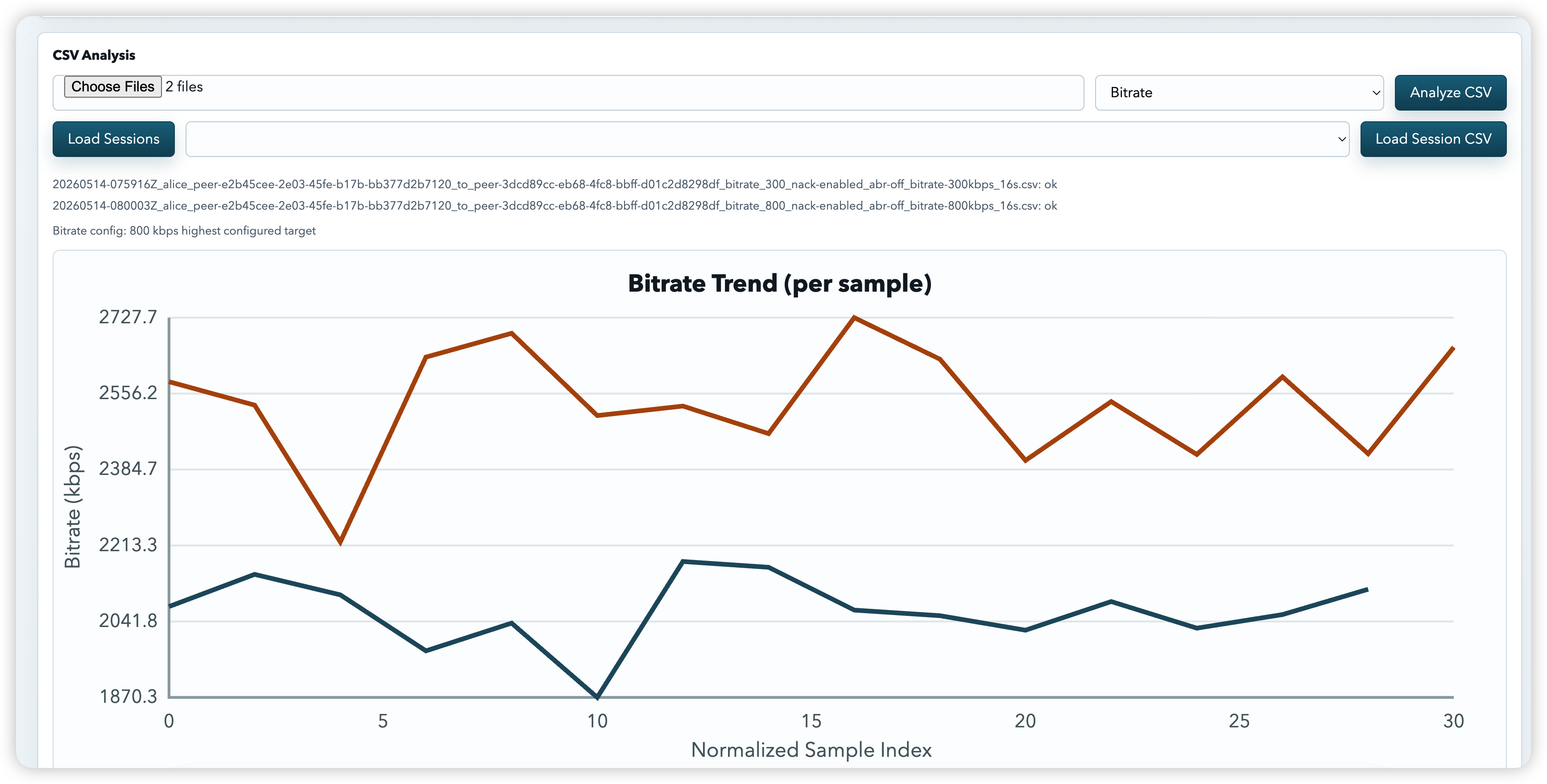
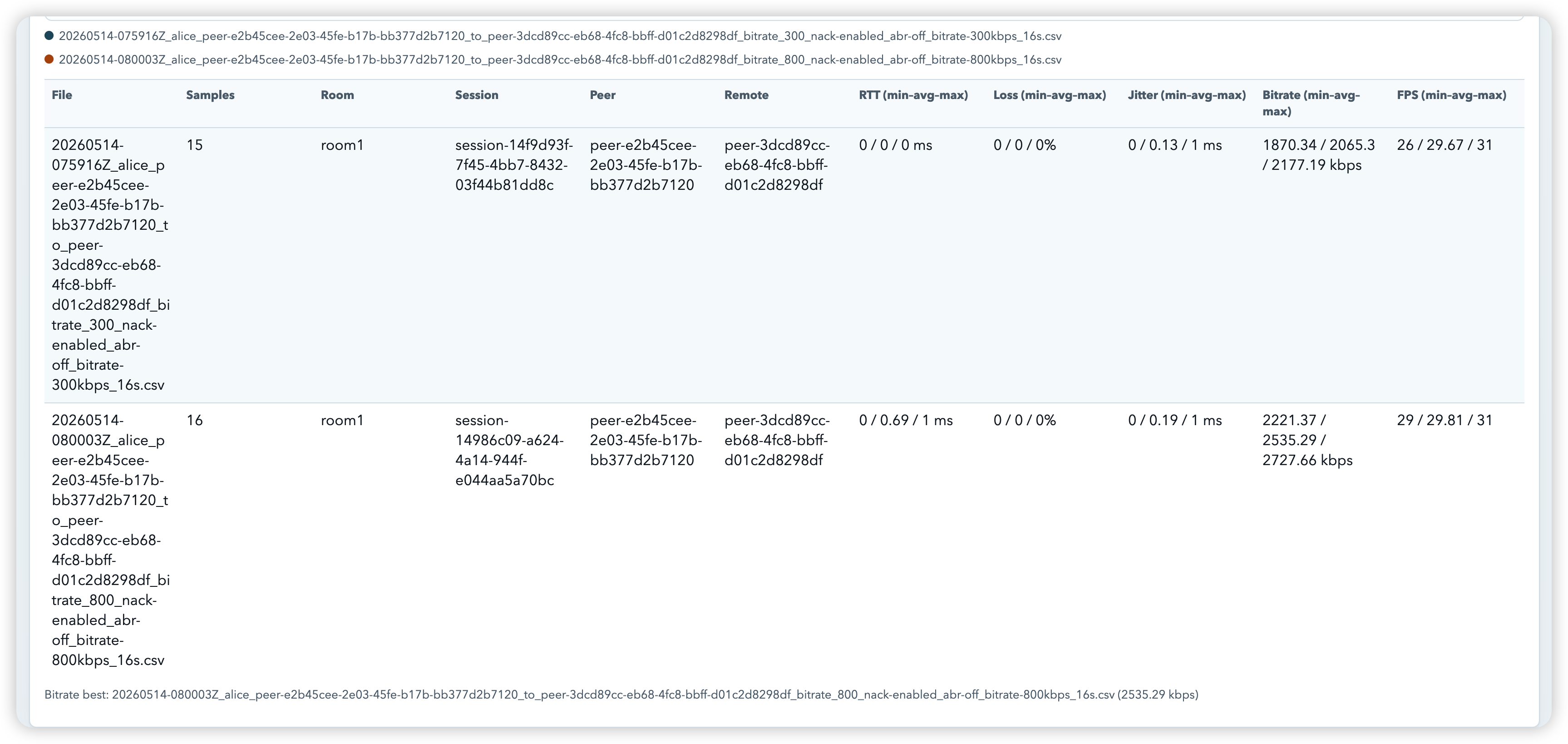
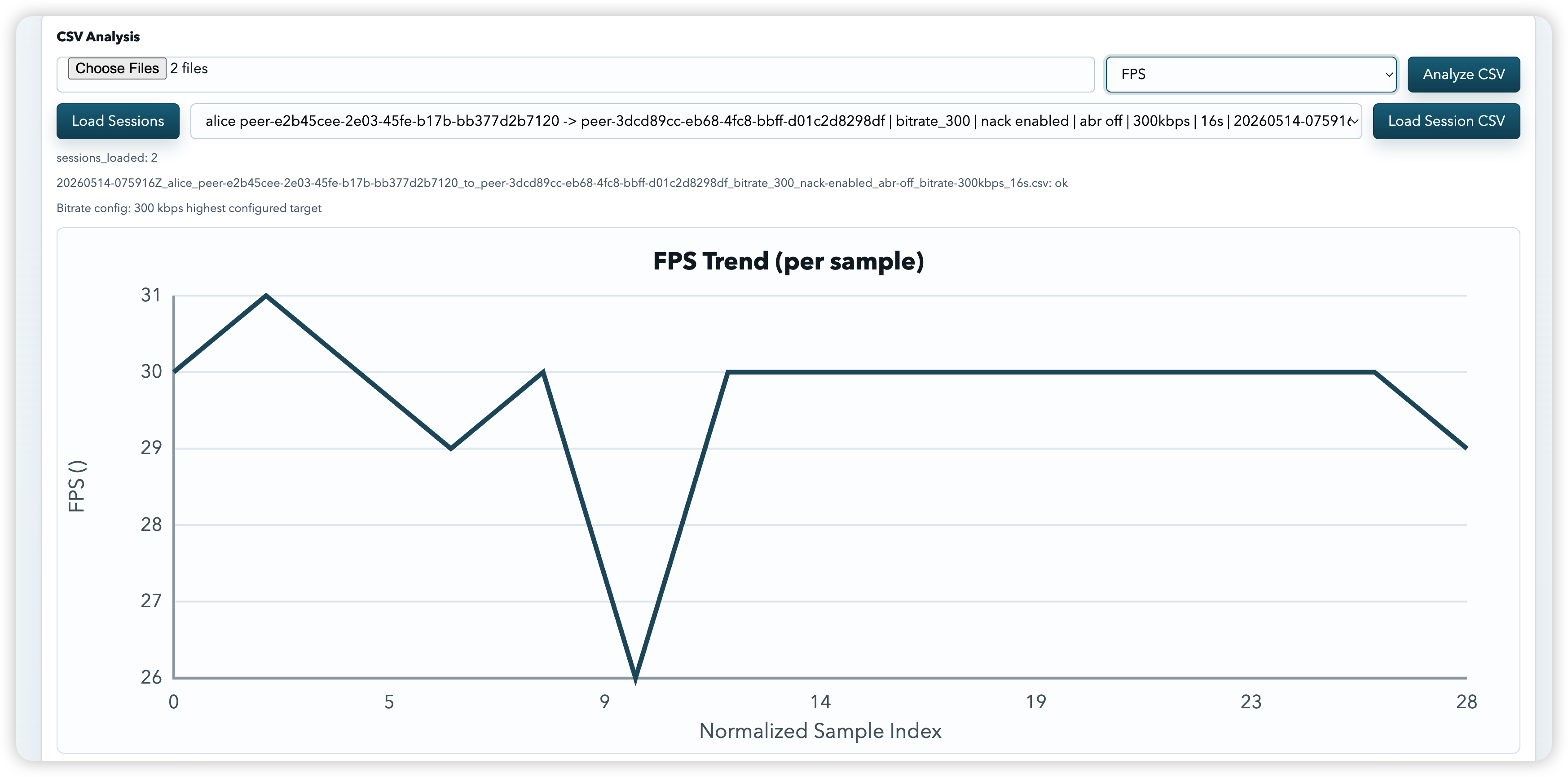
Use them to compare the same peer direction with NACK enabled, ABR off, and
manual bitrate set to 300 kbps versus 800 kbps.
To inspect them:
- Open Dashboard at
http://127.0.0.1:8081. - In
CSV Analysis, clickChoose Files. - Select both CSV files from
data/. - Choose a metric such as
Bitrate,RTT,Loss,Jitter, orFPS. - Click
Analyze CSV.
The data/ directory is local generated runtime data and is ignored by Git.
If the files are not present in a fresh checkout, run two local sessions and
save the exported CSV files there.
-
Dashboard live metrics screenshot.
-
Dashboard CSV comparison screenshot.
-
Dashboard CSV comparison data.
-
Dashboard CSV local session data.
Run a lightweight service-level smoke check:
make harness-smokeThe harness starts WebRTC Service and Dashboard Service, checks both pages, verifies JSON API envelopes, checks Dashboard proxy access, verifies CSV export headers, and shuts the services down.
By default it uses ephemeral local ports to avoid collisions with manually
running services. Pass --webrtc-port and --dashboard-port to
automation.harness.smoke when fixed ports are needed.
It does not replace unit tests or Playwright E2E tests.
make test-unit
make harness-smoke
make test-e2e
make test- Architecture:
docs/architecture.md - Stats API:
docs/api/stats.md - Rooms and signaling API:
docs/api/rooms-signaling.md - Dashboard API:
docs/api/dashboard.md - Error envelope:
docs/api/errors.md - CSV schema:
docs/api/csv_schema.md - Verification:
docs/agents/verification.md - Open source release checklist:
docs/open-source-release-checklist.md - Internal history and plans:
docs/internal/
Run make cert, then open https://localhost:8080 and allow the local
self-signed certificate in the browser.
Generate a certificate that includes the LAN IP:
.venv/bin/python scripts/generate_cert.py --host 192.168.x.xThen run:
make urlsCheck that the requested WebRTC origin is in
RTC_DASHBOARD_ORIGIN_ALLOWLIST. Dashboard proxy allowlist entries are exact
origins such as https://localhost:8080.
Install the browser dependency once:
.venv/bin/python -m playwright install chromiumRead CONTRIBUTING.md before opening a pull request.
Read SECURITY.md before exposing RTCTraining outside a trusted local network.
RTCTraining is released under the MIT License. See LICENSE.