


Unified controls for stopwatch, timer, and audio recording
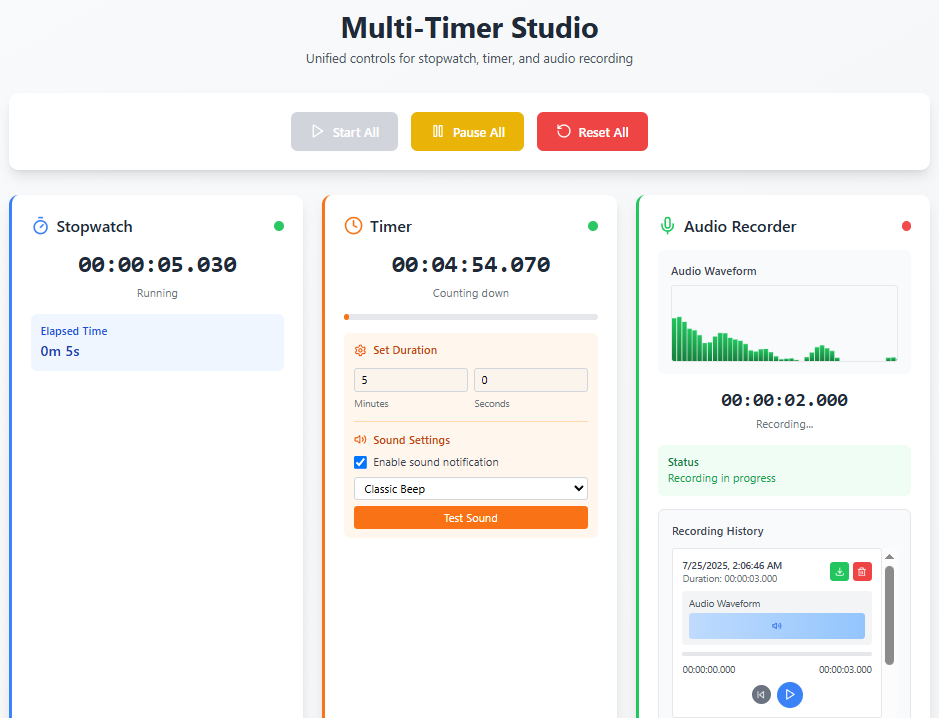
Multi-Timer Studio is a web application that integrates stopwatch, countdown timer, and audio recording functionality. It provides unified controls to operate all features simultaneously, with session persistence and real-time waveform visualization.
- Start All: Simultaneously start stopwatch, timer, and audio recording
- Pause All: Pause all functions simultaneously
- Reset All: Reset all functions and stop recording
- Stopwatch: Counts up from 00:00:00
- Timer: User-configurable countdown (minutes and seconds)
- Microphone Recording: Real-time recording using MediaRecorder API
- Waveform Display: Real-time audio waveform visualizer
- Audio Saving: Save recordings in .webm or .wav format
- Download: Download recorded audio files after completion
- Local Storage: Save recording files (Blob URL/base64)
- State Restoration: Save stopwatch elapsed time and timer remaining time
- Auto Restore: Restore previous session state on component mount
- Node.js 18.0 or higher
- npm 9.0 or higher
# Clone the repository
git clone https://github.com/didvc/multi-timer-audio-recorder.git
cd multi-timer-audio-recorder

# Install dependencies
npm install

# Start development server
npm run dev# Production build
npm run build
# Preview build result
npm run preview- Timer Setup: Enter minutes and seconds to set countdown time
- Unified Start: Use "Start All" button to begin all functions simultaneously
- Recording Check: Confirm recording status with waveform visualizer
- Pause: Use "Pause All" to interrupt as needed
- Complete & Download: Download recording file after completion
On first use, the browser will request microphone access permission. Permission is required to use recording features.
- Recommended: Chrome 88+, Firefox 85+, Safari 14+, Edge 88+
- Required APIs: MediaRecorder API, Web Audio API, LocalStorage
- Frontend: React 18 + TypeScript
- Build Tool: Vite
- Styling: Tailwind CSS
- Icons: Lucide React
- Recording: MediaRecorder API
- Audio Processing: Web Audio API
- Persistence: localStorage
src/
├── components/
│   ├── AudioRecorder.tsx      # Audio recording component
│   ├── Stopwatch.tsx          # Stopwatch component
│   ├── Timer.tsx              # Timer component
│   └── WaveformVisualizer.tsx # Waveform display component
├── hooks/
│   └── useLocalStorage.ts     # Local storage hook
├── utils/
│   └── timeUtils.ts           # Time calculation utilities
├── App.tsx                    # Main application
└── main.tsx                   # Entry point
We welcome contributions to the project! Please see CONTRIBUTING.md for details.
- Fork the project
- Create a feature branch (
git checkout -b feature/amazing-feature) - Commit your changes (
git commit -m 'Add amazing feature') - Push to the branch (
git push origin feature/amazing-feature) - Create a Pull Request
# Run linter
npm run lint

# Type check
npx tsc --noEmitThis project is licensed under the MIT License.
- GitHub: didvc/multi-timer-audio-recorder
- Live Demo: https://multi-timer-audio-recorder.pages.dev/
- Issues: Bug Reports & Feature Requests
- Discussions: Community Discussions
- Bug Reports: Bug Report Template
- Feature Requests: Feature Request Template
- General Questions: Discussions
Multi-Timer Studio - Efficient time management and recording!