
GitHub Repo | Prawjector Website
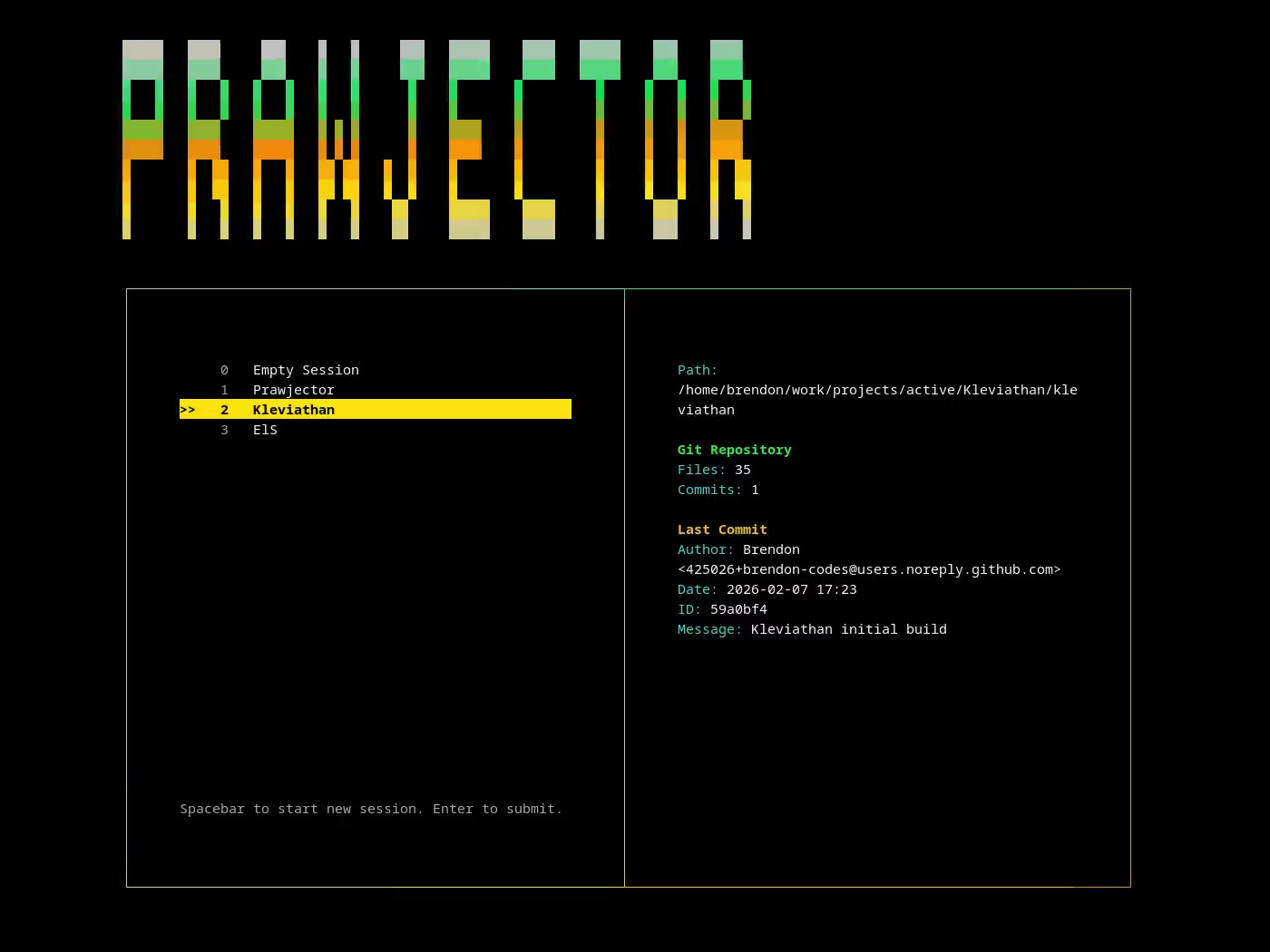
Prawjector is a keyboard-driven project and session launcher for developers who prefer to stay in the terminal. Its three panes show New session from project, Existing sessions, and Information. Selecting a project always creates an additional persistent Zellij session with its configured tabs. Selecting an existing session connects to that exact session and preserves its tabs and running commands.
Prawjector targets Zellij 0.45.1, works with existing Zellij configurations, and does not install a daemon. A worker refreshes sessions and live details every two seconds while the picker is open and stops before launch. Projects are declared in a default JSON config at ~/.prawjector/prawjector.json, or in another file selected with --config <PATH>.
Download the archive for your Linux platform from the latest GitHub release:
prawjector-*-x86_64-linux-musl.tar.gzfor most x86_64 Linux systems when you want the most portable binary.prawjector-*-aarch64-linux-musl.tar.gzfor most ARM64 Linux systems when you want the most portable binary.prawjector-*-x86_64-linux-gnu.tar.gzfor x86_64 glibc Linux systems.prawjector-*-aarch64-linux-gnu.tar.gzfor ARM64 glibc Linux systems.
tar -xzf prawjector-*-x86_64-linux-musl.tar.gz
mkdir -p ~/.local/bin
install -m 755 prawjector-*-x86_64-linux-musl/prawjector ~/.local/bin/prawjector
prawjector make-config- Use a MUSL archive if you use Alpine Linux, are unsure which libc your system uses, or want the fewest runtime library assumptions.
- Use a GNU archive when you specifically want a glibc-targeted binary. GNU archives target glibc 2.17 or newer.
- Verify downloads with the release
SHA256SUMSfile before installing when possible. - Zellij must be installed first. Prawjector relies on it for every launch.
cargo install --path .
prawjector make-config- The install command uses the current checkout path. Build prawjector from a local clone of the upstream repository.
- Zellij must be installed first. Prawjector relies on it for every launch.
- Source builds require Rust stable, a C toolchain,
pkg-config, and zlib development headers or a static zlib build setup. - OpenSSL is not required for Prawjector's default local Git metadata support.
prawjector make-configcreates an example JSON config at the selected config path and leaves existing files untouched.- Run
prawjector validate-configafter editing your projects to catch invalid entries before launch.
prawjector make-config
prawjector validate-config
prawjector make-configwrites the default~/.prawjector/prawjector.jsonwith starter projects to edit.- The checked-in starter config lives at
examples/.prawjector/prawjector.json. - Use
--config <PATH>before or after supported subcommands to select another config file. - Each project needs
name,path, and atabsarray. - Each tab uses a
launchvalue. Set it tonullto open a plain shell. - Launch commands resolve through your shell PATH, so bare commands like
nvimorcargowork when your shell can find them. - Commands are split on whitespace, with tilde expansion for each argument. Shell quoting, pipes, and redirects are not interpreted; use a script for commands that need shell syntax.
{
  "projects": [
    {
      "name": "Project 1",
      "path": "~/projects/project-1",
      "tabs": [
        { "launch": "claude" },
        { "launch": null }
      ]
    }
  ]
}Configure your terminal to run prawjector start through your shell so zellij and project launch commands inherit the same PATH your terminal normally provides. These examples use zsh; replace /bin/zsh, zsh, or prawjector with your shell or an absolute binary path when needed.
For Alacritty 0.14 and newer, add this to ~/.config/alacritty/alacritty.toml:
[terminal.shell]
program = "/bin/zsh"
args = ["-l", "-i", "-c", "prawjector start; exec zsh -l"]
Alacritty 0.13.x TOML configs used [shell] with the same keys:
[shell]
program = "/bin/zsh"
args = ["-l", "-i", "-c", "prawjector start; exec zsh -l"]
Alacritty 0.13.0 migrated configs from YAML to TOML, and Alacritty 0.14.0 moved shell to terminal.shell. Run alacritty migrate if you are updating an older config.
For Ghostty, add this to ~/.config/ghostty/config:
initial-command = /bin/zsh -l -i -c 'prawjector start; exec zsh -l'Ghostty's initial-command only runs for the first terminal surface created at startup. Use command = /bin/zsh -l -i -c 'prawjector start; exec zsh -l' instead if every new Ghostty window, tab, or split should start Prawjector.
prawjector start- Run
prawjector startto open the three-pane picker. Running bareprawjectorprints the help screen. - The project list starts focused. Either
LeftorRighttoggles between projects and sessions; each list remembers its selection. Up/Downmove through the focused list and stop at its first and last entries. Long lists scroll to keep the selection visible.- Type a number to select an indexed entry in the focused list. Project entry
0is alwaysEmpty Session; session entry0is the first running session. UseBackspaceto edit numeric input. Switching lists clears numeric input. Entercreates the selected project or empty session, or connects to the selected existing session. It does nothing on an empty session list.Spacedoes nothing.q/Escexits without launching.- Information follows the focused list: projects show their path and Git information; sessions show their full name, age, current-session marker, tab names, and terminal panes' working directories and commands. Unavailable details and discovery failures are reported explicitly.
- Use
PageUp/PageDownto scroll long information or error messages. Changing the active selection returns information to the top.
New sessions are named prawjector-{myproject}-{timestamp}. The project component is lowercased and retains only ASCII letters and digits, falling back to project if none remain. Empty sessions use empty. The timestamp is UTC YYYYMMDDHHMMSS followed by nine fractional-second digits, without separators. Prawjector checks for collisions against both running and exited sessions before creation.
The exact prawjector- prefix identifies managed sessions. Existing sessions are listed alphabetically, including running sessions with no attached client. Older names such as prawjector-web are included; unprefixed names such as prawjector are outside management. There is no registry, migration, or automatic renaming.
Whenever the picker starts, Prawjector deletes managed entries explicitly marked EXITED, using zellij delete-session <exact-name> without force, then refreshes the list. Cleanup never deletes running or unprefixed sessions. Individual deletion failures are reported and do not stop discovery. A failed discovery does not trigger cleanup. Cleanup runs only at startup, not during periodic refreshes.
Project creation first starts a uniquely named background session in the project directory. The first configured command runs as Zellij's native initial command; subsequent tabs are added sequentially without changing focus, and each result is checked. A null command opens a shell tab. Existing-session activation never applies project commands or tabs again.
For projects with multiple tabs, a temporary client supplies terminal dimensions during setup. This avoids Zellij 0.45.1 creating zero-sized tabs in a session with no attached client. Prawjector verifies that each new tab has initialized, closes the temporary client, and then connects your client. The temporary client does not remain running.
Outside Zellij, Prawjector attaches to the completed session. Inside Zellij, it creates the session separately and switches the current client, preserving the source session. Selecting the current session closes the picker and returns to it. If an existing target has exited or disappeared, Prawjector refreshes the picker and reports an error instead of deliberately resurrecting or recreating it. Creation or setup failures report the exact session name and leave any partially created session available for recovery.
prawjector make-config
prawjector validate-config
prawjector make-configcreates an example JSON config at the selected config path when it does not already exist.prawjector validate-configreads the selected config, reports invalid project entries, and prints the project count when validation succeeds.
prawjector --config ./prawjector.local.json start
prawjector validate-config --config ./prawjector.local.json
--config <PATH>uses a specific config file instead of the default~/.prawjector/prawjector.json.- The option is global and works before or after
start,validate-config,make-config,add, andremove.
prawjector add
prawjector add --name "My Project" --path ~/projects/my-project --tab nvim --tab - --tab "cargo test"
prawjector addappends the current directory to the config, derives the project name from the folder, and creates one plain shell tab.--name <NAME>overrides the derived project name, and--path <PATH>adds a project from a different directory.- Repeat
--tab <LAUNCH>to define tabs in order. Use--tab -for a plain shell tab withlaunch: null. - When no
--tabflags are provided, Prawjector adds one plain shell tab by default.
prawjector remove
prawjector remove --force
prawjector removeremoves project entries whose expanded path matches the current working directory.- Removal prompts for confirmation by default. Use
--forceto skip the prompt after verifying the current directory matches the project you want to remove.
prawjector
prawjector --help
prawjector help add
prawjector remove --help- The generated help lists
start,validate-config,make-config,add,remove, andhelp. - Use
-hor--helpon any command to print its help. Use-Vor--versionto print the binary version.
Yes. Prawjector uses Zellij to create and attach to project sessions, so zellij must be installed and available on your PATH.
Yes. Select Empty Session or press 0, then press Enter to open a fresh Zellij session with one plain shell tab.
Yes. Pass --config <PATH> before or after supported subcommands to use another config file instead of the default ~/.prawjector/prawjector.json.
Run prawjector remove from the project directory. Prawjector matches the current directory against expanded project paths and asks for confirmation unless you pass --force.
Yes. See Auto-start Prawjector in your terminal for Alacritty and Ghostty examples.
prawjector has only been tested on Linux.
(c) 2026 Prawjector. All rights reserved.