
A native, non-destructive RAW photo editor for macOS — no account, no subscription, and your photos never leave your Mac.
为个人摄影流程打造的原生 macOS 非破坏性 RAW 修图软件 —— 纯本地、无账号、无订阅。
Phos uses the com.zeno.phos application identifier. Existing .rawforge.json sidecars and the legacy
Application Support/RawForge/presets.json directory remain readable so existing edits are preserved.
Older releases may still use the former application and archive names.




🌐 官网 / Official site: zenodeng.com · Showcase & UI design · 界面设计展示页
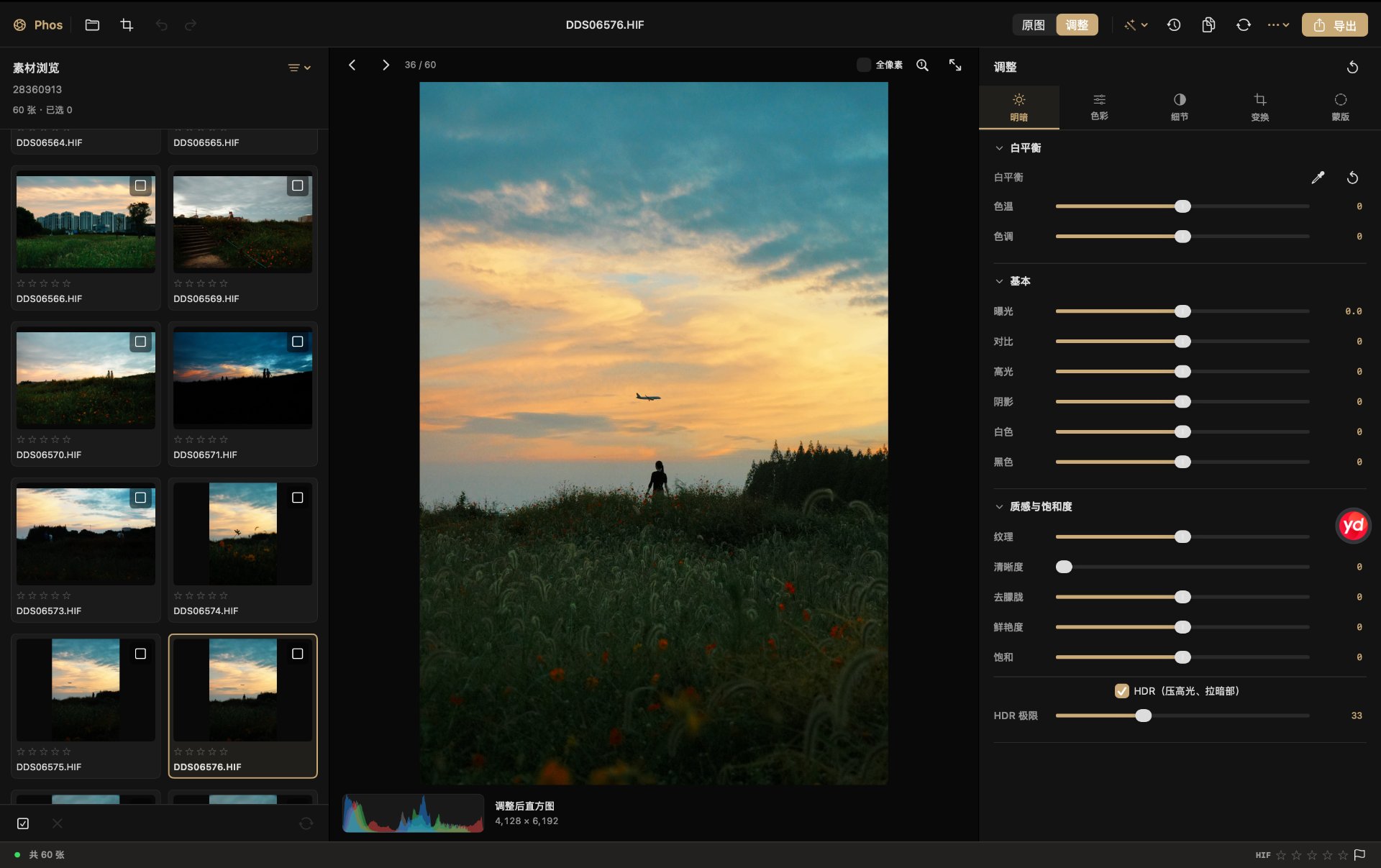
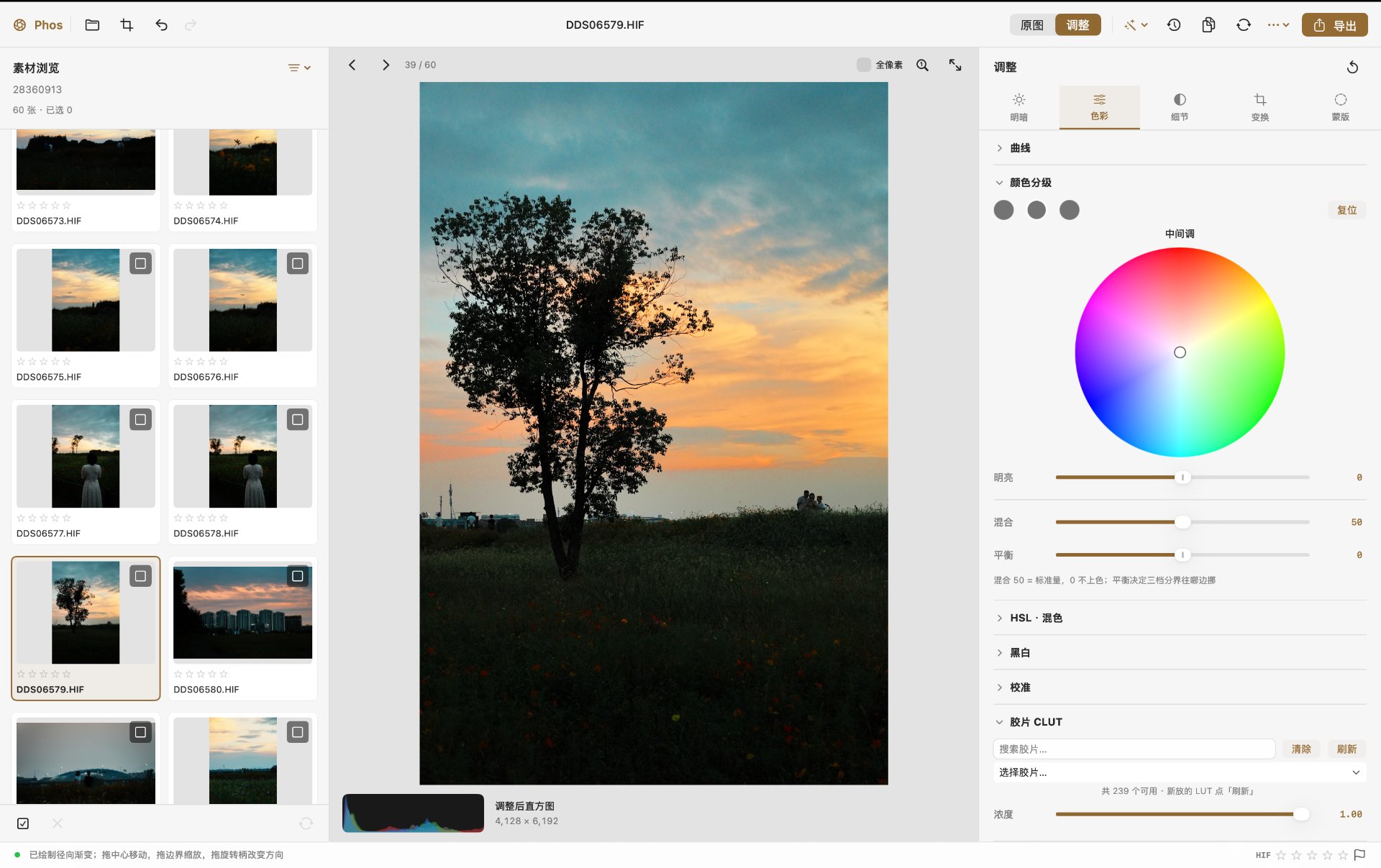
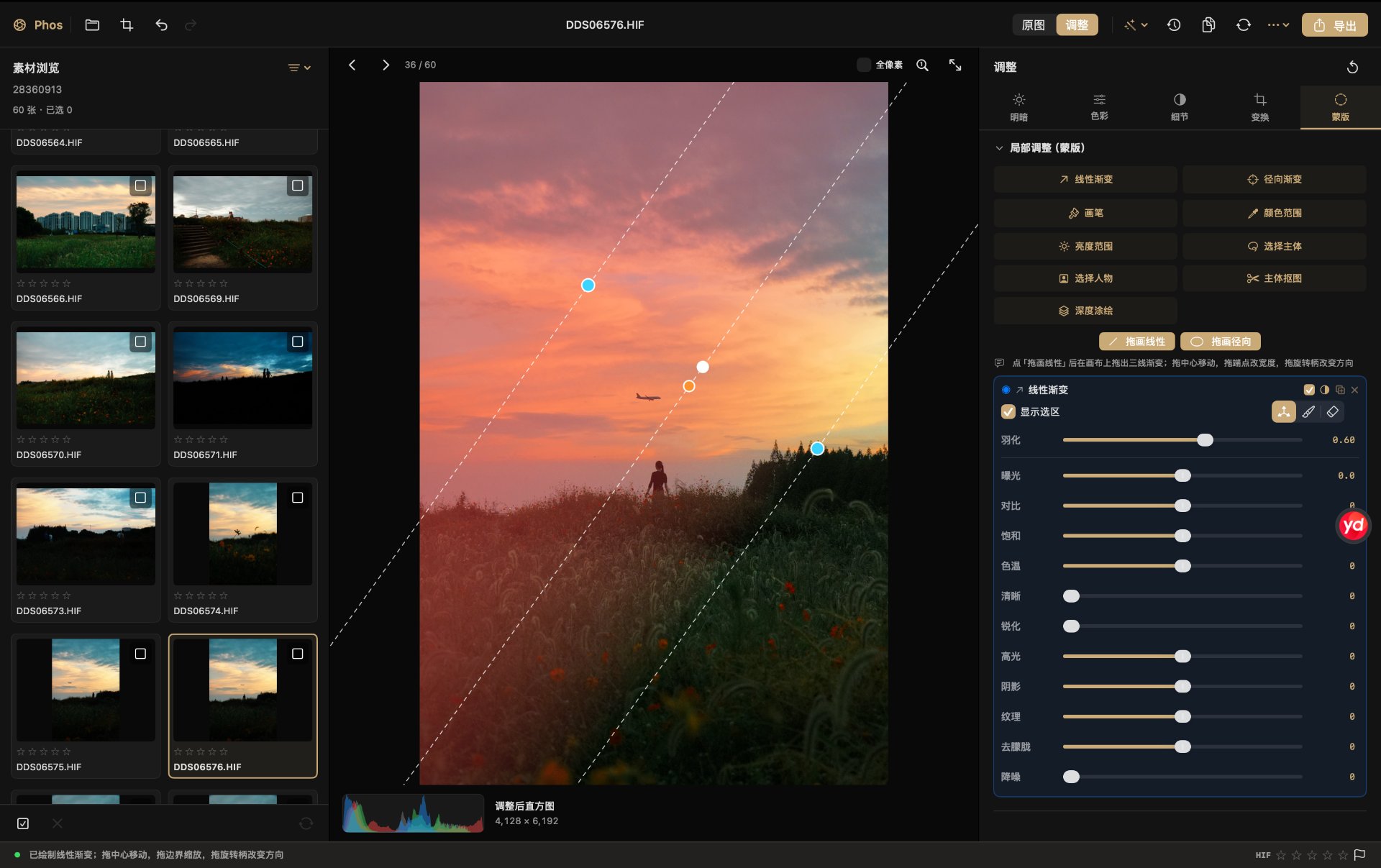
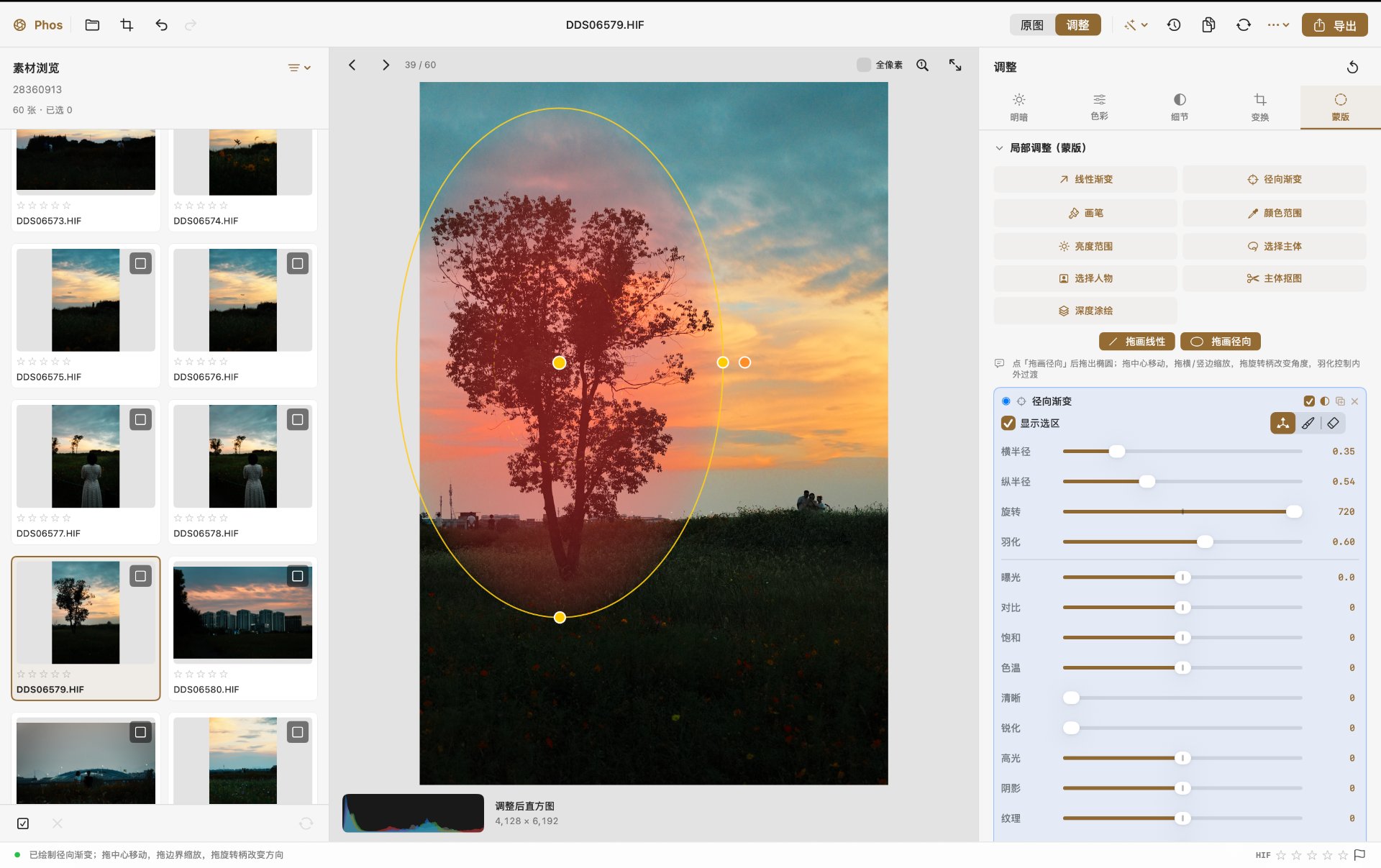
明暗调整 · 色彩分级与胶片 CLUT · 线性 / 径向渐变蒙版。更多界面见设计展示页。 Light adjustments · colour grading and film CLUT · linear and radial gradient masks. See the showcase page for more.
Phos is a non-destructive RAW photo editor written in Swift on top of Metal, Core Image, Vision and AppKit.
Everything runs on the local machine: no cloud services, no accounts, no subscription, no telemetry.
The entire colour and toning pipeline executes on the GPU in a 16-bit floating-point extended linear space (extendedLinearSRGB / .RGBAh, 20 Metal compute kernels) with an optional EDR / HDR Metal preview canvas (plus automatic CGImage fallback). On-device AI features — including Reference Color Match, Monocular Depth Optical Bokeh, RAW-domain Denoise & Export 2x Super Resolution, Smart Culling, Bilingual Semantic Search and a pure-Swift Native AI Workbench — work out of the box with zero Python dependencies, and a unified 5-slot Core ML Model Hub optionally accelerates LaMa removal, sky segmentation, DepthAnythingV2, denoise and 2x super resolution (plus optional external MLX-VLM support).
The only external network request is a version check against its own website at launch. Optional AI retouching sends image previews and editing parameters only to 127.0.0.1 on your Mac (port 8765 when available, otherwise a system-assigned local port).
It sends nothing about you, your photos or your machine, and it is the sole reason the app is not
strictly offline. Turn it off with:
defaults write com.zeno.phos updateCheckDisabled -bool trueThe project deliberately favours depth and colour accuracy across high-frequency photographic workflows over
feature bloat. All edits are stored in .rawforge.json (and optional bidirectional Adobe XMP sidecars) next to the original image, and the original file is never modified.
| Item | Requirement |
|---|---|
| OS | macOS 26.0 or later |
| CPU | Apple silicon (arm64) |
| Supported inputs | RAW (ARW / CR3 / NEF / …), HEIF / HEIC / HIF, JPEG, PNG, TIFF, AVIF |
| Signing | Ad-hoc (free); Apple notarisation is not available yet |
-
Download
Phos-macOS-apple-silicon.dmgfrom Releases. A.zipis published alongside it if you prefer. -
Verify integrity against
SHA256.txt:shasum -a 256 Phos-macOS-apple-silicon.dmg
-
Open the disk image and drag Phos onto the Applications folder. The image also contains a
首次打开必读.txtwith the steps below. -
macOS asks once — here's what to do.
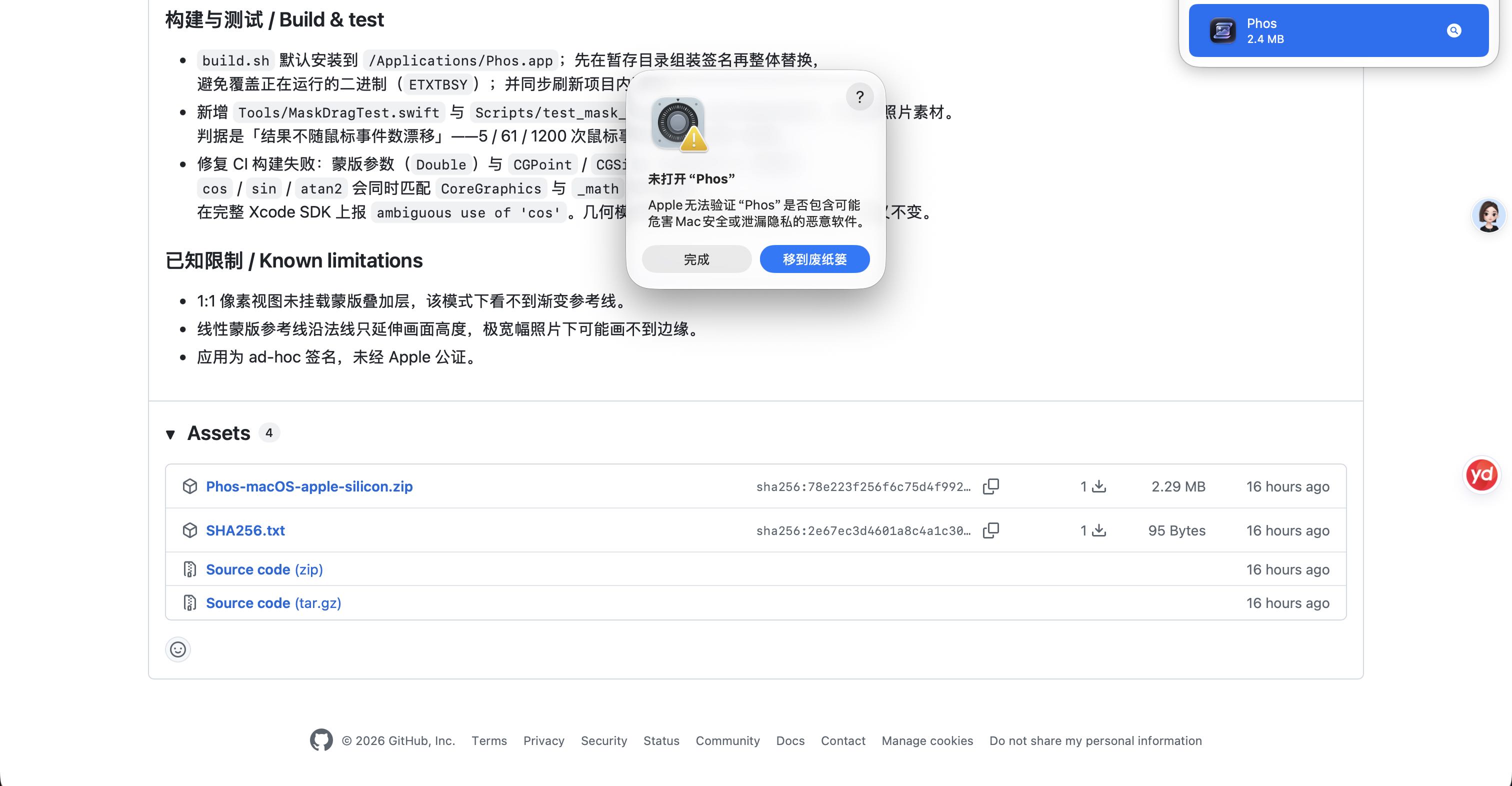
Phos is ad-hoc signed and not notarised, so the first double-click shows a warning. This is expected: the full source is public, and the app's only external network request is a version check against its own website.
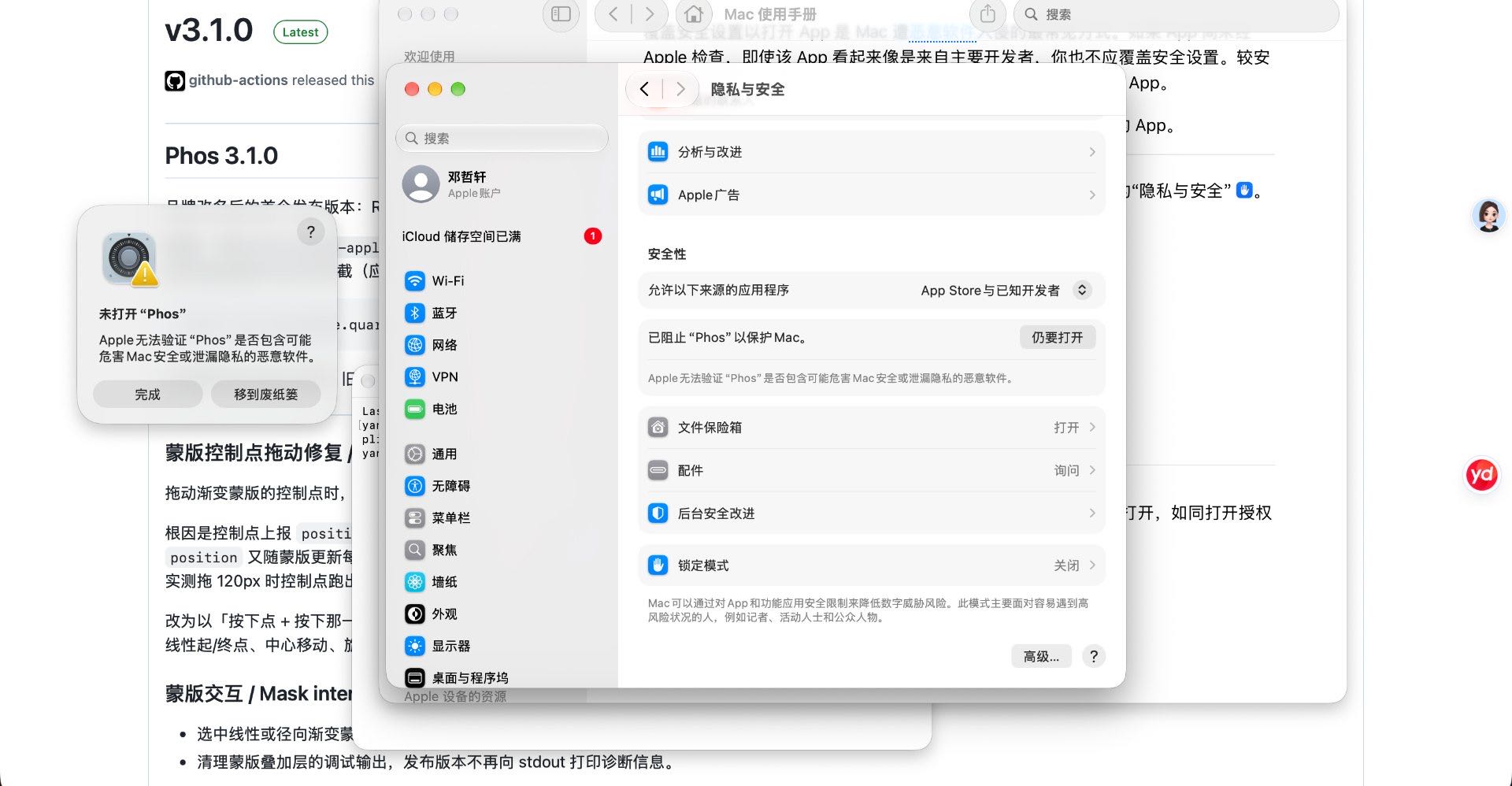
Click 完成 to close it, then immediately open System Settings → Privacy & Security, scroll to the bottom, and click Open Anyway:
The button only stays visible for about an hour after the warning, so do it right away. From then on Phos opens normally.
If you prefer the command line:
xattr -dr com.apple.quarantine /Applications/Phos.appdoes the same thing and skips the GUI steps entirely.
Important
App Sandbox is intentionally not enabled. Under ad-hoc signing, entitlements are not bound correctly; enabling the sandbox would break folder access and sidecar writing. The repository contains no entitlements file, and none should be added.
The inspector is organised into five tabs. Everything below is a local operation.
| Panel | Controls |
|---|---|
| White balance | Temperature, tint, a grey-point picker that samples straight from the canvas, and reset |
| Basic | Exposure, AgX contrast with contrast pivot and highlight rolloff, Guided Filter 14-stop edge-aware highlights & shadows, bidirectional whites & blacks, and highlight/shadow clipping overlay (J) |
| Texture & saturation | Texture, clarity, dehaze, vibrance, saturation, plus an HDR mode (compresses highlights while lifting shadows) with a limit control and EDR extended dynamic range display |
| Panel | Controls |
|---|---|
| Tone curve | Free-form point curves with an arbitrary number of control points, draggable in both axes, across five independent channels: composite, luminance, R, G and B. Monotone cubic interpolation (Fritsch–Carlson) guarantees the curve passes through every control point without overshoot. Refine Sat pulls saturation back after tonal changes. All five curves are baked into a single 64³ LUT. |
| Colour grading | Lightroom-style wheels for shadows, midtones and highlights — hue, saturation and luminance per band, plus blend and balance |
| HSL mixer | Eight hue bands computed in perceptually uniform OKLCH space with per-band hue / saturation / luminance and a clear-all action |
| Point Color (OKLCH) | Eyedropper sampling on the canvas to isolate targeted colours by hue, chroma and luminance ranges and shift hue / chroma / luma independently per swatch without affecting neighbours |
| Black & white | One-click conversion with its own channel mix |
| Calibration | RGB primary adjustment implemented as a row-normalised 3×3 matrix, so the white point stays put |
| Film CLUT | 303 built-in HALD film-emulation LUTs with search, plus background asynchronous scanning of an external HaldCLUT directory (~/Documents/RawTherapee/HaldCLUT) and a refresh action |
| Reference Colour Match | Reverse-solves any reference still into editable global exposure / AgX / curve / WB / 3-band colour grading / OKLCH HSL / film params (0%–150% blend + skin protection) |
| Panel | Controls |
|---|---|
| Detail & AI NR / 2x SR | Sharpening (amount, radius, detail, masking), YCoCg RAW-domain edge-preserving denoise (raw_denoise_apply + optional tiled Core ML Denoise.mlmodelc), and export-only 2x Super Resolution (super_res_enhance / optional SuperRes.mlmodelc) |
| Spot retouch & remove | Heal (auto-suggested source sampling + Poisson seamless blending), Clone, and Content-Aware Remove (4-level PatchMatch fallback plus optional offline Core ML Big-LaMa LaMa.mlmodelc inpainting via model import or Scripts/install_lama_model.sh). Supports direct canvas clicking/dragging on spot centres and yellow source handles, Re-suggest Source, hover brush preview rings, H to toggle pins and Delete to remove selected spots |
| Effects | Film grain (amount, size and silver-halide roughness), vignette, and halation (highlight extraction → wide-radius blur → warm tint → screen blend) |
| Optical Bokeh | Depth-driven physical defocus supporting portrait disparity, depth-painting mask, built-in zero-model monocular depth estimation (Vision saliency + person matte + horizon gradient) or optional DepthAnythingV2.mlmodelc (Scripts/install_depth_model.sh), click-on-canvas focus depth sampler, depth heatmap overlay, polygon aperture blades (circle or 5–8), specular HDR bokeh boost and cat-eye mechanical vignetting |
| Lens correction | 82 built-in lens profiles (Sony FE, Canon RF, Nikon Z, Fujifilm X, Sigma, Tamron, Leica, Panasonic) plus custom Lensfun XML import, before/after comparison, 8-division grid overlay, lateral chromatic aberration (counter-scaled R/B channels) and purple-fringe suppression |
Interactive crop overlay with eight handles and aspect-ratio presets, 90° rotation in both directions, horizontal mirroring, auto straightening (Vision horizon detection followed by a maximum-inscribed-rectangle crop), automatic perspective correction from a quadrilateral detected in the frame, manual vertical and horizontal perspective, and a reset action.
Full non-destructive compositing mask stack with boolean sub-components (Add / Subtract / Intersect) and optional Guided Filter edge refinement, all computed on-device:
| Mask | How it works |
|---|---|
| Linear / Radial gradient | Drag on the canvas to lay down gradients or ellipses, move centres, resize handles and rotate; works on both base masks and selected boolean sub-components. |
| Brush | Paint or erase directly on the canvas with Auto Mask colour edge snapping and tablet pen pressure modulation; brush size, feather and flow vary smoothly per stroke. |
| Colour / Luminance range | Sample a colour or luminance on the canvas or drag bounds on sliders. |
| Sky & Background | Upgraded zero-model sky segmentation (Vision horizon tilt + multi-prototype K-means + gradient-blocked BFS) with optional Core ML SkySegmentation model acceleration, plus foreground-inverted Background masks. |
| Subject, Person & Foreground cut-out | Vision saliency subject detection, system person matting and soft foreground-instance cut-out (also powers transparent-background export). |
| Portrait body sub-parts | Semantic segmentation for Face Skin, Body Skin, Eyes, Eyebrows, Lips, Teeth, Hair and Clothes (excluding skin). |
| Depth painting | Paint the background white and keep the subject black to drive the Bokeh panel. |
Each mask carries a complete local stack — exposure, contrast, saturation, temperature, tint, highlights, shadows, whites, blacks, clarity, texture, dehaze, sharpening, denoise, expandable local Tone Curve editor, local Point Color (OKLCH) and local Film CLUT — plus inversion, duplication and AI recomputation.
Frame alignment via Vision registration with a quality gate (frames whose overlap NCC scores below 0.7 are dropped automatically), selectable translation or homography alignment, and three compositing modes: average, exposure fusion, and hand-held denoise (pixel-wise averaging that rejects pixels deviating from the reference frame by more than kσ, removing noise while suppressing ghosting). Results are produced at full resolution as 16-bit TIFF and can be edited further.
- Non-destructive sidecars & Adobe XMP — native
<image>.rawforge.json(200-step undo stack) plus full bidirectional Adobe XMP sidecar support (xmp:Ratingincluding-1reject,xmpDM:goodpick flags,xmp:Label,dc:subjectkeywords, negative/positive clarity, 8-band HSL, RGB curves, Color Grading, Calibration, Grain, Crop & Angle, XXE protection and persistent auto-write toggle). - Presets & Lightroom
.xmpimport — save named presets, import Lightroom.xmppresets directly, preview presets live on hover and scale intensity smoothly from 0% to 200%. - Virtual copies & Snapshots — create, rename and delete non-destructive virtual copies (
⌘'), and save/restore per-photo named snapshots. - Copy / sync adjustments — copy adjustments to other photos or sync across a selection; geometry and masks are excluded by default, and every sync target receives a recovery snapshot first.
- Multi-view culling, Smart Culling & Semantic Search — recursive subfolder scanning toggle, on-device Smart Culling (Vision face EAR eye-closure warnings, ROI sharpness scoring, burst clustering with
isBurstBest& disk index cache), bilingual concept-group semantic search + visual similarity ranking, keyword search/tagging, camera & lens filters, star ratings, colour labels, pick/reject (X) flags, plus Grid View (G), Synchronised Side-by-Side Compare (C), 2–4 Up Survey View (N) with pinch-zoom/pan sync and per-card rating/baseline actions, and Reference View (⇧R) supporting external reference files, Reference Colour Match and horizontal/vertical split. - Native AI Workbench & 5-Slot Core ML Hub — pure-Swift zero-Python AI edit planner (
NativePhotoPlanner) with automatic local masks, alongside a unified 5-slot model hub (lama,sky,depth,denoise,superRes). - Preview modes — a 2200px proxy for speed, a full-pixel mode that runs the whole pipeline at the original resolution, and a 1:1 pixel view for checking sharpness.
- Before / after comparison (toggle
⌘Bor split view⌥⌘B) and a live EDR-aware output histogram. - Export & Metadata — JPEG / PNG / TIFF / HEIC (including Gain-Map HDR JPEG, 10-bit PQ HEIC and 16-bit Display P3 TIFF/PNG), preserves source EXIF / IPTC / GPS with optional GPS privacy stripping and copyright injection, plus watermark overlay applied strictly at export time.
- Batch export — bounded concurrent batch export applying each photo's sidecar (or picked-only / virtual copies).
- Transparent-background export — exports a cut-out using the foreground mask (PNG or TIFF with alpha).
- Live Bilingual UI (1,015 entries) — adaptive light/dark interface & Dock icon plus instant switching between Simplified Chinese and English without restarting.
- Update check — on launch Phos asks its own website for the latest version number. If a newer release exists, a small badge appears next to the app name in the toolbar; clicking it opens the download page. Nothing about you or your machine is sent, and the check can be turned off (see Overview). There is also a manual Check for Updates… in the toolbar's more menu.
| Action | Shortcut |
|---|---|
| Open folder | ⌘O |
| Crop and geometry | ⌘R |
| Export current photo | ⌘E |
| Before / after comparison | ⌘B |
| Split comparison | ⌥⌘B |
| Multi-exposure compositing | ⇧⌘M |
| Copy / Sync adjustments | ⇧⌘C / ⇧⌘V |
| Named snapshots | ⇧⌘S |
| Create virtual copy | ⌘' |
| Grid / Compare / Survey / Ref | G / C / N / ⇧R |
| Highlight & shadow clipping | J |
| Reject / Colour labels | X / 6–9 |
| Retouch pins / Delete spot | H / Delete (in Retouch) |
| Undo / Redo | ⌘Z / ⇧⌘Z |
git clone https://github.com/Zenodeng/Phos.git
cd Phos
./Scripts/package_app.sh      # builds Phos.app in the repository root
./build.sh                    # compiles and installs to /Applications
./Scripts/make_dmg.sh         # packages Phos.app into the distributable .dmg
make_dmg.sh produces the disk image users download: a background image, an arrow pointing at an
Applications shortcut, and a 首次打开必读.txt explaining the one-time Gatekeeper step. The layout
is written with dmgbuild (pip install dmgbuild) rather than
Finder AppleScript, so it works headless and on CI. Scripts/dmg/background.png and its @2x sibling
are generated by Tools/DMGBackground.swift.
Scripts/package_app.sh compiles with swiftc through the shared macOS 26 UI build policy.
It requires a macOS 26+ SDK and a successful core glass API probe. Set RF_SDK to select an SDK explicitly;
an invalid selection or probe failure stops the build. Frontend/linker SDK versions, the binary minimum,
and the signed bundle metadata are verified before delivery. A Package.swift is provided for use with SwiftPM-aware
editors; the release pipeline does not depend on it.
build.sh installs to /Applications/Phos.app by default (override with APP_PATH=), and stages and
signs the bundle before swapping it in. It deliberately does not keep a second copy inside the
repository — a .app sitting in a project folder is picked up by LaunchServices and shows up as a
duplicate in Launchpad. Set KEEP_LOCAL_APP=1 if you want one anyway.
bash Scripts/test_p012_upgrade.sh    # 16-bit Metal, OKLCH, boolean masks, LaMa, XMP, lens & batch export
bash Scripts/test_mask_drag.sh        # mask handle geometry, no photo needed, runs in seconds
bash Scripts/test_update.sh           # version comparison, offline, runs in milliseconds
bash Scripts/test_autotone.sh         # scene-aware auto tone regression
bash Scripts/test_clut.sh             # film LUT & HALD consistency
bash Scripts/test_performance.sh      # rendering, caches, undo/redo, async export
bash Scripts/test_workspace_r4.sh     # workspace shell, R2/R3/R4 workflows & localization
python3 Scripts/audit_localization.py # verify direct UI translation literal coverage (909 entries)
bash Scripts/test_studio.sh <fixture-image> <output-directory> [render-baseline-directory]
bash Scripts/test_real_photos.sh <output-directory> <soak-seconds> <photo> [more-photos...]
bash Scripts/test_workflow.sh <photo> <flat-copy> [more-photos...]
test_mask_drag.sh is a pure-geometry regression suite for the mask control points. Its key invariant is
that the result must not drift with the number of mouse events — 5, 61 and 1200 events must all produce
the same mask.
The render suite checks for nonblank output; pass a baseline pixel directory to require byte-identical rendering and curve LUT data. RAW camera samples and Vision subject/person segmentation still require separate real-photo testing.
| File | Responsibility |
|---|---|
Sources/Phos/Engine.swift |
Decoding, colour pipeline integration, LUT construction, masking, Vision-backed analysis |
Sources/Phos/MetalEngine.swift |
16-bit .RGBAh Metal compute orchestration, AgX / OKLCH / Guided Filter kernel dispatch |
Sources/Phos/MetalShaders.swift |
Metal compute kernels (toning, OKLCH HSL & Point Color, boolean masks, halo/grain/halations) |
Sources/Phos/MetalCanvasView.swift |
HDR/EDR extended dynamic range Metal preview view with CGImage fallback |
Sources/Phos/MaskEngine.swift |
Boolean mask compositing, sky segmentation (zero-model + optional Core ML) & portrait parts |
Sources/Phos/MaskAdvancedControls.swift |
Boolean component editor, sky model importer, local CurveEditor & local Point Color UI |
Sources/Phos/RetouchEngine.swift |
Heal (Poisson), Clone, 4-level PatchMatch Remove, Core ML LaMa.mlmodelc & suggestSource |
Sources/Phos/RetouchPane.swift |
Spot retouch inspector controls, model installation/management & selected spot binding |
Sources/Phos/ColorMatchEngine.swift |
Reference-to-editable-params OKLab/OKLCH solver with 0%–150% blend & skin protection |
Sources/Phos/ColorMatchPane.swift |
Reference Colour Match inspector subsection & options |
Sources/Phos/DepthEngine.swift |
Zero-model hybrid Vision depth estimation, click sampling & optional DepthAnythingV2 |
Sources/Phos/BokehPane.swift |
Optical bokeh (focus, range, polygon blades, HDR specular boost, cat-eye) & AI NR/2x SR UI |
Sources/Phos/NeuralDenoiseEngine.swift |
Linear YCoCg edge-preserving RAW denoise, export 2x Super Resolution & tiled Core ML inference |
Sources/Phos/SmartCullingEngine.swift |
Face EAR eye-closure, ROI sharpness, burst feature clustering & persistent index cache |
Sources/Phos/SemanticSearchEngine.swift |
Bilingual 120+ concept-group query expansion & VNFeaturePrint visual similarity ranking |
Sources/Phos/NativePhotoPlanner.swift |
Pure-Swift zero-Python AI retouching planner with closed-loop verification |
Sources/Phos/AIModelHub.swift |
Unified 5-slot Core ML model hub (lama, sky, depth, denoise, superRes) |
Sources/Phos/NativeAISheet.swift |
3-tab Native AI Workbench (AI Retouch, Reference Colour Match & Core ML Model Hub) |
Sources/Phos/PointColorPane.swift |
Global OKLCH Point Color swatch inspector |
Sources/Phos/MultiViewCanvas.swift |
Grid, Side-by-Side / Survey / Before-After compare, Reference view & interactive Retouch overlay |
Sources/Phos/MetadataIO.swift |
ImageIO EXIF/IPTC/GPS preservation, HDR HEIC & Gain-Map JPEG / 16-bit TIFF export |
Sources/Phos/XMPSidecar.swift |
XXE-safe bidirectional Adobe XMP sidecars & Lightroom .xmp preset parser |
Sources/Phos/LensProfiles.swift |
Lensfun XML loader & bundled/extended 82-profile lens database |
Sources/Phos/Alignment.swift |
Frame registration, quality gating, canvas normalisation for compositing |
Sources/Phos/Models.swift |
Parameter model, virtual copies, scaled presets & tolerant decoding |
Sources/Phos/AppMain.swift |
Application state, render scheduling, undo stack, XMP sync, export and batch processing |
Sources/Phos/Performance.swift |
Bounded thread-safe caches and latest-request background scheduling |
Sources/Phos/Workflow.swift |
Batch synchronisation, snapshots, grey-point sampling, sidecar migration, mask geometry |
Sources/Phos/WorkflowViews.swift |
Workflow panels: sync targets, snapshots, mask tool & auto-mask controls |
Sources/Phos/Views.swift |
Browser, canvas, mask overlay, crop overlay, toolbars |
Sources/Phos/Inspector.swift |
Adjustment panels, curve editor, colour wheels, mask panels |
Sources/Phos/Theme.swift |
Adaptive colour palette |
Sources/Phos/CLUT.swift |
Film LUT loading and baking |
Sources/Phos/Update.swift |
External network call: version check against the project's own website |
The application is non-destructive by design: all parameters are serialised to a sidecar file, and rendering is a pure function of (source image, parameters).
.github/workflows/release.yml builds, packages and publishes on GitHub Actions macOS runners. Pushing
a v* tag produces a release containing the zip and its SHA256, and the workflow can also be dispatched
manually from the Actions tab.
Before the first run, make sure Settings → Actions → General → Workflow permissions is set to Read and write permissions; otherwise uploading release assets returns 403.
Released under the MIT License.
Phos 是一款用 Swift 编写、基于 Metal、Core Image、Vision 与 AppKit 的非破坏性 RAW 修图软件。
所有处理都在本机完成:无账号、无订阅、无遥测。完整色彩与影调管线均在 GPU 上以 16-bit 浮点扩展线性色彩空间(extendedLinearSRGB / .RGBAh,20 个 Metal Compute 内核) 执行,并提供 EDR / HDR Metal 直通预览画布(保留 CGImage 自动回退);P3 端侧 AI 能力——参考图全可编辑参数调色、任意 RAW 单目深度物理散景、非破坏 RAW 域降噪与导出 2x 超分、智能挑片与双语语义搜图、以及纯 Swift 原生 AI 修图工坊——全部零 Python 开箱即用,并支持统一 5 槽位 Core ML 模型中心可选接入 Big-LaMa、SkySegmentation、DepthAnythingV2、降噪与 2x 超分模型(保留外部 MLX-VLM 支持)。
Phos 唯一的外网请求是启动时向自己的官网查一次版本号。本地 AI 修图仅向本机 127.0.0.1 发送照片预览和编辑参数。请求里不带任何关于你、你的照片或 本机环境的信息 —— 这也是这个应用唯一不是「完全离线」的地方。想关掉:
defaults write com.zeno.phos updateCheckDisabled -bool true项目刻意选择把高频摄影修图能力做深做透。所有调整写入原图旁边的 .rawforge.json 副档(及可选双向 Adobe XMP 旁档),
原始文件一个字节都不会被修改。
| 项目 | 要求 |
|---|---|
| 系统 | macOS 26.0 及以上 |
| 芯片 | Apple silicon(arm64) |
| 支持格式 | RAW(ARW / CR3 / NEF 等)、HEIF / HEIC / HIF、JPEG、PNG、TIFF、AVIF |
| 签名 | ad-hoc 本地签名(免费),尚未做 Apple 公证 |
-
从 Releases 下载
Phos-macOS-apple-silicon.dmg。 (同时也发布了一份.zip,习惯解压的可以用那个。) -
校验完整性:
shasum -a 256 Phos-macOS-apple-silicon.dmg
与 Release 中的
SHA256.txt比对。 -
打开磁盘映像,把 Phos 拖到 「应用程序」 文件夹。 映像里还放了一份
首次打开必读.txt,内容和下面一样。 -
macOS 首次启动会弹一次确认,按下面走一次就好。
Phos 是 ad-hoc 本地签名、未做 Apple 公证,所以首次启动会有一次警告。 这是正常的 —— 源码完全公开,应用唯一的外网请求是向自己的官网查一次版本号。
第一次双击会看到这张:
点「完成」关掉它,立刻打开「系统设置 → 隐私与安全性」,滚到底,点「仍要打开」:
「仍要打开」按钮在弹窗出现后大约 一小时内会消失,所以马上点。 之后 Phos 就能正常打开了。
习惯用命令行的可以一行解决:
xattr -dr com.apple.quarantine /Applications/Phos.app
效果完全一样,跳过系统设置里这几步。
Important
本项目不启用 App Sandbox。 免费 ad-hoc 签名下 entitlements 不会正确 bind,一旦 sandbox 生效,读取照片文件夹与写入 .rawforge.json 旁挂会全部失效。仓库中没有任何 entitlements 文件,也请不要添加。
检视器分为五个分类,以下全部为本机运算。
| 面板 | 控件 |
|---|---|
| 白平衡 | 色温、色调,以及可直接在画布上取色的灰点吸管与重置 |
| 基本 | 曝光、AgX 对比(含对比中心与高光滚降)、Guided Filter 14-stop 保边高光与阴影、双向白色/黑色色阶,以及高光/暗部溢出警示(J) |
| 质感与饱和度 | 纹理、清晰度、去朦胧、鲜艳度、饱和;另有 HDR 模式(压高光、拉暗部)与「HDR 极限」,支持 EDR 扩展动态范围显示 |
| 面板 | 控件 |
|---|---|
| 曲线 | 自由控制点曲线,点数任意、横竖均可拖,覆盖五个独立通道:合成、亮度、R、G、B。控制点之间采用单调三次插值(Fritsch–Carlson),严格过点且不过冲。Refine Sat 在改变调子后把饱和度拉回。五条曲线一次烘进 64³ LUT。 |
| 颜色分级 | Lightroom 式色轮,阴影 / 中间调 / 高光各一组色相、饱和、明亮度,另含混合与平衡 |
| HSL · 混色 | 8 个色相分区迁移至感知均匀 OKLCH 空间,逐区调整色相 / 饱和 / 明亮度,可一键清空 |
| 点颜色 (OKLCH) | 画布取色新建独立色样,按色相、彩度与明度范围精确隔离目标色并独立偏移,不连带邻近色彩 |
| 黑白 | 一键转为黑白,带独立通道混合 |
| 校准 | RGB 三原色调整,实现为行归一化 3×3 矩阵,保证白点不变形 |
| 胶片 CLUT | 内置 303 个 HALD 胶片模拟 LUT,支持搜索;可后台异步扫描外置 HaldCLUT 目录(~/Documents/RawTherapee/HaldCLUT)并刷新 |
| 参考图色彩匹配 | 基于 OKLab/OKLCH 感知统计与坐标下降将参考图反解为完全可继续编辑的全局参数(0%–150% 强度 + 肤色保护) |
| 面板 | 控件 |
|---|---|
| 细节与 AI 降噪 / 2x 超分 | 锐化(数量 / 半径 / 细节 / 蒙版);YCoCg 线性保边 RAW 降噪(raw_denoise_apply + 可选 512×512 Hann 窗 Core ML Denoise.mlmodelc)及仅导出阶段 2x 超分辨率(super_res_enhance / 可选 SuperRes.mlmodelc) |
| 污点修复与消除 | 修复 (Heal)(自动推荐干净采样源点 + 泊松融合)、仿制 (Clone) 与内容感知消除 (Remove)(内置 4 层 PatchMatch,支持导入离线 Core ML Big-LaMa LaMa.mlmodelc 及 Scripts/install_lama_model.sh 一键安装)。支持画布点选、直接拖动修补点与黄色采样源点、重选源点、悬停双环画笔光标、H 显隐标记与 Delete 删除选中 |
| 效果 | 胶片颗粒(浓度 / 颗粒大小 / 颗粒粗糙度)、暗角、Halation 光晕(高光提取 → 大半径模糊 → 暖色染色 → 屏幕混合) |
| 物理光学散景 | 按深度虚化,支持文件内置 disparity、手绘深度涂绘蒙版、内置零模型单目深度估计或可选 DepthAnythingV2.mlmodelc(Scripts/install_depth_model.sh);支持画布点击采样对焦、深度热力图、圆形及 5–8 边形叶片、HDR 高光光斑与边缘猫眼旋焦 |
| 镜头校正 | 内置 82 组镜头配置(覆盖 Sony FE / Canon RF / Nikon Z / Fujifilm X / Sigma / Tamron / Leica / Panasonic),支持导入 Lensfun XML、校正前后切换、8 等分网格、横向色差与紫边抑制 |
画布交互裁剪(八向手柄、画幅预设)、90° 顺 / 逆时针旋转、水平翻转、 自动校直(Vision 检测地平线后按最大内接矩形裁切)、 自动透视(检测画面内四边形后校正)、手动垂直 / 水平透视,以及一键复位。
完整的非破坏复合蒙版系统,支持**子蒙版布尔组合(加 / 减 / 交)**与 Guided Filter 边缘精修,全部在本机计算:
| 蒙版 | 用法 |
|---|---|
| 线性 / 径向渐变 | 在画布拖动三线渐变或椭圆,支持移动中心、缩放端点/半径与旋转;主蒙版与选中的布尔子组件均可在画布直接编辑。 |
| 画笔 | 直接在画布上涂抹或擦除,支持自动边缘吸附(Auto Mask)与数位板压感,按笔画调控大小、软边与流量。 |
| 颜色 / 亮度范围 | 吸管取色或拖动取样亮度,调节容差与上下界/软边控制范围。 |
| 天空 / 背景 | 升级零模型天空分割(地平线倾角 + 多原型聚类 + 梯度阻断连通域),并支持导入 Core ML SkySegmentation 加速;支持前景反选生成背景蒙版。 |
| 选择主体 / 人物 / 抠图 | Vision 显著性主体检测、系统人物分割与前景实例软边缘抠图(同步支持导出透明背景抠图)。 |
| 人像部位语义分割 | 支持**人脸皮肤、身体皮肤、眼睛、眉毛、嘴唇、牙齿、头发、衣服(扣除皮肤)**精细分割。 |
| 深度涂绘 | 把想虚化的背景涂白、主体留黑,配合「焦外散景」使用。 |
每个蒙版拥有完整局部调整栈 —— 曝光、对比、饱和、色温、色调、高光、阴影、白色、黑色、清晰、纹理、去朦胧、锐化、降噪、可展开局部曲线编辑器、局部 OKLCH 点颜色与局部 CLUT —— 并支持反转、复制与 AI 重算。
Vision 配准的帧对齐与质量门(重叠区 NCC 低于 0.7 的帧自动剔除),对齐方式可选平移或透视 (homography),三种合成模式:平均、曝光融合、手持降噪(逐像素平均,偏离参考帧超过 kσ 的像素 按参考值取,压噪同时去鬼影)。合成结果按全分辨率输出 16 位 TIFF,并可继续调整。
- 原生副档与 Adobe XMP 双向互通 ——
<原图名>.rawforge.json(200 步撤销栈)与完整 Adobe XMP 旁档(支持xmp:Rating=-1淘汰、xmpDM:good精选、关键词、负向/正向清晰度、8 色段 HSL、RGB 曲线、颜色分级、校准、颗粒、裁剪与角度、XXE 防护及持久化自动写入开关)。 - 预设与 Lightroom
.xmp预设导入 —— 保存/套用命名预设,支持直接导入 Lightroom.xmp预设、悬停实时预览及 0%–200% 预设强度滑块。 - 虚拟副本与命名快照 —— 创建、重命名与删除非破坏性虚拟副本(
⌘'),以及多版本命名快照管理。 - 复制 / 同步调整 —— 复制调整到其他照片,或在选中范围内同步;默认不含裁剪与蒙版,每个同步目标先自动存一份恢复快照。
- 多视图选片、智能挑片与语义搜图 —— 支持递归子文件夹扫描、端侧智能挑片(Vision 闭眼检测、焦点锐度评分、连拍聚簇标记
isBurstBest与磁盘缓存)、双语概念簇语义搜索与找相似照片排序、关键词搜索、相机/镜头筛选、星级/颜色标签/淘汰(X),以及 网格看片(G)、双图同步对比(C)、2–4 张多图同屏选片(N,支持双指缩放/拖动同步与逐卡打分/设为基准)、参考锁定视图(⇧R,支持外部参考文件、参考图色调匹配与左右/上下分屏)。 - 原生 AI 修图工坊与 5 槽位模型中心 —— 纯 Swift 零 Python
NativePhotoPlanner(结合像素统计、意图解析与自动局部蒙版),以及统一管理lama、sky、depth、denoise、superRes5 个端侧 Core ML 槽位。 - 预览模式 —— 2200px 代理图(快)、全像素模式(整条管线按原图分辨率渲染)、1:1 像素视图(检查锐度)。
- 前后对比(
⌘B/ 同几何分割⌥⌘B)与 EDR 感知实时直方图。 - 元数据保留与 HDR 导出 —— 支持 JPEG / PNG / TIFF / HEIC(含 Gain-Map HDR JPEG、10-bit PQ HEIC 与 16-bit Display P3 TIFF/PNG),保留源图 EXIF / IPTC / GPS,支持移除 GPS 隐私与版权注入;水印仅叠在导出文件上。
- 批量导出 —— 有界并发批量导出,套用各自旁档与虚拟副本,支持仅导出已标记精选照片。
- 透明背景导出 —— 用「主体抠图」蒙版导出透明背景抠图(PNG / TIFF)。
- 中英文实时切换(1,015 条翻译) —— 自适应浅/深色界面与 Dock 图标,实时切换简体中文 / English 无需重启。
- 更新提示 —— 启动时向官网查一次最新版本号;有新版就在工具栏应用名旁边出现一个小徽标, 点它打开下载页。请求不带任何关于你或本机的信息,也可以关掉(见「概述」)。 工具栏「更多」菜单里另有手动「检查更新…」。
| 操作 | 快捷键 |
|---|---|
| 打开文件夹 | ⌘O |
| 裁剪与几何 | ⌘R |
| 导出当前照片 | ⌘E |
| 前后对比 / 同几何分割 | ⌘B / ⌥⌘B |
| 多重曝光合成 | ⇧⌘M |
| 复制 / 同步调整 | ⇧⌘C / ⇧⌘V |
| 命名快照 / 创建虚拟副本 | ⇧⌘S / ⌘' |
| 网格 / 双图 / 多图同屏 / 参考 | G / C / N / ⇧R |
| 高光/暗部溢出警示 | J |
| 淘汰 / 颜色标签 | X / 6–9 |
| 修补标记显隐 / 删除选中点 | H / Delete(修补模式) |
| 撤销 / 重做 | ⌘Z / ⇧⌘Z |
git clone https://github.com/Zenodeng/Phos.git
cd Phos
./Scripts/package_app.sh      # 在仓库根目录打出 Phos.app
./build.sh                    # 编译并安装到 /Applications
./Scripts/make_dmg.sh         # 把 Phos.app 打成可发布的 .dmg
make_dmg.sh 产出用户实际下载的磁盘映像:带背景图、指向「应用程序」的箭头,以及一份说明
Gatekeeper 步骤的 首次打开必读.txt。窗口布局用
dmgbuild(pip install dmgbuild)写 .DS_Store,
不用 Finder AppleScript —— 后者需要图形会话与自动化权限,无头环境和 CI 上不可靠。
背景图(Scripts/dmg/background.png 与 @2x)由 Tools/DMGBackground.swift 生成。
Scripts/package_app.sh 使用统一的 macOS 26 UI 构建策略直接调用 swiftc,要求 macOS 26+
SDK 和核心玻璃 API 探针通过。可用 RF_SDK 显式选择 SDK;选择无效或探针失败会停止构建。
出包前核对编译/链接 SDK 版本、二进制最低系统以及签名包的 metadata。
仓库同时提供 Package.swift 供支持 SwiftPM 的编辑器使用,但发布流程不依赖它。
build.sh 默认安装到 /Applications/Phos.app(可用 APP_PATH= 覆盖),
先在暂存目录组装并签名再整体替换。它刻意不在仓库里再留一份副本 ——
项目目录里的 .app 会被 LaunchServices 收录,在启动台里显示成一个重复的应用。
确实需要时加 KEEP_LOCAL_APP=1。
bash Scripts/test_p012_upgrade.sh    # 16-bit Metal、OKLCH、蒙版布尔、LaMa、XMP、镜头与批量导出回归
bash Scripts/test_mask_drag.sh        # 蒙版控制点几何,不需要照片,秒级
bash Scripts/test_update.sh           # 版本号比较,不联网,毫秒级
bash Scripts/test_autotone.sh         # 场景感知自动影调回归
bash Scripts/test_clut.sh             # 胶片 LUT 与 HALD 等价一致性
bash Scripts/test_performance.sh      # 渲染、缓存、撤销重做、异步导出
bash Scripts/test_workspace_r4.sh     # 工作区壳、R2/R3/R4 端到端与多语言回归
python3 Scripts/audit_localization.py # 校验直译 UI 词条覆盖率(909 项)
bash Scripts/test_studio.sh <fixture-image> <output-directory> [render-baseline-directory]
bash Scripts/test_real_photos.sh <output-directory> <soak-seconds> <photo> [more-photos...]
bash Scripts/test_workflow.sh <实拍照片> <实拍纸面照片> [其他照片...]
test_mask_drag.sh 是蒙版控制点的纯几何回归。关键判据是结果不随鼠标事件数漂移 ——
5 次、61 次、1200 次事件必须给出同一个蒙版。
渲染测试会拒绝空白结果;传入基准像素目录时会逐字节比较渲染结果与曲线 LUT。 真实相机 RAW 和 Vision 主体 / 人物识别还需要单独用实拍照片验证。
| 文件 | 职责 |
|---|---|
Sources/Phos/Engine.swift |
解码、渲染管线集成、LUT 构建、蒙版、视觉分析 |
Sources/Phos/MetalEngine.swift |
16-bit .RGBAh Metal Compute 调度与 AgX / OKLCH / Guided Filter |
Sources/Phos/MetalShaders.swift |
Metal 计算核(影调、OKLCH HSL 与点颜色、布尔蒙版、颗粒、光晕) |
Sources/Phos/MetalCanvasView.swift |
支持 HDR / EDR 扩展动态范围直通的 Metal 预览画布(含 CGImage 回退) |
Sources/Phos/MaskEngine.swift |
布尔蒙版组合、天空分割(零模型 + 可选 Core ML)与人像部位分割 |
Sources/Phos/MaskAdvancedControls.swift |
子蒙版布尔编辑器、天空模型导入、局部曲线编辑器与局部点颜色控件 |
Sources/Phos/RetouchEngine.swift |
污点修复(泊松融合)、克隆、PatchMatch、Core ML LaMa 与推荐源点 |
Sources/Phos/RetouchPane.swift |
修补检查器面板、模型安装管理和选中斑点参数绑定 |
Sources/Phos/ColorMatchEngine.swift |
参考图 → 全可编辑参数反解引擎(OKLab/OKLCH 坐标下降 + 肤色保护) |
Sources/Phos/ColorMatchPane.swift |
参考图色彩匹配检查器分区与混合强度控件 |
Sources/Phos/DepthEngine.swift |
零模型 Vision 混合单目深度、画布点击采样与可选 DepthAnythingV2 |
Sources/Phos/BokehPane.swift |
物理光学散景高级面板及 AI 降噪 / 2x 超分开关 |
Sources/Phos/NeuralDenoiseEngine.swift |
线性 YCoCg 保边 RAW 降噪、导出 2x 超分与分块 Core ML 推理 |
Sources/Phos/SmartCullingEngine.swift |
EAR 闭眼检测、ROI 锐度评分、连拍特征聚类与磁盘索引缓存 |
Sources/Phos/SemanticSearchEngine.swift |
120+ 组双语摄影概念语义扩展与视觉相似图排序 |
Sources/Phos/NativePhotoPlanner.swift |
纯 Swift 零 Python AI 修图编排器(图像统计 + 意图 + 局部蒙版) |
Sources/Phos/AIModelHub.swift |
统一 5 槽位 Core ML 模型中心(lama/sky/depth/denoise/superRes) |
Sources/Phos/NativeAISheet.swift |
三标签原生 AI 工作台(AI 润色、参考图调色与模型中心) |
Sources/Phos/PointColorPane.swift |
全局 OKLCH 点颜色色板检查器 |
Sources/Phos/MultiViewCanvas.swift |
网格看片、双图/多图同屏对比、参考视图与交互式修补覆盖层 |
Sources/Phos/MetadataIO.swift |
ImageIO EXIF/IPTC/GPS 保留、Gain-Map JPEG / 10-bit PQ HEIC 导出 |
Sources/Phos/XMPSidecar.swift |
防 XXE 的双向 Adobe XMP 旁档与 Lightroom .xmp 预设解析 |
Sources/Phos/LensProfiles.swift |
Lensfun XML 读取与 82 组内置/扩展镜头配置库 |
Sources/Phos/Alignment.swift |
帧配准、质量门、合成画幅归一化 |
Sources/Phos/Models.swift |
参数模型、虚拟副本、预设强度缩放与宽容解码 |
Sources/Phos/AppMain.swift |
应用状态、渲染调度、撤销栈、XMP 同步、导出与批处理 |
Sources/Phos/Performance.swift |
有界线程安全缓存、最新请求后台调度 |
Sources/Phos/Workflow.swift |
批量同步、快照、灰点取样、副档迁移、蒙版几何 |
Sources/Phos/WorkflowViews.swift |
工作流面板:同步目标、快照、画笔自动吸附开关 |
Sources/Phos/Views.swift |
浏览器、画布、蒙版叠加层、裁剪叠加层、工具条 |
Sources/Phos/Inspector.swift |
调整面板、曲线编辑器、色轮、蒙版面板 |
Sources/Phos/Theme.swift |
自适应调色板 |
Sources/Phos/CLUT.swift |
胶片 LUT 读取与烘焙 |
Sources/Phos/Update.swift |
外网请求:向官网查版本号 |
设计上不可变:所有参数序列化到副档,渲染是关于「源图 + 参数」的纯函数。
.github/workflows/release.yml 在 GitHub Actions 的 macOS 运行器上编译、打包并发布。
推送 v* 标签会生成 Release(含 zip 与 SHA256),也可在 Actions 页面手动触发。
首次使用前请确认仓库 Settings → Actions → General → Workflow permissions 已设为 Read and write permissions,否则 Release 上传会返回 403。
各版本改动见 CHANGELOG.md。
以 MIT 许可证 发布。
调整面板顶部的 AI 修图可读取当前照片,理解中文要求,提出全局滑杆和局部蒙版调整。生成建议后查看前后预览,再应用调整;一次应用对应一次撤销,编辑沿用原有旁档保存。模型只提出参数,不生成或替换图像内容。
需要已配置的 mlx-community/Qwen3-VL-4B-Instruct-4bit 与独立 MLX-VLM 环境。底模约 3.1 GB,不随应用分发,用 Release 里的 Phos-Optional-Model-Installer.zip 安装(只含脚本与哈希清单,首次安装需要联网)。应用本身已内含一个约 1.3 MB 的 LoRA 适配器(Contents/Resources/PhotoAIAdapter),启动服务与每次请求都会显式指定它,避免误用同端口上的原版模型。默认查找 ~/Library/Application Support/Phos/MLX,可在窗口中选择模型环境。服务未运行时自动启动,仅监听本机,日志位于 ~/Library/Logs/Phos-MLX.log。由 Phos 启动的服务会随应用退出。
第一版支持曝光、影调、白平衡、质感、饱和度,以及主体、人物、前景、线性、径向和亮度范围蒙版。既有蒙版、曲线、裁剪和其他参数保留。4.1.0 起附带一个在 2563 条 Phos 编辑样本上训练的单轮 LoRA 适配器(rank 8,约 1.3 MB),界面上标注为微调实验版;它改善的是指令理解与参数约束,不保证审美正确,请根据预览判断效果。
Optional AI uses a localhost API and separately installed dependencies. Photos stay on the Mac. Validation: bash Scripts/test_photo_ai.sh
- 勾选“自动优化构图与裁切”后,先分析当前画面并生成裁切范围,再在裁切后的预览上调色。取消勾选即可保持构图。裁切沿用原有非破坏性参数和撤销;原有渐变、画笔等蒙版坐标随裁切换算。
- AI 可使用 HSL、综合/亮度/R/G/B 曲线、阴影/中间调/高光颜色分级,以及锐化、降噪、颗粒和暗角等调整。曲线输出使用五个控制点;所有数值检查范围并限制输出精度。明确要求使用的工具会被校验,不能仅在说明中声称已调整。
- 蒙版分别表达目标(主体、背景、亮区、暗部或几何选区)与明暗意图。选区反转不等于曝光反号。系统规范化明暗方向与亮度选区,并从真实渲染像素核对局部变化;不符合要求的建议会重试或被拦截。
- 裁切、调色和新蒙版组成一个预览方案,应用后可一次撤销。4.1.0 的适配器在开发验证集(301 条)上首次严格完成率 94.02%,但这组题是受控参数操作,不代表审美或任意构图能力;独立测试集尚未重跑,审美仍需根据预览判断。
可试用的要求:
适度裁去左边缘干扰,保留树与日落。用 HSL 将绿色饱和度降至 -15,用亮度曲线轻提中间调,阴影颜色分级用 210 度蓝色、饱和度 8。用亮度范围蒙版压暗亮区,局部曝光 -0.3 EV。
阶段 1–3 的独立本机工作台位于 Tools/PhotoAIData/README.md:冻结当前模型、工作树源码和生产协议;记录公开数据许可;用 Phos 真实渲染器生成前后图、参数和蒙版;并排审核、编辑方案与重新渲染。审核页提供首次模型输出和实际参数差异。它不会启动权重训练或修改照片旁档。
本次环境可双击 Scripts/open_photo_ai_workbench.command 启动,再打开 http://127.0.0.1:8766。首次输出基线和数据证据在 ../outputs/Phos-Training-20261017。测试集、待审核、审核已失效或许可不匹配的样本不会进入发布用途训练导出。