


The missing UI for Claude Code loops.
Claude Code is the engine.
LoopBoard is the cockpit.
You're still the pilot.
Less prompting. No babysitting. More building.
"I don't prompt Claude anymore. I have loops running that prompt Claude and figure out what to do. My job is to write loops."
— Boris Cherny, creator of Claude Code at Anthropic
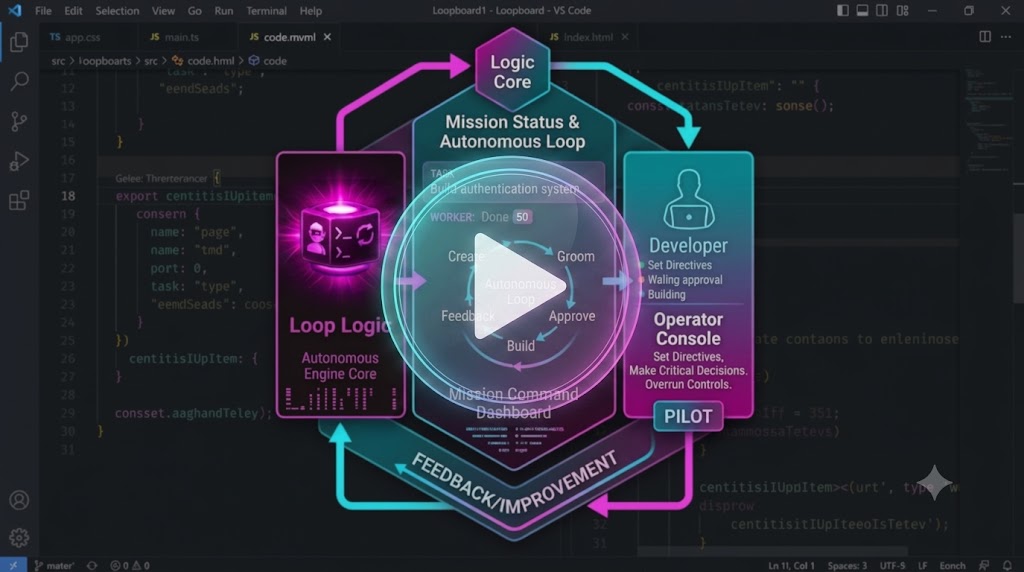
LoopBoard is a VSCode extension that turns your workspace .loopboard/ tracker into an interactive
board your Claude Code agent loops groom, build, and deliver from — while you keep the only two keys
that matter: what gets started, and what gets accepted. Markdown stays the source of truth.
What you get, at a glance:
- 🗂️ Your
TODO.mdis the board — markdown stays the source of truth; the UI is a live view, never a second database. - 🤖 Agents groom, build, and deliver — Groomer and Worker loops collaborate on each task while you hold the only two gates: what starts, what's accepted.
- ⏯️ Press Start, not prompts — spawn model-specific Claude Code loop terminals in one click instead of writing a fresh prompt per task.
- 🧩 Multi-model slots — assign Opus / Sonnet / Fable per task (groom vs. work), each a configurable slot.
- 🔒 Zero runtime dependencies — the extension ships no runtime deps; the webview is vanilla HTML/CSS/JS with a CSP nonce on every script.
- 🧵 Context stays on the task — worklog, feedback, and delivery notes live in
tasks/<id>.md, not scattered across chats.
- Create a task.
- Start the Groomer and Worker loops.
- Review the Groomed story.
- Approve it.
- Let the Worker build.
- Answer questions—or chat with Claude when deeper discussion is needed.
That's it.

Run LoopBoard: Initialize Workspace from the Command Palette (or the board's empty-state
button) to scaffold .loopboard/ in your workspace. Click the LoopBoard icon in the activity bar
for the sidebar summary, then Open Board (or run LoopBoard: Open Board). Accepted work is
archived to .loopboard/DONE.md.
.loopboard/
  TODO.md          slim task index — one entry per active task (id, phase, model, groomer, Q&A)
  DONE.md          accepted tasks, newest first (created lazily on the first acceptance)
  LOOP.md          workflow rules + the loop worker instructions the loops read every pass
  tasks/<id>.md    per-task detail: meta, description, notes, worklog, feedback, delivered
  cache/<id>/      staged image attachments (created on the first attach), see below
The board composes each card from the slim index entry plus its tasks/<id>.md. Every edit
re-reads the disk, applies one field-level patch, and writes the whole file back canonically
(atomic temp-file + rename) — so humans, the board, and multiple agent loops share it safely. On
acceptance the index entry moves to DONE.md while the task file stays in tasks/ as history.
.loopboard/ is gitignored, so anything under it — including staged attachments — is local-only
and never committed or shared via git. Attach an image to a task by dragging it onto a card (or
the New Story composer) or pasting it from the clipboard — no button, drag-drop/paste only — and
it's staged under .loopboard/cache/<id>/, referenced with a markdown link in the task's
description (or the specific comment/answer field it was dropped into; drafts carry the link in
their raw story text). In the New Story composer, pasting inserts a [name](…) link at the
caret and the image stays pending (the draft isn't saved yet) — Save Draft stages the bytes and
rewrites the link to the real cache path. Each card lists its staged images in an Attachments
area with a × that deletes the file and its link; all remaining staged files are deleted once
the task is accepted to DONE.md.
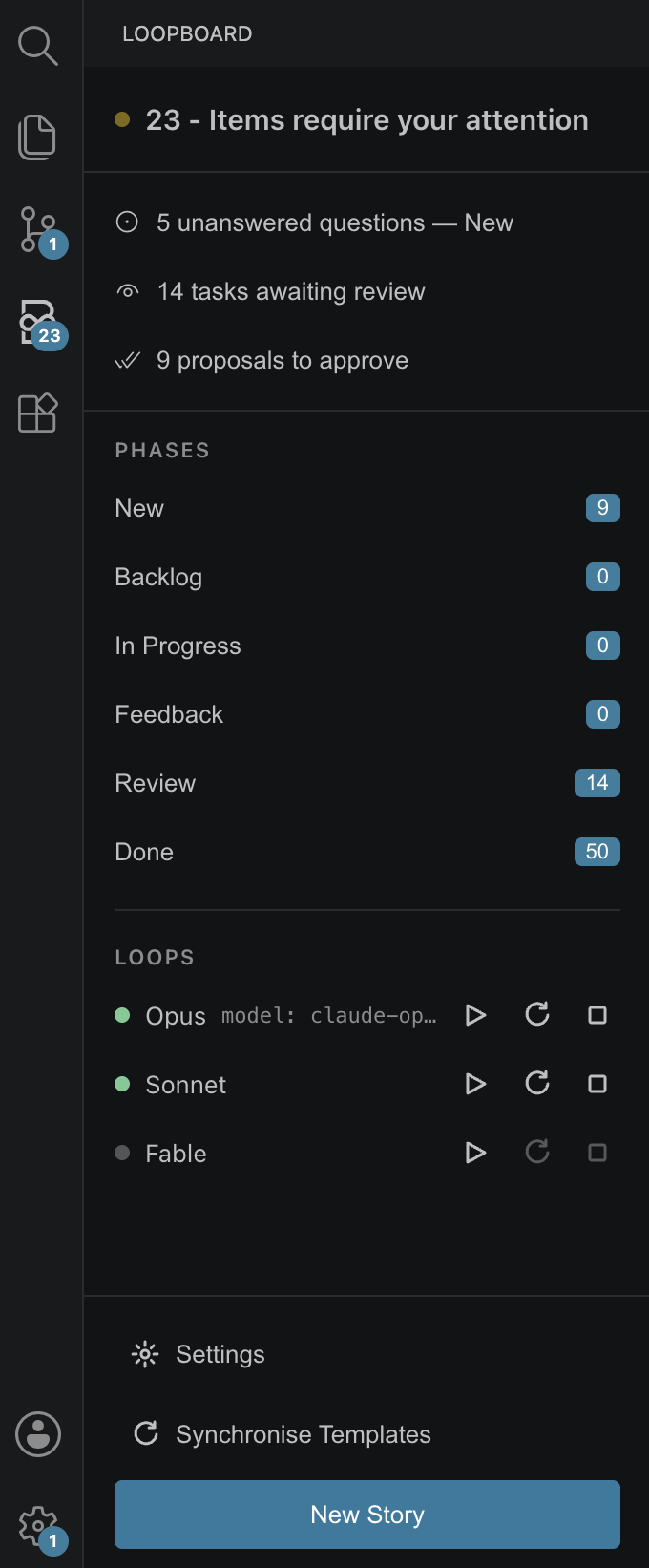
The activity-bar sidebar (left) is a read-only, at-a-glance summary — click any row to jump into the board. From top to bottom, it shows:
 |
|
On the board itself:
- New — tick a task's checkbox to promote it to Backlog.
- Feedback — type an answer under each question; the loop resumes once all are answered.
- Review — read DELIVERED, optionally write review feedback (sends it back), or tick to accept → archived to
DONE.md. - New story composer — write free text and choose the groom/worker models inline; it lands as a
DRAFT:the loop grooms into a story.
Edits save on blur/Enter as field patches; if the file changed on disk under your edit, the disk value wins and a toast tells you. The board performs only the two human gates — promote and accept — everything else is a field patch the loops react to on their next pass.
The ▶ buttons open a plain VSCode terminal named Claude <Model> in the workspace root and run
claude --model <m> --permission-mode <cfg> with a tiny bootstrap prompt that points the loop at
.loopboard/LOOP.md's Automation section — the standing instructions each loop re-reads every pass.
↻ disposes and respawns for a fresh context. Loops die with the VSCode window; restart is one click,
since all state lives in .loopboard/.
| Setting | Default | Meaning |
|---|---|---|
loopBoard.defaultWorkerModel |
sonnet |
model that works tasks with no model: field |
loopBoard.defaultGroomerModel |
opus |
model that grooms tasks/drafts with no groomer: field |
loopBoard.permissionMode |
auto |
--permission-mode passed to the claude CLI |
loopBoard.loopInterval |
1m |
interval passed to the injected /loop line |
loopBoard.autoRecycle |
false |
restart a model's terminal after it finishes a task (fresh context) |
loopBoard.clearSessionAfterTask |
false |
lighter alternative — send /clear after a task instead of restarting |
loopBoard.models.<slot> |
— | per-slot overrides: .enabled, .model, .effort (see below) |
See FAQ.md for common questions (e.g. why there's no Haiku slot).
The built-in model slots — opus, sonnet, fable — are what you assign to tasks
(model: / groomer:) and what the sidebar Loops rows spawn. Each slot is configured through
three keys:
loopBoard.models.<slot>.enabled— show/hide the slot in the Loops overview and the board's model selects.loopBoard.models.<slot>.model— the actual string passed asclaude --model <string>(e.g.opus[1m]or a dated snapshot). Empty falls back to the slot's built-in default; anything outside[A-Za-z0-9._\[\]-]is rejected before it reaches the terminal.loopBoard.models.<slot>.effort— grooming-subagent reasoning-effort ceiling (low…max) for that slot, per Rule 14 inLOOP.md.
Migrating from "Claude TODO Board" (≤ 0.1.1): the extension, command, and settings ids were renamed from
claudeTodo.*toloopBoard.*with no fallback — re-enter any custom settings.json values under the new keys.
Node and every other tool run inside Docker — nothing is installed on the host, which needs
only Docker, make, git, and VSCode. Open the folder in VSCode and press F5 to launch the
Extension Development Host against this repo's own .loopboard/ tracker. All toolchain commands are
wrapped in the Makefile:
make install    # npm install (typescript + @types/vscode only) in node:22
make build      # tsc -> out/
make test       # compile pure modules + run node --test round-trip / merge suites
make package    # build a .vsix via @vscode/vsce
Zero runtime dependencies; the webview is vanilla HTML/CSS/JS with a CSP nonce on every script.
Treat .loopboard/ and workspace settings as trusted input. LoopBoard points an autonomous
claude session at .loopboard/LOOP.md's Automation block, running with the configured
loopBoard.permissionMode — which may be bypassPermissions. Anything written into LOOP.md (or
the task files it opens), or into .vscode/settings.json, steers an agent that can run commands on
your machine. This is inherent to what LoopBoard does, not a bug.
- A
.loopboard/from a source you don't control (a cloned repo, a shared workspace) is a prompt-injection vector with arbitrary-command-execution reach. - Review
.loopboard/LOOP.mdbefore starting a loop in a repo you didn't author, and setloopBoard.permissionModeno higher than you're comfortable running unattended.
VSCode Workspace Trust gates activation, but trusting a repo to open it is not the same as vetting
what its .loopboard/ will tell an agent to do.
Advertised usage limits for Pro and Max plans assume "ordinary, individual usage of Claude Code and
the Agent SDK." A tight loop (the default is 1m) spinning multiple model terminals unattended
around the clock can push past that, and Anthropic may rate-limit or enforce against the account.
LoopBoard drives your own locally-authenticated Claude Code CLI — nothing here is against the ToS,
but its design encourages high-frequency multi-model looping, so it's worth being aware of.
Less prompting. No babysitting. More building.
MIT License