
A Rails engine for a dashboard with metrics, lists, categories and pages. Every widget runs your own code: ActiveRecord queries, Stripe calls, Good Job stats, Action Mailbox records.
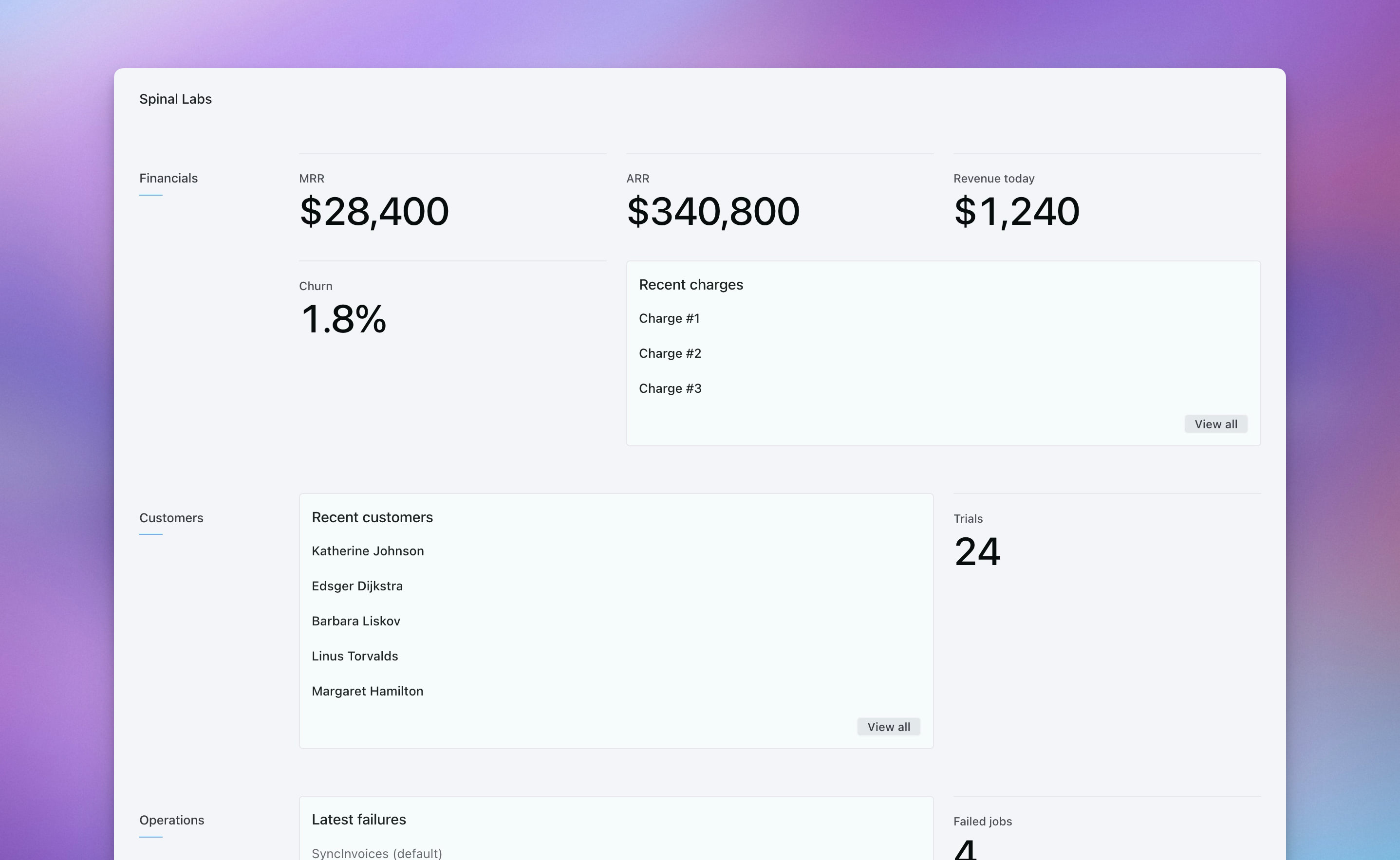
Sponsored By Rails Designer

bundle add bord
bin/rails generate bord:install
The installer creates config/bord/dashboard.rb and mounts the engine at /bord. Bord loads every file under config/bord/**/*.rb automatically.
# config/bord/dashboard.rb
Bord.draw do
  title "Spinal Labs"

  category :financials, label: "Financials", position: 1 do
    metric :mrr, label: "MRR", value: -> { Current.account.mrr.format }
    list :recent_users, label: "Recent users", items: -> { User.order(created_at: :desc).limit(5) }
  end
end
Values and items are lambdas, evaluated per request. List items are model instances, so Bord renders each entry with to_bord (see Lists). Add more categories and widgets the same way.
metric :users, label: "Users", value: -> { User.count }| Option | Description |
|---|---|
label |
Card title, defaults to the humanized id |
value |
Scalar or lambda evaluated per request |
href |
Makes the value a link |
position |
Ordering within the category |
actions |
Widget-level actions |
if / unless |
Conditional visibility |
list :recent_users,
  label: "Recent users",
  items: -> { User.order(created_at: :desc).limit(5).map { |user| {label: user.email, href: "/admin/users/#{user.id}"} } }
Each item is a hash with label, optional href and actions. You can also pass model instances and map them with to_bord:
class User < ApplicationRecord
  def to_bord
    {title: full_name, description: email, href: admin_user_path(self)}
  end
end

list :recent_users,
  label: "Recent users",
  items: -> { User.order(created_at: :desc).limit(5) }
Without to_bord, the title falls back to ModelName #id. The id comes from to_gid or to_param. The link comes from the host polymorphic route.
category :operations, label: "Operations", position: 2 do
  metric :failed_jobs, label: "Failed jobs", value: -> { FailedJob.count }
end
Categories group widgets and accept position and if/unless. Widgets outside any category appear below the categories.
Two kinds:
# Navigation
{label: "View", href: "/admin/users"}

# Server-side action
{label: "Refund", action: {record: charge.to_gid.to_s, method: :refund, customer_id: charge.id}}
Bord locates the record by GlobalID, calls method with the remaining parameters and refreshes the widget. Add confirm: to ask before submitting. Submitted actions must match the actions you declared. Anything else returns 404.
A list with per-item actions and a widget-level action:
list :recent_charges,
  label: "Recent charges",
  items: -> {
    Current.account.charges.recent.limit(3).map do |charge|
      {
        label: charge.label,
        href: "/charges/#{charge.id}",
        actions: [
          {
            label: "Refund",
            confirm: "Refund this charge?",
            action: {record: charge.to_gid.to_s, method: :refund, customer_id: charge.id}
          }
        ]
      }
    end
  },
  actions: [{label: "View all", href: "/admin/charges"}]
Use variant: to style actions: :primary, :danger or :text.
# config/bord/users.rb
Bord.page :users,
  label: "Users",
  description: "All users",
  records: -> {
    User.order(created_at: :desc).map do |user|
      {
        title: user.email,
        description: "Joined #{user.created_at.to_date}",
        actions: [{label: "View", href: "/admin/users/#{user.id}"}]
      }
    end
  },
  record: ->(id) {
    user = User.find(id)

    {
      title: user.email,
      description: "Customer since #{user.created_at.to_date}",
      fields: [{label: "Email", value: user.email}, {label: "Plan", value: user.plan}],
      actions: [{label: "Edit", href: "/admin/users/#{user.id}/edit"}]
    }
  }
Routes:
/bord/pages/:page_id: record list/bord/pages/:page_id/records/:record_id: record detail
record is optional. Without it, the detail route returns 404.
Link to a page from a widget with bord.page_path(:users) inside a lambda or a string path.
bin/rails generate bord:presetsThe generator lists the bundled presets: Solid Queue, GoodJob, Stripe, Devise, Sidekiq, Active Storage, Action Mailbox and User. Pick the ones you want and the generator appends their code to config/bord/presets.rb.
Other gems can ship presets too. A preset is a JSON file at bord/presets/<name>.json with name, description, an optional note and code lines. Presets from gems show up in the same selection list.
In production, /bord returns 404 until you set an authenticated parent_controller. Development and test work out of the box. Bord has one authorization gate: the host's parent_controller. Anyone with dashboard access can run every declared action. Submitted actions must match the actions you declared. Anything else returns 404.
# config/initializers/bord.rb
Bord.configure do |configuration|
  configuration.parent_controller = "Admin::BaseController"
  configuration.brand_hue = 250
end
title is set inside Bord.draw.
MIT