
ExtendedTable is a JavaFX library that extends the default TableView and TreeTableView with many new features like a very fast filter, validation, fixed column support, tree lines and more.
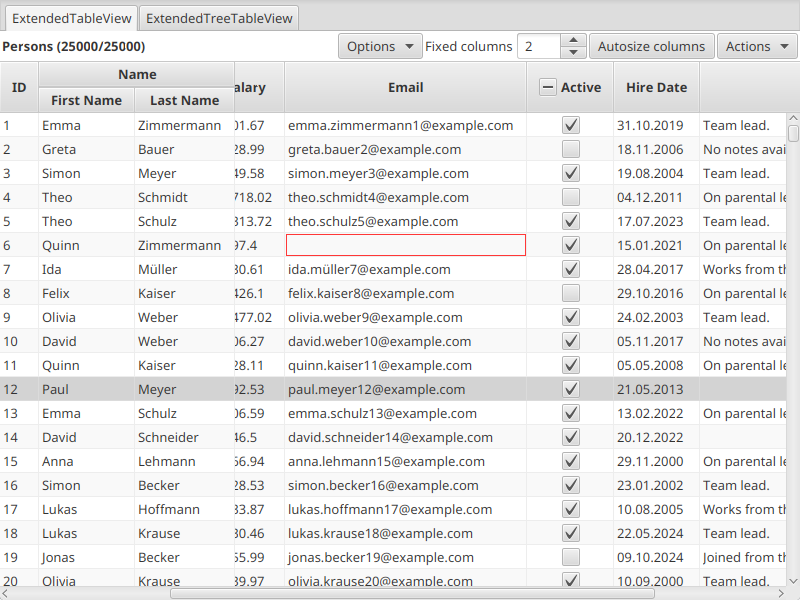
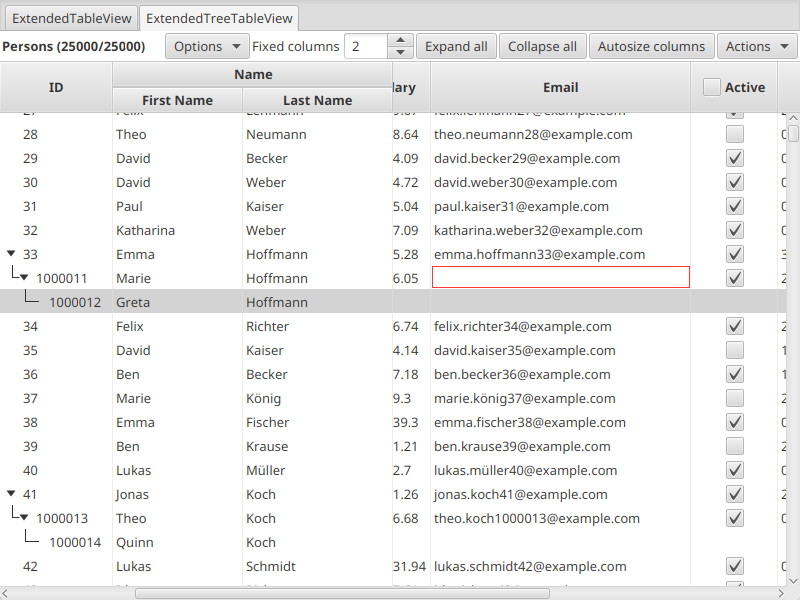
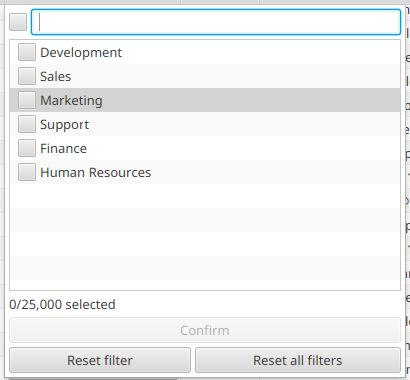
- 📌 Fixed column support (also known as frozen columns)
- ✅ Validation Support
- 💬 Table Header
- 🔍 First class filter support
- 🌳 Treeline support to better see the indentation
- 🎨 Sane defaults for different kind of cells. Everything will just work and look good by default
- 📏 Optimized table columns
- ⚡ Built for large data sets
- 🌍 Localized texts (English and German out of the box)
| Dependency | Version |
|---|---|
| Java | 25+ |
| JavaFX | 25+ |
<dependency>
    <groupId>tools.maran</groupId>
    <artifactId>extended-table</artifactId>
    <version>1.0.0</version>
</dependency>implementation 'tools.maran:extended-table:1.0.0'Both tables can replace their JavaFX counterpart, the main difference being the rows and columns.
A read and a write function take the place of the cell value factory and commit, which is all that is needed for editing, validation and filtering.
The second difference is the data model: setItems(...) sets the backing items, while getItems() only returns the
rows currently visible, so items should be added or removed via getBackingItems() and all filters are dropped with restoreBackingItems().
ExtendedTableView<Person> tableView = new ExtendedTableView<>();
tableView.setEditable(true);
tableView.setValidationEnabled(true);
// Table Header API.
tableView.setHeaderText("Persons");
Button addButton = new Button("Add");
addButton.setOnAction(_ -> tableView.getBackingItems().add(new Person()));
tableView.getHeaderButtons().add(addButton);
// The first two columns stay in place while scrolling horizontally.
tableView.setFixedColumnCount(2);

StringTableColumn<Person> firstName = new StringTableColumn<>("First Name");
// How the value of this column is read from the item (row).
firstName.setReadFunction(Person::getFirstName);
// How the value is written back on commit. Setting it makes the column editable.
firstName.setWriteFunction(Person::setFirstName);
// Invalid cells are marked, and the table itself becomes invalid.
firstName.setValidator(name -> name != null && !name.isBlank());

IntegerTableColumn<Person> age = new IntegerTableColumn<>("Age");
age.setReadFunction(Person::getAge);
age.setWriteFunction(Person::setAge);
age.setValidator(value -> value != null && value >= 0 && value <= 120);

tableView.getColumns().addAll(firstName, age);
tableView.setItems(FXCollections.observableArrayList(persons));The same table, but with TreeItems and the *TreeTableColumn classes:
ExtendedTreeTableView<Person> treeTableView = new ExtendedTreeTableView<>();
treeTableView.setEditable(true);
treeTableView.setValidationEnabled(true);
// Table Header API.
treeTableView.setHeaderText("Persons");
Button addButton = new Button("Add");
addButton.setOnAction(_ -> treeTableView.getBackingItems().add(new TreeItem<>(new Person())));
treeTableView.getHeaderButtons().add(addButton);
// The first two columns stay in place while scrolling horizontally.
treeTableView.setFixedColumnCount(2);
// Draws the lines which show what belongs to which parent.
treeTableView.setShowTreeLines(true);

StringTreeTableColumn<Person> firstName = new StringTreeTableColumn<>("First Name");
// How the value of this column is read from the item (row).
firstName.setReadFunction(Person::getFirstName);
// How the value is written back on commit. Setting it makes the column editable.
firstName.setWriteFunction(Person::setFirstName);
// Invalid cells are marked, and the table itself becomes invalid.
firstName.setValidator(name -> name != null && !name.isBlank());

IntegerTreeTableColumn<Person> age = new IntegerTreeTableColumn<>("Age");
age.setReadFunction(Person::getAge);
age.setWriteFunction(Person::setAge);
age.setValidator(value -> value != null && value >= 0 && value <= 120);

treeTableView.getColumns().addAll(firstName, age);
// The items are the top level TreeItems. The root itself is created and hidden by the table.
treeTableView.setItems(FXCollections.observableArrayList(persons.stream().map(TreeItem::new).toList()));The items in the filter popup will always match the underlying items of the table.
The popup is created by the FilterPopupFactory of the column when the filter is opened for the first time.
Developers can override it and set the Comparator, which sorts the items inside the filter, or the FilterStrategy, which decides when a text matches an item.
The column connects the popup to the table afterward.
With the default FilterStrategy, every whitespace separated word or double-quoted phrase must be contained in the item text, case-insensitive and in any order.
firstName.setFilterPopupFactory(() -> {
    FilterPopupControl<Person> popupControl = new FilterPopupControl<>();
    popupControl.setComparator(Comparator.comparing(Person::getFirstName, String.CASE_INSENSITIVE_ORDER));
    popupControl.setFilterStrategy(filterText -> {
        String prefix = filterText.toLowerCase(Locale.ROOT);
        return itemText -> itemText.startsWith(prefix);
    });
    return popupControl;
});The sampler is in the tests and can be used to show examples and manually test the ExtendedTableView and the
ExtendedTreeTableView.
Launch the following class located in the tests:
tools.maran.extendedtable.manual.SamplerThe JavaFX TableView and TreeTableView are powerful, but everything beyond the basics may have to be built yourself (again): freezing columns, filtering, validating cells, editing without losing values and making a table with thousands of rows feel fast.
ExtendedTable is the API contract for all new features, so a TableView can be swapped for an ExtendedTableView without rewriting much of the surrounding code.
The filter works in a different way than pretty much all other frameworks do. Instead of text based filter or a FilteredList that works with a Predicate, we are using the items directly from the table.
The filter basically just mirrors the table items and will set back the selected items directly on the table, no steps inbetween. So there is no need for e.g. live reload the table on every keystroke, or any other processing.
During my testing back then, this was the fastest approach (by a lot) that works well with many items. Even over 100k items are no problem. Also, the behavior is more close to spreadsheet tools like Excel, which might be more familiar to some users.
Details about the API naming and changelog.
- Classes that replace a JavaFX counterpart use the
Extendedprefix:ExtendedTableView,ExtendedTableRow,ExtendedTableCell, ... - Columns are named after the type they show:
StringTableColumn,IntegerTableColumn,LongTableColumn,DoubleTableColumn,CheckBoxTableColumnandGenericTableColumnfor everything else. The tree variants carry aTreeinfix:StringTreeTableColumn,GenericTreeTableColumn, ... readFunctionandwriteFunctionreplace the cell value factory: read maps the item (row) to the value of the column, write is called on commit and makes the column editable.toStringConverterandfromStringConverterdefine how a value is displayed and parsed back.- Items are what the table currently shows, backing items are the full, unfiltered data model.
- Initial release
- Optimize
CheckBoxcolumn state handling - Improve
ExtendedTreeTableViewdouble click behavior - Improve column autosizing
- Make it possible that the
FilterPopupControlwidth/height can actually be set in code (Which apparently is normally ignored in JavaFX for popups) - Tooltips with a short description for all buttons in the
FilterPopupControl