


English · Nederlands
Follow your Belgian football team in Home Assistant: the match calendar, the next and the previous match, the series with its ranking and fair play standings, and the squads of every team in the series. The data comes from the Royal Belgian Football Association (RBFA) website, which serves Voetbal Vlaanderen and ACFF.
It works for every team that has a page on rbfa.be, from the first team down to the youngest youth teams.
- What you get
- Installation
- Configuration
- Entities
- Attributes
- How and when data is refreshed
- Youth series: no ranking, but fair play
- Example cards
- Updates
- Troubleshooting
- Releasing a new version (maintainers)
| 📅 Calendar | Every match of the season as a calendar event, with location, series and (when published) the score. Usable in the calendar panel, in calendar cards and as an automation trigger. |
| ⏭️ Next match | Start and end time, home and away team with club logo, location, series, referee and the RBFA match ID. |
| ⏮️ Previous match | The same set of sensors for the last match, including goals and penalties when RBFA publishes them. |
| 🏆 Ranking | The ranking of the series as an attribute: position, team, logo and matches played. |
| 🤝 Fair play | The fair play percentage of every team in the series. |
| 👥 Squads | Players (with matches played and goals) and staff (with their function) of every team in the series. |
| 🧑⚖️ Referee | The referee of the match, when one is assigned. |
Everything is read-only: the integration never changes anything on rbfa.be and needs no account.

Or manually:
- In Home Assistant open HACS → menu (⋮) → Custom repositories.
- Repository:
https://github.com/Maffiow/RBFA, type: Integration → Add. - Search for RBFA in HACS, click Download and restart Home Assistant.
Already using another
rbfaintegration? Remove it in HACS first (or delete/config/custom_components/rbfa), then install this one. Your existing configuration and entity IDs are kept.
Copy custom_components/rbfa to /config/custom_components/rbfa and restart Home Assistant.
Settings → Devices & services → Add integration → RBFA
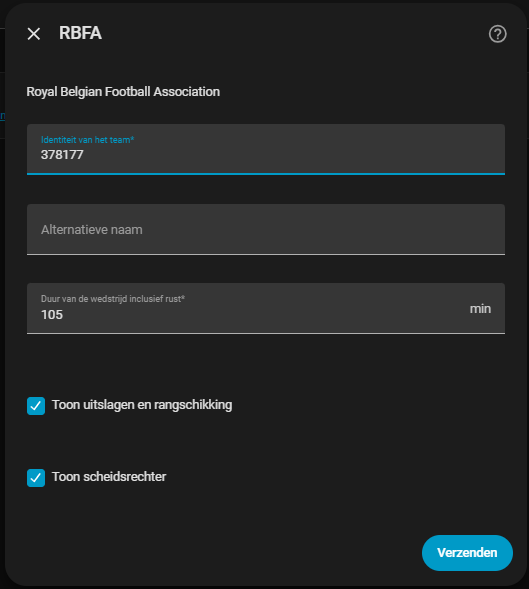
| Field | Description |
|---|---|
| Team | The number after ploeg in the URL of the team page. For https://www.rbfa.be/nl/club/1932/ploeg/378177/overzicht that is 378177. |
| Alternative name | Optional name for the calendar (default: club | team, e.g. EENDRACHT MECHELEN A/D MAAS | U10 A). |
| Duration | Match duration in minutes including the break; used for the end time of calendar events and to decide when a match is over. |
| Show ranking | Fetch the ranking, the fair play standings and the squads of the series. |
| Show referee | Fetch the referee and create the referee sensors. |
All settings except the team can be changed later via Configure on the integration. To follow several teams, add the integration once per team.
Team IDs change every season. If you get "Team … not found" in the log after the summer, remove the integration and add it again with the new ID from rbfa.be.
Each configured team gets one calendar and two sets of sensors: one for the upcoming match and one for the last match.
| Entity | State | Notes |
|---|---|---|
| Calendar | on while a match is being played |
Named club | team or your alternative name. Holds every match of the season. |
| Start time | Kick-off (timestamp) | |
| Finish time | Kick-off + duration (timestamp) | |
| Home team | Team name | Entity picture is the club logo. |
| Away team | Team name | Entity picture is the club logo. |
| Location | Address of the ground, on three lines | Empty until RBFA publishes it. |
| Series | Name of the series | Entity picture is the logo of the organiser. Carries the ranking and the squads. |
| Referee | Name of the referee | Only when Show referee is on; unknown when none is assigned. |
| Match ID | RBFA match ID | Handy for a link to https://www.rbfa.be/nl/wedstrijd/<id>. |
Good to know:
- Sensors are disabled by default. Enable the ones you need under Settings → Devices & services → RBFA → entities.
- Entity IDs follow your Home Assistant language. In English you get
sensor.home_team, in Dutchsensor.thuis. The examples below use the Dutch IDs. - Two sets, one suffix. Both sets share the same names, so Home Assistant gives the second
one a
_2suffix (sensor.thuisandsensor.thuis_2). Check thetagattribute to see which is which:upcomingorlastmatch.
Every sensor has:
| Attribute | Meaning |
|---|---|
baseid |
The team ID you configured. |
tag |
upcoming or lastmatch. |
Home team and Away team add:
| Attribute | Meaning |
|---|---|
id |
RBFA team ID of that team. |
goals |
Goals scored, when the score is published. |
penalties |
Penalties scored in a shoot-out, when applicable. |
position |
Position in the ranking of the series. |
entity_picture |
URL of the club logo. |
Series adds:
| Attribute | Meaning |
|---|---|
ranking |
List with one entry per team: position, team, id, logo, matches (played) and fairplay (percentage). |
squads |
Players and staff per team, keyed by team ID (see below). Not stored in the recorder. |
squads looks like this:
"378177":
  players:
    - name: Jan Janssens
      matches: 8        # matches played according to the match sheets
      goals: 0
  staff:
    - name: Piet Peeters
      function: T1      # T1, T2, Officiële Team Afgevaardigde, ...
Privacy. Squads contain the names that RBFA publishes on the public team page, which for youth teams are the names of children. The attribute is kept out of the recorder database. Think twice before sharing screenshots or exposing it outside your home.
- Everything is refreshed every 30 minutes.
- Requests are spaced one second apart; the RBFA website blocks clients that fire bursts.
- The location and referee of the next match are refreshed on every update. Other matches are looked up once, a few per update, nearest first.
- Squads are refreshed at most every 12 hours, one request per team in the series.
- If RBFA is unreachable or blocks a request, the previous data is kept and the update is retried on the next cycle.
For the youngest age groups (7 to 12 years in Flanders) the football federations deliberately do not publish scores or a ranking. RBFA still returns the list of teams, so for those series:
positionis simply the order in which RBFA lists the teams, not a real standing;goalsstays empty;fairplayis filled in. After each match the person filling in the match sheet rates both teams on five points: players, supporters, coaches, team delegate and fair play parent. Teams averaging over 80% receive a fair play certificate. More about the fair play standings (Dutch).
In these series the team names from RBFA also end in a short code such as A 2, as in
E. Mechelen a/d Maas A 2.
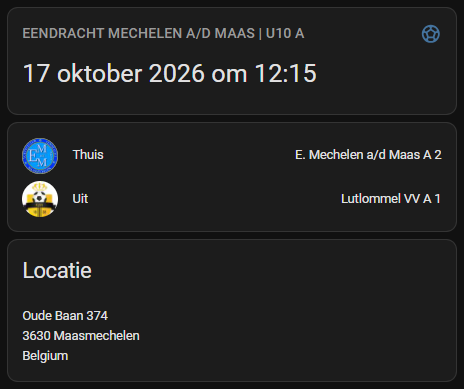
All examples are Markdown cards and need no custom cards. Replace the entity IDs with the ones in your installation.
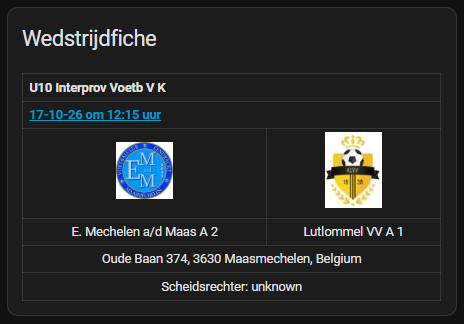
<table width="100%">
<tr><th colspan=2>{{ states('sensor.reeks') }}</th></tr>
<tr><th colspan=2>
<a href="https://www.rbfa.be/nl/wedstrijd/{{ states('sensor.wedstrijd_id') }}">{{ as_timestamp(states('sensor.start')) | timestamp_custom('%d-%m-%y om %H:%M uur') }}</a>
</th></tr>
<tr>
<td align="center"><img src="{{ state_attr('sensor.thuis', 'entity_picture') }}" width="64"></td>
<td align="center"><img src="{{ state_attr('sensor.uit', 'entity_picture') }}" width="64"></td>
</tr>
<tr>
<td align="center">{{ states('sensor.thuis') }}</td>
<td align="center">{{ states('sensor.uit') }}</td>
</tr>
<tr><td align="center" colspan="2">{{ states('sensor.locatie') | replace("\n", ", ") }}</td></tr>
<tr><td align="center" colspan="2">Scheidsrechter: {{ states('sensor.scheidsrechter') }}</td></tr>
</table>
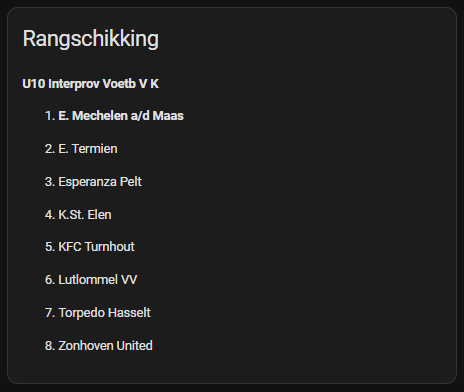
Uses the ranking attribute of the series sensor and the baseid attribute (your team ID)
to print your own team in bold:
type: markdown
title: Ranking
content: >-
  {% set sensor = "sensor.reeks" %}
  **{{ states(sensor) }}**

  {% for item in state_attr(sensor, "ranking") or [] %}
  {{ item.position }}. {% if item.id == state_attr(sensor, "baseid") %}**{{ item.team }}**{% else %}{{ item.team }}{% endif %}
  {% endfor %}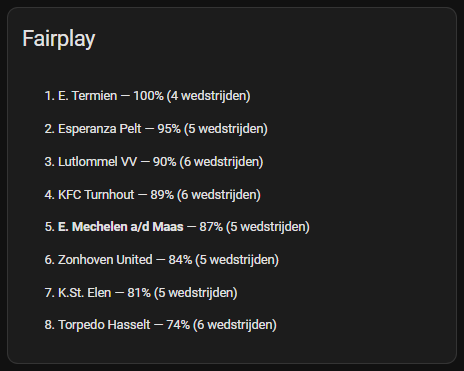
Sorts the teams of the series by fair play percentage:
type: markdown
title: Fair play
content: >-
  {% set sensor = "sensor.reeks" %}
  {% for item in (state_attr(sensor, "ranking") or [])
     | selectattr("fairplay", "number")
     | sort(attribute="fairplay", reverse=true) %}
  {{ loop.index }}. {% if item.id == state_attr(sensor, "baseid") %}**{{ item.team }}**{% else %}{{ item.team }}{% endif %} — {{ item.fairplay }}% ({{ item.matches }} matches)
{% endfor %}Lists the players and staff of your own team. Use another team ID instead of baseid to
show an opponent, for example state_attr('sensor.thuis', 'id').
type: markdown
title: Squad
content: >-
  {% set sensor = "sensor.reeks" %}
  {% set squad = (state_attr(sensor, "squads") or {}).get(state_attr(sensor, "baseid"), {}) %}
  **Players**

  {% for p in (squad.players or []) | sort(attribute="matches", reverse=true) %}
  - {{ p.name }} — {{ p.matches }} matches{% if p.goals %}, {{ p.goals }} goals{% endif %}

  {% endfor %}
  **Staff**

  {% for s in squad.staff or [] %}
  - {{ s.name }} ({{ s.function }})

{% endfor %}alias: Match reminder
triggers:
- trigger: calendar
event: start
entity_id: calendar.rbfa_378177 # your RBFA calendar
offset: "-02:00:00"
actions:
- action: notify.notify
data:
title: "⚽ {{ trigger.calendar_event.summary }}"
message: "Kick-off in 2 hours at {{ trigger.calendar_event.location | replace('\n', ', ') }}"
mode: singleNew versions are published as GitHub releases. HACS checks for them automatically and shows an update in Settings → Updates.
HACS creates an update entity for the integration (e.g. update.rbfa_update). This automation
installs new versions at night and restarts Home Assistant:
alias: Auto-update RBFA
triggers:
  - trigger: time
    at: "04:00:00"
conditions:
  - condition: state
    entity_id: update.rbfa_update
    state: "on"
actions:
  - action: update.install
    target:
      entity_id: update.rbfa_update
  - delay: "00:01:00"
  - action: homeassistant.restart
mode: single| Symptom | Cause and fix |
|---|---|
| "Team … not found on rbfa.be" | Team IDs change every season. Look up the new ID in the URL of the team page and add the integration again. |
| "request blocked by the RBFA firewall" | The RBFA API sits behind a firewall that blocks requests that do not look like they come from the website. The integration sends browser-like requests and limits itself to a few calls per update; it retries automatically. Open an issue if it keeps happening. |
| Sensors are missing | They are disabled by default; enable them on the integration page. |
position looks alphabetical, goals is empty |
That series has no published ranking or scores, see Youth series. |
squads or ranking is missing |
Show ranking is off, or the first refresh after a restart is still running (squads take one request per team). |
| Location or referee is empty | RBFA has not published it yet; it is picked up on a later update. |
Debug logging:
logger:
  logs:
custom_components.rbfa: debug- Change the code.
- Bump
versionincustom_components/rbfa/manifest.json(e.g.1.2.0→1.2.1). - Push to
main. The Release workflow creates tagv1.2.1and a GitHub release with generated notes; HACS users then see the update.