
Download Latest Release (v1.0.0) · Product Page · All 36 Cortex Scripts · Docs · Discord
Free direct download — no Tebex checkout or Asset Escrow required. Download the ready-to-drop
cortex-echo-1.0.0.zipfrom GitHub Releases and extractcortex-echointo your FiveMresources/folder.
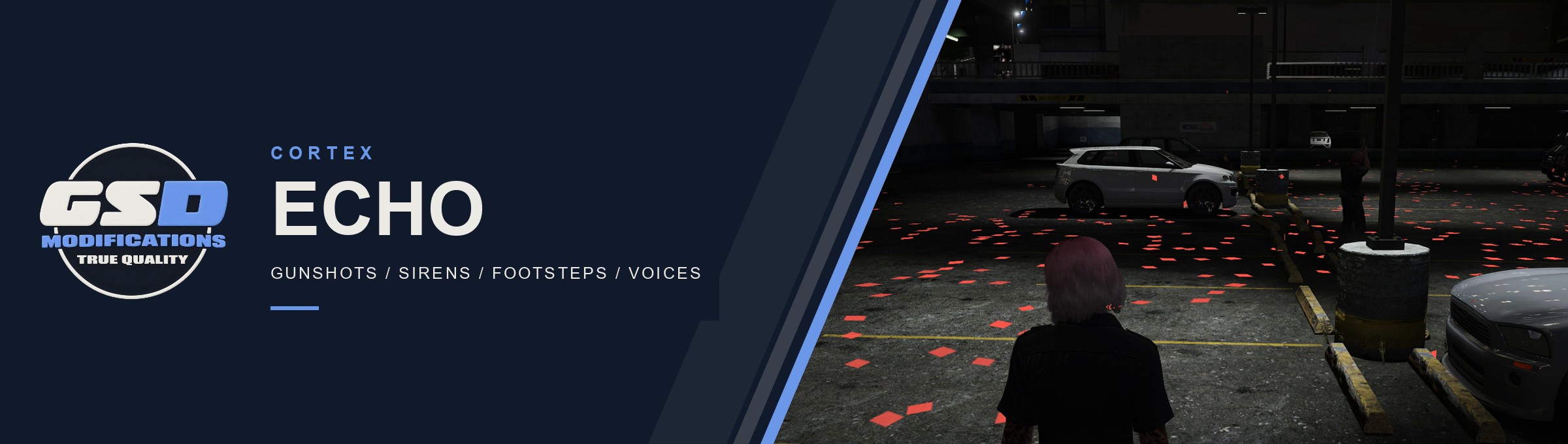
Sound marks for deaf and hard-of-hearing players. What a hearing player would hear is drawn into the world as small glowing marks lying flat on the ground, walls, props and parked vehicles. Each sound starts at whatever made it and spreads outward as a wave, densest at the source and thinning with distance. Louder sounds reach further. Colour and shape say what it is, and each player can pick both for every sound.
Needs cortex-lib 3.7.0 or newer for its settings, which live in an Echo tab in Cortex settings. Older cortex-lib versions cap a tab at 64 settings, so Echo still loads but only the first sounds get shape and colour pickers. No framework and no server code.
| Sound | Default marks | Reach | Notes |
|---|---|---|---|
| Gunshots | Red diamonds, a wave per shot | About 45 m around the shooter | Suppressed weapons spread much less and are only picked up close |
| Explosions | Red diamonds, one big wave | About 80 m. Covers the ground, walls and cars all around it | |
| Fire | Red chevrons, slow pulses | About 16 m | Burning ground, burning vehicles and engine fires, and people on fire |
| Fights | Red squares, a small wave per hit | About 9 m | Punches and melee hits, from the fighter or the person hit |
| Screams and shouts | Red triangles around the person | About 24 m | People screaming in panic, shouting in a fight, and yelling in pain when hurt |
| Crashes | Amber squares, a wave | About 30 m | From the game's crash events and from the vehicle itself: a sudden change in speed, or a big hit to its health. Catches cars hitting walls, poles and parked cars |
| Backfires | Amber dots from the exhaust, two or three quick waves | About 20 m | Lifting off the throttle at high revs, fast upshifts and bouncing off the limiter. Sports, super, muscle and motorbike classes, cars with an aftermarket exhaust or engine, and engines close to failing |
| Tyre blowouts | Amber rings, one sharp wave | About 30 m | |
| Breaking glass | Yellow stars, a wave | About 16 m | Vehicle windows smashed by a hit, by gunfire, or while the car is empty or locked, so rolling a window down never counts |
| Breaking and knocked props | Yellow squares, a small wave | About 12 m | Bins, cones, signs and poles knocked over, broken or landing, and other property damage |
| Doors | White squares at the door | About 7 m | Vehicle doors, bonnets and boots opening and slamming, and swinging building doors the game knows about |
| Car stereos | Purple rings, pulsing around the vehicle | About 13 m | Vehicles driven by players with the radio on, and NPC cars playing their radio loud |
| Pedestrian talk | Mint dots around the talker | About 5 m | Pedestrians and players' characters speaking: chatter, phone calls, comments |
| Sirens | Blue crosses, pulsing around the vehicle | About 38 m | Emergency lights count by default, for servers that replace siren audio. Your own vehicle's siren shows too, slightly dimmer |
| Horns | Amber squares, fast pulses | About 28 m | |
| Car alarms | Amber squares, pulses | About 24 m | |
| Tyre squeal | Amber squares bursting out from the rear tyres, with a quick ripple | 10 to 16 m, from how hard the tyres slip | Burnouts, wheelspin off the line, drifts and locked-wheel braking. Read from the wheels, so it works for electric cars and for a burnout standing still |
| Vehicles | Other vehicles leave a wake: every engine beat drops a ring of pale dashes on the road where the vehicle was, and it spreads outward from there. Rings bunch up ahead of a moving vehicle and stretch out behind it, so their spacing shows direction and speed. Rings drop slowly at idle and faster as revs climb, and an upshift sends out one bolder ring. Your own vehicle gets a tight outline instead, with pulses that beat slowly at idle and quicken and sweep out faster as revs climb, heavier at the back under throttle. An upshift snaps out one sharp ring, and at redline the inner outline stays lit | 4 to 18 m, from loudness. Rings stop at walls | Loudness follows engine revs, throttle and speed. Electric cars only make tyre noise, so they show nothing until they are moving fast. Your own vehicle, plus the nearest four around you on foot. While you drive, only loud traffic within 22 m shows, dimmed, and only vehicles heading for you on foot get an edge pip |
| Aircraft | Pale dashes on the ground under the aircraft | About 40 m | Rotor wash, so you can tell where it is hovering |
| Footsteps | Mint triangles, a small spread per step | 4 to 9 m, more when running | Players only by default. Sneaking is quieter |
| Your footsteps | Fainter mint triangles around your own feet | 3 to 7 m | Can be switched off on its own |
| Voices | Bright green rings around the talker | 3 to 18 m, from the talker's voice range | Players talking on voice chat. The spread follows their pma-voice range (or a numeric voiceRange state bag), so whispering is small and shouting is wide, and you only see it when you are close enough to hear them. With voice_useNativeAudio on, pma-voice is heard at 3 times its set distance, and Echo matches that |
| Your voice | Fainter bright green rings around you while your mic transmits | 3 to 18 m, from your voice range | Shows that you are being heard and roughly how far. Can be switched off on its own |
| Other sounds | Amber squares, or the tone the reporting script picks | Scales with the reported range | Anything another script reports through the export |
Nothing in Echo flashes three or more times a second (the fastest, the horn, pulses about 2.6 times a second), which keeps it under the three-per-second limit for flashing content in WCAG 2.3.1, so it stays safe for photosensitive players. Fast sounds like full-auto fire show as a steady stream of waves rather than one per shot.
Every sound has its own shape and its own colour, and players pick both per sound in the Echo tab:
- Shapes: diamonds, squares, crosses, triangles, dashes, dots, rings, chevrons and stars. Each one stays recognisable without colour, close up and as single marks. In the densest groups far from the camera, every shape thins out to specks, so use the Large size if you rely on shape at a distance.
- Colours: nine swatches, or any hex colour typed into the box next to them. The off-screen pip uses the same colour.
- Colour presets recolour every sound at once: red-green safe (deuteranopia and protanopia), blue-yellow safe (tritanopia) and high contrast, which also draws marks at full opacity. Each preset was picked by simulating that colour vision and keeping the five colours as far apart as possible. Measured as colour difference (CIELAB): the closest pair of default colours is 47 apart for normal vision but only 9 for protanopia and 15 for deuteranopia; the red-green preset keeps its closest pair 34 apart for deuteranopia and 46 for protanopia, and the blue-yellow preset 45 for tritanopia. Shapes stay as each player set them.
- Per sound is the default: each sound uses the colour picked under it, which starts as the colours in the table above.
- Every row has its own reset button, and Reset tab puts everything back to the server defaults.
Marks only help when you can see them. When the source of a sound is off screen, behind you, or hidden behind a wall, a small pip sits at the edge of the screen in its direction: the sound's icon in its colour, an arrow pointing toward it, and its name for the first two seconds. Pips stay clear of the minimap.
By default, sound stops at solid walls: marks never appear on the far side of a building from the source, and the pip at the screen edge is what tells you it is there. This also avoids handing anyone a wallhack. Set Config.Marks.throughWalls = true to let marks spread to the ground behind walls instead.
- Drop
cortex-echointo your resources folder. - Add
ensure cortex-echotoserver.cfg, afterensure cortex-lib.
- Settings are in Cortex settings (I by default, or
/echo), on the Echo tab: turn Echo on, pick which sounds to show, and set the mark size and the density. Sounds are grouped into Danger, Vehicles, Crashes and breaking, People and Other. Under each sound you pick its shape and colour, and Colours at the top swaps in a colourblind-safe preset. Each sound's row names its marks (for example "Red diamonds"); the name updates the next time Settings opens. - Size picks between many small marks and fewer, bigger ones. Density sets how closely they are packed and how many can show at once; Low is lighter on slower PCs.
- Play sample plays every shown sound around your character for a few seconds. Settings blurs the game behind it, so after changing a shape or colour the sample plays again as you close Settings, where you can see it clearly.
- Settings save per player. Choices made in the old
/echopanel carry over. - A toggle key can be bound under Settings > Key Bindings > FiveM ("Toggle Echo sound marks"). It has no default key.
Echo is off until a player turns it on. Set Config.DefaultEnabled = true to start everyone with it on.
config.lua:
| Key | Meaning |
|---|---|
Config.Locale |
en, es, fr, de or pt-br. Add your own file in locales/ |
Config.Command |
The settings command, echo by default |
Config.DefaultEnabled |
Whether new players start with Echo on |
Config.MaxCues |
Most off-screen pips at once |
Config.Marks.throughWalls |
false stops marks at solid walls. true lets them reach the ground behind |
Config.Marks.density |
Starting density for players who have not picked one: s, m or l |
Config.Marks.budget |
Most mark groups drawn per frame on High density (2400). Medium uses 75% of it, Low 50%. Each group is one textured triangle holding up to thirty marks |
Config.Marks.drawDistance |
Marks further than this from the camera are not drawn, and sounds that far away cast none |
Config.Marks.raysPerFrame |
How many surface probes start per frame. Lower spreads a big explosion over more frames |
Config.Marks.offscreenCues |
false removes the edge pips |
Config.Marks.palette |
Starting colours for players who have not picked: custom (per sound), redgreen, tritan or contrast |
Config.Sounds.<sound>.enabled |
false removes that sound for everyone and hides it from the settings |
Config.Sounds.<sound>.range |
How far away it is picked up, in metres |
Config.Sounds.<sound>.shape, color |
Default shape (diamond, square, cross, triangle, dash, circle, ring, chevron, star) and colour (#rrggbb) for that sound. Players can change both |
gunshot.suppressedRange |
Range for suppressed weapons |
siren.lightsCount |
true treats emergency lights as a siren. Set false to require the game's own siren audio |
siren.own |
false hides the siren of the vehicle you are in |
vehicle.quietest |
How loud a vehicle has to be to show, from 0 to 1. An idling petrol car is about 0.22, an electric car rolling at 30 km/h about 0.1 |
vehicle.own, vehicle.nearest, vehicle.driving |
Whether your own vehicle shows, and how many other vehicles show at once on foot and while you drive (nearest first) |
footsteps.players, npcs, walkRange |
Who makes footsteps, and how close walking has to be |
ownsteps.enabled |
false removes the player's own footsteps |
ownvoice.enabled |
false removes the player's own voice marks |
backfire.stockCars |
true lets every petrol car backfire, not only sporty or modified ones |
music.npcs |
false limits car stereos to vehicles driven by players |
scream.pain |
false stops showing yells when someone is hurt |
Competitive servers that do not want footsteps or voices shown can switch those off here.
Report a sound from any client script, so your door knocks, phone rings and custom alarms reach deaf players too:
exports['cortex-echo']:ping({
    coords = vector3(215.0, -810.0, 30.7), -- or entity = handle
    kind = 'backfire',   -- optional: report as one of Echo's own sounds (gunshot, explosion, fire, fight, scream, crash, siren, horn, alarm, backfire, skid, tyrepop, vehicle, door, music, aircraft, glass, props, voice, chatter, footsteps)
    tone = 'alert',      -- 'danger', 'alert' or 'presence': picks which sound's look the marks use (see below)
    icon = 'custom',     -- icon for the off-screen pip: gunshot, explosion, crash, siren, horn, alarm, vehicle, aircraft, footsteps, voice, custom
    range = 40.0,        -- metres it is picked up from; also scales how far the marks spread
    duration = 1500,     -- milliseconds; long sounds send a new wave every 1.2 s
    id = 'bank-alarm',   -- same id refreshes the same sound and fires a new wave
})
From the server: TriggerClientEvent('cortex-echo:ping', target, data) with the same table.
A ping with a kind uses that sound's look and its toggle, so a player who turns off Backfires also stops seeing an anti-lag script's pops. scale (0.3 to 2) makes the marks spread less or more. Without a kind, a ping takes the look the player chose for one of their sounds, by tone: danger uses Gunshots, alert uses Other sounds, and presence uses Voices, and turning off Other sounds hides it.
| Export | Returns |
|---|---|
isEnabled() |
Whether this player has Echo on |
setEnabled(boolean) |
|
getState() |
{ enabled, size, detail, palette, kinds }, each kind with shape and color |
open() / close() |
Cortex settings |
ping(data) |
true when the player will see it |
The client event cortex-echo:changed fires with the same state table whenever a setting changes.
Nothing runs while a player has Echo off. With it on and nothing audible, the mark loop sleeps, and the check for gunfire and explosions runs 20 times a second. It only goes to every frame while you or someone near you holds a gun, since a shot lasts one frame. While sounds are playing:
- Marks are drawn in small groups: one textured triangle carries up to thirty marks, so a whole intersection of marks costs about a thousand draw calls instead of many thousands.
- Marks only go where a probe actually hit. Ground away from the source gets a small group. Walls, props and vehicles are checked first with three short probes around the hit: a group only goes on a surface that is flat and wide enough to hold it, and poles, bins, signs and edges get a single mark on the exact hit instead. A spacing grid stops marks piling up where many probes land, such as the foot of a wall.
- Each sound probes the area around it once, in even rings on the ground and an even spread across walls, and keeps that layout. A siren or alarm that has not moved re-pulses the same marks with no new probes.
- Probes are asynchronous and capped (
Config.Marks.raysPerFrame, 32 started per frame, at most 64 in flight), so other scripts' raycasts are never starved. Results are collected oldest first and collection stops at the first few still in flight, so a full queue costs a handful of checks a frame instead of 64. A big explosion takes about 210 probes on Low density, 380 on Medium and 580 on High, nearest ground first. Explosions and gunshots jump ahead of steady sounds like sirens, and a probe whose wave has already passed is dropped, so marks never trickle in late. - Vehicles, tyre squeal, and sirens and horns on moving vehicles skip probes altogether. Each gets rings of marks around the vehicle's own outline (3 rings on Low and Medium, 4 on High, about 30 to 70 marks), laid out once per model and turned with the vehicle every frame. One ground check every 50 ms for each vehicle on screen gives the road's height and slope under it, and every mark sits on that plane, so the field moves with the car each frame without hopping. The engine ripple is a brightness wave through the same marks. Vehicles more than 30 m from the camera draw every second mark, past 60 m every third. A car costs the same whether it is crawling or doing 100 mph.
- Marks behind the camera or past the draw distance are skipped, sounds far from the camera use wider spacing, and drawing stops at
Config.Marks.budget. - Horns are checked 10 times a second on the nearest 8 driven vehicles, and gunfire every frame on the nearest 16 armed people (the armed list refreshes every 0.6 s).
- Backfires, crashes, blowouts, glass, doors, stereos and vehicle fires are read from the nearest 12 vehicles every 0.4 s (your own vehicle's backfires and crashes 10 times a second). Each check compares a few numbers with the last reading: revs and throttle, speed, health, how many windows and tyres are intact, how far each door is open.
- Props are read every 0.4 s from objects within 35 m: whether each one moved since the last reading or has been broken. Fire is checked every 0.8 s. Screams, fights and talk ride on the people scan that already runs for footsteps.
- Shapes and colours are a texture name and a tint on marks that are drawn anyway, so customising them costs nothing per frame. A shape's textures load the first time a sound uses it.
- The UI only receives the off-screen pips while there are any, and only when they change.
Cortex Echo is free and stays free. All 36 Cortex scripts share one free library (cortex-lib) and one consistent UI, with native cross-script integrations and zero conflicts.
| Police & Tactical | Economy & World | Core UI & Vehicles |
|---|---|---|
| Cortex MDT: Full police MDT + Dispatch included free | Cortex Banking: 4 banks, rebuilt 3D ATMs, cards, credit scores & loans | Cortex HUD: HUD Studio with Cortex, Lore Friendly & VI layouts |
| Cortex PolCam: FLIR helicopter camera with tracking & ground link | Cortex Vending: Player-owned vending machines with 105 3D products | Cortex Handling: Live in-game vehicle handling editor & exporter |
| Cortex Dispatch: Live alerts, unit routing & panic calls | Cortex Caseboard: Detective corkboards with red strings & 18 card types | Cortex Multicharacter: Character roster, dossier & ID registration |
| Cortex Radar: Handheld 3D police radar gun | Cortex Whiteboard: 28 drawable boards with city maps & physics | Cortex Rewind: Forza-style vehicle rewind in FiveM |
| Cortex Arges · Radio · SceneKit | Cortex Computer: In-world playable computers & monitors | Cortex Chat · Spawn · Emote Studio |
- Cortex Complete — One-time lifetime bundle, no subscription.
- Cortex LEO Kit — Complete unified police stack (
MDT,Dispatch,PolCam,Radar,ALPR,Arges,Radio,SceneKit,Caseboard,Whiteboard,Flashlight,Binoculars). - Cortex Interface Kit — Complete core UI stack (
HUD,Chat,Spawn,Multicharacter,Loading Screen). - Cortex All-Access — Every current paid script + every future release on day one.
cortex-pause · cortex-alpr · cortex-newspaper · cortex-gunsmith · cortex-echo · cortex-drone · cortex-droneraces · cortex-thrusters · cortex-megaphone · cortex-minigames · cortex-admin · cortex-atmrobbery · cortex-vendrobbery · cortex-lib