Repository navigation
New functions to Rotate, Delete & Insert pages #69

Description

What are you trying to do?
Allow selection of multiple pages to Rotate or Delete.
Allow Insertion of other PDF documents into the current one, either at the start/end or before/after a selected page. These functions may potentially be available off the right-click menu when a page is selected in "Reorder Pages" mode, which could perhaps be renamed as one of "Edit/Modify/Manage Pages" to cover the broader range of available functions.
This additional suite of functions would nicely round out the set of every-day editing features for a very elegant app!
What would help?
N/A
Activity
joswalt commentedon Nov 6, 2026
I'd like this too, and I tried building it to see how it would work. Here's the design, in case it helps decide on the scope.
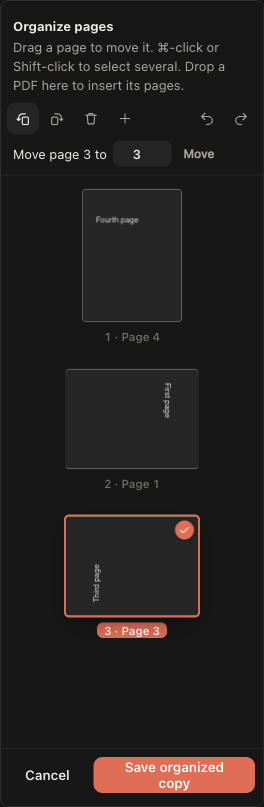
Reorder pages becomes Organize pages and keeps how it works today: changes are a draft shown on the thumbnails, and Save downloads a new copy, so the original file and the open tab are never changed.
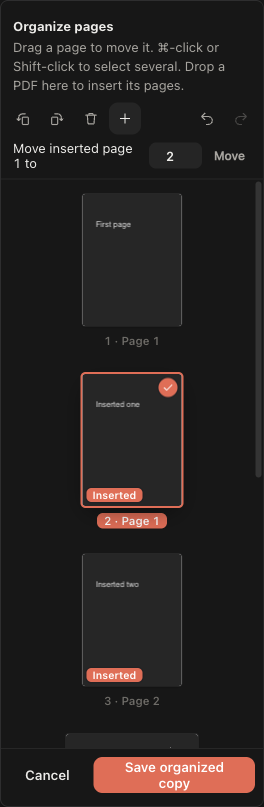
Highlights and notes are saved into the copy, so they stay on their pages, including turned ones. Marks on deleted pages are dropped, and only what's inside an inserted PDF comes along.
Limits: password-protected PDFs can't be inserted. Inserting into an encrypted document is unavailable, because pdf.js saves a copy that mixes two files without encryption and the protection would be lost silently. Deleting, reordering, and rotating keep the encryption.
It uses pdf.js's
extractPages, which reorder and export already use, to copy pages from several files. That always keeps each page's original rotation, so a second step withpdf-lib(already used for image edits, and loaded only when needed) sets the new one. pdf.js isn't modified.My version is on a local branch as three commits (delete, rotate, insert), with smoke checks for the saved copy's pages, order, rotation, inserted pages, highlights on turned pages, and encrypted PDFs. It passes
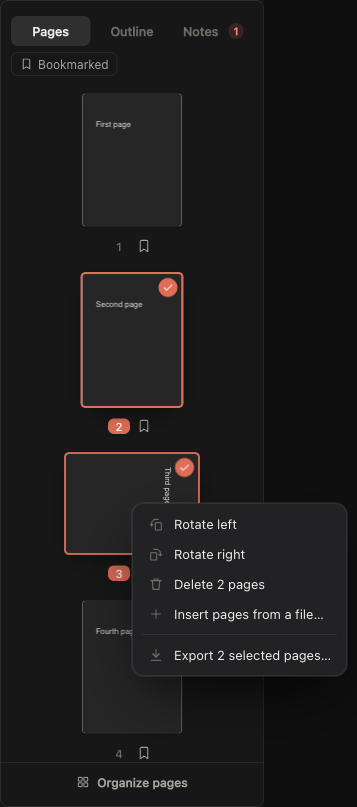
npx tsc --noEmit,npm run build, andnpm run smokeon macOS; I haven't run it on Windows or Linux. If this scope works for you, I can open a pull request, as one or as three, or change the design first. If you'd rather build it yourselves, that's fine too.[Screenshot 1: 1-pages-menu.png — the Pages tab's right-click menu]
[Screenshot 2: 2-rotate-and-delete.png — Organize pages after rotating and deleting]
[Screenshot 3: 3-insert.png — Organize pages with inserted pages]
mberman84 commentedon Nov 7, 2026
Approved, with the design @joswalt described: Reorder pages becomes Organize pages, with delete, rotate left and right, and insert pages from a file. Changes stay a draft on the thumbnails and Save writes a new copy.
@joswalt, please open three PRs against
main, one each for delete, rotate, and insert, starting with delete. That keeps each one small enough to review, and CI will run them on Windows and Linux, which you haven't been able to test. Keep the limits you listed for password-protected and encrypted PDFs.Generated by Claude Code
muzdav commentedon Nov 8, 2026
Sound great! Thanks for fully scoping this out @joswalt!
joswalt commentedon Nov 8, 2026
Thanks! @mberman84 - Delete is up as #85, rebased on current main, with before/after screenshots. CI passes on Windows, macOS, and Linux. I'll open rotate after #85 merges, then insert, and keep the limits for password-protected and encrypted PDFs.
mberman84 commentedon Nov 11, 2026
@joswalt, I checked #85 against current
main. The only file with conflicts issrc/App.tsx, where the document now waits for saved annotations and the export path includes recognized scan text. Please update #85 againstmain, preserve both when saving an organized copy, and rerun the three platform checks. After deletion merges, rotation and insertion can follow as agreed.joswalt commentedon Nov 11, 2026
@mberman84 - I have updated the PR and corrected the conflicts. The CI is green on #85.