Skip to content

Keep bulk-duplicated expenses on the source report when it can accept them - #105047

Open
MelvinBot wants to merge 8 commits into
mainfrom
claude-bulkDuplicateSourceReport
Open

MelvinBot wants to merge 8 commits into
mainfrom
claude-bulkDuplicateSourceReport

Conversation

@MelvinBot

@MelvinBot MelvinBot commented Oct 26, 2026 •

Copy link
Copy Markdown
Contributor

Explanation of Change

Bulk duplicating expenses from an expense report always targeted the default workspace chat, so the copies landed on whatever report that chat's iouReportID pointed at, which is usually the newest report. The single-expense duplicate was already fixed to stay on the source report in #103072, but that PR left bulk duplicate out of scope, so the two entry points behaved differently.

This change brings bulk duplicate in line with the single-expense duplicate:

  • MoneyReportHeaderSelectionDropdown and SelectionToolbar now pass the report being viewed, its chat report, and its policy through BulkDuplicateHandler into useBulkDuplicateAction.
  • useBulkDuplicateAction targets that source report and its policy (categories, tags, and participants included) when every selected expense lives on it and canDuplicateExpenseIntoSourceReport returns true. Otherwise it keeps the existing routing to the default workspace chat. Search-page bulk duplicate passes no source report, so it is unchanged.
  • bulkDuplicateExpenses no longer patches iouReportID onto the target when it is an expense report. That patching assumes the target is a chat.

Unit tests cover the new target selection in useBulkDuplicateAction (source report used, and fallback when a selected expense is on another report) and bulkDuplicateExpenses with an open expense report as the target.

AI tests run locally: npm run lint on changed files, npm run typecheck, npm run fmt (oxfmt), npm run react-compiler-compliance-check check on changed components, cspell (no issues in changed files), and DuplicateTest, useSearchBulkActionsDuplicateTest, and ReportUtilsTest (1,684 tests passed). An automated web UI run of the issue's steps could not complete because the test session's page went blank during onboarding, so the UI flow still needs a manual check.

Fixed Issues

$ #103866
PROPOSAL: #103866 (comment)

Tests

Setup

  • Workspace A is your default workspace. In Workspace A > Workflows, turn on Delay submissions, set the frequency to Manually, and leave Approvals off.
  • Create Workspace B (not your default workspace) with the same Workflows settings and at least one category.

Steps

  1. Open Workspace A's chat. Create Report 1 and add a manual expense to it. Then create Report 2 and add a manual expense to it. Report 2 is now the newest report.
  2. Open Report 1 and click More > Duplicate expense. Verify that the copy appears on Report 1 (this checks that single-expense duplicate still works).
  3. On Report 1, select one expense (on mobile, long press an expense and tap Select). Open the selection menu and click Duplicate expense.
  4. Verify that the copy appears on Report 1 and that Report 1's total goes up by the expense amount.
  5. Open Report 2 and verify that no new expense was added to it.
  6. On Report 1, select 2 expenses and click Duplicate expenses. Verify that both copies appear on Report 1 and that the total includes both.
  7. In Workspace B's chat, create Report 3 and add an expense that uses a Workspace B category. Open Report 3, select the expense, and duplicate it. Verify that the copy appears on Report 3, not in Workspace A, and keeps the category.
  8. Open Report 2 and click Submit. With no approvals, this closes the report. Select an expense on Report 2 and duplicate it. Verify that the copy is not added to Report 2. It should appear on an open report or a new report in Workspace A's chat.
  9. Go to Reports > Expenses, select expenses from 2 different reports, and click Duplicate expenses. Verify that the copies go to Workspace A's chat the same way they did before this change.
  10. Verify that no errors appear in the JS console.

QA Steps

Same as tests

  • Verify that no errors appear in the JS console

PR Author Checklist

  • I linked the correct issue in the ### Fixed Issues section above
  • I wrote clear testing steps that cover the changes made in this PR
    • I added steps for local testing in the Tests section
    • I added steps for the expected offline behavior in the Offline steps section
    • I added steps for Staging and/or Production testing in the QA steps section
    • I added steps to cover failure scenarios (i.e. verify an input displays the correct error message if the entered data is not correct)
    • I turned off my network connection and tested it while offline to ensure it matches the expected behavior (i.e. verify the default avatar icon is displayed if app is offline)
    • I tested this PR with a High Traffic account against the staging or production API to ensure there are no regressions (e.g. long loading states that impact usability).
  • I included screenshots or videos for tests on all platforms
  • I ran the tests on all platforms & verified they passed on:
    • Android: Native
    • Android: mWeb Chrome
    • iOS: Native
    • iOS: mWeb Safari
    • MacOS: Chrome / Safari
  • I verified there are no console errors (if there's a console error not related to the PR, report it or open an issue for it to be fixed)
  • I verified any copy / text that was added to the app is either coming verbatim from figma or has been approved by marketing (in order to get marketing approval, ask the Bug Zero team member to add the Waiting for copy label to the issue)
  • If a new code pattern is added I verified it was agreed to be used by multiple Expensify engineers
  • I tested other components that can be impacted by my changes (i.e. if the PR modifies a shared library or component like Avatar, I verified the components using Avatar are working as expected)
  • If new assets were added or existing ones were modified, I verified that:
    • The assets are optimized and compressed (for SVG files, run npm run compress-svg)
    • The assets load correctly across all supported platforms.
  • If the PR modifies code that runs when editing or sending messages, I tested and verified there is no unexpected behavior for all supported markdown - URLs, single line code, code blocks, quotes, headings, bold, strikethrough, and italic.
  • If the PR modifies a generic component, I tested and verified that those changes do not break usages of that component in the rest of the App (i.e. if a shared library or component like Avatar is modified, I verified that Avatar is working as expected in all cases)
  • If the PR modifies a component related to any of the existing Storybook stories, I tested and verified all stories for that component are still working as expected.
  • If the PR modifies a component or page that can be accessed by a direct deeplink, I verified that the code functions as expected when the deeplink is used - from a logged in and logged out account.
  • If the PR modifies the UI (e.g. new buttons, new UI components, changing the padding/spacing/sizing, moving components, etc) or modifies the form input styles:
    • I verified that all the inputs inside a form are aligned with each other.
    • I added Design label and/or tagged @Expensify/design so the design team can review the changes.
  • If the PR adds or modifies the UI:
    • I asked an AI agent to review the changes for accessibility issues and addressed its findings.
    • I tested with a screen reader (VoiceOver on macOS) and verified all new/changed elements are reachable with a logical focus order.
    • I verified all new/changed elements have meaningful accessible names and roles.
    • I verified state changes are announced (e.g. checked/unchecked, expanded/collapsed, selected).
  • I added unit tests for any new feature or bug fix in this PR to help automatically prevent regressions in this user flow.
  • If the main branch was merged into this PR after a review, I tested again and verified the outcome was still expected according to the Test steps.

Screenshots/Videos

Android: Native
Android: mWeb Chrome
iOS: Native
iOS: mWeb Safari
MacOS: Chrome / Safari

@melvin-bot melvin-bot Bot added Melvin-Test-Android Melvin-Test-Web Triggers Melvin to run the testing steps of the PR on web labels Oct 26, 2026
@MelvinBot
MelvinBot requested a review from a team October 26, 2026 19:04
@MelvinBot

Copy link
Copy Markdown
Contributor Author

The failing typecheck check is unrelated to this PR, so I didn't push a change. Main is broken, and [NO QA] Fix typecheck: use renamed travelBilling path for monthly limit error already fixes it. Re-run the checks after that PR merges.

Details

@codecov

codecov Bot commented Oct 26, 2026 •

Copy link
Copy Markdown

Codecov Report

❌ Looks like you've decreased code coverage for some files. Please write tests to increase, or at least maintain, the existing level of code coverage. See our documentation here for how to interpret this table.

Files with missing lines Coverage Δ
.../MoneyRequestReportView/SelectionToolbar/index.tsx 89.40% <100.00%> (+0.21%) ⬆️
src/hooks/useBulkDuplicateAction.ts 98.79% <100.00%> (+0.24%) ⬆️
src/libs/actions/IOU/Duplicate.ts 94.34% <83.33%> (+1.08%) ⬆️
...aderActions/MoneyReportHeaderSelectionDropdown.tsx 0.54% <0.00%> (-0.01%) ⬇️
src/components/Search/BulkDuplicateHandler.tsx 0.00% <0.00%> (ø)
... and 10 files with indirect coverage changes

@MelvinBot

MelvinBot commented Oct 26, 2026 •

Copy link
Copy Markdown
Contributor Author

🤖 Web test steps verification results: ✅ pass

Bulk "Duplicate expense" from an expense report now keeps the new copy on the source report (report 1), matching the single-expense duplicate path. The newer report (report 2) was unaffected in both the single and bulk duplicate flows.
Report 2 still has only one expense

Step Status
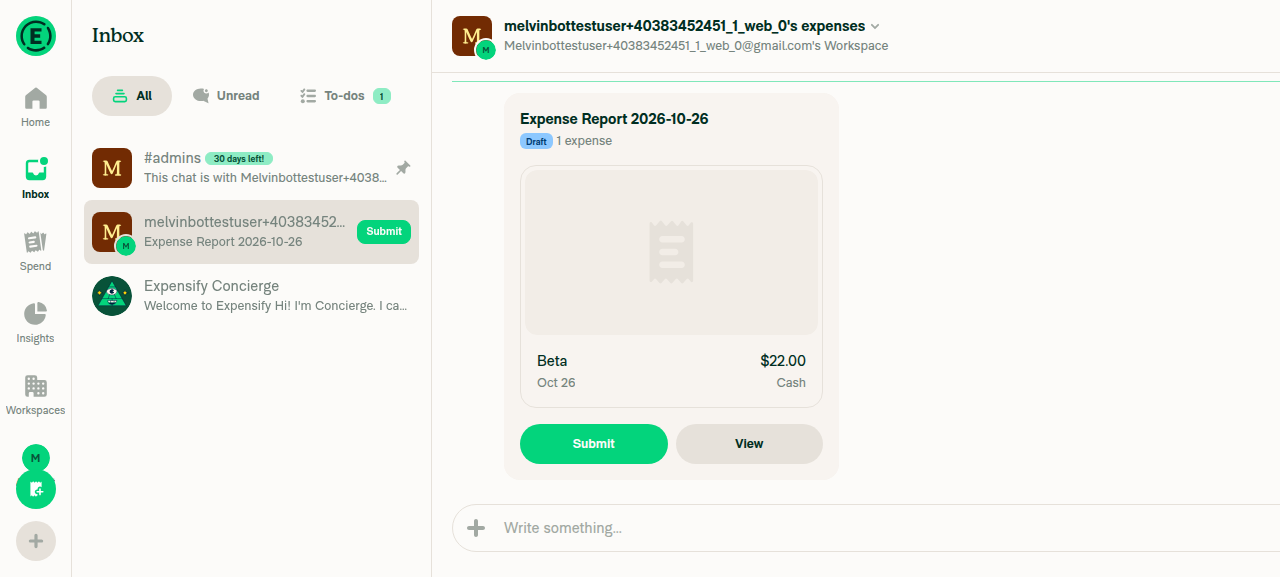
Workspace chat shows two separate expense reports, each with one expense (older = report 1, newer = report 2)Created report 1 with $11.00 Alpha and report 2 with $22.00 Beta (newer). The chat showed two distinct report previews: $11.00 (report 1) and $22.00 (report 2).
Workspace chat showing both reports
✅
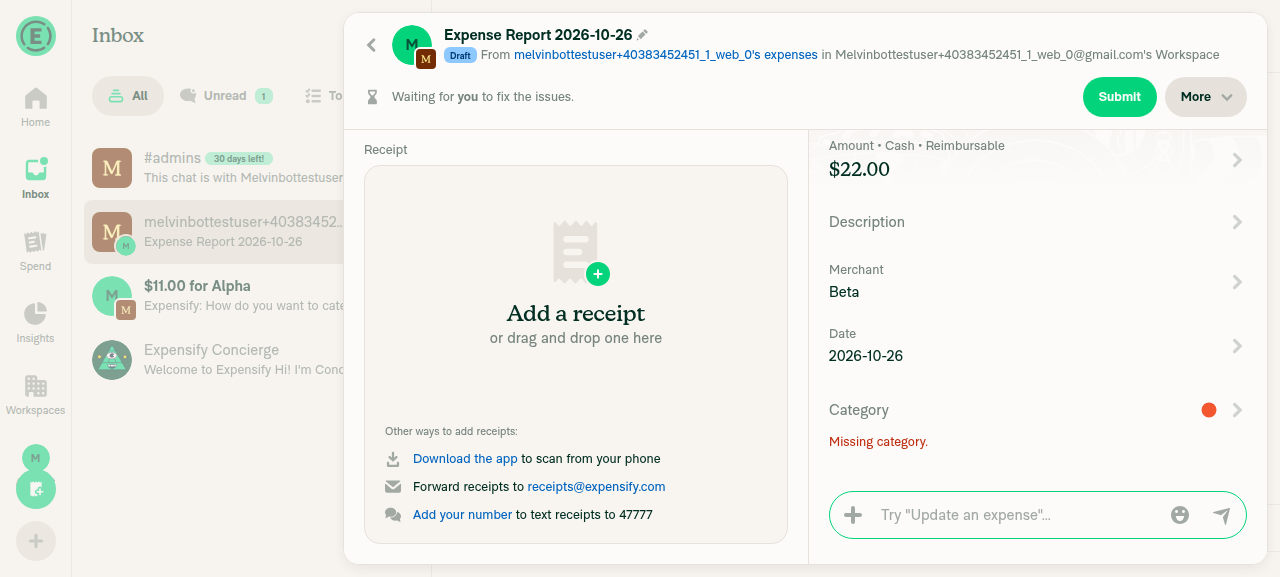
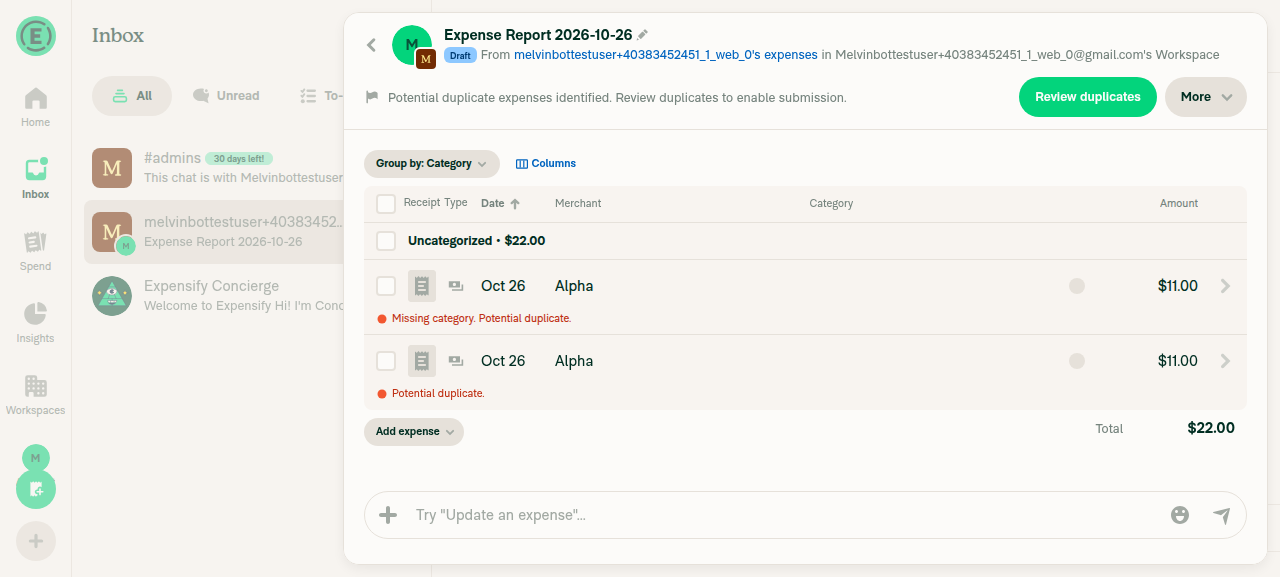
Open report 1 and use More > Duplicate expense on its single expense; report 1 gains the duplicate, report 2 is unchangedAfter the single-expense duplicate, report 1 showed two Alpha $11.00 rows (total $22.00). Report 2 still showed exactly one Beta $22.00 expense.
Report 1 after single-expense duplicate: two Alpha $11.00 rows
Report 2 unchanged after single duplicate
✅
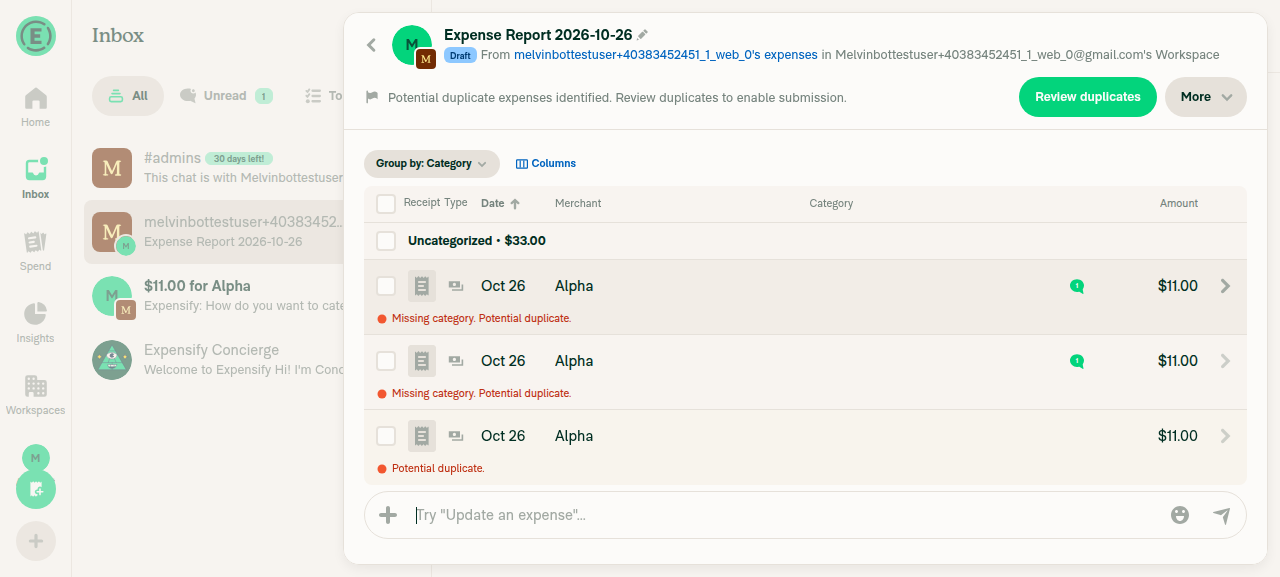
In report 1, bulk-select one expense and use More > Duplicate expense; the duplicate lands on report 1 (source report)Checked one Alpha $11.00 row and used the selection toolbar's More > Duplicate expense. Report 1 went from 2 to 3 Alpha $11.00 rows (total $33.00). The duplicate stayed on the source report.
Report 1 after bulk duplicate: three Alpha $11.00 rows
✅
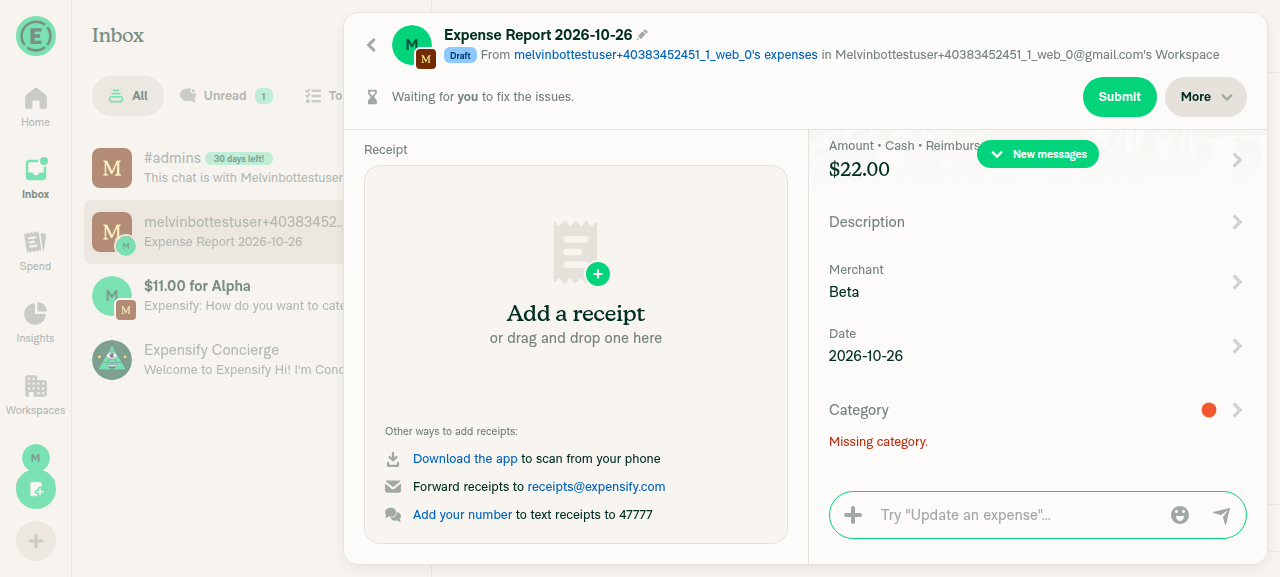
Report 2 (newest) still contains only its original expense; no duplicate from the bulk step landed thereThe chat list showed report 1 at $33.00 and report 2 still at $22.00. Report 2 contained exactly one Beta $22.00 expense.
Report 2 still has only one expense
✅
No red error messages or failure banners on the duplicated expenses or reportsOnly the expected "Missing category" and "Potential duplicate" review flags appeared. No "Something went wrong" or request-error banners appeared, and the console had no errors.
✅

view run · view recording

@MelvinBot

Copy link
Copy Markdown
Contributor Author

I merged main into this branch and typecheck now passes. No code change was needed.

Details

@MelvinBot

MelvinBot commented Oct 26, 2026 •

Copy link
Copy Markdown
Contributor Author

🤖 Android test steps verification results: ❌ fail

Testing was blocked. The Android app stopped responding to all input while the second test expense was being added, before any duplicate-expense step ran, so this run neither confirms nor disproves the fix.
App frozen on the Create expense menu for the empty report 2

Step Status
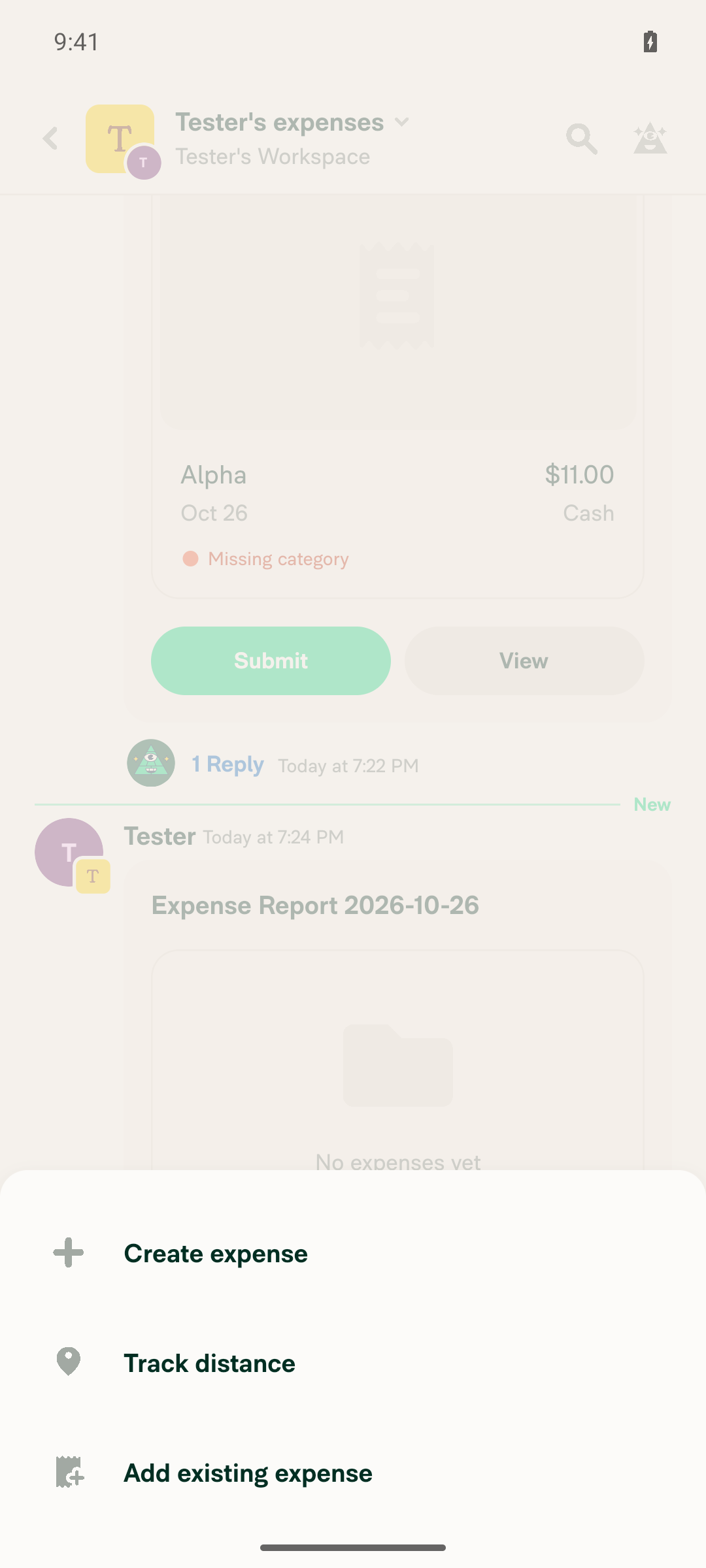
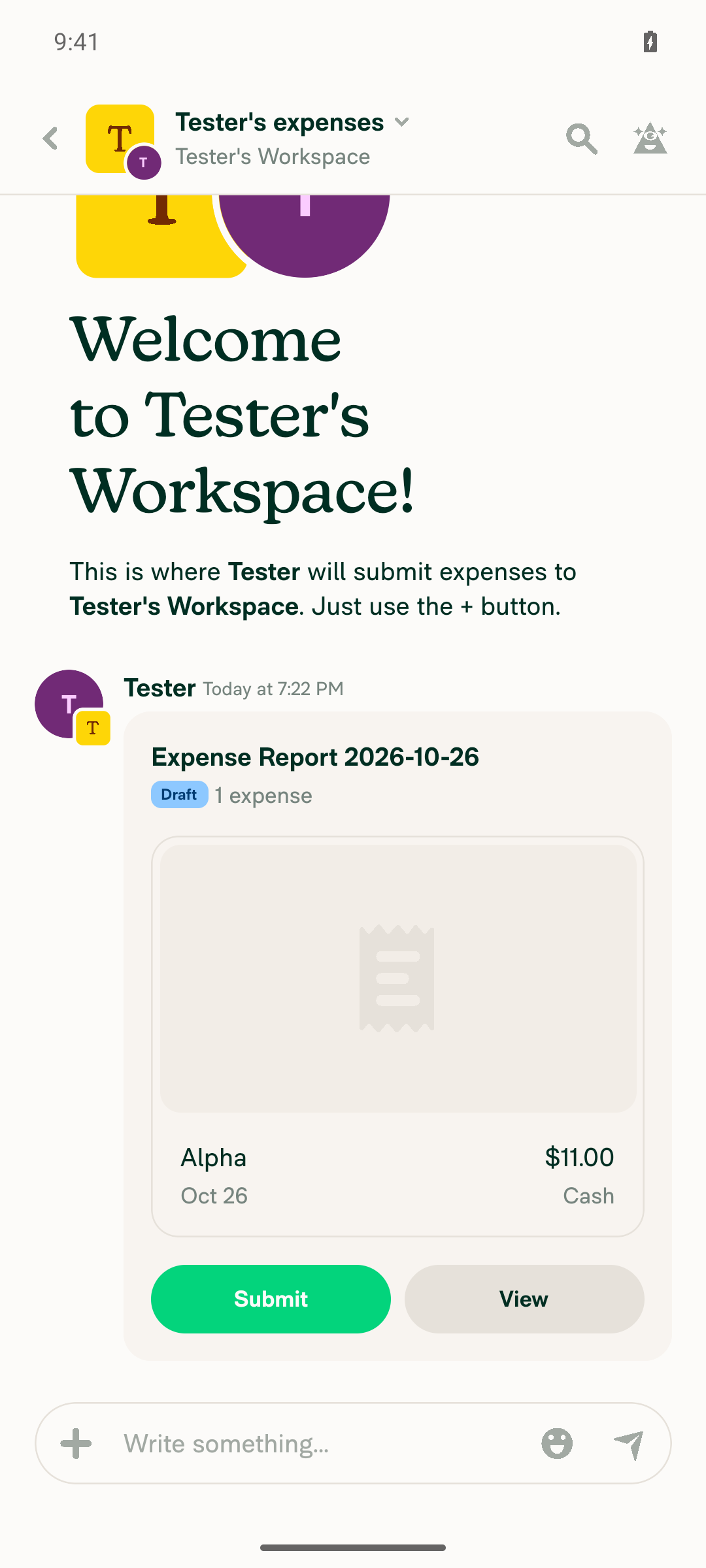
Workspace chat shows two separate expense reports, each with one expenseReport 1 was created with one $11.00 Alpha expense. Report 2 was created as a separate, newer, empty report. The app froze on the Create expense menu before the $22.00 Beta expense could be added, and stayed frozen after a Metro restart.
Report 1 created in workspace chat with $11.00 Alpha expense
App frozen on the Create expense menu for the empty report 2
❌
Single-expense duplicate on report 1 keeps both expenses on report 1Not reached because the app froze during setup.
❌
Bulk-select duplicate on report 1 adds the new duplicate to report 1 (source report)Not reached because the app froze during setup.
❌
Report 2 (newest report) still contains only its original expenseNot reached because the app froze during setup.
❌
No red error messages or failure banners on the duplicated expenses or reportsNot reached because no duplicate action ran.
❌

view run · view recording

@francoisl
francoisl marked this pull request as ready for review October 27, 2026 18:19
@francoisl
francoisl requested a review from a team as a code owner October 27, 2026 18:20
@melvin-bot
melvin-bot Bot requested review from thelullabyy and removed request for a team October 27, 2026 18:20
@melvin-bot

melvin-bot Bot commented Oct 27, 2026

Copy link
Copy Markdown

@thelullabyy Please copy/paste the Reviewer Checklist from here into a new comment on this PR and complete it. If you have the K2 extension, you can simply click: [this button]

@melvin-bot
melvin-bot Bot requested review from joekaufmanexpensify and removed request for a team October 27, 2026 18:20
@chatgpt-codex-connector

chatgpt-codex-connector Bot commented Oct 27, 2026 •

Copy link
Copy Markdown

Codex Review Summary

This comment shows the latest Codex review activity on this pull request.

Review Status Commit Review trigger
📝 Code Review ✅ Completed 2026-10-27T18:27:50.495830Z c9060b6 Draft marked ready
ℹ️ About Codex in GitHub

Your team has set up Codex to review pull requests in this repo. Reviews are triggered when you

  • Open a pull request for review
  • Mark a draft as ready
  • Comment "@codex review" or "@codex security review".

Codex reacts with 👀 while any review is running, comments if it has suggestions, and reacts with 👍 once all reviews finish with no findings.

@francoisl
francoisl requested review from a team and NikkiWines October 27, 2026 18:20
@melvin-bot
melvin-bot Bot requested review from francoisl and removed request for a team October 27, 2026 18:20
@melvin-bot

melvin-bot Bot commented Oct 27, 2026

Copy link
Copy Markdown

@francoisl Please copy/paste the Reviewer Checklist from here into a new comment on this PR and complete it. If you have the K2 extension, you can simply click: [this button]

@melvin-bot
melvin-bot Bot requested review from garrettmknight and removed request for a team October 27, 2026 18:20

@chatgpt-codex-connector chatgpt-codex-connector Bot left a comment

Copy link
Copy Markdown

Choose a reason for hiding this comment

The reason will be displayed to describe this comment to others. Learn more.

💡 Codex Review

Here are some automated review suggestions for this pull request.

Reviewed commit: c9060b6cf6

ℹ️ About Codex in GitHub

Codex has been enabled to automatically review pull requests in this repo. Reviews are triggered when you

  • Open a pull request for review
  • Mark a draft as ready
  • Comment "@codex review".

If Codex has suggestions, it will comment; otherwise it will react with 👍.

When you sign up for Codex through ChatGPT, Codex can also answer questions or update the PR, like "@codex address that feedback".

Comment on lines +1406 to 1407
if (currentTargetReport && !isTargetExpenseReport) {
currentTargetReport = {...currentTargetReport, iouReportID: currentOptimisticIOUReportID};

Copy link
Copy Markdown

Choose a reason for hiding this comment

The reason will be displayed to describe this comment to others. Learn more.

P1 Badge Preserve routing after instant-submit closes the source

When the source policy uses instant submit plus submit-and-close and the copies are all non-reimbursable (or reimbursement is disabled), the first copy closes the source report because policyWillSplitReport prevents deferral. This branch then clears optimisticIOUReport but, for an expense-report target, leaves currentTargetReport pointing at that now-closed report; every later request therefore still sends the source report as its explicit moneyRequestReportID instead of creating a fresh report. Either defer submission while targeting an explicit source report or switch subsequent iterations to its parent chat.

Useful? React with 👍 / 👎.

Copy link
Copy Markdown
Contributor

Choose a reason for hiding this comment

The reason will be displayed to describe this comment to others. Learn more.

(Francois' agent)

Good catch, fixed in 564c46c. When the target is an expense report, the copies no longer split: they all land on the source report, and only the last one lets the server auto-submit. I didn't switch to the parent chat, because that would scatter the copies across new reports. I added a DuplicateTest case for this setup.

Comment on lines +103 to +104
const duplicateTargetPolicy = canDuplicateIntoSourceReport ? sourcePolicy : defaultExpensePolicy;
const duplicateTargetReport = canDuplicateIntoSourceReport ? sourceReport : activePolicyExpenseChat;

Copy link
Copy Markdown

Choose a reason for hiding this comment

The reason will be displayed to describe this comment to others. Learn more.

P2 Badge Check billing restrictions for the selected source policy

When bulk-duplicating from a non-default workspace whose billing is restricted while the default workspace remains usable, this now selects the restricted source policy, but the report-selection callers invoke the handler without the shouldRestrictUserBillableActions check that the single-expense duplicate applies to its target policy. The action consequently submits writes to the restricted workspace instead of navigating to the restricted-action screen, producing failed optimistic copies; the billing guard needs to evaluate this newly selected target policy before duplication.

Useful? React with 👍 / 👎.

Copy link
Copy Markdown
Contributor

Choose a reason for hiding this comment

The reason will be displayed to describe this comment to others. Learn more.

(Francois' agent)

Agreed, fixed in 564c46c. useBulkDuplicateAction now checks billing restrictions on the chosen target policy and opens the restricted action page instead of duplicating, like single-expense duplicate. I added a test for it.

Comment thread src/hooks/useBulkDuplicateAction.ts Resolved
Bulk duplicating into an open expense report on a workspace with instant
submit and no approvals split the copies as if each one needed its own
report. None of them deferred auto-submit, so the server closed the
source report after the first copy. The later copies still targeted it,
and the optimistic total left out the first copy. An expense report
target now never splits: every copy lands on it, and only the last one
lets the server auto-submit.

Bulk duplicate from a report view never checked billing restrictions.
Now that the target can be the source workspace, a restricted source
workspace would produce failed copies. The handler now opens the
restricted action page for the chosen target policy, like the
single-expense duplicate does.

Also drop two prop comments that only restated the prop names.
@francoisl
francoisl requested a review from a team as a code owner October 27, 2026 23:01
@melvin-bot
melvin-bot Bot requested review from marcochavezf and removed request for a team October 27, 2026 23:01
@melvin-bot

melvin-bot Bot commented Oct 27, 2026

Copy link
Copy Markdown

@marcochavezf Please copy/paste the Reviewer Checklist from here into a new comment on this PR and complete it. If you have the K2 extension, you can simply click: [this button]

@joekaufmanexpensify joekaufmanexpensify left a comment

Copy link
Copy Markdown
Contributor

Choose a reason for hiding this comment

The reason will be displayed to describe this comment to others. Learn more.

The change makes sense to me from a product perspective.

@francoisl

Copy link
Copy Markdown
Contributor

@thelullabyy can you review when you have a chance please? Melvin opened the PR, but I made manual commits to address Codex's comments and fix conflicts.

@thelullabyy thelullabyy left a comment

Copy link
Copy Markdown
Contributor

Choose a reason for hiding this comment

The reason will be displayed to describe this comment to others. Learn more.

Thanks, the approach matches what #103072 did for single-expense duplicate, and reusing canDuplicateExpenseIntoSourceReport keeps the two entry points consistent. A few questions and comments are inline. One more that isn't on a changed line:

Per diem stays hidden on non-default workspace reports. shouldShowBulkDuplicateOption (src/hooks/useSearchBulkActions.ts) still hides bulk duplicate for a per diem expense unless its policy is the default workspace. Single duplicate now checks duplicateTargetPolicy?.id !== policy?.id, so on Report 3 in Workspace B (step 7 of the tests), single duplicate of a per diem expense is allowed but bulk duplicate of the same expense is hidden. Should the visibility check also account for the source report target, or should that be a follow-up?

currentReportPreviewActionID = NumberUtils.rand64();
reportWasSplit = true;
if (currentTargetReport) {
if (currentTargetReport && !isTargetExpenseReport) {

Copy link
Copy Markdown
Contributor

Choose a reason for hiding this comment

The reason will be displayed to describe this comment to others. Learn more.

With an expense report target, what happens if this split branch still runs? policyWillSplitReport is now false, but !canAddTransaction(optimisticIOUReport, rules) can still return true mid-loop (for example a rule that limits the report). Then optimisticIOUReport is reset to undefined, and the next iteration passes the source expense report again as targetReport. The builder then resolves it through moneyRequestReportID, which reads allReports. Onyx callbacks are deferred, so that copy is stale and doesn't include the previous iteration's total. That is the race the existingIOUReport comment above warns about.

For an expense report target, should we either keep passing optimisticIOUReport, or fall back to the default workspace chat for the remaining expenses? Either way, a test that covers a mid-loop canAddTransaction failure with an expense report target would help.

const participantsPolicyTags = useParticipantsPolicyTags(participants);

const handleDuplicate = () => {
if (restrictedActionPolicyID) {

Copy link
Copy Markdown
Contributor

Choose a reason for hiding this comment

The reason will be displayed to describe this comment to others. Learn more.

This restricted-action redirect is new for every bulk duplicate path, including the Search page, where duplicateTargetPolicy is the default workspace. The description says Search-page bulk duplicate is unchanged. The change looks right because single duplicate does the same check, but could you mention it in the description and QA steps, and add a test for it?

Comment thread src/hooks/useBulkDuplicateAction.ts Outdated
const duplicateTargetPolicy = canDuplicateIntoSourceReport ? sourcePolicy : defaultExpensePolicy;
const duplicateTargetReport = canDuplicateIntoSourceReport ? sourceReport : activePolicyExpenseChat;

const [targetPolicyCategories] = useOnyx(`${ONYXKEYS.COLLECTION.POLICY_CATEGORIES}${duplicateTargetPolicy?.id}`);

Copy link
Copy Markdown
Contributor

Choose a reason for hiding this comment

The reason will be displayed to describe this comment to others. Learn more.

NAB: the single-duplicate code wraps the ID with getNonEmptyStringOnyxID(duplicateTargetPolicy?.id), so an undefined policy doesn't subscribe to policyCategories_undefined. Same for the tags key on the next line.

@garrettmknight
garrettmknight removed their request for review October 30, 2026 10:57
A copy can push a submitted report's total past an approval rule's limit, so
the report stops accepting expenses partway through a bulk duplicate. The loop
dropped the report's latest optimistic state at that point, so the builder
reread an outdated copy from Onyx and still added the next copy to the same
report with the wrong total. The loop now keeps that state for an expense
report target, and the builder opens a new report in the same workspace chat.

Also add a test for the restricted-action redirect when the copies fall back
to the default workspace, and wrap the target policy ID with
getNonEmptyStringOnyxID like single-expense duplicate does.
@francoisl

Copy link
Copy Markdown
Contributor

Updated the PR.

Per diem stays hidden on non-default workspace reports.

Let's keep that for a follow-up, the PR doesn't change that check.

Main now reads the default workspace chat with a useOnyx selector
(policyExpenseChatSelector) instead of getPolicyExpenseChat. Keep that
read in useBulkDuplicateAction and keep this branch's choice of
duplicate target, matching how main updated useExpenseActions.
@francoisl

Copy link
Copy Markdown
Contributor

Fixed the conflict, let's try to merge this before it conflicts again 🙏

The pre-commit hook rebuilt these two compiled actions during the last
merge of main, using an outdated expensify-common from this worktree's
node_modules. The output no longer matched a fresh build, which failed
the Verify Javascript Action Builds check. Take main's versions again.
Brings in the main fix for the Oxlint failure: the unnecessary type
assertions added in tests/unit/ReportActionsUtilsTest.ts and
tests/unit/ReportUtilsTest.ts were removed in #105195.

This branch has not been deployed

No deployments
Sign up for free to join this conversation on GitHub. Already have an account? Sign in to comment

Labels

Melvin-Test-Android Melvin-Test-Web Triggers Melvin to run the testing steps of the PR on web

Projects

None yet

Development

Successfully merging this pull request may close these issues.

4 participants