Skip to content

Use the shorter Describe rule input height on small screens - #103864

Closed
MelvinBot wants to merge 1 commit into
mainfrom
claude-describeRuleModalSmallScreenHeight
Closed

MelvinBot wants to merge 1 commit into
mainfrom
claude-describeRuleModalSmallScreenHeight

Conversation

@MelvinBot

Copy link
Copy Markdown
Contributor

Explanation of Change

On small screens, the Describe rule modal is a bottom-docked sheet that moves up above the keyboard. Its prompt input had a fixed height of 312px, and the sheet can't scroll or shrink. On Android phones with the keyboard open, the sheet ended up taller than the space above the keyboard, so its top went under the status bar.

This PR keeps the 312px input on wide screens (the centered dialog) and uses the earlier height, variables.textInputAutoGrowMaxHeight (115px), on small screens. That was the input height before #99624 made it taller.

AI tests run locally:

  • npm run typecheck: passed
  • npm run lint-changed: passed
  • npm run spell-changed: passed
  • npm run react-compiler-compliance-check check src/pages/workspace/rules/DescribeRuleModal.tsx: passed
  • npm test -- --findRelatedTests src/pages/workspace/rules/DescribeRuleModal.tsx: passed (7 tests)
  • Formatter (oxfmt --check) and findUnusedStyles could not run in this environment. The new style is used, and the changed line follows the file's existing formatting.
  • An automated web check of the modal could not run because the test browser session failed to load. The fix still needs a check on Android with the keyboard open.

Fixed Issues

$ #103859
PROPOSAL: #103859 (comment)

Tests

// TODO: The human co-author must fill out the tests you ran before marking this PR as "ready for review"
// Please describe what tests you performed that validates your changed worked.

  • Verify that no errors appear in the JS console

Offline tests

QA Steps

// TODO: The human co-author must fill out the QA tests you ran before marking this PR as "ready for review".
// Please describe what QA needs to do to validate your changes and what areas do they need to test for regressions.

  • Verify that no errors appear in the JS console

PR Author Checklist

  • I linked the correct issue in the ### Fixed Issues section above
  • I wrote clear testing steps that cover the changes made in this PR
    • I added steps for local testing in the Tests section
    • I added steps for the expected offline behavior in the Offline steps section
    • I added steps for Staging and/or Production testing in the QA steps section
    • I added steps to cover failure scenarios (i.e. verify an input displays the correct error message if the entered data is not correct)
    • I turned off my network connection and tested it while offline to ensure it matches the expected behavior (i.e. verify the default avatar icon is displayed if app is offline)
    • I tested this PR with a High Traffic account against the staging or production API to ensure there are no regressions (e.g. long loading states that impact usability).
  • I included screenshots or videos for tests on all platforms
  • I ran the tests on all platforms & verified they passed on:
    • Android: Native
    • Android: mWeb Chrome
    • iOS: Native
    • iOS: mWeb Safari
    • MacOS: Chrome / Safari
  • I verified there are no console errors (if there's a console error not related to the PR, report it or open an issue for it to be fixed)
  • I verified any copy / text that was added to the app is either coming verbatim from figma or has been approved by marketing (in order to get marketing approval, ask the Bug Zero team member to add the Waiting for copy label to the issue)
  • If a new code pattern is added I verified it was agreed to be used by multiple Expensify engineers
  • I tested other components that can be impacted by my changes (i.e. if the PR modifies a shared library or component like Avatar, I verified the components using Avatar are working as expected)
  • If new assets were added or existing ones were modified, I verified that:
    • The assets are optimized and compressed (for SVG files, run npm run compress-svg)
    • The assets load correctly across all supported platforms.
  • If the PR modifies code that runs when editing or sending messages, I tested and verified there is no unexpected behavior for all supported markdown - URLs, single line code, code blocks, quotes, headings, bold, strikethrough, and italic.
  • If the PR modifies a generic component, I tested and verified that those changes do not break usages of that component in the rest of the App (i.e. if a shared library or component like Avatar is modified, I verified that Avatar is working as expected in all cases)
  • If the PR modifies a component related to any of the existing Storybook stories, I tested and verified all stories for that component are still working as expected.
  • If the PR modifies a component or page that can be accessed by a direct deeplink, I verified that the code functions as expected when the deeplink is used - from a logged in and logged out account.
  • If the PR modifies the UI (e.g. new buttons, new UI components, changing the padding/spacing/sizing, moving components, etc) or modifies the form input styles:
    • I verified that all the inputs inside a form are aligned with each other.
    • I added Design label and/or tagged @Expensify/design so the design team can review the changes.
  • If the PR adds or modifies the UI:
    • I asked an AI agent to review the changes for accessibility issues and addressed its findings.
    • I tested with a screen reader (VoiceOver on macOS) and verified all new/changed elements are reachable with a logical focus order.
    • I verified all new/changed elements have meaningful accessible names and roles.
    • I verified state changes are announced (e.g. checked/unchecked, expanded/collapsed, selected).
  • I added unit tests for any new feature or bug fix in this PR to help automatically prevent regressions in this user flow.
  • If the main branch was merged into this PR after a review, I tested again and verified the outcome was still expected according to the Test steps.

Screenshots/Videos

Android: Native
Android: mWeb Chrome
iOS: Native
iOS: mWeb Safari
MacOS: Chrome / Safari

@MelvinBot
MelvinBot requested a review from a team October 13, 2026 11:43
@melvin-bot melvin-bot Bot added Melvin-Test-Android Melvin-Test-Web Triggers Melvin to run the testing steps of the PR on web labels Oct 13, 2026
@MelvinBot

Copy link
Copy Markdown
Contributor Author

I created this PR from an upstream branch since I don't have push access to your fork.

To take ownership of this branch and be able to push updates, run:

git remote add upstream https://github.com/Expensify/App.git
git fetch upstream claude-describeRuleModalSmallScreenHeight
git checkout -b claude-describeRuleModalSmallScreenHeight upstream/claude-describeRuleModalSmallScreenHeight
git push -u origin claude-describeRuleModalSmallScreenHeight

Then you can close this PR and open a new one from your fork.

@rushatgabhane

Copy link
Copy Markdown
Member

@MelvinBot mark ready for review

@codecov

codecov Bot commented Oct 13, 2026 •

Copy link
Copy Markdown

Codecov Report

✅ Changes either increased or maintained existing code coverage, great job!

Files with missing lines Coverage Δ
src/styles/index.ts 61.64% <ø> (ø)
src/pages/workspace/rules/DescribeRuleModal.tsx 1.66% <0.00%> (ø)
... and 10 files with indirect coverage changes

@rushatgabhane

Copy link
Copy Markdown
Member

@Krishna2323 can you please take this over the finish line to fix the deploy blocker

@MelvinBot

MelvinBot commented Oct 13, 2026 •

Copy link
Copy Markdown
Contributor Author

🤖 Android test steps verification results: ⚠️ partial

The PR's Tests section is still a TODO, so I used the reproduction steps from the linked issue. The Rules page loaded on a Collect workspace, but tapping Add rule showed a Control plan upgrade screen, so I couldn't reach the Restrict card spend > Describe modal that this PR changes. The test account needs a Control workspace to check steps 2–6. I didn't buy the upgrade.
Add rule tap shows Control-plan upgrade paywall instead of rule options

Step Status
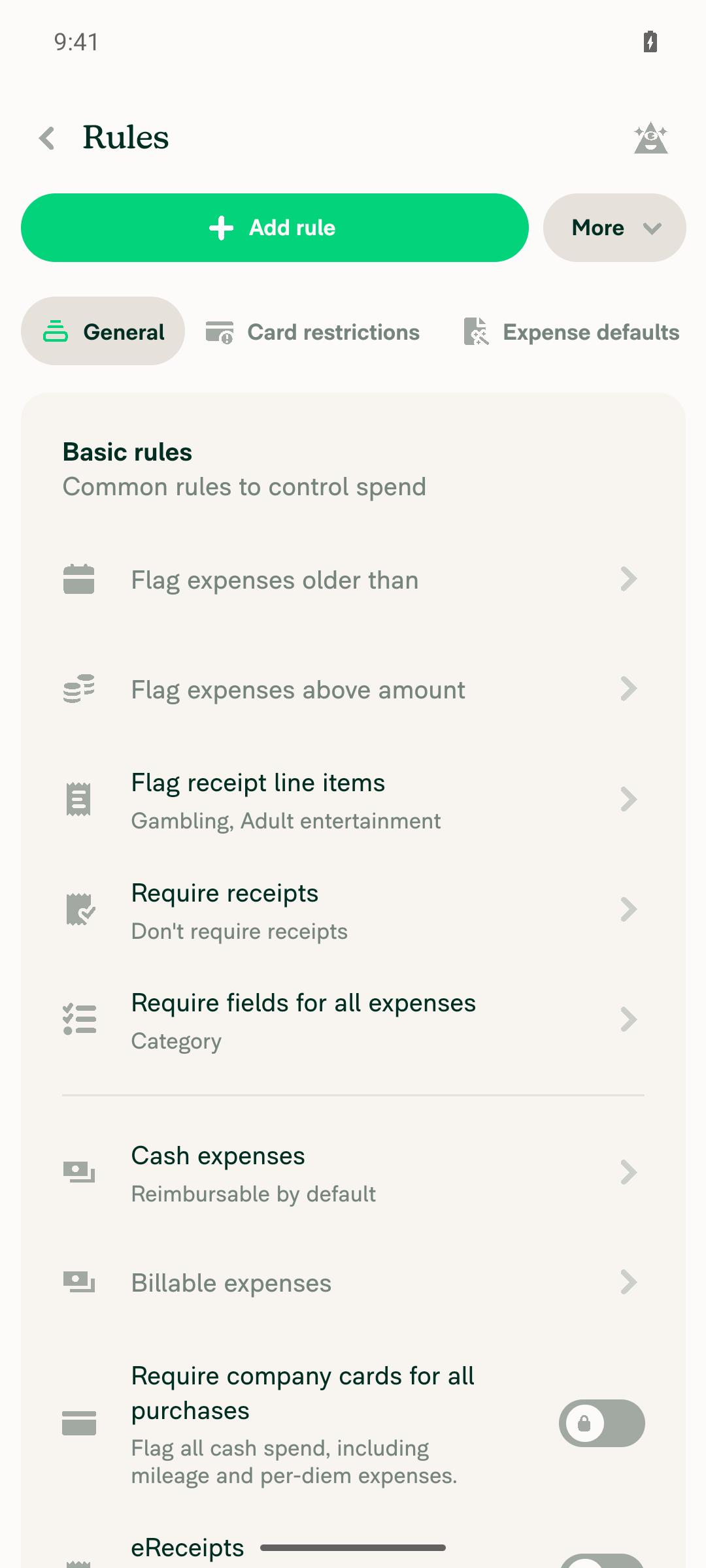
Go to Workspace settings > Rules for a Collect workspace with Rules enabled; the Rules page loads.Created a new Collect workspace, turned on Rules under More features, and opened Workspace settings > Rules. The page loaded with the General, Card restrictions, Expense defaults, and Field requirements tabs and the basic rule toggles.
Workspace Rules page loaded for the Collect workspace with Rules enabled
✅
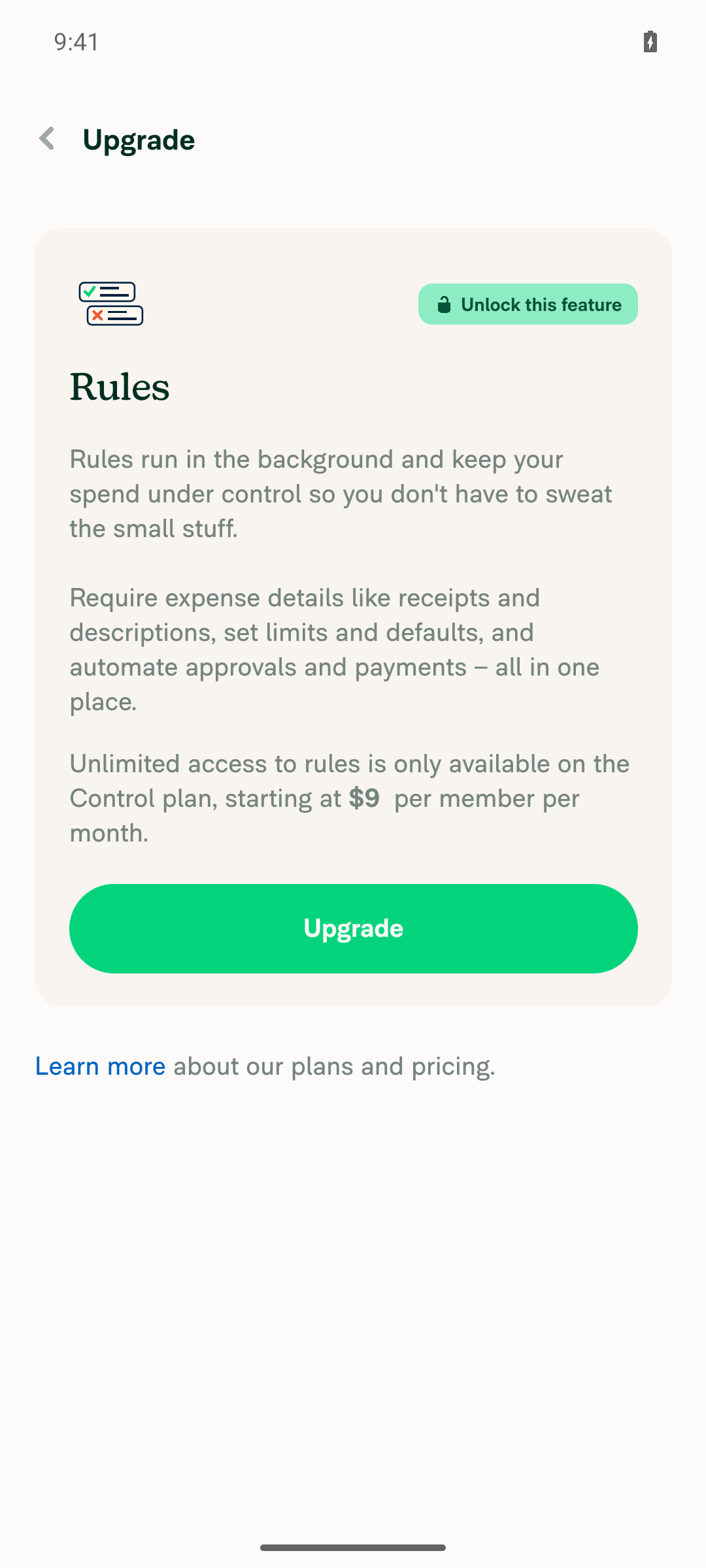
Tap "Add rule"; the add rule options appear.Tapping Add rule opened an "Unlock this feature" screen ("Unlimited access to rules is only available on the Control plan") instead of the rule options. The Card restrictions tab showed the same screen. Switching to Control leads to a paid upgrade screen, so I kept the workspace on Collect.
Add rule tap shows Control-plan upgrade paywall instead of rule options
❌
Tap "Restrict card spend"; the Restrict card spend flow opens.Not reached. The Control plan screen in step 2 blocked it.
❌
Tap "Describe"; the Describe rule modal opens.Not reached. Steps 2–3 blocked it.
❌
With the Describe modal open and the keyboard shown, the modal's top edge does not overlap the device status bar.Not reached. Steps 2–4 blocked it.
❌
Typing a multi-line rule description with the keyboard open keeps the input usable and the modal does not overlap the status bar.Not reached. Steps 2–4 blocked it.
❌

view run · view recording

@MelvinBot
MelvinBot marked this pull request as ready for review October 13, 2026 11:58
@MelvinBot
MelvinBot requested review from a team as code owners October 13, 2026 11:58
@MelvinBot

Copy link
Copy Markdown
Contributor Author

I marked this PR ready for review.

The Tests and QA sections in the PR description are still TODO. The human co-author needs to fill them in. The Android test run couldn't open the Describe modal because adding a rule needs a Control workspace, so the fix hasn't been checked on a device yet.


view run

@melvin-bot
melvin-bot Bot requested review from Krishna2323 and garrettmknight and removed request for a team October 13, 2026 11:58
@melvin-bot

melvin-bot Bot commented Oct 13, 2026

Copy link
Copy Markdown

@Krishna2323 Please copy/paste the Reviewer Checklist from here into a new comment on this PR and complete it. If you have the K2 extension, you can simply click: [this button]

@melvin-bot
melvin-bot Bot removed the request for review from a team October 13, 2026 11:58
@chatgpt-codex-connector

chatgpt-codex-connector Bot commented Oct 13, 2026 •

Copy link
Copy Markdown

Codex Review Summary

This comment shows the latest Codex review activity on this pull request.

Review Status Commit Review trigger
📝 Code Review ✅ Completed 2026-10-13T12:00:42.217126Z e9600d4 Draft marked ready
ℹ️ About Codex in GitHub

Your team has set up Codex to review pull requests in this repo. Reviews are triggered when you

  • Open a pull request for review
  • Mark a draft as ready
  • Comment "@codex review" or "@codex security review".

Codex reacts with 👀 while any review is running, comments if it has suggestions, and reacts with 👍 once all reviews finish with no findings.

@Krishna2323

Copy link
Copy Markdown
Contributor

The feature is now behind beta and rushat will handle all the blockers in a new PR, closing this one.

Sign up for free to join this conversation on GitHub. Already have an account? Sign in to comment

Labels

Melvin-Test-Android Melvin-Test-Web Triggers Melvin to run the testing steps of the PR on web

Projects

None yet

Development

Successfully merging this pull request may close these issues.

3 participants