Skip to content

Keep the workspace member Role page working right after inviting a member - #103855

Open
MelvinBot wants to merge 8 commits into
mainfrom
claude-fixRolePageStaleOptimisticAccountID
Open

MelvinBot wants to merge 8 commits into
mainfrom
claude-fixRolePageStaleOptimisticAccountID

Conversation

@MelvinBot

@MelvinBot MelvinBot commented Oct 13, 2026 •

Copy link
Copy Markdown
Contributor

Explanation of Change

The problem:

When an admin invites a new workspace member, the app first creates a temporary account ID. When the server returns the real account ID, the Role page may still use the temporary ID.

This causes the error "Hmm... it's not here" when opening the Role page immediately after inviting someone.

What this PR fixes:

  • Finds the correct member even when their account ID changes.
  • Prevents the error when opening the Role page.
  • Ensures role changes apply to the correct member.
  • Fixes related member pages and back navigation.

Fixed Issues

$ #103058

PROPOSAL: #103058 (comment)

Tests

1: Open Workspace → Members → Invite member.

2: Invite a new user.

3: Immediately open their details → Role.

4: Verify the Role page opens without errors.

5: Change Member → Workspace admin.

6: Verify the role updates correctly.

7: Navigate back and verify no duplicate pages appear.

8: Verify Work arrangement and Custom fields open correctly, if available.

  • Verify that no errors appear in the JS console

Offline tests

1: Go offline before confirming a new invitation.

2: Invite a member and open their Role page.

3: Reconnect and verify the page remains accessible.

4: Change the role and verify it saves correctly.

QA Steps

Same as Tests

  • Verify that no errors appear in the JS console

PR Author Checklist

  • I linked the correct issue in the ### Fixed Issues section above
  • I wrote clear testing steps that cover the changes made in this PR
    • I added steps for local testing in the Tests section
    • I added steps for the expected offline behavior in the Offline steps section
    • I added steps for Staging and/or Production testing in the QA steps section
    • I added steps to cover failure scenarios (i.e. verify an input displays the correct error message if the entered data is not correct)
    • I turned off my network connection and tested it while offline to ensure it matches the expected behavior (i.e. verify the default avatar icon is displayed if app is offline)
    • I tested this PR with a High Traffic account against the staging or production API to ensure there are no regressions (e.g. long loading states that impact usability).
  • I included screenshots or videos for tests on all platforms
  • I ran the tests on all platforms & verified they passed on:
    • Android: Native
    • Android: mWeb Chrome
    • iOS: Native
    • iOS: mWeb Safari
    • MacOS: Chrome / Safari
  • I verified there are no console errors (if there's a console error not related to the PR, report it or open an issue for it to be fixed)
  • I verified any copy / text that was added to the app is either coming verbatim from figma or has been approved by marketing (in order to get marketing approval, ask the Bug Zero team member to add the Waiting for copy label to the issue)
  • If a new code pattern is added I verified it was agreed to be used by multiple Expensify engineers
  • I tested other components that can be impacted by my changes (i.e. if the PR modifies a shared library or component like Avatar, I verified the components using Avatar are working as expected)
  • If new assets were added or existing ones were modified, I verified that:
    • The assets are optimized and compressed (for SVG files, run npm run compress-svg)
    • The assets load correctly across all supported platforms.
  • If the PR modifies code that runs when editing or sending messages, I tested and verified there is no unexpected behavior for all supported markdown - URLs, single line code, code blocks, quotes, headings, bold, strikethrough, and italic.
  • If the PR modifies a generic component, I tested and verified that those changes do not break usages of that component in the rest of the App (i.e. if a shared library or component like Avatar is modified, I verified that Avatar is working as expected in all cases)
  • If the PR modifies a component related to any of the existing Storybook stories, I tested and verified all stories for that component are still working as expected.
  • If the PR modifies a component or page that can be accessed by a direct deeplink, I verified that the code functions as expected when the deeplink is used - from a logged in and logged out account.
  • If the PR modifies the UI (e.g. new buttons, new UI components, changing the padding/spacing/sizing, moving components, etc) or modifies the form input styles:
    • I verified that all the inputs inside a form are aligned with each other.
    • I added Design label and/or tagged @Expensify/design so the design team can review the changes.
  • If the PR adds or modifies the UI:
    • I asked an AI agent to review the changes for accessibility issues and addressed its findings.
    • I tested with a screen reader (VoiceOver on macOS) and verified all new/changed elements are reachable with a logical focus order.
    • I verified all new/changed elements have meaningful accessible names and roles.
    • I verified state changes are announced (e.g. checked/unchecked, expanded/collapsed, selected).
  • I added unit tests for any new feature or bug fix in this PR to help automatically prevent regressions in this user flow.
  • If the main branch was merged into this PR after a review, I tested again and verified the outcome was still expected according to the Test steps.

Screenshots/Videos

Android: Native
Android: mWeb Chrome
iOS: Native
iOS: mWeb Safari
MacOS: Chrome / Safari

After inviting a member, the Role page route still holds the optimistic
accountID. Once AddMembersToWorkspace finishes, that personal details entry
is removed, so the page lost the member and showed the not found view.
Share the optimistic-ID fallback from the member details page and use it on
the Role, Work arrangement, and custom field pages.

Co-authored-by: Maruf Sharifi <[email protected]>
@MelvinBot
MelvinBot requested a review from a team October 13, 2026 10:51
@melvin-bot melvin-bot Bot added Melvin-Test-Android Melvin-Test-Web Triggers Melvin to run the testing steps of the PR on web labels Oct 13, 2026
@MelvinBot

Copy link
Copy Markdown
Contributor Author

I created this PR from an upstream branch because I don't have push access to your fork.

To take ownership of this branch and push updates, run:

git remote add upstream https://github.com/Expensify/App.git
git fetch upstream claude-fixRolePageStaleOptimisticAccountID
git checkout -b claude-fixRolePageStaleOptimisticAccountID upstream/claude-fixRolePageStaleOptimisticAccountID
git push -u origin claude-fixRolePageStaleOptimisticAccountID

Then you can close this PR and open a new one from your fork.

@MelvinBot

Copy link
Copy Markdown
Contributor Author

The failing test (job 7) check is unrelated to this PR, so I didn't push a fix. A rerun after main is fixed should pass.

Analysis: One test fails: IOURequestStepConfirmationPageTest › Report selection guard tests › should use the transaction report when it is allowed, even if it differs from the route (IOURequestStepConfirmationPageTest.tsx:1691 expects "202" but gets undefined). The same test fails on at least six unrelated PR branches today, for example refactor/66415-8, claude-cardFeedAddWorkEmailButton, fix/99385-regressions, and violation-fix-parity.

Evidence: This PR touches only the workspace member pages, their test, and PolicyUtils. The PolicyUtils change only adds a new function, getMemberLoginByOptimisticAccountID, used by the member pages. None of this code is on the money request confirmation page's path.

Check independent approval also fails. That check needs a reviewer's approval and doesn't point to a code problem.


view run

@MelvinBot

MelvinBot commented Oct 13, 2026 •

Copy link
Copy Markdown
Contributor Author

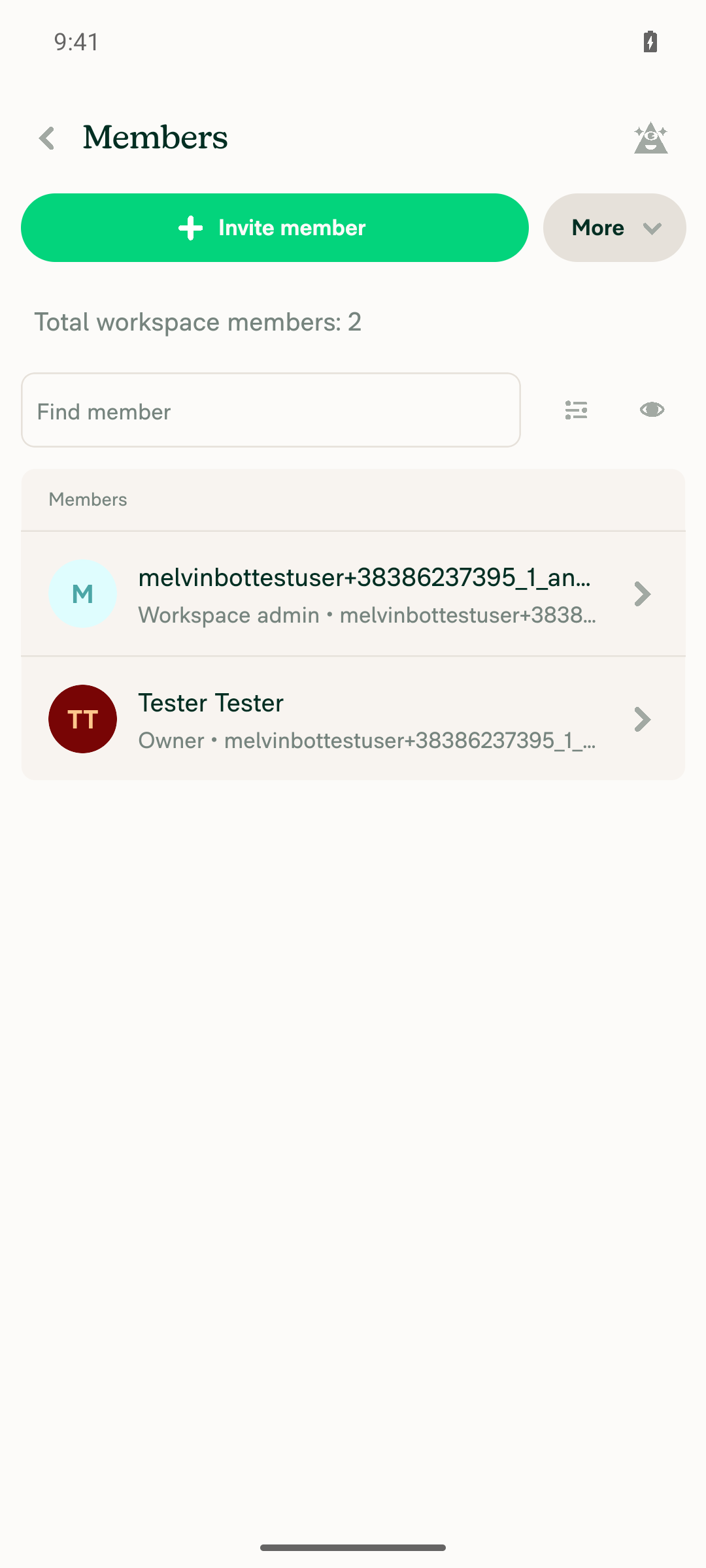
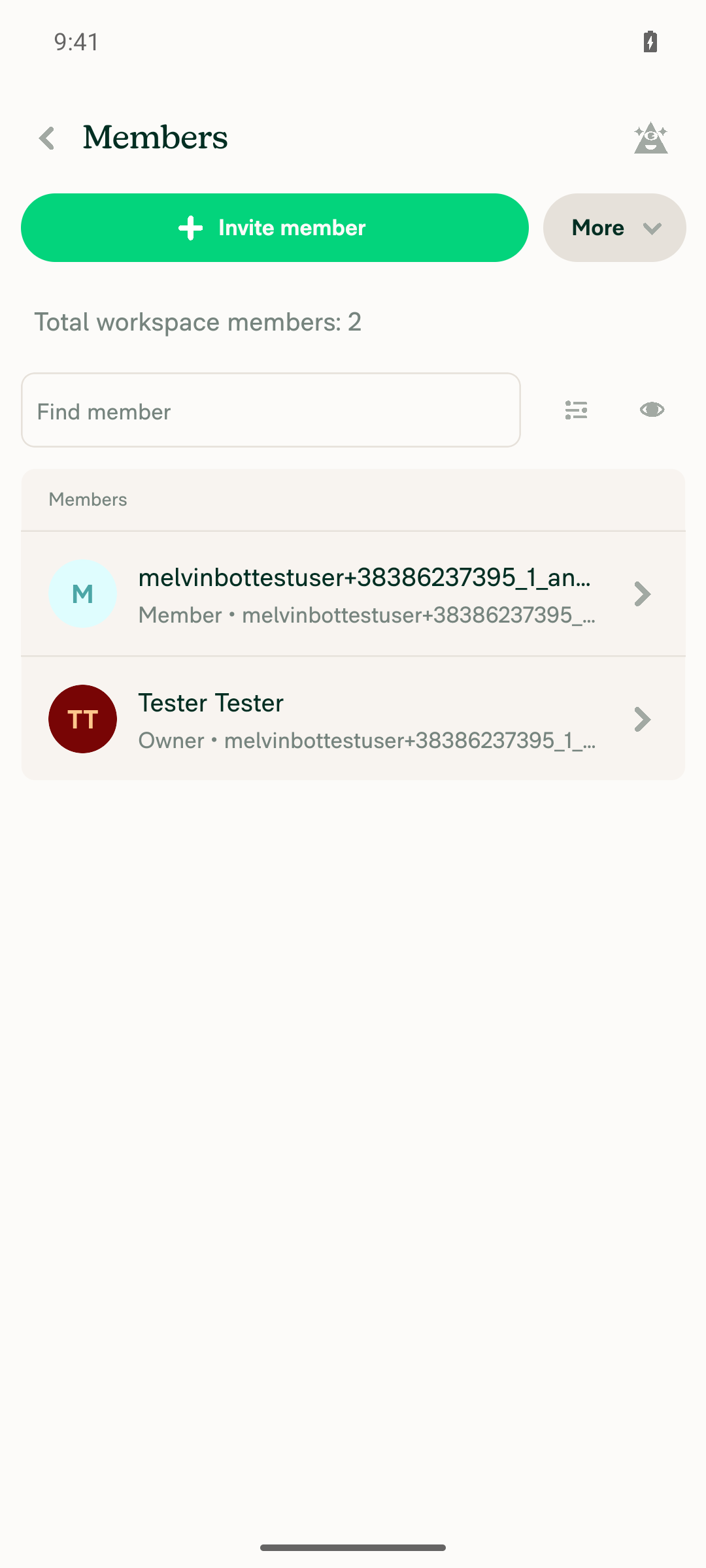
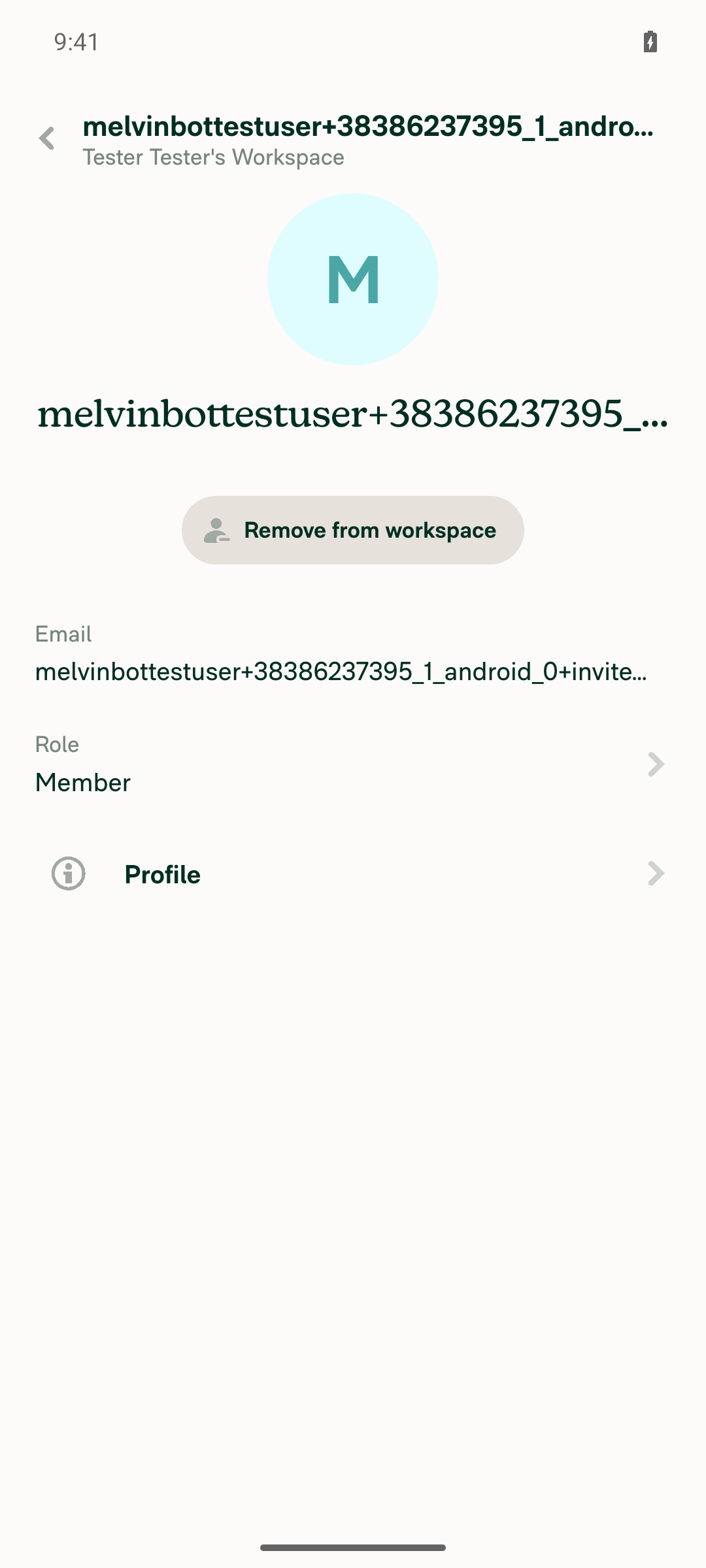
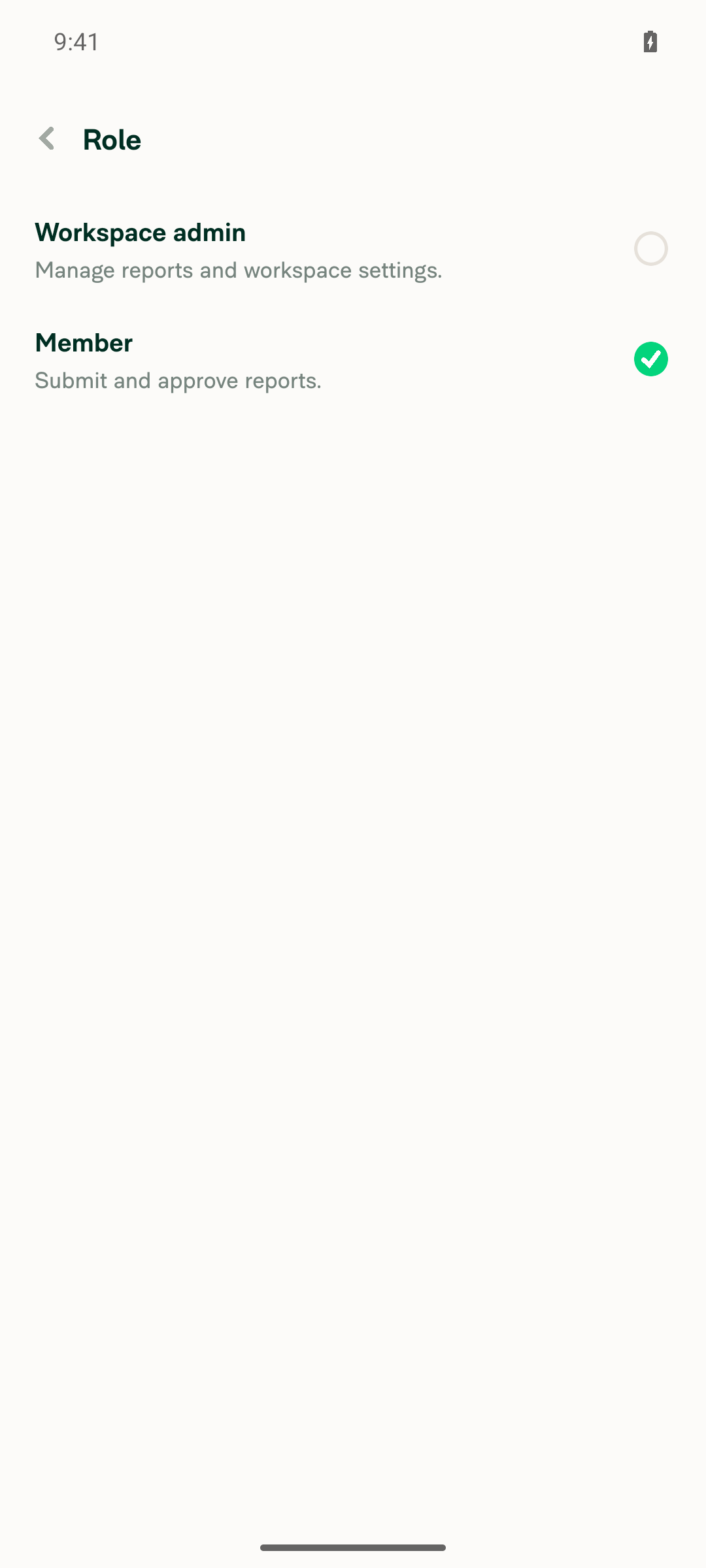
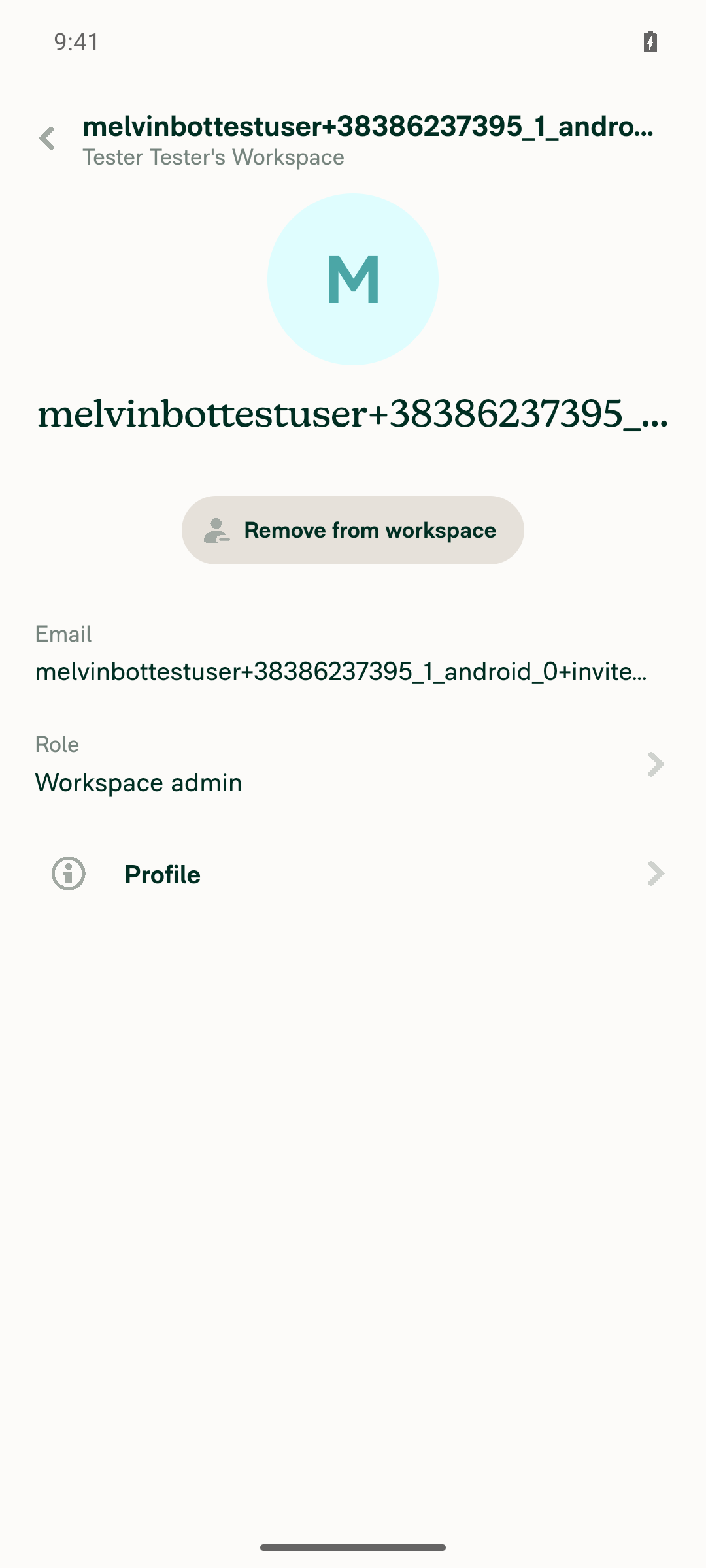
🤖 Android test steps verification results: ✅ pass

On standalone Android, inviting a new user and then quickly opening their details, opening Role, changing the role, and going back to the list all worked with no "Hmm... it's not here" error. The PR has no written test steps yet, so I used the repro steps from [$175] WS settings - Error appear when changing role just after adding User.

Members list shows updated Workspace admin role with no error indicator

Step Status
Invite a non-existing user from Workspace > Members; the user appears in the members listAfter the invite, the members list showed "Total workspace members: 2" with the new user listed as Member.
Newly invited member appears in the members list
✅
Quickly tap the new user; the member details page opens with no errorThe page showed Profile, Role: Member, Email, and Remove from workspace.
Member details page opens correctly right after invite
✅
Quickly tap Role; the Role page shows the role list, not an error pageThe page showed "Workspace admin" and "Member" options, with Member selected. Auditor did not appear because it depends on the workspace plan.
Role page opens with role options, not an error page
✅
Select Workspace admin; the change saves and the details page shows the new roleThe app returned to member details showing "Role: Workspace admin" with no error.
Member details page shows updated role (Workspace admin)
✅
Go back to the members list; the user shows the new role with no red error indicatorThe user's row showed "Workspace admin" with no error indicator.
Members list shows updated Workspace admin role with no error indicator
✅

view run · view recording

@MelvinBot

MelvinBot commented Oct 13, 2026 •

Copy link
Copy Markdown
Contributor Author

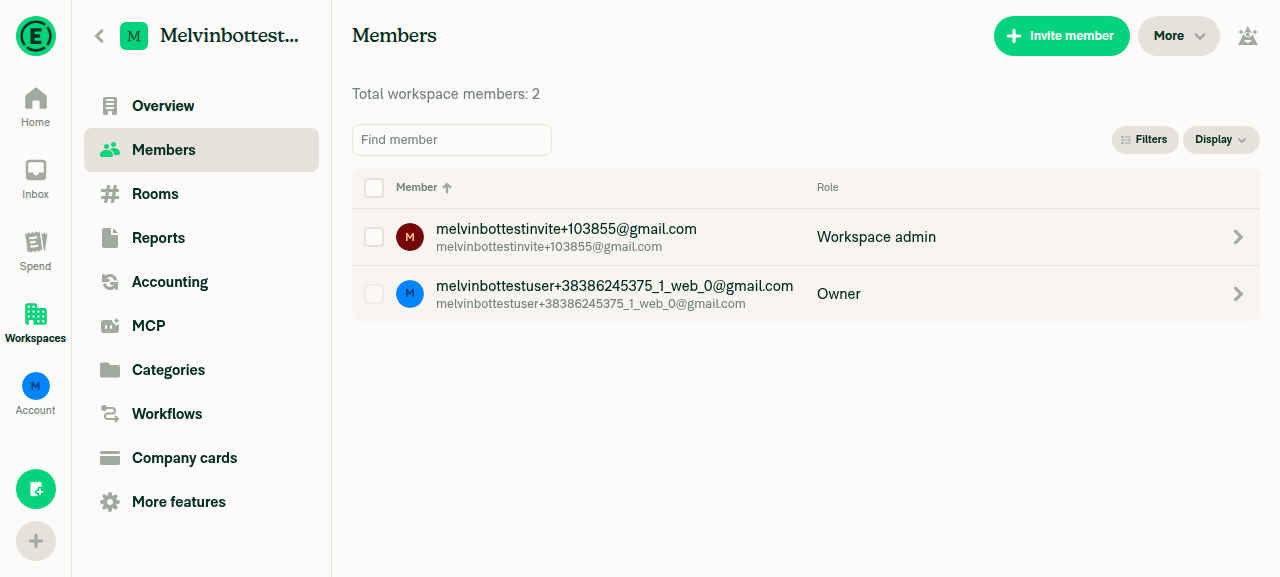
🤖 Web test steps verification results: ✅ pass

On Web, inviting a new user and then quickly opening their details, opening Role, changing the role, and going back to the list all worked with no "Hmm... it's not here" error. The PR has no written test steps yet, so I used the repro steps from [$175] WS settings - Error appear when changing role just after adding User.

Members list with invited user's role updated to Workspace admin

Step Status
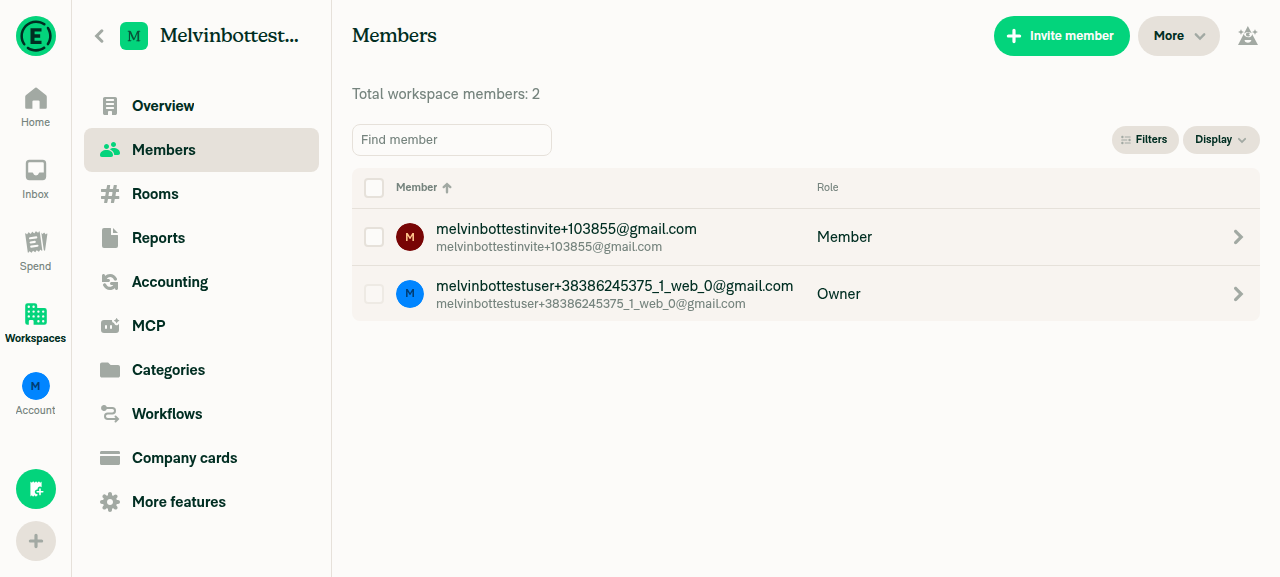
Invite a non-existing user from Workspace > Members; the user appears in the members listAfter inviting [email protected], the members list showed the owner and the new user with role Member.
Members list showing newly invited user
✅
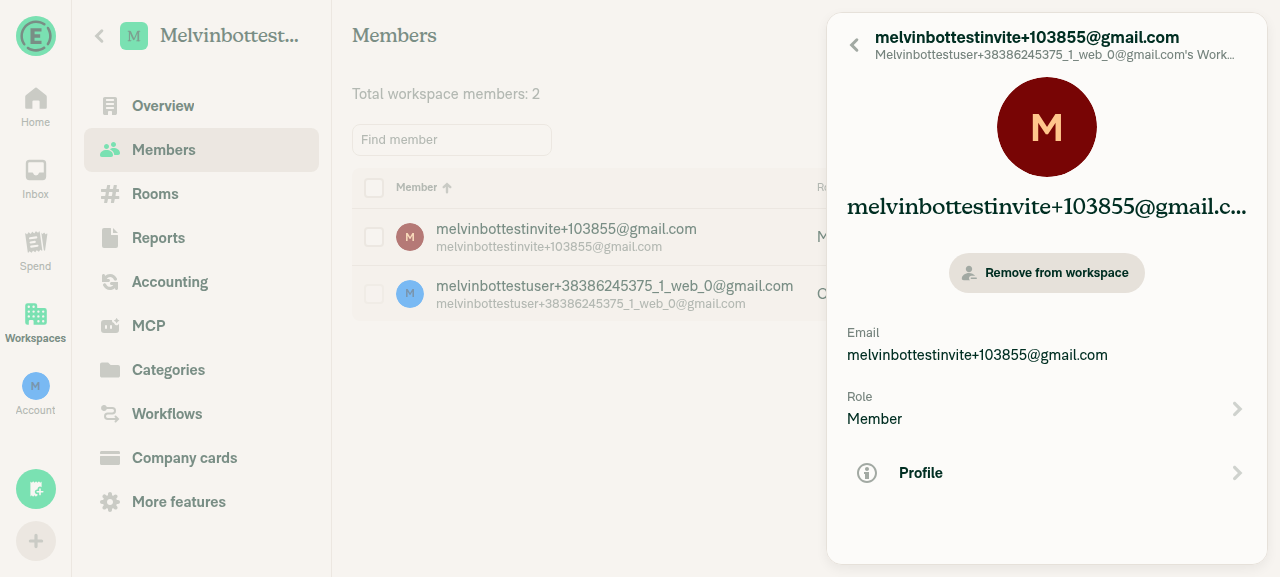
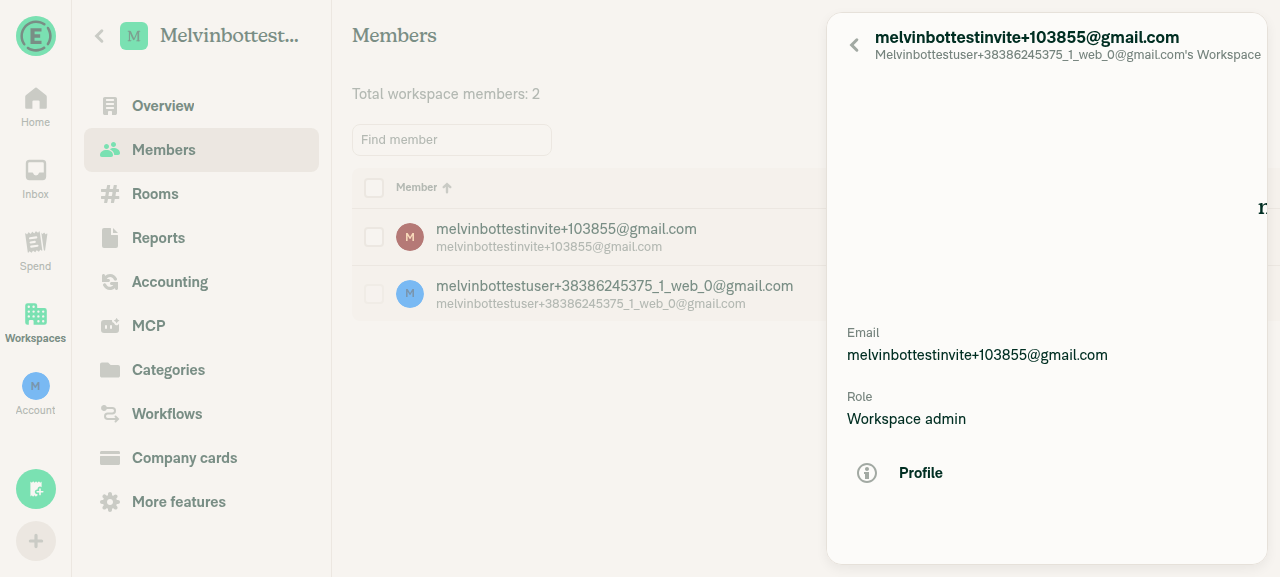
Quickly click the new user; the member details page opens with no errorThe page showed the user's email with Role, Profile, and Remove from workspace.
Member details page for newly invited user
✅
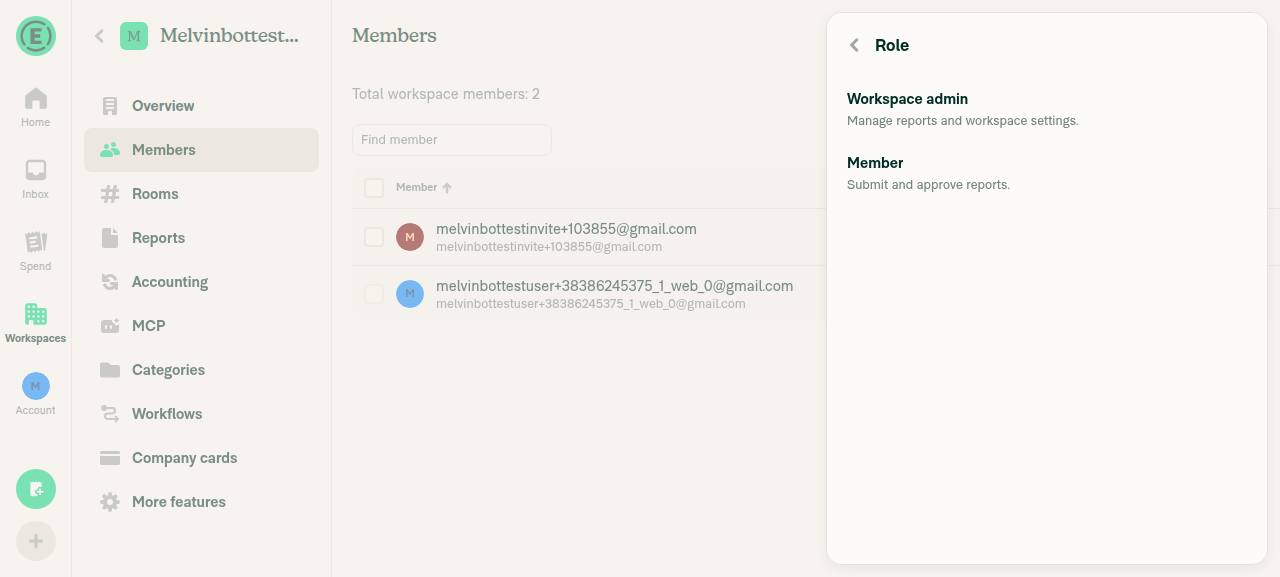
Quickly click Role; the Role page shows the role list, not an error pageThe page listed "Workspace admin" and "Member".
Role selection page listing Workspace admin / Member
✅
Select Workspace admin; the change saves and the details page shows the new roleThe app returned to member details showing "Role: Workspace admin" with no error.
Member details page showing updated role Workspace admin
✅
Go back to the members list; the user shows the new role with no red error indicatorThe user's row showed "Workspace admin" with no error indicator.
Members list with invited user's role updated to Workspace admin
✅
No JS console errors appear during the flowNot fully verified: the test browser can't capture console output. No error banners, red dots, or error pages appeared at any step.
⚠️

view run · view recording

@marufsharifi

Copy link
Copy Markdown
Contributor

BUG#1:

Preconditions:
Chrome, a Control workspace where you are an admin, and a new email never used in Expensify.

Test Steps:

  1. Open Workspaces → your workspace → Members in two tabs: A and B
  2. In Tab A, while online. , click Invite member , enter the new email, select it, and click Next
  3. On Confirm details disconnect your internet, then click invite
  4. Open the new member’s details. Note the number after members in the address bar.
  5. Open Custom field 1 and leave it open.
  6. Reconnect your internet.
  7. In Tab B, refresh Members and open the same member. Confirm their address-bar number differs from step 4.
  8. Return to Tab A without refreshing
  9. Click the in-app Back arrow twice

Expected result:

First Back opens member details. Second Back returns to Members.

Actual Result :
Second Back shows the same member’s details again, requiring a third Back.

Screen.Recording.2026-10-14.at.3.52.53.PM.mov

@marufsharifi

Copy link
Copy Markdown
Contributor

BUG#2:

Test Steps:

  1. Go to Account → Profile → Contact Methods.
  2. Add a secondary email address to your account.
  3. Copy the secondary email address.
  4. Go to Workspaces → [Workspace] → Members.
  5. Click Invite Members.
  6. Paste the secondary email address and click Next.
  7. Click Invite.

Expected Result:
The invitation should be completed successfully without displaying any error.

Actual Result:
After clicking Invite, the app displays “Hmm... it's not here” for a few seconds.

Screen.Recording.2026-10-14.at.8.27.21.PM.mov

@marufsharifi

Copy link
Copy Markdown
Contributor

Bug#3:

Test Steps:

  1. Go to Workspaces → your workspace → Members.
  2. Click Invite member, enter a new user’s email, then click Next → Invite.
  3. Open the invited member’s details and click Role.
  4. Copy the Role page URL from the address bar.
  5. Open a new tab and paste the URL.
  6. Change the role from Member to Workspace admin.

Expected result:
The member’s role immediately displays Workspace admin after the change.

Actual result:
The role briefly displays Member for a few seconds after selecting Workspace admin.

Screen.Recording.2026-10-14.at.3.01.30.PM.mov

@marufsharifi

Copy link
Copy Markdown
Contributor

@MelvinBot find the root causes of the above 3 reported bugs

@MelvinBot

Copy link
Copy Markdown
Contributor Author

Root causes for the 3 reported bugs

Only Bug 1 is caused by this PR. Bugs 2 and 3 also happen on main.

Bug Caused by this PR? Root cause Confidence
1. Extra Back press Yes Sub-pages build the Back route from the real accountID, but the details screen below still has the optimistic ID in its route High
2. "Hmm... it's not here" after inviting your own secondary email No The invite picker lets your own secondary login through. The not-found flash most likely comes from the server response to that self-invite Low–medium
3. Role shows "Member" for a few seconds No A Members-page read request that is still in flight overwrites the optimistic role Medium

Bug 1: second Back shows the same member again

Root cause: This PR sets accountID to the member's real accountID in WorkspaceMemberCustomFieldPage.tsx:50. goBack then uses it to build the details route at :57. The details screen below still has the optimistic ID. goUp compares accountID when it looks for that screen (Navigation.ts:353, :388-392). The IDs don't match, so it replaces the Custom field screen with a second details screen instead of going back (:606-609).

That leaves this stack: Members → Details (optimistic ID) → Details (real ID).

The Role and Work arrangement pages have the same problem:

Fix: Keep the real accountID for API calls. Use routeAccountID wherever these pages build a details route for navigation. You can also make the new test assert that goBack receives the route with the stale ID.

Bug 2: "Hmm... it's not here" after inviting your own secondary email

Root cause: Two things combine here. Neither is in this PR's diff.

  1. The invite picker doesn't exclude your own secondary login. getUserToInviteOption blocks your own logins, but only the ones that pass expensifyLoginsSelector (entries with an Expensify partnerID). The page's own exclusion list, DynamicWorkspaceInvitePage.tsx:82-91, checks only employeeList. The secondary email is therefore invited as a new user.
  2. The not-found flash most likely comes from the server's response to that self-invite. The optimistic data in addMembersToWorkspace doesn't change your own role. I suspect the server response briefly changes your role or removes your member entry, until a later update restores it. Then AccessOrNotFoundWrapper would show not-found on the invite pages, which require write access to Members. I couldn't confirm this from App code alone.

Fix: Add the current user's logins (from ONYXKEYS.LOGINS) to excludedUsers in DynamicWorkspaceInvitePage. If the server response really does change the inviter's own role, that needs a separate internal fix.

Bug 3: role shows "Member" for a few seconds after choosing Workspace admin

Root cause: This is a race between a read request and the role update. When you open the Role URL in a new tab, the app also loads the Members page behind it (WORKSPACE_TO_RHP.ts:19-21). The Members page sends OpenWorkspaceMembersPage when it mounts (WorkspaceMembersPage.tsx:133-139). If you pick a role before that read returns, the sequence is:

  1. The optimistic update shows the role as Workspace admin.
  2. The read response arrives with the old role. Read responses go straight into Onyx (OnyxUpdates.ts:69), so the role shows Member again.
  3. UpdateWorkspaceMembersRole's success data is applied only when the write queue empties, so the role shows Workspace admin again a few seconds later.

The optimistic data is keyed by login (Member.ts:616-647), so this PR's accountID change has no effect on it. On main, the same Role URL with a real accountID behaves the same way.

Fix: This is outside this PR's scope. The general fix belongs in the network layer: re-apply pending write data after a read response that touches the same keys.

Investigation notes
  • I traced all three bugs through the code. I didn't reproduce them in a browser or check logs.
  • Bug 1: The details page's own Back button calls plain goBack() (WorkspaceMemberDetailsPage.tsx:334-337), so its Back press goes to the extra details screen.
  • Bug 2: No file on the invite path differs between this PR and main. The researcher couldn't watch the video, so I haven't confirmed which screen shows the not-found. The request and response for AddMembersToWorkspace would confirm it.
  • Bug 3: The flash would only appear if the OpenWorkspaceMembersPage response includes the member's role. The network order of OpenWorkspaceMembersPage and UpdateWorkspaceMembersRole would confirm the race.

Next Steps: Reply with @MelvinBot implement the Bug 1 fix to have me push it to this PR, or @MelvinBot <your feedback> to refine this analysis.


view run

@marufsharifi

Copy link
Copy Markdown
Contributor

@MelvinBot fix only the bug 1

…tic ID still pops to the screen below

Co-authored-by: Maruf Sharifi <[email protected]>
@MelvinBot

MelvinBot commented Oct 15, 2026 •

Copy link
Copy Markdown
Contributor Author

I pushed a fix for Bug 1 in da2f0de. I didn't change anything for Bugs 2 and 3.

What changed: The Role, Work arrangement, and Custom field pages now go back using the accountID from their own route. The details screen below them was opened with that same ID, so Back now returns to it instead of adding a second details screen. The role, work arrangement, and custom field updates still use the member's real accountID.

Checks run:

  • Typecheck, ESLint, and the React Compiler check on the changed files passed.
  • WorkspaceMemberDetailsRolePageTest, WorkArrangementPageTest, and WorkspaceMemberDetailsPageTest passed (23 tests).
  • I couldn't run oxfmt in this environment.
  • The web test didn't run because the test browser showed a blank page. Please re-run your Bug 1 steps by hand.

view run · no recording available

@codecov

codecov Bot commented Oct 15, 2026 •

Copy link
Copy Markdown

Codecov Report

✅ Changes either increased or maintained existing code coverage, great job!

Files with missing lines Coverage Δ
src/hooks/useWorkspaceMemberFromRoute.ts 100.00% <100.00%> (ø)
...rc/pages/workspace/members/WorkArrangementPage.tsx 100.00% <100.00%> (ø)
...rkspace/members/WorkspaceMemberCustomFieldPage.tsx 100.00% <100.00%> (+100.00%) ⬆️
...rkspace/members/WorkspaceMemberDetailsRolePage.tsx 84.61% <100.00%> (+84.61%) ⬆️
...s/workspace/members/WorkspaceMemberDetailsPage.tsx 82.84% <83.33%> (+0.48%) ⬆️
... and 73 files with indirect coverage changes

@marufsharifi

marufsharifi commented Oct 16, 2026 •

Copy link
Copy Markdown
Contributor

BUG#1:

Test Steps:

  1. Go to Workspaces → Your workspace → Members.
  2. Click Invite member and enter a new email.
  3. Click Next → Invite.
  4. Open the newly invited member's details.
  5. Click Work arrangement.
  6. Select a different work arrangement.
  7. Reopen Work arrangement.
  8. Refresh the app.
  9. Click the Back button on the Work arrangement page.
  10. Reopen Work arrangement.
  11. Click the browser Back button.
  12. Verify that the member's details page opens.
  13. Click the browser Back button again.

Expected Result:
The first browser Back returns to the member's details page. The second browser Back returns to the Members list.

Actual Result:
The second browser Back opens the same member's details page again, requiring a third Back to return to the Members list.

RF-1.mov

@marufsharifi

Copy link
Copy Markdown
Contributor

BUG#2:

Preconditions: Chrome, a Control workspace where you are an admin, and a new email never used in Expensify.

  1. Open Workspaces → your workspace → Members in two tabs: A and B.
  2. In Tab A, click Invite member, enter the new email, select it, and click Next.
  3. On Confirm details, disconnect your internet, then click Invite.
  4. Open the new member’s details. Note the number after /members/ in the URL. Do not open Role yet.
  5. Reconnect your internet.
  6. In Tab B, refresh Members and open the same member. Confirm their URL number differs from Tab A’s.
  7. Return to Tab A without refreshing. Click Role. Its URL should now show the new number.
  8. Select Workspace admin.
  9. On member details, click the in-app Back arrow.

Expected: One Back press returns to Members.

Actual Result: The same member details appear again, requiring another Back press.

RF-2mov.mov

@marufsharifi

Copy link
Copy Markdown
Contributor

@MelvinBot find the root cause of those two bugs reported

@MelvinBot

Copy link
Copy Markdown
Contributor Author

Root causes for the two bugs reported today

Neither bug is a regression from this PR. Both also happen on main. BUG#2 is a gap in my earlier Back fix and belongs in this PR. BUG#1 is a separate navigation issue.

Bug Root cause Fix here? Confidence
#2: extra Back after Role, after the invite completes The details page opens sub-pages with the real accountID, not its own route ID Yes High
#1: extra browser Back after a refresh on Work arrangement After a refresh, no details screen sits under Work arrangement, so Back replaces the history entry instead of popping it No, separate issue High

BUG#2: same details page after Role → Workspace admin → Back

Root cause: The details page keeps the optimistic ID (X) in its route, but resolves the real ID (Y) once the invite completes (WorkspaceMemberDetailsPage.tsx:122-125). It then opens Role, Work arrangement, and custom fields with Y (:401-406, :419, :427-435). That is why the Role URL shows the new number.

My last commit made Role go back with its own route ID. On this path, that ID is Y. goUp compares accountID and finds no Details(Y) below (Navigation.ts:353). It then replaces Role with a new Details(Y) (:606-609). The stack becomes Members → Details(X) → Details(Y).

My earlier fix only covers opening Role while still offline, when the details page still passes X. The new test renders Role directly with X, so it misses this path.

Fix: In WorkspaceMemberDetailsPage, use routeAccountID instead of accountID for the Role, Work arrangement, and custom field routes, and for the upgrade backTo (lines 401, 406, 419, 427, 435). Each sub-page already resolves the real ID for its API call. Keep accountID for API and data uses, such as removeMembers, the profile link, and the card filter. Add a test that opens Role from Details(X) after the swap and checks that the Role route holds X.

BUG#1: same details page on the second browser Back after a refresh

Root cause: Work arrangement uses a static route. After a refresh, the app rebuilds only Members plus Work arrangement, with no details screen between them (getAdaptedStateFromPath.ts:361-379). Only dynamic routes rebuild the parent screen beneath them.

When you press the in-app Back, goUp finds no details screen to pop to. It replaces Work arrangement with Details (Navigation.ts:606-609). On web, the patched useLinking turns that into history.replaceState (patch lines 185-206). The Details entry from before the refresh is still in browser history, so it becomes:

Members → Details (before refresh) → Details (replaced) → Work arrangement

That is why browser Back shows Details twice. The accountID doesn't matter here. main uses the same goBack route. Role and custom fields behave the same way after a refresh.

Fix: Handle this separately from this PR. The codebase's existing approach is to make the member sub-pages (role, work-arrangement, :customFieldType) dynamic suffixes of workspaces/:policyID/members/:accountID. Then a refresh rebuilds Details beneath them, and Back pops instead of replacing.

Investigation notes
  • I traced both bugs through the code at da2f0de. I didn't reproduce them in a browser.
  • BUG#2 on main: the details page already resolved the real ID and navigated with it. Main's Role page went back to that same ID, so the mismatch is identical. This PR's change only moved the helper into PolicyUtils.
  • BUG#2 alternative: call setParams on the details screen to update X to Y once resolved. That also corrects the URL, but it adds a URL rewrite. The routeAccountID change is smaller.
  • BUG#1: Work arrangement, Role, and custom fields are static routes in the RHP settings stack (config.ts:1171-1180). The patched useLinking keeps history in memory, so after a refresh it can't see the browser entries from before the reload. It replaces the current entry instead of going back.

Next Steps: Reply with @MelvinBot implement the BUG#2 fix to have me push it to this PR, or @MelvinBot <your feedback> to refine this analysis.


view run

@marufsharifi

Copy link
Copy Markdown
Contributor

@MelvinBot implement the BUG#2 fix

…s to the same details screen after the invite resolves

Co-authored-by: Maruf Sharifi <[email protected]>
@MelvinBot

Copy link
Copy Markdown
Contributor Author

I pushed the BUG#2 fix in 3fbc4f5. I didn't change anything for BUG#1.

What changed: The member details page now opens Role, Work arrangement, and both custom fields with the accountID from its own route. Before, it used the member's real accountID. When the details screen still had the old optimistic ID, Back from Role couldn't find it and added a second details screen. Now the sub-page's route matches the details screen below it, so Back returns to it. The sub-pages still use the real accountID for their updates.

Checks run:

  • Typecheck, ESLint, the React Compiler check, and cspell on the changed files passed.
  • WorkspaceMemberDetailsPageTest, WorkspaceMemberDetailsRolePageTest, and WorkArrangementPageTest passed (24 tests).
  • I couldn't run oxfmt in this environment.
  • I didn't run a browser test. Please re-run your BUG#2 steps by hand.

view run

@MelvinBot

Copy link
Copy Markdown
Contributor Author

Fixed the failing Oxfmt check. It now passes on 35b9afd.

The check flagged src/pages/workspace/members/WorkspaceMemberDetailsPage.tsx. The PR changes left two spots out of format for the 190-character printWidth:

  • The tryNavigateToSubmitWorkspaceUpgrade(...) call now fits on one line, because its last argument became the shorter memberDetailsRoute.
  • The two custom-field onPress lines were 192 characters after accountID became routeAccountID. They now wrap inside { … }.

This change is formatting only. The behavior is the same.

Check independent approval is a review-approval check, not a code check, so I left it alone.


view run

@marufsharifi

Copy link
Copy Markdown
Contributor

@MelvinBot Mark this as ready for review

@MelvinBot
MelvinBot marked this pull request as ready for review October 17, 2026 08:15
@melvin-bot
melvin-bot Bot requested review from garrettmknight and removed request for a team October 17, 2026 08:15
@chatgpt-codex-connector

chatgpt-codex-connector Bot commented Oct 17, 2026 •

Copy link
Copy Markdown

Codex Review Summary

This comment shows the latest Codex review activity on this pull request.

Review Status Commit Review trigger
📝 Code Review ✅ Completed 2026-10-17T08:19:05.484446Z 35b9afd Draft marked ready
ℹ️ About Codex in GitHub

Your team has set up Codex to review pull requests in this repo. Reviews are triggered when you

  • Open a pull request for review
  • Mark a draft as ready
  • Comment "@codex review" or "@codex security review".

Codex reacts with 👀 while any review is running, comments if it has suggestions, and reacts with 👍 once all reviews finish with no findings.

const routeAccountID = Number(route.params.accountID);
const policyID = route.params.policyID;
const showRuleBotGuardModal = useRuleBotGuardModal();
const {login: currentUserLogin = ''} = useCurrentUserPersonalDetails();

Copy link
Copy Markdown
Contributor

Choose a reason for hiding this comment

The reason will be displayed to describe this comment to others. Learn more.

❌ CONSISTENCY-3 (docs)

This three-line member-resolution block — const memberLogin = personalDetails?.[routeAccountID]?.login ?? getMemberLoginByOptimisticAccountID(policy, routeAccountID); followed by const memberPersonalDetails = usePersonalDetailByLogin(memberLogin); and const accountID = memberPersonalDetails?.accountID ?? routeAccountID; — is now duplicated verbatim in WorkspaceMemberDetailsPage.tsx, WorkArrangementPage.tsx, and here. The PR already consolidated the getMemberLoginByOptimisticAccountID helper into PolicyUtils; this surrounding resolution logic should be consolidated the same way so a future change to how stale optimistic accountIDs are resolved only has to be made in one place.

Extract the block into a single shared hook in @hooks (e.g. useWorkspaceMemberFromRoute(policy, personalDetails, routeAccountID)) returning {memberLogin, accountID}, and call it from all three pages:

const {memberLogin, accountID} = useWorkspaceMemberFromRoute(policy, personalDetails, routeAccountID);

Reviewed at: 35b9afd | Please rate this suggestion with 👍 or 👎 to help us improve! Reactions are used to monitor reviewer efficiency.

Copy link
Copy Markdown
Contributor Author

Choose a reason for hiding this comment

The reason will be displayed to describe this comment to others. Learn more.

Fixed in 5f0aaba. I moved the block into a new hook, useWorkspaceMemberFromRoute. This page, WorkArrangementPage, and WorkspaceMemberDetailsPage now call the hook instead of repeating the three lines.


view run

const isWorkArrangementBetaEnabled = isBetaEnabled(CONST.BETAS.COMMUTER_EXCLUSIONS_ARRANGEMENTS);

const memberLogin = personalDetails?.[accountID]?.login ?? '';
const memberLogin = personalDetails?.[routeAccountID]?.login ?? getMemberLoginByOptimisticAccountID(policy, routeAccountID);

Copy link
Copy Markdown
Contributor

Choose a reason for hiding this comment

The reason will be displayed to describe this comment to others. Learn more.

❌ CONSISTENCY-3 (docs)

The same three-line stale-accountID resolution block (memberLogin via getMemberLoginByOptimisticAccountID, then usePersonalDetailByLogin, then accountID fallback) added here is identical to the blocks in WorkspaceMemberDetailsPage.tsx and WorkspaceMemberDetailsRolePage.tsx. Duplicating it across pages means a future fix to the optimistic-accountID swap logic must be applied in several files and risks drift.

Move this block into a single shared hook (e.g. useWorkspaceMemberFromRoute) and consume it here instead:

const {memberLogin, accountID} = useWorkspaceMemberFromRoute(policy, personalDetails, routeAccountID);

Reviewed at: 35b9afd | Please rate this suggestion with 👍 or 👎 to help us improve! Reactions are used to monitor reviewer efficiency.

Copy link
Copy Markdown
Contributor Author

Choose a reason for hiding this comment

The reason will be displayed to describe this comment to others. Learn more.

Fixed in 5f0aaba. This page now calls the shared useWorkspaceMemberFromRoute hook, as do the Role and Details pages.


view run

@marufsharifi

Copy link
Copy Markdown
Contributor

@MelvinBot, replace the PR Author checklist with the verified one below:

PR author checklist

<!-- If necessary, assign reviewers that know the area or changes well. Feel free to tag any additional reviewers you see fit. -->

### Explanation of Change
<!-- Explain what your change does and how it addresses the linked issue -->
The problem:

When an admin invites a new workspace member, the app first creates a temporary account ID. When the server returns the real account ID, the Role page may still use the temporary ID.

This causes the error "Hmm... it's not here" when opening the Role page immediately after inviting someone.

What this PR fixes:
- Finds the correct member even when their account ID changes.
- Prevents the error when opening the Role page.
- Ensures role changes apply to the correct member.
- Fixes related member pages and back navigation.

### Fixed Issues
<!---
1. Please postfix `$` with a URL link to the GitHub issue this Pull Request is fixing. For example, `$ https://github.com/Expensify/App/issues/<issueID>`.
2. Please postfix  `PROPOSAL:` with a URL link to your GitHub comment, which contains the approved proposal (i.e. the proposal that was approved by Expensify).  For example, `PROPOSAL: https://github.com/Expensify/App/issues/<issueID>#issuecomment-1369752925`

Do NOT add the special GH keywords like `fixed` etc, we have our own process of managing the flow.
It MUST be an entire link to the github issue and your comment proposal ; otherwise, the linking and its automation will not work as expected.

Make sure this section looks similar to this (you can link multiple issues using the same formatting, just add a new line):

$ https://github.com/Expensify/App/issues/<issueID>
$ https://github.com/Expensify/App/issues/<issueID(comment)>

Do NOT only link the issue number like this: $ #<issueID>
--->
$ https://github.com/Expensify/App/issues/103058

PROPOSAL: https://github.com/Expensify/App/issues/103058#issuecomment-5998471862


<!--- 
If you want to trigger adhoc build of hybrid app from specific Mobile-Expensify PR please link it like this:

MOBILE-EXPENSIFY: https://github.com/Expensify/Mobile-Expensify/pull/<PR-number>

--->

### Tests
<!---
Add a numbered list of manual tests you performed that validates your changes work on all platforms, and that there are no regressions present.
Add any additional test steps if test steps are unique to a particular platform.
Manual test steps should be written so that your reviewer can repeat and verify one or more expected outcomes in the development environment.

For example:
1. Click on the text input to bring it into focus
2. Upload an image via copy paste
3. Verify a modal appears displaying a preview of that image
--->
1: Open Workspace → Members → Invite member.

2: Invite a new user.

3: Immediately open their details → Role.

4: Verify the Role page opens without errors.

5: Change Member → Workspace admin.

6: Verify the role updates correctly.

7: Navigate back and verify no duplicate pages appear.

8: Verify Work arrangement and Custom fields open correctly, if available.

- [x] Verify that no errors appear in the JS console

### Offline tests
<!---
Add any relevant steps that validate your changes work as expected in a variety of network states e.g. "offline", "spotty connection", "slow internet", etc. Manual test steps should be written so that your reviewer and QA testers can repeat and verify one or more expected outcomes. If you are unsure how the behavior should work ask for advice in the `#expensify-open-source` Slack channel.
--->
1: Go offline before confirming a new invitation.

2: Invite a member and open their Role page.

3: Reconnect and verify the page remains accessible.

4: Change the role and verify it saves correctly.

### QA Steps
<!---
Add a numbered list of manual tests that can be performed by our QA engineers on the staging environment to validate that your changes work on all platforms, and that there are no regressions present.
Add any additional QA steps if test steps are unique to a particular platform.
Manual test steps should be written so that the QA engineer can repeat and verify one or more expected outcomes in the staging environment.

For example:
1. Click on the text input to bring it into focus
2. Upload an image via copy paste
3. Verify a modal appears displaying a preview of that image

It's acceptable to write "Same as tests" if the QA team is able to run the tests in the above "Tests" section.
--->
Same as Tests 

- [x] Verify that no errors appear in the JS console

### PR Author Checklist
<!--
This is a checklist for PR authors. Please make sure to complete all tasks and check them off once you do, or else your PR will not be merged!
-->

- [x] I linked the correct issue in the `### Fixed Issues` section above
- [x] I wrote clear testing steps that cover the changes made in this PR
    - [x] I added steps for local testing in the `Tests` section
    - [x] I added steps for the expected offline behavior in the `Offline steps` section
    - [x] I added steps for Staging and/or Production testing in the `QA steps` section
    - [x] I added steps to cover failure scenarios (i.e. verify an input displays the correct error message if the entered data is not correct)
    - [x] I turned off my network connection and tested it while offline to ensure it matches the expected behavior (i.e. verify the default avatar icon is displayed if app is offline)
    - [x] I tested this PR with a [High Traffic account](https://github.com/Expensify/App/blob/main/contributingGuides/CONTRIBUTING.md#high-traffic-accounts) against the staging or production API to ensure there are no regressions (e.g. long loading states that impact usability).
- [x] I included screenshots or videos for tests on [all platforms](https://github.com/Expensify/App/blob/main/contributingGuides/CONTRIBUTING.md#make-sure-you-can-test-on-all-platforms)
- [x] I ran the tests on **all platforms** & verified they passed on:
    - [x] Android: Native
    - [x] Android: mWeb Chrome
    - [x] iOS: Native
    - [x] iOS: mWeb Safari
    - [x] MacOS: Chrome / Safari
- [x] I verified there are no console errors (if there's a console error not related to the PR, report it or open an issue for it to be fixed)
- [x] I verified any copy / text that was added to the app is either coming verbatim from figma or has been approved by marketing (in order to get marketing approval, ask the Bug Zero team member to add the Waiting for copy label to the issue)
- [x] If a new code pattern is added I verified it was agreed to be used by multiple Expensify engineers
- [x] I tested other components that can be impacted by my changes (i.e. if the PR modifies a shared library or component like `Avatar`, I verified the components using `Avatar` are working as expected)
- [x] If new assets were added or existing ones were modified, I verified that:
    - [x] The assets are optimized and compressed (for SVG files, run `npm run compress-svg`)
    - [x] The assets load correctly across all supported platforms.
- [x] If the PR modifies code that runs when editing or sending messages, I tested and verified there is no unexpected behavior for all supported markdown - URLs, single line code, code blocks, quotes, headings, bold, strikethrough, and italic.
- [x] If the PR modifies a generic component, I tested and verified that those changes do not break usages of that component in the rest of the App (i.e. if a shared library or component like `Avatar` is modified, I verified that `Avatar` is working as expected in all cases)
- [x] If the PR modifies a component related to any of the existing Storybook stories, I tested and verified all stories for that component are still working as expected.
- [x] If the PR modifies a component or page that can be accessed by a direct deeplink, I verified that the code functions as expected when the deeplink is used - from a logged in and logged out account.
- [x] If the PR modifies the UI (e.g. new buttons, new UI components, changing the padding/spacing/sizing, moving components, etc) or modifies the form input styles:
    - [x] I verified that all the inputs inside a form are aligned with each other.
    - [x] I added `Design` label and/or tagged `@Expensify/design` so the design team can review the changes.
- [x] If the PR adds or modifies the UI:
    - [x] I asked an AI agent to review the changes for accessibility issues and addressed its findings.
    - [x] I tested with a screen reader (VoiceOver on macOS) and verified all new/changed elements are reachable with a logical focus order.
    - [x] I verified all new/changed elements have meaningful accessible names and roles.
    - [x] I verified state changes are announced (e.g. checked/unchecked, expanded/collapsed, selected).
- [x] I added [unit tests](https://github.com/Expensify/App/blob/main/tests/README.md) for any new feature or bug fix in this PR to help automatically prevent regressions in this user flow.
- [x] If the `main` branch was merged into this PR after a review, I tested again and verified the outcome was still expected according to the `Test` steps.

### Screenshots/Videos
<details>
<summary>Android: Native</summary>

<!-- add screenshots or videos here -->

</details>

<details>
<summary>Android: mWeb Chrome</summary>

<!-- add screenshots or videos here -->

</details>

<details>
<summary>iOS: Native</summary>

<!-- add screenshots or videos here -->

</details>

<details>
<summary>iOS: mWeb Safari</summary>

<!-- add screenshots or videos here -->

</details>

<details>
<summary>MacOS: Chrome / Safari</summary>

<!-- add screenshots or videos here -->

</details>


@MelvinBot

Copy link
Copy Markdown
Contributor Author

I replaced the PR description with your verified version. It now has your Explanation of Change, Tests, Offline tests, QA Steps, and a fully checked PR Author Checklist. The TODO placeholders are gone.

The Screenshots/Videos sections are still empty, so you still need to add recordings for each platform.


view run

@marufsharifi

marufsharifi commented Oct 19, 2026 •

Copy link
Copy Markdown
Contributor

Reviewer Checklist

  • I have verified the author checklist is complete (all boxes are checked off).
  • I verified the correct issue is linked in the ### Fixed Issues section above
  • I verified testing steps are clear and they cover the changes made in this PR
    • I verified the steps for local testing are in the Tests section
    • I verified the steps for Staging and/or Production testing are in the QA steps section
    • I verified the steps cover any possible failure scenarios (i.e. verify an input displays the correct error message if the entered data is not correct)
    • I turned off my network connection and tested it while offline to ensure it matches the expected behavior (i.e. verify the default avatar icon is displayed if app is offline)
  • I checked that screenshots or videos are included for tests on all platforms
  • I included screenshots or videos for tests on all platforms
  • I verified that the composer does not automatically focus or open the keyboard on mobile unless explicitly intended. This includes checking that returning the app from the background does not unexpectedly open the keyboard.
  • I verified tests pass on all platforms & I tested again on:
    • Android: HybridApp
    • Android: mWeb Chrome
    • iOS: HybridApp
    • iOS: mWeb Safari
    • MacOS: Chrome / Safari
  • If there are any errors in the console that are unrelated to this PR, I either fixed them (preferred) or linked to where I reported them in Slack
  • I verified any copy / text that was added to the app is either coming verbatim from figma or has been approved by marketing (in order to get marketing approval, ask the Bug Zero team member to add the Waiting for copy label to the issue)
  • If a new code pattern is added I verified it was agreed to be used by multiple Expensify engineers
  • I verified other components that can be impacted by these changes have been tested, and I retested again (i.e. if the PR modifies a shared library or component like Avatar, I verified the components using Avatar have been tested & I retested again)
  • If a new component is created I verified that:
    • A similar component doesn't exist in the codebase
    • All props are defined accurately
    • The component has a clear name that is non-ambiguous and the purpose of the component can be inferred from the name alone
    • The only data being stored in the state is data necessary for rendering and nothing else
    • The component has the minimum amount of code necessary for its purpose, and it is broken down into smaller components in order to separate concerns and functions
  • If the PR modifies code that runs when editing or sending messages, I tested and verified there is no unexpected behavior for all supported markdown - URLs, single line code, code blocks, quotes, headings, bold, strikethrough, and italic.
  • If the PR modifies a generic component, I tested and verified that those changes do not break usages of that component in the rest of the App (i.e. if a shared library or component like Avatar is modified, I verified that Avatar is working as expected in all cases)
  • If the PR modifies a component related to any of the existing Storybook stories, I tested and verified all stories for that component are still working as expected.
  • If the PR modifies a component or page that can be accessed by a direct deeplink, I verified that the code functions as expected when the deeplink is used - from a logged in and logged out account.
  • If the PR modifies the UI (e.g. new buttons, new UI components, changing the padding/spacing/sizing, moving components, etc) or modifies the form input styles:
    • I verified that all the inputs inside a form are aligned with each other.
    • I added Design label and/or tagged @Expensify/design so the design team can review the changes.
  • If the PR adds or modifies the UI:
    • I asked an AI agent to review the changes for accessibility issues and addressed its findings.
    • I tested with a screen reader (VoiceOver on macOS) and verified all new/changed elements are reachable with a logical focus order.
    • I verified all new/changed elements have meaningful accessible names and roles.
    • I verified state changes are announced (e.g. checked/unchecked, expanded/collapsed, selected).
  • For any bug fix or new feature in this PR, I verified that sufficient unit tests are included to prevent regressions in this flow.
  • If the main branch was merged into this PR after a review, I tested again and verified the outcome was still expected according to the Test steps.
  • I have checked off every checkbox in the PR reviewer checklist, including those that don't apply to this PR.

Screenshots/Videos

Android: HybridApp
Screen.Recording.2026-10-19.at.12.11.06.PM.mov
Android: mWeb Chrome
Screen_Recording_20261019_121621_Chrome.mp4
iOS: HybridApp
Screen.Recording.2026-10-19.at.12.26.14.PM.mov
iOS: mWeb Safari
Screen.Recording.2026-10-19.at.12.29.11.PM.mov
MacOS: Chrome / Safari
Screen.Recording.2026-10-19.at.11.56.31.AM.mov

garrettmknight
garrettmknight previously approved these changes Oct 19, 2026

@garrettmknight garrettmknight left a comment

Copy link
Copy Markdown
Contributor

Choose a reason for hiding this comment

The reason will be displayed to describe this comment to others. Learn more.

Looks good from a product perspective.

@marufsharifi

Copy link
Copy Markdown
Contributor

@MelvinBot Merge the main.

…leOptimisticAccountID

Co-authored-by: Maruf Sharifi <[email protected]>

# Conflicts:
#	src/libs/PolicyUtils/index.ts
@MelvinBot

Copy link
Copy Markdown
Contributor Author

Merged main into this branch and pushed (fec9308).

One conflict: main split src/libs/PolicyUtils/index.ts into submodules, so that file is now just re-exports. I kept main's version and moved getMemberLoginByOptimisticAccountID into src/libs/PolicyUtils/members.ts, next to the other member helpers. Callers still import it from @libs/PolicyUtils, so nothing else changed.

Checks
  • WorkspaceMemberDetailsRolePageTest and WorkspaceMemberDetailsPageTest: 21/21 pass.
  • ESLint on members.ts: clean.
  • npm run typecheck: one error, in useNativeTabBarOptions/index.ios.ts (tabBarAccessibilityLabel). This PR doesn't touch that file. The error most likely comes from outdated local dependencies.

view run

@melvin-bot
melvin-bot Bot requested review from Gonals and removed request for a team October 19, 2026 18:45
@melvin-bot

melvin-bot Bot commented Oct 19, 2026

Copy link
Copy Markdown

@Gonals Please copy/paste the Reviewer Checklist from here into a new comment on this PR and complete it. If you have the K2 extension, you can simply click: [this button]

@MelvinBot

Copy link
Copy Markdown
Contributor Author

⚠️ MelvinBot CI Fix Loop Detected

MelvinBot has made 5 consecutive commits trying to fix CI failures. Automatic CI fix dispatches are now paused for this PR.

Next steps: A human should review the recent commits and resolve the conflicting CI errors manually.

@marufsharifi

Copy link
Copy Markdown
Contributor

@MelvinBot check this: #103855 (comment), and #103855 (comment)

@MelvinBot

Copy link
Copy Markdown
Contributor Author

I fixed both duplication comments in 5f0aaba and replied in each thread.

The three pages repeated the same three lines for finding the member. Those lines now live in one hook, src/hooks/useWorkspaceMemberFromRoute.ts. It returns memberLogin, memberPersonalDetails, and accountID. These pages now call it:

  • WorkspaceMemberDetailsPage
  • WorkspaceMemberDetailsRolePage
  • WorkArrangementPage

WorkspaceMemberCustomFieldPage still calls getMemberLoginByOptimisticAccountID directly. It only needs the login, not the other two values.

Checks
  • WorkspaceMemberDetailsRolePageTest and WorkspaceMemberDetailsPageTest: 21/21 pass.
  • npm run typecheck: passes.
  • React Compiler compliance check on the four changed files: passes.
  • ESLint finds no errors on the changed lines. The remaining errors in these files also exist on main.

view run

@marufsharifi

Copy link
Copy Markdown
Contributor

@MelvinBot Merge the main.

…leOptimisticAccountID

Co-authored-by: Maruf Sharifi <[email protected]>

# Conflicts:
#	src/pages/workspace/members/WorkArrangementPage.tsx
#	src/pages/workspace/members/WorkspaceMemberDetailsPage.tsx
@MelvinBot

Copy link
Copy Markdown
Contributor Author

🤖 I merged main into this branch and pushed it (46de57a). Two files had conflicts:

  • WorkspaceMemberDetailsPage.tsx: main added the same member lookup as this PR's useWorkspaceMemberFromRoute hook, so I kept the hook.
  • WorkArrangementPage.tsx: I kept main's new invite flow and this PR's fix. The page now uses the hook, and Back still uses the route's accountID.

Typecheck passes, and the PR's 21 UI tests pass.

One follow-up for you: main's new getMemberLoginByAccountID is now unused and duplicates this PR's getMemberLoginByOptimisticAccountID. Ask me if you want it removed.

Comment thread src/libs/PolicyUtils/members.ts Outdated
Comment on lines +218 to +233
/**
* A member who was just invited is listed under an optimistic accountID derived from their login, and that entry is removed from
* personal details once the invite request finishes and the backend supplies the real accountID. A member page opened
* while the invite was still in flight therefore holds a stale accountID in its route. Recover the login from the employee list
* so the page keeps resolving the member across that swap.
*/
function getMemberLoginByOptimisticAccountID(policy: OnyxEntry<Policy>, accountID: number) {
const matchesOptimisticAccountID = (login: string) => generateAccountID(login) === accountID || generateAccountID(Str.removeSMSDomain(login)) === accountID;
// A member invited by one of their secondary logins ends up listed under their primary login, so a route ID derived
// from the secondary matches no employee — primaryLoginsInvited records that mapping and recovers the member.
const primaryLoginOfInvitedSecondary = Object.entries(policy?.primaryLoginsInvited ?? {}).find(([secondaryLogin]) => matchesOptimisticAccountID(secondaryLogin))?.[1];
if (primaryLoginOfInvitedSecondary) {
return primaryLoginOfInvitedSecondary;
}
return Object.keys(policy?.employeeList ?? {}).find(matchesOptimisticAccountID) ?? '';
}

Copy link
Copy Markdown
Contributor

Choose a reason for hiding this comment

The reason will be displayed to describe this comment to others. Learn more.

Duplication / dead code: this function is a byte-for-byte copy of the existing getMemberLoginByAccountID in src/libs/WorkArrangementUtils.ts. Only the function name and the inner lambda name differ:

// existing — src/libs/WorkArrangementUtils.ts
function getMemberLoginByAccountID(policy: OnyxEntry<Policy>, accountID: number): string {
    const matchesAccountID = (login: string) => generateAccountID(login) === accountID || generateAccountID(Str.removeSMSDomain(login)) === accountID;
    const primaryLoginOfInvitedSecondary = Object.entries(policy?.primaryLoginsInvited ?? {}).find(([secondaryLogin]) => matchesAccountID(secondaryLogin))?.[1];
    if (primaryLoginOfInvitedSecondary) {
        return primaryLoginOfInvitedSecondary;
    }
    return Object.keys(policy?.employeeList ?? {}).find(matchesAccountID) ?? '';
}

This PR removes the only two callers of getMemberLoginByAccountID: the WorkArrangementPage.tsx and WorkspaceMemberDetailsPage.tsx imports in this diff. There are no other references in src/ or tests/. After merge, the old function, its export, and the orphaned Str/generateAccountID imports in WorkArrangementUtils.ts all become dead code.

Copy link
Copy Markdown
Contributor Author

Choose a reason for hiding this comment

The reason will be displayed to describe this comment to others. Learn more.

Fixed in 20e2616. I removed getMemberLoginByOptimisticAccountID and pointed useWorkspaceMemberFromRoute at the existing getMemberLoginByAccountID. The PR no longer changes members.ts, and there's no dead code.

const customFieldType = params.customFieldType;
const accountID = Number(params.accountID);
const memberLogin = personalDetails?.[accountID]?.login ?? '';
const memberLogin = personalDetails?.[accountID]?.login ?? getMemberLoginByOptimisticAccountID(policy, accountID);

Copy link
Copy Markdown
Contributor

Choose a reason for hiding this comment

The reason will be displayed to describe this comment to others. Learn more.

The other three pages in this PR use the new useWorkspaceMemberFromRoute hook, but this one calls getMemberLoginByOptimisticAccountID directly.

It's functionally correct: the submit uses memberLogin, and goBack intentionally uses the route's stale accountID. So this is non-blocking. Still, it leaves the "resolve member from route" fallback in two call paths instead of one. Consider using the hook here too, ignoring the real accountID it returns, so the pattern lives in one place:

const {memberLogin} = useWorkspaceMemberFromRoute(policy, personalDetails, accountID);

Also, this new fallback path has no test coverage. A "custom field opens/saves under a stale optimistic accountID" test would guard it, the same way WorkspaceMemberDetailsRolePageTest guards the Role page.

Copy link
Copy Markdown
Contributor Author

Choose a reason for hiding this comment

The reason will be displayed to describe this comment to others. Learn more.

Fixed in 20e2616:

// Only an existing member has an account ID here. The invite flow reads its own arrangement draft and never looks up a member.
const accountID = route.name === SCREENS.WORKSPACE.MEMBER_WORK_ARRANGEMENT ? Number(route.params.accountID) : CONST.DEFAULT_NUMBER_ID;
const memberLogin = personalDetails?.[accountID]?.login ?? getMemberLoginByAccountID(policy, accountID);
const routeAccountID = route.name === SCREENS.WORKSPACE.MEMBER_WORK_ARRANGEMENT ? Number(route.params.accountID) : CONST.DEFAULT_NUMBER_ID;

Copy link
Copy Markdown
Contributor

Choose a reason for hiding this comment

The reason will be displayed to describe this comment to others. Learn more.

This file ships two behavior changes that no test exercises:

  • navigateBackToDetails now goes back with routeAccountID (the stale optimistic id) instead of memberAccountID (line 87).
  • setEmployeeWorkArrangement is now called with the resolved real accountID instead of memberAccountID (line 99).

Both mirror the Role-page fix, which has solid coverage in the new WorkspaceMemberDetailsRolePageTest. Please add an equivalent test for the Work arrangement flow under a stale optimistic accountID. It should assert that:

  • (a) setEmployeeWorkArrangement receives the real account id.
  • (b) goBack targets the details route built with the stale id, so it returns to the existing details screen instead of stacking a new one.

Copy link
Copy Markdown
Contributor Author

Choose a reason for hiding this comment

The reason will be displayed to describe this comment to others. Learn more.

Fixed in 20e2616. main's WorkArrangementPageTest already covers both cases with an optimistic accountID that swaps to a synced one:

All 33 tests across the four member-page suites pass.

@marufsharifi

Copy link
Copy Markdown
Contributor

@MelvinBot please validate the requested changes and address them.

… useWorkspaceMemberFromRoute, and cover stale optimistic accountIDs in tests

Remove the duplicate getMemberLoginByOptimisticAccountID in favor of the existing getMemberLoginByAccountID. Update the WorkArrangementPage back-navigation test to expect the stale optimistic accountID, and add WorkspaceMemberCustomFieldPage tests for a stale optimistic accountID.

Co-authored-by: Maruf Sharifi <[email protected]>
@MelvinBot

Copy link
Copy Markdown
Contributor Author

🤖 I addressed all three review comments in 20e2616 and replied in each thread:

  • Duplicate helper: I removed getMemberLoginByOptimisticAccountID. The hook now uses main's existing getMemberLoginByAccountID, so nothing is left unused.
  • Custom field page: It now uses useWorkspaceMemberFromRoute. I also added WorkspaceMemberCustomFieldPageTest for a stale optimistic accountID.
  • Work arrangement tests: main's WorkArrangementPageTest already covered the real-accountID update. Its back-navigation test still expected the synced ID, so I updated it to expect the stale optimistic ID.

A correction to my last comment: that back-navigation test had been failing since my merge. I only ran the Details and Role page suites then.

Typecheck passes. All 33 tests in the four member-page suites pass.

@MelvinBot

Copy link
Copy Markdown
Contributor Author

🤖 I checked your three requested changes against the current head (20e2616). All three are done:

  • Duplicate helper: getMemberLoginByOptimisticAccountID is gone, and the PR no longer touches members.ts. useWorkspaceMemberFromRoute now uses main's getMemberLoginByAccountID, so that function isn't dead code.
  • Custom field page: It uses the hook. WorkspaceMemberCustomFieldPageTest covers it with a stale optimistic accountID.
  • Work arrangement tests: One test checks that setEmployeeWorkArrangement gets the real accountID. Another checks that goBack uses the stale optimistic accountID.

I made no new changes. Typecheck, ESLint, React Compiler, and Jest job 5 pass on CI. The other Jest jobs are still running. Check independent approval is failing because the PR still needs a reviewer's approval.

This branch has not been deployed

No deployments
Sign up for free to join this conversation on GitHub. Already have an account? Sign in to comment

Labels

Melvin-Test-Android Melvin-Test-Web Triggers Melvin to run the testing steps of the PR on web

Projects

None yet

Development

Successfully merging this pull request may close these issues.

3 participants