




A lightweight, SVG-based TypeScript library for rendering simple musical notation, rhythm staves, and guitar chords. Designed for simple displaying musical information for musical oriented web applications.
- Supports grand, treble, bass, and alto clefs.
- Easy to add notes and provides justifying alignment functions.
- Simple single line staff for display chords, notes, or scales.
- Go to Music Staffs
- Write explicitly which string, fret, and optionally finger to display on the diagram.
- Supports explicity barre chords.
- Label each string below diagram, useful for showing tuning of chord.
- Go to Guitar Chords
- Dedicated staff for rhythm exercises with customizable time signatures and bar handling. Go to Rhythm Staff
- Staff made to allow for 'endless' style of notes. Go to Scrolling Staff
Create a container element in your HTML where the staff will be rendered.
<div id="staff-container"></div>Import desired class (MusicStaff, GuitarChord, etc.). Declare variable with reference to container element. Pass in options for specific class (options are typed).
import { MusicStaff } from 'vector-score';

const container = document.getElementById('staff-container');

const staff = new MusicStaff(container, {
  staffType: 'treble', // 'treble', 'bass', 'alto', or 'grand'
  width: 400,
  scale: 1.2,
  spaceBelow: 1,
  keySignature: "Bb"
});

// Draw a C Minor scale (quarter notes)
staff.drawNote(['C4q', 'D4q', 'Eb4q', 'F4q', 'G4q', 'Ab4q', 'Bb4q', 'C5q']);
staff.justifyNotes();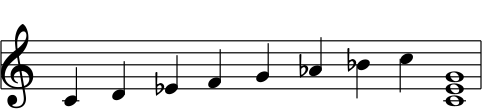
Listed below will be all the specific classes that can be targeted to change their repsective elements styling. All elements that are designed to be targeted with classes are prefixed with vs-.
svg.vs-svg-renderer-root: The actual svg element.g.vs-svg-renderer-parent: The main group element.text.vs-guitar-text-base && text.vs-guitar-text-small: The <text> elements for the labels on the guitar chord diagram.circle.vs-guitar-fret-dot: The element for the guitar fret dots.rect.vs-guitar-barre: The element for the guitar barre lines.g.vs-scrolling-notes-layer > g.vs-note-wrapper: Targeting the scrolling staff's notes, which a transition property can be added for smooth animation.
Example
/* Target and change the fret dot colors */
.vs-guitar-fret-dot {
  fill: oklch(67% 0.05 240.864);
}See Note String Syntax to see how to write notes on music staff (i.e. ['G4q', 'E4h', 'C4w', "A3h", "F3h"] )
See MusicStaffOptions to see how configuration options during class instantiation.
import { MusicStaff } from 'vector-score';

const grandStaff = new MusicStaff(container, {
  staffType: 'grand',
  width: 400,
  spaceBelow: 2,
  spaceAbove: 2
});

// Notes are automatically positioned on the correct stave based on pitch
grandStaff.drawNote(['G4q', 'E4h', 'C4w', "A3h", "F3h"]);

grandStaff.drawChord(["G3w", "C4w", "E4w"]);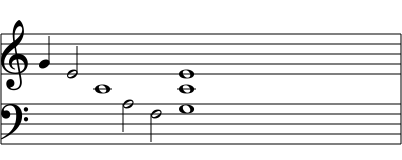
See Guitar String Syntax to see how to write frets, fingers, and barre lines on Guitar Chord diagrams (i.e., "x32010", "032010").
See GuitarChordOptions to see how configuration options during class instantiation.
import { GuitarChord } from 'vector-score';

const grandStaff = new GuitarChord(container, {
  fretCount: 5,
  stringCount: 6,
  stringLabels: ["E", "A", "D", "G", "B", "E"],
  inlineChordsAmount: 2, // Choose how many chords are in a single line
  scale: 1,
  color: "var(--font-color)",
  backgroundColor: "white"
});

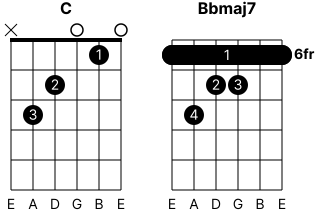
// C chord
guitarChordsSection.addChord("x32010", "032010", {
  label: "C",
});

// Bbmaj7 Barre Chord (Automatically calculates the starting fret and barre positioning)
const frets = "687766";
const fingers = "142311";
const barres = guitarChordsSection.determineBarreOptions(frets, fingers, [6]);

guitarChordsSection.addChord(frets, fingers, {
  label: "Bbmaj7",
  barres: barres
});
import { RhythmStaff } from 'vector-score';

const rhythmContainer = document.getElementById('rhythm-container');

const rhythm = new RhythmStaff(rhythmContainer, {
  width: 400,
  topNumber: 4, // Time signature numerator (e.g., 4/4 time)
  barsCount: 2
});

// Draw notes and rests
rhythm.drawNote(['q', 'q']); // Duration only
rhythm.drawRest(['h']);

// Draw beamed note
rhythm.drawBeamedNotes("e", 4); // Draws a beamed note of 4 eighth notes

// Finish the bar
rhythm.drawNote(['q', 'q']);

// Increment the UI to show the first beat in the bar
rhythm.incrementCurrentBeatUI();
import { ScrollingStaff } from 'vector-score';

const scrollingContainer = document.getElementById('scrolling-container');

const scrollingStaff = new ScrollingStaff(scrollingContainer, {
  width: 400,
  spaceBelow: 2,
  spaceAbove: 2,
  onNotesOut: handleNotesOut, // Connect a handler when notes run out (optional)
});

// Handler for when notes run out
function handleNotesOut() {
  isNotesOut = true;
}

// ****
// NOTE CSS SELECTOR FOR NOTES FOR ANIMATION IS
// .vs-scrolling-notes-layer > g.vs-note-wrapper { transition: transform 0.2s ease-in }
// ****

// Add notes to the queue
// 5 single notes, a C chord, 2 more notes, finally a D chord
scrollingStaff.queueNotes([
  "C4w",
  "F4w",
  "C4w",
  "B4w",
  "D4w",
  ["C4w", "E4w", "G4w"],
  "B4w",
  "D4w",
  ["D4w", "F#4w", "A4w"],
]);

// The button event listener calls 'advanceNotes()' to move the notes over, one step at a time.
Notes are defined using a specific string format parsed by the library:
[Name][Accidental?][Octave][Duration]
- Name:
A-G(Case insensitive) - Accidental:
#(Sharp) orb(Flat). Optional. - Octave:
0-9 - Duration:
w: Wholeh: Halfq: Quartere: Eighth
Examples:
C4w: C, Octave 4, Whole noteF#5q: F Sharp, Octave 5, Quarter noteBb3e: B Flat, Octave 3, Eighth note
Chords are defined using two continuous strings: one for frets and one for fingers. The length of both strings must match the configured string count of the diagram (default is 6). Notes are written in string order, with the first character representing the lowest string (e.g., low E in standard tuning).
xorX: Muted string.0: Open string.1-9: Fretted at the specified fret.a-z/A-Z: Base-36 alphanumeric encoding for double-digit frets (e.g.,a= 10,b= 11,c= 12).
0: No finger labeled.1-9: Finger number to display on the dot.
Example:
guitarChordsSection.addChord("x32010", "032010"): Displays an open C major chord.- The lowest string is muted (
x) and has no finger label (0). - The A string is played at the 3rd fret (
3) with the 3rd finger (3). - Note: The
startFretoption is now automatically calculated based on the lowest fretted note if left undefined.
- The lowest string is muted (
Barre lines can be added dynamically using the built-in helper method, determineBarreOptions(frets, fingers, barreFrets).
- Pass in your fret string, finger string, and an array of the target frets you wish to barre.
- The method will automatically calculate the stretch (
fromStringtotoString) based on the matching finger numbers and return a definition array to pass directly into youraddChordoptions.
| Method | Description |
|---|---|
drawNote(notes: string | string[]) |
Draws one or multiple notes sequentially. |
drawChord(notes: string | string[]) |
Draws multiple notes stacked as a chord at the current cursor position. |
justifyNotes() |
Evenly spaces all currently drawn notes across the staff width. |
clearAllNotes() |
Removes all notes from the staff and resets the cursor. |
changeNoteByIndex(note: string, index: number) |
Replaces a note at a specific index with a new note. |
changeChordByIndex(notes: string[], index: number) |
Replaces a chord at a specific index with a new chord. |
destroy() |
Destroys internal arrays and elements |
| Method | Description |
|---|---|
addChord(frets: string, fingers: string, options?: GuitarChordDrawOptions) |
Draws notes on the diagram using string configurations. Options include manual startFret, label, and barres. |
modifyChordByIndex(frets: string, fingers: string, chordIndex: number, options?: GuitarChordDrawOptions) |
Modifies the chord at the specified index with new definitions and options. |
determineBarreOptions(frets: string, fingers: string, barreFrets: number[]) |
Automatically calculates barre line dimensions based on fingering and returns GuitarBarreDef[] to be used in chord options. |
removeChordByIndex(chordIndex: number) |
Removes the chord diagram at the specified index and recalculates layout. |
clearAllChords() |
Removes all chords in the container. |
destroy() |
Destroys internal arrays and elements. |
| Method | Description |
|---|---|
drawNote(notes: string | string[]) |
Draws rhythm notes. |
drawRest(rests: string | string[]) |
Draws rests. |
drawBeamedNotes(type: 'e'|'s', count: number) |
Draws a group of beamed eighth or sixteenth notes. |
clearAllNotes() |
Removes all items from the staff. |
incrementCurrentBeatUI() |
Starts the UI for showing the current beat. Connect to a external interval for accurate showing of current beat. |
resetCurrentBeatUI() |
Must be called if current beat goes over the total beats in the bar to reset its state |
destroy() |
Destroys internal arrays and elements |
| Method | Description |
|---|---|
queueNotes(notes: (string | string[])[]) |
Queues notes on the staff. ["C4", ["C4", "E4", "G4"], "B4"] |
advanceNotes() |
Advances notes to the next position |
clearAllNote() |
Clears all notes on the staff |
destroy() |
Destroys internal arrays and elements |
width: Total width of the SVG in pixels.scale: Zoom factor (default: 1).staffType:'treble' | 'bass' | 'alto' | 'grand'.keySignature: Change key signature to display on the staff.spaceAbove: Padding units above the staff (in staff line spaces).spaceBelow: Padding units below the staff (in staff line spaces).noteStartX: Position where notes start to draw.staffColor: CSS color string for lines and notes.staffBackgroundColor: CSS color string for background.
stringCount: Amount of strings to show in diagram, default is 6.fretCount: Amount of frets to show in diagram, default is 5.stringLabels: Labels to show under each string in each chord diagram. Provided string values will display in order of strings in this array value.inlineChordsAmount: Max amount of chords to display on a single line (default: 2).scale: Zoom factor (default: 1).color: CSS color string for lines and notes.backgroundColor: CSS color string for background.width: Total width of the SVG in pixels, overrides inlineChordAmount auto width calculation (default: undefined).
topNumber: The top number of the time signature (e.g., 4 for 4/4 time).barsCount: Number of measures to draw.currentBeatUIColor: CSS color string for current beat UI.- Inherits sizing and color options from MusicStaffOptions.
width: Total width of the SVG in pixels.scale: Zoom factor (default: 1).topNumber: The top number of the time signature (e.g., 4 for 4/4 time).barsCount: Number of measures to draw.spaceAbove: Padding units above the staff (in staff line spaces).spaceBelow: Padding units below the staff (in staff line spaces).staffColor: CSS color string for lines and notes.staffBackgroundColor: CSS color string for background.currentBeatUIColor: CSS color string for current beat UI indicator.
width: Total width of the SVG in pixels.scale: Zoom factor (default: 1).noteStartX: Position where notes start to draw.staffType:'treble' | 'bass' | 'alto' | 'grand'.spaceAbove: Padding units above the staff (in staff line spaces).spaceBelow: Padding units below the staff (in staff line spaces).staffColor: CSS color string for lines and notes.staffBackgroundColor: CSS color string for background.onNotesOut: Callback function for when there are no more notes on the staff to advance.