All in One Script: Link
Set-ExecutionPolicy -ExecutionPolicy Unrestricted -Scope CurrentUser
Install-PackageProvider -Name NuGet -Force

cd downloads\AzFilesHybrid
.\CopyToPSPath.ps1
Import-Module -Name AzFilesHybrid

Install-Module Az
Import-Module Az
Connect-AzAccount
To assign an Azure role to an Azure AD identity, using the Azure portal, follow these steps:
- In the Azure portal, go to your file share, or create a file share.
- Select Access Control (IAM).
- Select Add a role assignment
- In the Add role assignment blade, select the appropriate built-in role (Storage File Data SMB Share Reader, Storage File Data SMB Share Contributor) from the Role list. Leave Assign access to at the default setting: Azure AD user, group, or service principal. Select the target Azure AD identity by name or email address. The selected Azure AD identity must be a hybrid identity and cannot be a cloud only identity. This means that the same identity is also represented in AD DS.
- Select Save to complete the role assignment operation.
Use Windows File Explorer to grant full permission to all directories and files under the file share, including the root directory.
- Open Windows File Explorer and right click on the file/directory and select Properties.
- Select the Security tab.
- Select Edit.. to change permissions.
- You can change the permissions of existing users or select Add... to grant permissions to new users.
- In the prompt window for adding new users, enter the target username you want to grant permissions to in the Enter the object names to select box, and select Check Names to find the full UPN name of the target user.
- Select OK.
- In the Security tab, select all permissions you want to grant your new user.
- Select Apply.
$connectTestResult = Test-NetConnection -ComputerName qnastcshared01.file.core.windows.net -Port 445
if ($connectTestResult.TcpTestSucceeded) {
  # Mount the drive
  net use S: \\stgunique0001.file.core.windows.net\sitecoreshared01
} else {
  Write-Error -Message "Unable to reach the Azure storage account via port 445. Check to make sure your organization or ISP is not blocking port 445, or use Azure P2S VPN, Azure S2S VPN, or Express Route to tunnel SMB traffic over a different port."
}
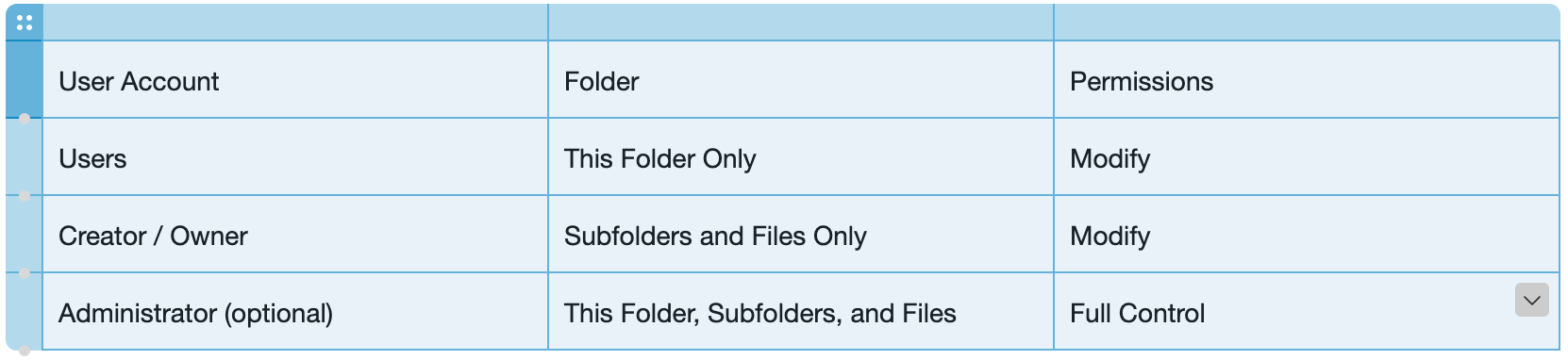
There are many ways to create secure and functional storage permissions for use with Profile Containers and Office Container. Below is one configuration option that provides new-user functionality that doesn't require users to have administrative permissions.
Link to the Azure Files Script(AzFilesHybrid): https://github.com/Azure-Samples/azure-files-samples/releases